Role guide · Law firm ops · ChatGPT Business · Oct 2026
ChatGPT for law firm ops (Oct 2026): sanitized intake summaries, billing-narrative cleanup, and firm-policy drafts without client confidences
Law firm ops role guide — a Billing style project in a ChatGPT Business workspace that tidies sanitized billing narratives, turns stripped-down intake forms into consistent summaries, and drafts firm policies from your own existing policies. ChatGPT drafts; the billing partner, intake manager, or managing partner checks every line before anyone uses it. No client names, matter facts, or privileged content go in unless your firm's policy and contract allow it. Nothing here is legal advice, and a licensed attorney signs every client-facing word. If your practice-management system already does the job with matter data inside it, start there: see Clio AI or 8am MyCase AI.
Who this guide is for
Firm administrators, practice managers, billing coordinators, intake coordinators, and legal ops leads — the people who clean up time entries before bills go out, keep intake consistent, and write the firm's internal policies — at a law firm that already pays for ChatGPT Business. If a tool with your matter data already does the job, use it first: Clio AI drafts bills and client updates inside Clio, Smokeball AI works inside each matter, and Lawmatics AI qualifies leads in its intake CRM. Product deep-dive: ChatGPT.
Client confidences stay out. The ABA's first formal opinion on generative AI, Formal Opinion 512 (announced 29 July 2024), says lawyers using these tools must keep client information confidential under Model Rule 1.6 unless the client gives informed consent, alongside duties of competence, communication, and reasonable fees. Your state's rules and bar guidance govern your firm; this guide is not legal advice and is not an ethics opinion. It keeps every prompt free of client names, matter facts, and privileged content.
Ground rules for every section below: strip client and opposing-party names, matter numbers, addresses, dates of birth, case numbers, and any fact that could identify a matter before anything is pasted — use practice area, task type, month, and counts instead. ChatGPT does not decide whether to accept a client, run a conflict check, give legal advice, or send anything to a client; a licensed attorney owns any filing, citation, demand, deadline, client message, or discovery response; the billing partner owns every bill, the intake manager every intake summary, and the managing partner every policy. Use Projects, not new custom GPTs — OpenAI says custom GPTs are scheduled to retire on December 11, 2026.
Major features (with how someone uses them)
Examples at a glance: each feature has a concrete example from a real job plus a short Try this you can run this week.
1. Project Billing style: sanitized narrative cleanup (primary)
What it is: Select New project in the sidebar and name it Billing style. Upload your firm's billing guidelines and a sanitized export of one month's time-entry narratives — task, hours, timekeeper initials, and the narrative with client and matter names removed. In Project settings, add instructions: fix grammar, spell out abbreviations, follow the guidelines, never change hours or add work that is not in the entry, and list every changed line. OpenAI's Projects help article (read 20 October 2026) says project instructions apply only inside that project and Business projects take up to 40 files.
Block-billed or vague entries are a style problem ChatGPT can flag; whether the work happened, and how long it took, is not. Any edit that changes the meaning of an entry goes back to the timekeeper.
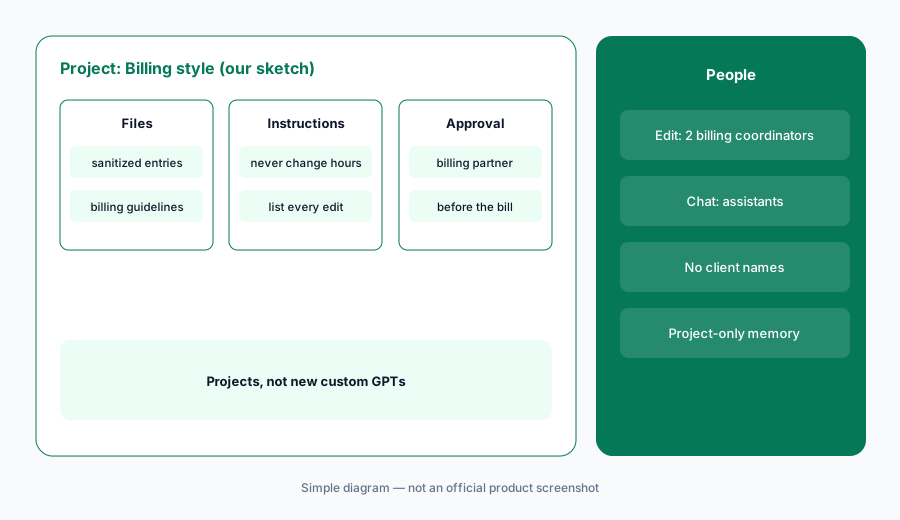
Primary workflow:
Paste a sanitized month of billing narratives (no client or matter names) into a ChatGPT project and ask for style fixes. Have the billing partner check every edit against the original entry before it goes on a bill.
2. Sanitized intake summaries in your firm's template
What it is: Upload your intake summary template and practice-area checklists to a separate Intake project. Paste a web-form or call-note submission only after removing names, contact details, and any identifying facts — keep practice area, county or state, timing in months, and the kind of help requested. Ask ChatGPT to fill the template and list which checklist questions are still unanswered. The summary helps staff route the inquiry; it does not decide whether the firm can take the matter.
Conflict checks and acceptance decisions happen in your practice-management system with the real names, before anyone learns more of the facts. ChatGPT never sees that step.
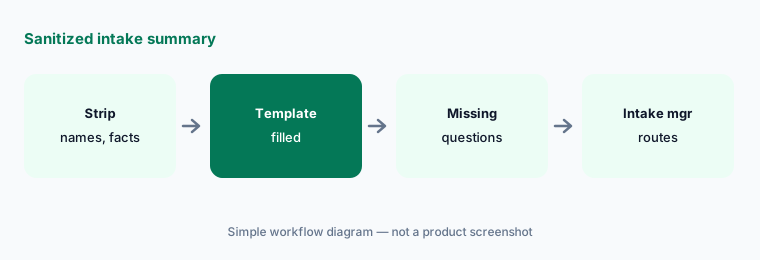
Strip first:
Fill your intake template from five stripped-down inquiries. Have the intake manager compare each summary with the original form and confirm nothing identifying slipped through before any summary is shared.
3. Firm-policy drafts from your own policies
What it is: Upload the firm's existing handbook sections and the policy you want to update — an AI use policy, a records-retention outline, or a remote-work rule — and ask ChatGPT to draft a revision that keeps the firm's terms, marks every new sentence, and lists questions a partner must answer. It is a drafting aid for internal policy, not advice on what your rules of professional conduct require.
A policy that touches confidentiality, supervision, or fees needs a partner who knows your state's rules. ChatGPT can organize the draft; it cannot tell you what your bar requires.
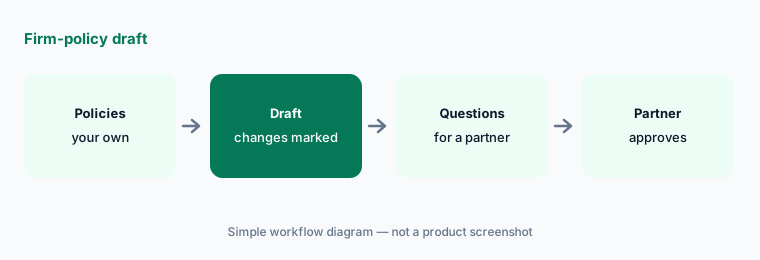
Mark every change:
Draft one policy update from your existing handbook. Have the managing partner check every new sentence against the firm's rules and your state bar guidance before staff see it.
4. Project-only memory and sharing settings
What it is: OpenAI's Projects help article says that on Business, a project with default memory can reference conversations outside the project, and outside chats can reference it; only project-only memory keeps it contained. Shared projects switch to project-only memory automatically. Invitees get edit or chat access, every member can view and download project files, and a workspace project can have up to 100 collaborators.
Set project-only memory on every firm project, even private ones, so billing work does not leak into someone's intake chat. Give edit access only to the people who maintain instructions.
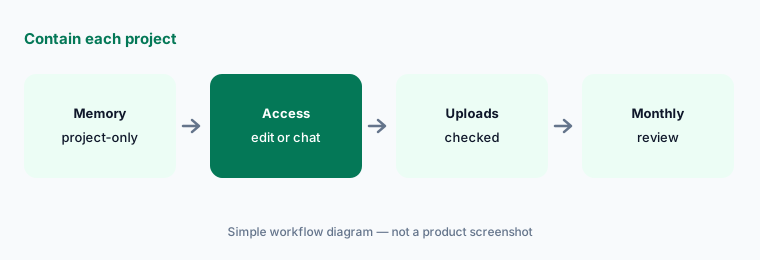
Contain each project:
Switch every firm project to project-only memory and share with edit access for two maintainers only. Have the practice manager review members and uploads monthly and delete anything not sanitized.
5. When work needs client data: Business vs a contracted plan
What it is: OpenAI's Business overview says ChatGPT Business does not train on workspace data, but that Zero Data Retention, business associate agreements, invoice billing, and other sales-led terms need a contracted offering rather than self-serve Business. Its pricing page lists custom retention, data residency, SCIM, and enterprise key management under Enterprise, not Business.
Whether any plan is acceptable for client confidences is a decision for your managing partner, ethics counsel, and the contract — not for the person writing prompts. Until then, client-specific work stays in tools where the firm already has terms in place.
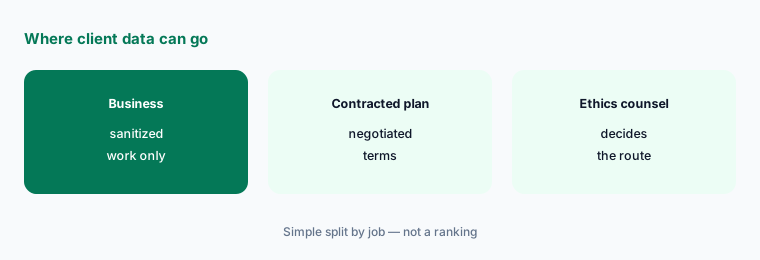
Route client work:
List every task staff want ChatGPT for and mark which need client facts. Have the managing partner route those to a tool with approved terms and keep only sanitized tasks in Business.
6. Use Projects, not new custom GPTs
What it is: OpenAI's custom GPT retirement FAQ (updated early October 2026) says custom GPTs are scheduled to retire on December 11, 2026, with February 11, 2027 for Enterprise workspaces that have an approved deferral, and that GPTs move to plugins. Its Enterprise timeline lists October 26, 2026 as the planned end of new custom GPT creation. A firm that built an intake or billing GPT should rebuild it as a project with instructions and files.
Write down every GPT the firm relies on, who owns it, and which project replaces it. Test the project on the same prompts before the old GPT goes away.
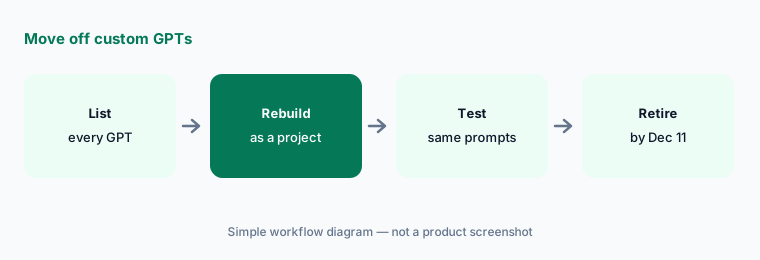
Rebuild and test:
List every custom GPT staff use. Have the legal ops lead rebuild each one the firm still needs as a project and run ten familiar prompts through both before December 11, 2026.
Pricing context (October 2026)
As listed in OpenAI's ChatGPT Business overview and on openai.com/business/pricing (read through a reader on 20 October 2026 because both block plain downloads) and the chatgpt.com pricing page: ChatGPT Business Standard seat $20 per user per month billed annually, $25 billed monthly; Premium seat $100 per user per month billed annually, $125 billed monthly, as of 20 Oct 2026. Business is for teams of 2–200, and a workspace needs at least two seats. OpenAI notes pricing may vary by country and currency. Projects and shared projects are included with no separate line item.
ChatGPT Enterprise has no public price — OpenAI says to contact sales (quote-only). Budget Business from your invoice, and never use a personal ChatGPT account for firm work.
Uncertainty: OpenAI list prices and seat types change; use the live pricing page and your invoice. We read OpenAI's pages through a reader on 20 Oct 2026 because they block plain downloads. Custom GPT dates follow OpenAI's retirement FAQ as read that day. Whether any plan suits client confidences is a decision for your firm, its ethics counsel, and the contract, not this page.
When it’s useful (honest take)
Useful when your firm already pays for ChatGPT Business and wants billing-narrative style fixes, intake summaries, and policy drafts from sanitized material, with a billing partner, intake manager, or managing partner checking every line.
Less useful when the work needs client facts (use a tool with approved terms), your practice-management system already drafts bills and updates from matter data (Clio AI, 8am MyCase AI), your firm runs on Microsoft 365 and wants help inside Outlook and Word (Microsoft 365 Copilot for law firm ops), or nobody will check the output.
Paying for ChatGPT and a few other AI tools? The $9 AI toolkit spreadsheet lists every AI subscription you have, what each one costs, and how fast it pays for itself, so you can see which ones are worth the money.
Want someone to do it for you? AI toolkit audit — $19
Related options (educational)
| Need | Better home | Why |
|---|---|---|
| Sanitized billing, intake, and policy drafts in a Project | ChatGPT for law firm ops (this page) | Business seats |
| Matter emails, engagement letters, meeting notes in Microsoft 365 | Microsoft 365 Copilot for law firm ops | Copilot license |
| AI bills and client updates from matter data | Clio AI | Core and above, quote |
| Intake triage and outreach in a legal CRM | Lawmatics AI | Quote-only base plans |
| Healthcare twin guide | ChatGPT for healthcare ops | Business seats |
FAQ
Can we put client information into ChatGPT Business?
This guide says no. OpenAI says it does not train on Business workspace data, but confidentiality decisions belong to your firm under your state's rules; the ABA's Formal Opinion 512 points to the duty of confidentiality and informed consent. Keep prompts free of client names, matter facts, and privileged content unless your firm's policy and contract allow it.
Can ChatGPT run conflict checks or decide whether to take a matter?
No. Conflict checks and acceptance decisions happen in your practice-management system with real names, made by the people your firm assigns. ChatGPT only formats a stripped-down summary.
Can ChatGPT change time entries?
It can suggest wording. It should never change hours or add work. The billing partner checks every edited narrative against the original entry, and the timekeeper describes any work the edit got wrong.
Should we build a custom GPT for billing or intake?
Not a new one. OpenAI says custom GPTs are scheduled to retire on December 11, 2026 and move to plugins. Use a project with project-only memory instead.
Who approves outputs?
The billing partner for every bill narrative, the intake manager for every intake summary, the managing partner for every policy, and a licensed attorney for anything client-facing. Nothing here is legal advice.
Optional next step (if seats overlap)
If your firm pays for ChatGPT, Microsoft 365 Copilot, and a practice-management add-on that all draft the same bills and emails, map that overlap before adding another seat. Map the overlap with the $19 AI toolkit audit or the $9 AI toolkit spreadsheet. Email Audit $19 or Toolkit spreadsheet $9.
Checkout is live via Stripe. After you pay, we email delivery (spreadsheet) or intake next steps (audit).