Tool deep-dive · Ops & automation · Writing cross-link
Microsoft 365 Copilot review (Sep 2026): Word/Excel/Outlook — when the seat pays vs ChatGPT + Office
For ops, finance, and small teams already living in Word, Excel, Outlook, and Teams — when Copilot inside those files beats a separate ChatGPT seat plus copy-paste, and when the license cost and setup friction are not worth it. Features and usage, with honest limits.
Who this page helps
Ops leads, finance owners, and founders whose weekly work already happens in Microsoft files — status memos in Word, spend sheets in Excel, replies in Outlook, recaps in Teams — and who are deciding whether a Copilot seat on top of Microsoft 365 is worth it versus keeping ChatGPT (or Claude) as the AI seat and pasting results back into Office.
What Microsoft 365 Copilot is
Microsoft 365 Copilot is AI assistance licensed into the Microsoft apps you already use. The selling point is not a better blank chat — it is drafting and analyzing inside the open document, workbook, mailbox, or meeting. Microsoft also markets a lighter Copilot Chat experience on eligible plans; that is not the same as a full Copilot license with deep Word/Excel/Teams features. Confirm what your tenant actually bought.
Major features (with how someone uses them)
Examples at a glance: each feature has a concrete ops/finance example plus a short Try this.
1. Word — drafts that stay in the file
What it is: Copilot in Word helps outline, rewrite, and tighten prose while the document stays the system of record. Useful when the team reviews the Doc, not a chat thread.
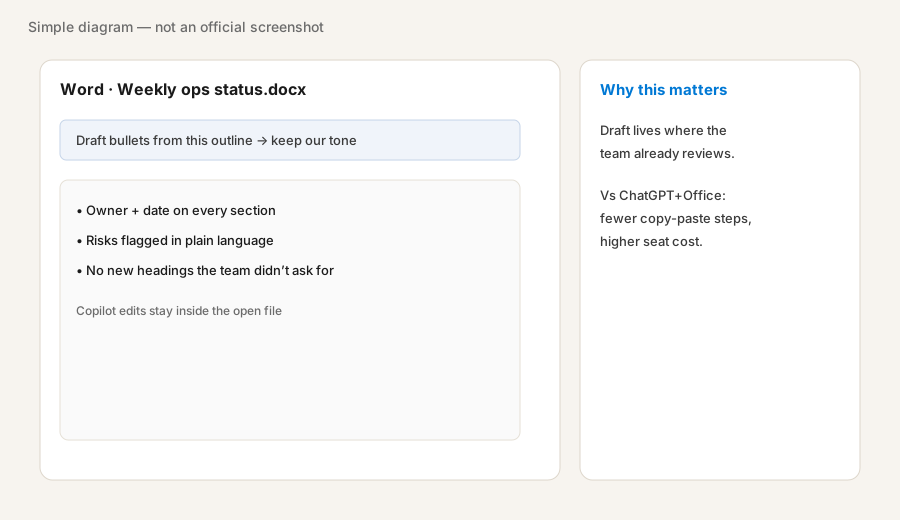
In Word with Copilot (if licensed), on a real status outline:
Rewrite this outline as bullets-first status notes. Every section must start with Owner + date. No emojis. Do not invent metrics. Keep headings I already used.
2. Excel — explain variance without new sheet sprawl
What it is: Copilot in Excel can summarize tables, explain month-over-month moves, and draft short narratives from the open sheet. The trap is letting it spawn sheets you did not ask for — treat “no new sheets” as a standing rule.

In Excel with Copilot (if licensed):
From this sheet, explain MoM variance for the top 5 rows by spend; output a short Outlook-ready note. Do not create new sheets.
3. Outlook — replies from thread context
What it is: Copilot in Outlook drafts replies and summaries using the open thread. Strongest when inbox is the workflow and you already spend hours there. Weak when the real decision lives in a tracker and email is just noise.
In Outlook with Copilot (if licensed), on a real thread:
Draft a reply: confirm what we agreed, name the owner, include today’s date, ask one clarifying question. Bullets only. Tone: direct, no fluff. Do not promise dates that are not in the thread.
4. Teams — meeting recap → owners
What it is: Copilot in Teams can help turn meeting discussion into decisions, open questions, and action owners. Useful when recaps currently die in chat. Confirm your license actually includes Copilot in Teams — chat-only Copilot Chat is not the same product surface.
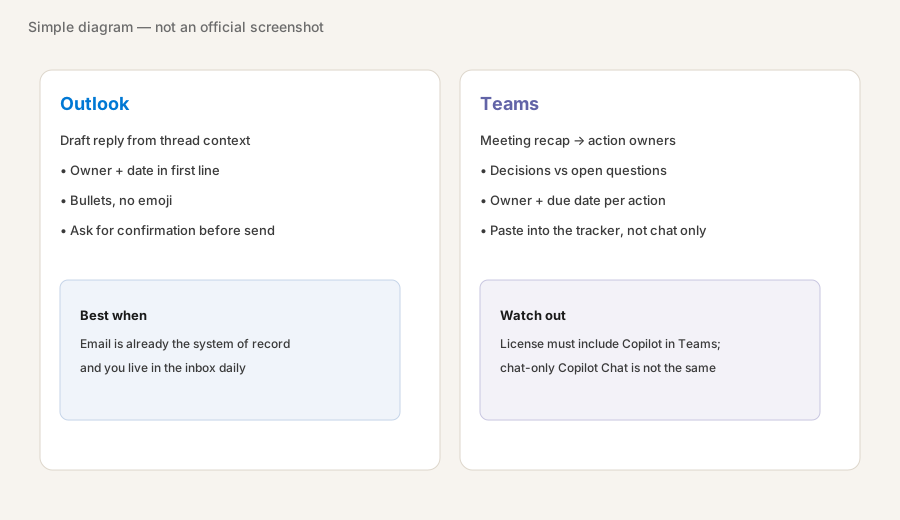
After a Teams meeting with Copilot (if licensed):
List: Decisions | Open questions | Actions. Each action needs Owner + due date. Drop anything that was only brainstorming. Do not invent owners.
5. When Copilot beats ChatGPT + Office — and when it doesn’t
What it is: Copilot wins when the final artifact must stay inside Microsoft files and copy-paste is the weekly tax. ChatGPT still wins for Custom GPTs, Memory tone rules, and work that is not Office-bound. Claude still wins document-heavy Projects on mixed file sets. Paying for Copilot and ChatGPT for the same memo loop is stack sprawl unless the jobs are clearly different.
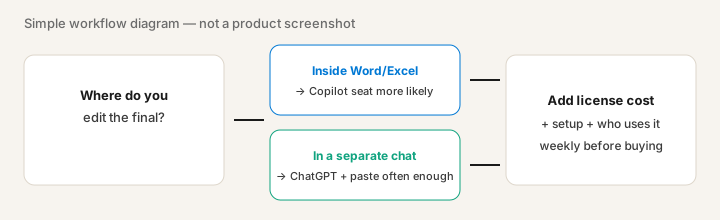
Pick one weekly Office job. Time both paths once:
Same prompt: once inside Copilot in the file, once in ChatGPT then paste back. Score only: (1) minutes to a shareable file, (2) whether numbers/owners survived, (3) whether anyone else could reopen the file without the chat. If (1) and (3) clearly favor in-file work every week, Copilot owns that job.
Public pricing (September 2026)
Figures from Microsoft’s public Copilot pricing pages as of September 2026. US list prices often shown:
- Microsoft 365 Copilot (enterprise add-on): about $30/user/month, paid yearly — requires a qualifying Microsoft 365 plan (paid separately).
- Microsoft 365 Copilot Business (add-on): about $21/user/month paid yearly for eligible Business plans (often capped around 300 users). Public pages have shown first-year promotional pricing around $18 through late 2026 — confirm live.
- Bundled examples: Business Standard with Copilot around $23.50/user/month; Business Premium with Copilot around $32/user/month (paid yearly). Confirm live.
- Copilot Chat: Microsoft markets a lighter chat experience on eligible plans at no extra seat cost — not a substitute for full in-app Copilot.
Uncertainty: SKU names (Business vs enterprise), promos, “no Teams” variants, agent metering, and what “included” means for Word/Excel/Teams change often. Always confirm on microsoft.com business Copilot pricing and enterprise pricing. Your reseller quote may differ from marketing list prices.
When Microsoft 365 Copilot is useful (honest take)
Copilot tends to help when the work already lives in Microsoft files, people will use it weekly inside Word/Excel/Outlook/Teams, and someone owns license assignment + training. It tends not to replace ChatGPT when Custom GPTs and Memory already own intake and tone, or Claude when Projects hold the recurring private file set. Buying seats for people who only open Office for email is a common overspend — license the roles that edit the files.
Paying for Microsoft 365 Copilot and a few other AI tools? The $9 AI toolkit spreadsheet lists every AI subscription you have, what each one costs, and how fast it pays for itself, so you can see which ones are worth the money.
Want someone to do it for you? AI toolkit audit — $19
Alternatives compared: ChatGPT, Claude, Gemini
| Axis | M365 Copilot | ChatGPT | Claude | Gemini |
|---|---|---|---|---|
| Typical paid seat (Sep 2026) | Business add-on ~$21/user/mo; enterprise ~$30/user/mo + M365 base. Confirm Microsoft. | Plus ~$20/mo; Business ~$20–25/user/mo. Confirm openai.com. | Pro ~$20/mo; Team from ~$20–25/member. Confirm claude.com. | Google AI Pro ~$19.99/mo. See Gemini. |
| Native strength | Inside Word/Excel/Outlook/Teams | Custom GPTs + Memory | Projects + Artifacts | Workspace (Docs/Sheets/Gmail) |
| Best fit when… | Final edits stay in Microsoft files. | Reusable SOP/intake bots. | Private recurring doc sets. | Files already live in Google. |
| Less useful when… | Team barely opens Office for real drafts. | All drafts must stay in Excel/Word UI. | You only need Outlook/Teams in-app AI. | Your org is Microsoft-first. |
Same job, two products: Gemini vs Microsoft 365 Copilot for ops.
FAQ
What is Microsoft 365 Copilot?
AI assistance licensed into Word, Excel, Outlook, PowerPoint, and Teams. Strongest when drafts and numbers already live in those apps.
How much is Microsoft 365 Copilot in September 2026?
Public US pages often list about $30/user/month (enterprise add-on) and about $21/user/month (Business add-on), paid yearly, on top of a qualifying Microsoft 365 plan. Promos and bundles differ. Confirm on Microsoft’s live pricing pages.
When does Copilot beat ChatGPT plus Office?
When the final shareable file must stay inside Word/Excel/Outlook and weekly copy-paste is the pain. Keep ChatGPT for GPTs/Memory and non-Office jobs.
Is Copilot Chat the same as a full Copilot license?
No. Copilot Chat is a lighter included experience on eligible plans; full Microsoft 365 Copilot adds deeper in-app work. Check your tenant licenses.
Optional next step (if seats overlap)
If Copilot is one of several AI seats doing the same draft-and-paste loop, optional help: $19 AI toolkit audit or $9 AI toolkit spreadsheet — only if you are juggling overlapping seats.
Checkout is live via Stripe. After you pay, we email delivery (spreadsheet) or intake next steps (audit).