Compare guide · Ops · Nov 2026
Gemini vs Microsoft 365 Copilot for ops (Nov 2026): Google vs Microsoft homes
Educational side-by-side for ops leads at Workspace-centered vs Microsoft 365-centered companies — file home drives the fit. Not a scorecard. Run the same decision-memo brief in both; note which suite you would rather open if files live in Drive vs SharePoint.
How to compare fairly (ops rule)
Ops leads usually do not need a winner badge. They need less editing on weekly decision memos, sheet narratives, and mail — and a clear answer to whether the company already lives in Google Workspace or Microsoft 365. This page walks Gemini (especially Workspace-native) vs Microsoft 365 Copilot with the same brief, then plain-language notes on fit. Role patterns: Gemini for ops. For ChatGPT Team vs Gemini, see ChatGPT vs Gemini for ops. For Claude vs ChatGPT on memo/sheet jobs, see Claude vs ChatGPT for ops.
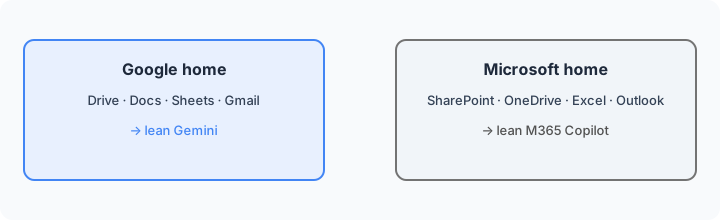
Examples at a glance: each job has a concrete ops example, a simple diagram, and a short Try this you can paste into both products.
Rule first: where files live drives the choice
What the rule is: If standing SOPs, status Docs, and spend Sheets already live in Google Drive, lean Gemini so drafts stay next to Workspace apps. If the weekly truth is already in SharePoint, OneDrive, Word, Excel, Outlook, and Teams, lean Microsoft 365 Copilot so drafts stay inside those files. Buying both seats for the identical decision memo is usually overlap — pick the suite that already holds the files.
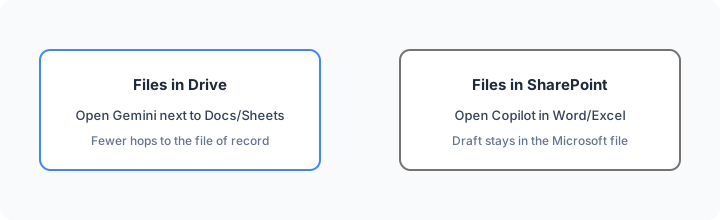
Inventory before you renew:
List where our last 10 ops decision memos were drafted (Gemini / Copilot in Word / Docs comment / other). Circle Drive vs SharePoint as the file home. Put the next 30 days of decision memos only in the suite that already holds the files unless edit quality fails.
Job 1: Ops decision memo (same brief in both)
What the job is: Turn a short bullet list into a one-page ops decision memo a founder can skim — context, options, recommendation, owners — without inventing names or dates you did not provide.
Where Gemini often helps: When the bullets already sit in a Doc or Drive export and you want the draft beside Workspace apps. See Gemini for ops and Gemini.
Where Microsoft 365 Copilot often helps: When the packet lives in SharePoint/OneDrive and the memo must stay a Word file teammates review in Teams. See Microsoft 365 Copilot.
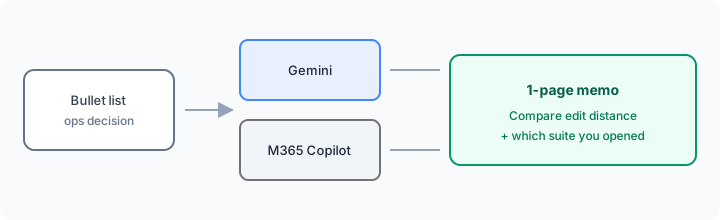
Same brief in both (Marketing SoT primary):
Same brief: Draft a 1-page ops decision memo from this bullet list. Note which suite you’d rather open if files live in Drive vs SharePoint.
Paste the same bullets into Gemini and into Copilot (Word or Copilot chat with the Word file). Keep owners only if named; use Unknown otherwise. Record which home felt fewer hops.
Job 2: Sheets vs Excel cleanup / narrative
What the job is: Summarize a spend or SLA table into a short narrative with owners — without inventing metrics or spawning mystery tabs.
Where Gemini often helps: Workspace-native assists next to Sheets when Google is already SoR (Google Sheets + Gemini).
Where Microsoft 365 Copilot often helps: Copilot in Excel on the open workbook — especially when Show Changes / jump-to-edit links help you verify AI edits (see What’s new in M365 Copilot, Sep 2026).
In the tool that sits next to your file home:
From only this open sheet: top 5 merchants MoM, 3 policy questions, and a 6-bullet leadership narrative. Do not invent metrics. Do not create new sheets unless I ask.
Job 3: Gmail vs Outlook drafting
What the job is: Draft a vendor or stakeholder reply from the open thread — confirm date, name owner, ask one clarifying question — without inventing commitments.
Where Gemini often helps: When Gmail + Drive context is already the workflow and Workspace Gemini can see the thread/files your seat allows.
Where Microsoft 365 Copilot often helps: When Outlook is the inbox of record and Copilot drafts inside the open message (triage expansions in Sep 2026 notes are bonus for folder hygiene — still confirm before bulk actions).
On a real thread in your primary suite:
Draft a reply that confirms the new date from this thread only, names the owner if present, and asks one clarifying question. Do not invent SLAs. Mark Unknown where the thread is silent.
Pricing (checked November 7, 2026)
Figures below are US list prices from public Google and Microsoft pages, checked Nov 7, 2026. Prices exclude tax; regional prices vary. Always confirm live: workspace.google.com/pricing, Google AI plans, and Microsoft 365 Copilot business pricing / enterprise pricing.
- Gemini via Google Workspace: Gemini is bundled in Workspace business plans. On a 1-year commitment (US): Business Starter $7, Business Standard $14, Business Plus $22 per user per month. Starter lists Gemini in Gmail plus the Gemini chat app; Standard adds Gemini in Docs, Sheets, Meet, and more — which is what Workspace-native ops writing needs. Personal Google AI Pro is $19.99/month ($199.99/year); Ultra is $99.99/month.
- Microsoft 365 Copilot: enterprise add-on is $30/user/month paid yearly. Copilot Business add-on is $21/user/month paid yearly (public promo $18 through late 2026, first year). Bundled examples: Business Standard with Copilot $23.50, Business Premium with Copilot $32 per user/month paid yearly. A qualifying Microsoft 365 plan is usually required for the add-on. Copilot Chat on eligible plans is not the same as a full Copilot license.
Uncertainty: Plan names, usage caps, promotional windows, and usage-based Copilot Credits for advanced agents change. Do not budget from a blog post — use the live vendor pages and your admin center.
When each often fits (plain language)
| Situation | Often lean Gemini | Often lean M365 Copilot |
|---|---|---|
| Files already in Drive | In-Docs / Sheets / Gmail path | Export/paste tax into Microsoft apps |
| Files already in SharePoint / OneDrive | Upload/paste into Gemini | Draft stays in Word / Excel / Outlook |
| Weekly home is Sheets + Docs | Workspace-native writing | Only if Excel/Word is becoming SoR |
| Weekly home is Excel + Outlook + Teams | Only for Drive-side packets | In-app Copilot on the open file |
Many teams stick with one primary suite seat aligned to where files live, then add a second only when a weekly job still needs heavy editing. That decision should come from your same-brief Try this, not from a brand preference.
Related options (educational)
- ChatGPT vs Gemini for ops — Team chat vs Workspace-native writing.
- Claude for ops — when Projects + Artifacts are already the weekly loop.
- Claude vs ChatGPT for ops — memo / sheet / meeting jobs across those two seats.
- GitHub Copilot Business — coding seat; different job from M365 Copilot in Word/Excel.
- What’s new in Microsoft 365 Copilot (Sep 2026) — dated Copilot changelog for Excel/Outlook-heavy ops.
When this compare is useful (honest take)
Useful when leadership is asking “Google AI vs Microsoft AI” and the company already standardized on Workspace or Microsoft 365 — and you want a fair same-brief check before adding a second-suite seat.
Less useful when the bottleneck is a dedicated chat workspace (see ChatGPT vs Gemini for ops), Notion-as-wiki extracts (see Notion AI for ops), or automation glue rather than drafting (Zapier / Make / n8n). This page will not name a universal winner; it helps you match Drive vs SharePoint to a product.
Still choosing between Gemini and Microsoft 365 Copilot? The $19 AI toolkit audit gives you a written plan for which tools to keep using and which to drop across your whole AI stack, including this pair.
Prefer to do it yourself? Spreadsheet — $9
FAQ
Should ops pick Gemini or Microsoft 365 Copilot?
Let where files live drive it. Drive/Docs/Sheets/Gmail → Gemini. SharePoint/OneDrive/Word/Excel/Outlook/Teams → Microsoft 365 Copilot. Run the same-brief Try this before you buy a second-suite seat.
How do I compare them fairly?
Same bullet list → 1-page ops decision memo in both → compare edit distance and note which suite you would rather open if files live in Drive vs SharePoint.
How is this different from ChatGPT vs Gemini for ops?
That page compares ChatGPT Team chat vs Gemini/Workspace. This page is Gemini (Google home) vs Microsoft 365 Copilot (Microsoft home).
What do they cost in November 2026?
Gemini comes with Workspace: Starter $7, Standard $14, Plus $22 per user/mo on a 1-year commitment (US). M365 Copilot enterprise add-on is $30/user/mo yearly; Copilot Business is $21 list ($18 promo) yearly plus a qualifying M365 plan. Confirm on vendor pricing pages — plans change.
Optional next step (if seats overlap)
If Gemini and Microsoft 365 Copilot seats overlap with other writing/ops tools and the real problem is stack sprawl, optional help: $19 AI toolkit audit or $9 AI toolkit spreadsheet — only if overlapping seats are the pain. Email hello@aiproduct.reviews with subject Audit $19 or Toolkit spreadsheet $9 if you prefer.
Checkout is live via Stripe. After you pay, we email delivery (spreadsheet) or intake next steps (audit).