Ops · Glue scripts · Coding AI
GitHub Copilot Business review (Sep 2026): when a seat helps ops-adjacent scripts
For small eng+ops teams that maintain glue scripts and repos, Copilot Business is the org seat with admin/policy controls — useful for tight “validation + logging only” edits, not a reason to buy coding AI for status memos. This page maps IDE assists, chat/CLI patterns, admin basics, credit honesty, and when Cursor is the clearer alternative.
Who this page helps
Small teams where eng and ops share a few glue repos (sync scripts, webhook handlers, Sheet exporters) and someone already codes in a GitHub-backed IDE. If nobody touches scripts weekly, this is the wrong buy question — start with ChatGPT/Claude for status and SOPs instead.
What Copilot Business is
GitHub Copilot Business is GitHub’s organization plan for AI coding help in the IDE, CLI, and related surfaces — with centralized seat assignment and policy controls. This review focuses on what an ops-adjacent maintainer can use on glue scripts — without assuming you should buy Copilot for leadership notes or wiki FAQs.

Major features (with how someone uses them)
Examples at a glance: each feature has a concrete ops/eng example plus a Try this mini-workflow.
1. Inline completions on glue scripts
What it is: As you type in a supported IDE, Copilot suggests the next lines — useful for boilerplate validation, logging, and error branches on scripts you already own. Treat model routing as a moving target; confirm on GitHub’s Copilot docs.
sync_vendors.py. Eng asks them to harden empty-input handling. Completions sketch a guard + warning log; a human reviews before merge.
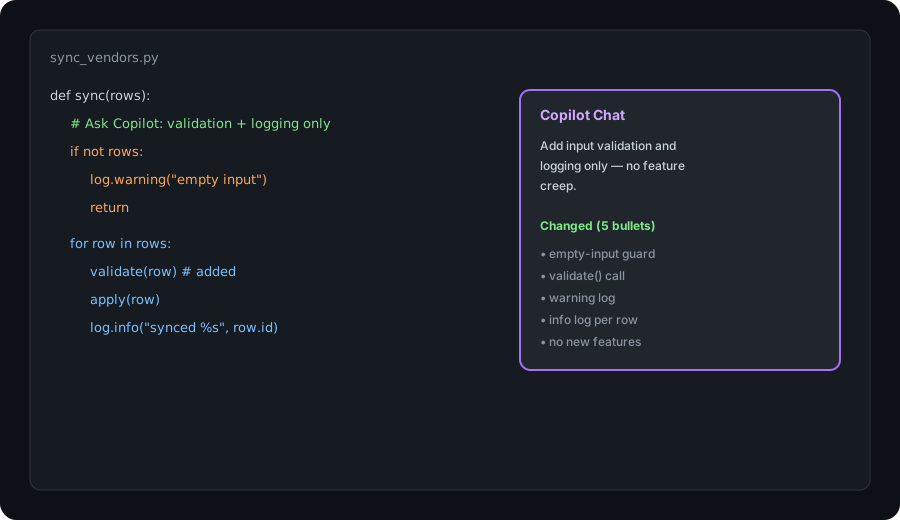
In a sample script file:
Ask Copilot to add input validation and logging only — no feature creep. Summarize what changed in 5 bullets.
2. Copilot Chat for scoped edits
What it is: Chat in the IDE (and related surfaces) for “explain this function,” “add logging,” or “write a failing test” — scoped to the open file or selection. The high-ROI ops pattern is narrow change lists, not “rewrite our whole sync platform.”
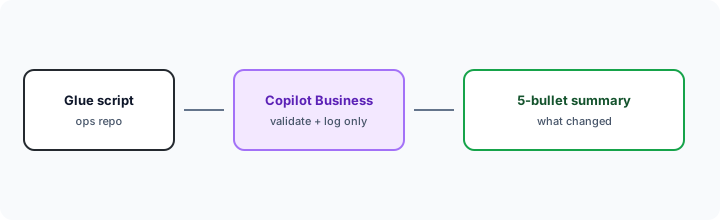
After a scoped Chat edit:
Summarize the diff in 5 bullets: what validation was added, what logs fire, and confirm no new features or dependency changes.
3. Org admin & policy basics
What it is: Copilot Business is built for org admins: grant seats, set policies (which models/features are allowed), and keep IP/indemnity packaging on the Business path vs individual Pro. For a small eng+ops team, the win is “who has a seat” and “what is allowed” — not Enterprise-only custom models.
Before assigning seats org-wide:
List who edits glue repos weekly. Assign Copilot Business only to those people. Write a one-line policy: scoped validation/logging edits OK; no auto-merge without human review.
4. AI credits & plan gates
What it is: Public GitHub packaging (Sep 2026) describes GitHub AI Credits included with Business seats — commonly cited as about 1,900 credits per user per month, pooled at the billing entity. Completions and next-edit suggestions are publicly described as not consuming AI credits. Chat / premium-model / agent-style usage can. Confirm on GitHub’s Copilot plans and billing docs — this is the uncertainty that bites budgets.
Before upgrading to Enterprise or buying parallel coding seats:
Estimate monthly chat/agent jobs on glue repos. Map them to GitHub’s published AI credit allowance for Copilot Business. If we cannot name a credit owner and a monthly ceiling, keep completions + scoped chat only for 30 days.
Public pricing (September 2026)
Copilot Business is a per granted seat / month org plan — not free unlimited forever for chat/agent usage. From public Copilot plans and GitHub Copilot docs we cross-checked in September 2026:
- Copilot Business: about $19 USD per granted seat per month.
- Included AI credits (commonly cited): about 1,900 GitHub AI Credits per user per month, pooled at org/enterprise. Promotional higher allowances may apply for some existing customers for limited windows — confirm live.
- Completions: public docs state code completions / next-edit suggestions remain unlimited and are not billed in AI credits.
- Overage: additional usage often described around $0.01 per AI credit when the org allows overages; otherwise usage may pause — confirm on GitHub billing docs.
- Copilot Enterprise: about $39 / seat / month with a higher credit pool — usually overkill for a tiny glue-script team.
Uncertainty flags: Credit pools, which features burn credits, promotional windows, and model catalogs change with short notice. Never budget from this page alone — open GitHub’s live Copilot plans + billing docs for your org.
When Copilot Business is useful (honest take)
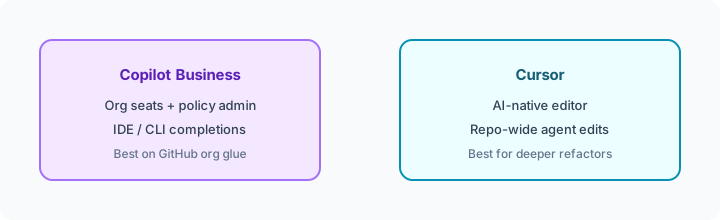
Copilot Business tends to help when someone already maintains scripts in GitHub, you want org seat/policy control, and the weekly job is tight edits (validation, logging, small helpers). It tends not to help when you hoped coding AI would write your ops status notes, when nobody opens an IDE monthly, or when you need deep multi-file agent refactors that an AI-native editor like Cursor already owns. Buying Copilot + Cursor for the same three glue files is usually the expensive parallel stack this page warns against.
Paying for GitHub Copilot Business and a few other AI tools? The $9 AI toolkit spreadsheet lists every AI subscription you have, what each one costs, and how fast it pays for itself, so you can see which ones are worth the money.
Want someone to do it for you? AI toolkit audit — $19
Alternatives compared: Copilot Business vs Cursor vs chat seats
| Axis | Copilot Business | Cursor | ChatGPT / Claude | No coding AI |
|---|---|---|---|---|
| Best when… | GitHub org + IDE glue scripts. | AI-native editor / deeper refactors. | Status, SOPs, intake memos. | Rare script edits; human time OK. |
| Cost shape (Sep 2026) | ~$19/seat + AI credit pool. | Cursor plan (see Cursor). | Chat seats; paste/export time. | Near $0 tooling; human time. |
| Less useful when… | Nobody codes weekly. | You only need org Copilot policy. | You need in-IDE completions. | Glue bugs pile up without review. |
Also see Cursor, ChatGPT for ops, Claude for ops, and the ops & automation hub.
Same job, two products: Sourcegraph Cody vs GitHub Copilot.
FAQ
What is GitHub Copilot Business?
GitHub’s org plan for AI coding assists in the IDE/CLI with centralized seats and policy — not a status/SOP chat product.
How much does Copilot Business cost in September 2026?
Public docs list about $19 per granted seat / month with about 1,900 AI credits / user / month commonly cited. Completions are described as unlimited / not credit-billed. Confirm on GitHub’s live plans and billing pages.
Copilot Business vs Cursor?
Copilot Business fits GitHub-org glue + policy. Cursor fits AI-native editor workflows and deeper refactors. See Cursor deep-dive.
Should ops buy Copilot without eng?
Only if someone already maintains scripts weekly. Otherwise prefer ChatGPT/Claude for ops writing jobs.
Optional next step (if seats overlap)
If Copilot Business is one of several AI seats and you want a written pass across the whole list, the optional $19 AI toolkit audit produces a short memo. Prefer an editable grid? The $9 AI toolkit spreadsheet is a one-time CSV. Soft offer only — this deep-dive stands alone.
Checkout is live via Stripe. After you pay, we email delivery (spreadsheet) or intake next steps (audit).