Role guide · Ops leads · ChatGPT Team
ChatGPT for ops leads (Sep 2026): Team patterns for status, SOPs, and intake
Role guide for ops leads on ChatGPT Team / Business — Custom GPTs, Memory, and Projects-style workflows for weekly status notes, SOP cleanup, and request intake. Soft CTA only if multiple AI seats overlap on the same ops jobs. Differentiates from Claude for ops and the general ChatGPT / Custom GPTs / Memory pages.
Who this guide is for
Ops leads (and founder-operators wearing the ops hat) whose company already pays ChatGPT Team / Business and need a repeatable weekly loop for status, SOPs, and intake — not another generic “use AI for productivity” list. Product deep-dive: chatgpt.html. Claude-shaped version of the same job: claude-for-ops.html.
The weekly ops loop (picture)
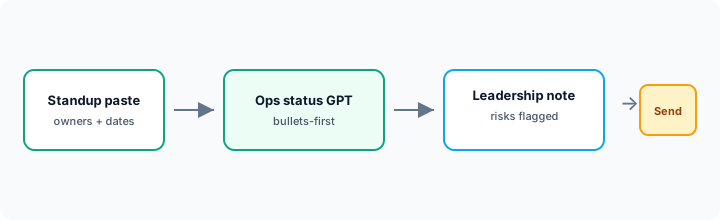
How an ops lead actually runs ChatGPT on Team
Examples at a glance: each pattern has a concrete ops example plus a short Try this.
1. Ops status Custom GPT (primary pattern)
What it is: A shared Custom GPT with standing instructions: bullets-first leadership notes, owner + date required, risks called out, Unknown when missing. The GPT turns standup paste into a note a human can send — it does not invent owners.
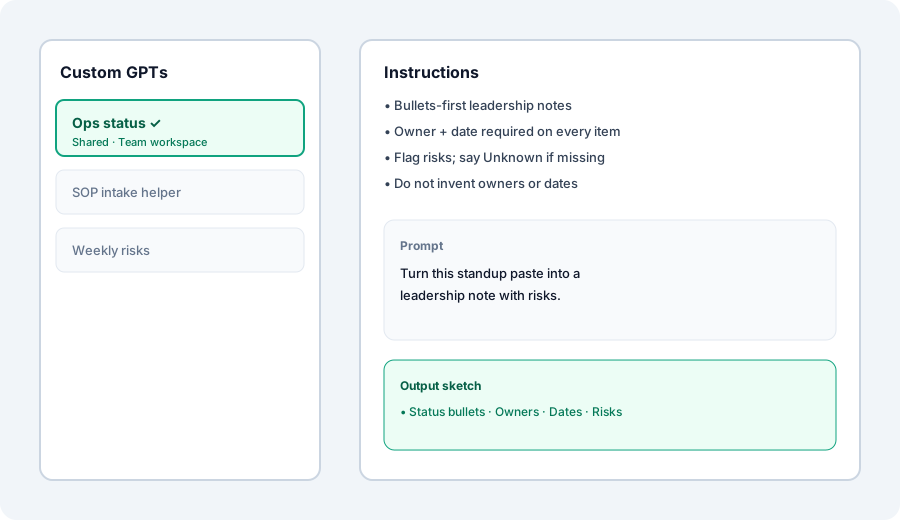
Create a Custom GPT Ops status. Instructions: bullets-first, owner+date required. Prompt:
Turn this standup paste into a leadership note with risks.
2. SOP rewrite Project
What it is: A ChatGPT Project that holds standing SOP templates and custom instructions (“purpose → numbered steps → owner blanks; do not invent controls”). Each week you paste one messy procedure and ask for a clean draft the owner edits in the wiki of record.
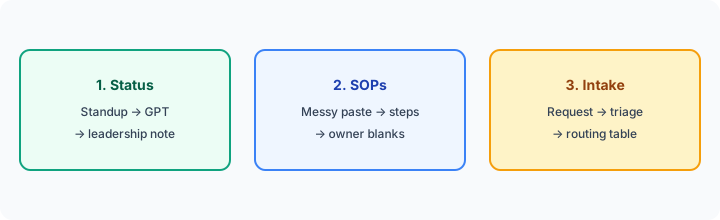
In a Project with one messy SOP paste:
Rewrite into purpose, numbered steps, owner blanks, and exit criteria. Mark missing owners as Unknown. Do not add controls that are not in the paste.
3. Intake triage (requests → routing table)
What it is: A second Custom GPT or the same Project with a routing table: request type → owner → SLA → next step. Paste a form dump or Slack request; get a triage row, not a vague “someone should look.”
After pasting one real intake request:
Produce a triage row: type, owner, SLA, next step, source quote. Use Unknown for missing fields. Do not invent owners.
4. Memory hygiene for ops prefs
What it is: ChatGPT Memory can store standing prefs (bullets-first, always ask for owner + date). Do not store raw standups, vendor names, or customer PII in Memory — keep those in Project files with clear retention habits.
Review Memory this week:
List saved memories related to ops. Keep only standing format prefs (bullets-first, owner+date). Delete anything that looks like a person name, vendor, or pasted status note.
When ChatGPT Team fits vs Claude for ops
What it is: Same status/SOP/intake jobs; different home seat. ChatGPT wins when shared Custom GPTs are already how the team encodes SOPs. Claude wins when Projects + Artifacts are the weekly long-doc habit (see Claude for ops). Running both for identical standup→leadership notes is usually seat overlap.
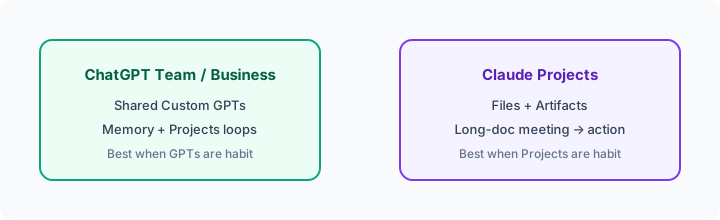
One decision this month:
List our paid AI seats. Circle which one already holds the ops status SOP. Put Ops status + SOP rewrite only there for 30 days. Revisit only if edit quality fails a real leadership review.
When seats overlap
If ChatGPT Business, Claude, and Gemini are all drafting the same leadership notes, you are paying three times for one habit. Pick the seat that already has the shared bots and files. Soft next step below only if that overlap is real.
Pricing context (September 2026)
Figures summarized from OpenAI’s public Business / ChatGPT pricing and help pages as of September 2026. Plan names and seat types change — confirm live.
- ChatGPT Business (formerly Team): public pages list Standard about $25/user/month monthly or $20/user/month billed annually; Premium about $125/$100. Workspace typically requires at least two paid seats. Confirm on openai.com/business/pricing.
- Included for this guide: Business seats publicly advertise Custom GPTs, Projects, Memory, admin controls, and (by default) no training on business data — verify current feature matrix on OpenAI’s pages.
- Plus (individual): often about $20/month — can build GPTs, but shared workspace ops bots fit Business better.
Uncertainty: Team→Business rename, Standard vs Premium usage limits, and seat caps have moved through 2025–2026. Always confirm on Business pricing and chatgpt.com/pricing before you buy.
When ChatGPT for ops is useful (honest take)
It tends to help when the company already pays Team/Business and needs a shared Ops status GPT plus SOP/intake Projects with strict “owner + date / no invented names” instructions. It tends not to replace your tracker, a wiki of record, or Claude when Projects/Artifacts are already the ops home. Paying ChatGPT + Claude + Gemini for the same standup paste is stack sprawl.
Paying for ChatGPT and a few other AI tools? The $9 AI toolkit spreadsheet lists every AI subscription you have, what each one costs, and how fast it pays for itself, so you can see which ones are worth the money.
Want someone to do it for you? AI toolkit audit — $19
FAQ
How should an ops lead set up ChatGPT Team or Business?
Shared Ops status GPT (bullets-first, owner+date) plus a SOP/intake Project. Share inside the workspace. Keep Memory for format prefs only.
Is ChatGPT Team the same as ChatGPT Business?
OpenAI renamed Team to Business; patterns on this page still apply. Confirm live seat names and prices.
When should we use Claude for ops instead?
When Projects + Artifacts are already the weekly meeting→action loop. See Claude for ops.
Where is the full ChatGPT review?
chatgpt.html · Custom GPTs · Memory. This page is the ops-lead role guide.
Optional next step (if seats overlap)
If ChatGPT Team is one of several AI seats doing the same status/SOP loop, optional help: $19 AI toolkit audit or $9 AI toolkit spreadsheet — only if you are juggling overlapping seats.
Checkout is live via Stripe. After you pay, we email delivery (spreadsheet) or intake next steps (audit).
Same job, two products: Claude vs ChatGPT for ops.
Same job, two products: ChatGPT vs Gemini for ops.