Compare guide · Ops · Sep 2026
Claude vs ChatGPT for ops (Sep 2026): memos, sheet cleanup, meeting → actions
Educational side-by-side on three concrete ops jobs — help you match the job to the product. Not a brand ranking. Run the same prompt in both; choose whichever output your ops lead would paste with less editing.
How to compare fairly (ops rule)
Ops leads usually do not need a winner badge. They need less editing on the jobs that show up every week: status memos, messy sheet cleanup, and turning meeting notes into tracker rows. This page walks those three jobs with the same prompt in Claude and ChatGPT, then plain-language notes on when each often fits. Full product context lives on the deep-dives; role patterns on Claude for ops; Projects on Claude Projects; Memory and GPTs on ChatGPT Memory and Custom GPTs.
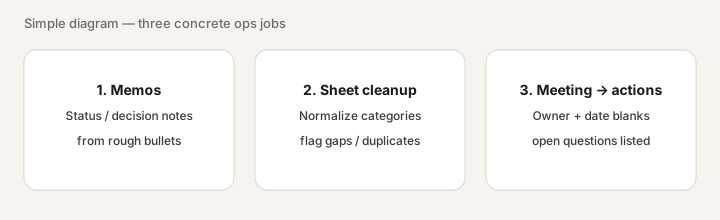
Examples at a glance: each job has a concrete ops example, a simple diagram, and a short Try this you can paste into both products.
Job 1: Memos (status / decision notes)
What the job is: Turn rough bullets into a short memo a founder or finance owner can skim — problem, options, ask — without inventing numbers you did not provide.
Where Claude often helps: Long source PDFs or a Project with standing instructions; Artifacts for a draft you can tweak beside chat. See also Claude for ops.
Where ChatGPT often helps: A Custom GPT with house tone, or Memory holding “bullets-first, owner + date, no emojis” so every memo starts on-brand. See Custom GPTs.
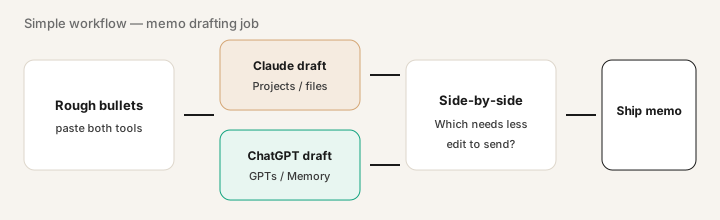
Same prompt in Claude and ChatGPT:
Turn these rough bullets into a half-page ops memo: context, what changed, risk, decision needed. Bullets-first after the lede. Do not invent metrics, names, or dates not in the bullets. [paste bullets]
Job 2: Sheet cleanup
What the job is: Normalize a messy category column (or vendor names) to an allowed list, flag blanks/duplicates, and return columns you can paste back — without inventing spend figures.
Where Claude often helps: Paste a CSV snippet into a Project that already holds your chart-of-accounts cheat sheet; ask for a clean table only.
Where ChatGPT often helps: Fast back-and-forth cleanup in chat, or a Custom GPT that always returns “cleaned | original | flag” columns. If work must stay inside Excel, also see Microsoft 365 Copilot — different job (in-file).
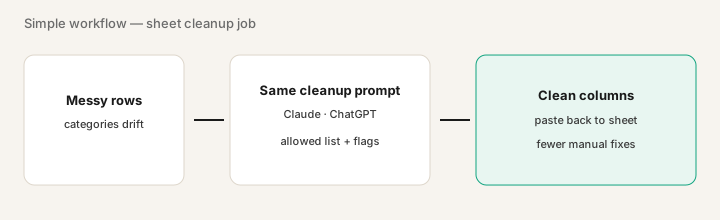
Same prompt in Claude and ChatGPT:
Normalize the Category column to this allowed list only: [paste list]. Return three columns: cleaned_category, original_category, flag (blank|duplicate|unknown). Do not change dollar amounts. Only use the pasted rows. [paste table snippet]
Job 3: Meeting → actions
What the job is: Turn a messy meeting note into tracker-ready action items (owner + date blanks) plus open questions — using only the text you pasted.
Where Claude often helps: Longer transcripts in a Project with your tracker template; careful extraction that leaves blanks instead of guessing owners.
Where ChatGPT often helps: Quick paste after a call; a Custom GPT named “Meeting → tracker” with your column headers; Memory for standing format rules (not the confidential names).
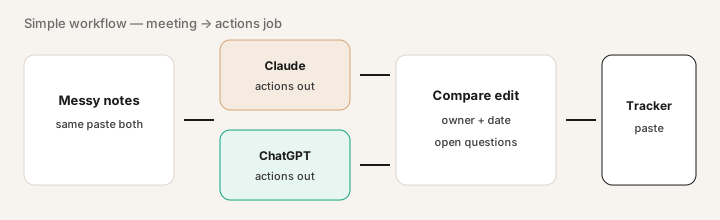
Same prompt in both: paste a messy meeting note.
Extract action items with owner + date blanks; list open questions. Only use this text.
Compare which output your ops lead would paste into the tracker with less editing.
Public pricing context (September 2026)
Figures below are from public Anthropic and OpenAI pricing pages as of September 2026. Prices exclude tax; regional and mobile-store prices vary. Always confirm live: claude.com/pricing and openai.com/chatgpt/pricing.
- Claude Pro: commonly about $20/month billed monthly, or about $17/month when billed annually. Max starts from about $100/month for higher usage. Team: minimum two seats; public Standard often about $25/member/month (or ~$20 annual) — confirm on Anthropic Help / pricing.
- ChatGPT Plus: commonly about $20/month for one person. Business (formerly Team): minimum two seats; public Standard often about $25/user/month monthly or $20 annual; Premium higher — confirm on OpenAI Business pricing.
Uncertainty: Plan names, usage caps, and seat bundles move. Do not budget from a blog post — use the live vendor pages. API token pricing is a separate bill from consumer/Team seats.
When each often fits (plain language)
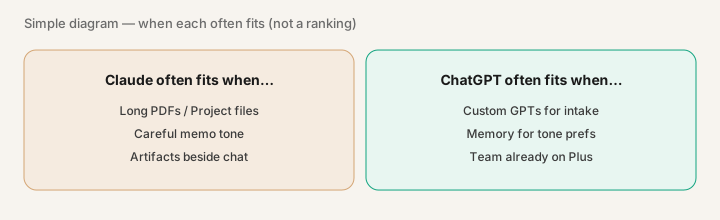
| Situation | Often lean Claude | Often lean ChatGPT |
|---|---|---|
| Long PDFs / Project knowledge | Projects + careful memo tone | Works too — prefer if team already lives in ChatGPT |
| Reusable intake bot | Project instructions / shared Team project | Custom GPTs shared in Business |
| Standing tone rules | Project custom instructions | Memory (tone only — not customer $) |
| Meeting → tracker paste | Strong on long transcripts | Strong on fast post-call paste |
Many teams stick with one primary seat and add a second only when a weekly job still needs heavy editing. That decision should come from your three Try-this runs, not from a brand preference.
Related options (educational)
- Gemini — when Google Workspace is already the file home and a separate Claude/ChatGPT seat is the question.
- Microsoft 365 Copilot — when the draft must stay inside Word/Excel/Outlook rather than chat paste.
- Perplexity — when the job is cited research, not memo drafting from your own notes.
- Sheets + a single LLM paste — fair baseline before buying a second assistant seat for cleanup alone.
When this compare is useful (honest take)
Useful when you already pay for Claude, ChatGPT, or both, and weekly time goes into memos, cleanup, or meeting → tracker — and you want a fair, same-prompt check before renewing or adding a seat.
Less useful when the real bottleneck is sitting inside Microsoft or Google files (try Copilot / Gemini in-product first), or when you need automation glue rather than drafting (see Zapier / Make / n8n reviews). This page will not name a universal winner; it helps you match your three jobs to a product.
Still choosing between Claude and ChatGPT? The $19 AI toolkit audit gives you a written plan for which tools to keep using and which to drop across your whole AI stack, including this pair.
Prefer to do it yourself? Spreadsheet — $9
FAQ
Should ops teams pick Claude or ChatGPT?
Match the job, not the brand. Run the same prompts for memos, sheet cleanup, and meeting → actions. Choose the product that needs less editing for the jobs you run weekly.
Which is better for meeting notes to action items?
Use the locked Try this under Job 3: same messy note, same extract prompt, compare tracker paste. That beats a generic ranking.
How much do they cost in September 2026?
Public list often shows Claude Pro ~$20/mo and ChatGPT Plus ~$20/mo; Team/Business seats higher. Confirm on vendor pricing pages — plans change.
Where are the full reviews?
Claude, ChatGPT, plus Claude for ops, Claude Projects, ChatGPT Memory, and Custom GPTs.
Optional next step (if seats overlap)
If Claude and ChatGPT seats overlap with other writing/ops tools and the real problem is stack sprawl, optional help: $19 AI toolkit audit or $9 AI toolkit spreadsheet — only if overlapping seats are the pain.
Checkout is live via Stripe. After you pay, we email delivery (spreadsheet) or intake next steps (audit).