Feature how-to · ChatGPT · Writing & ops
ChatGPT Memory how-to (Sep 2026): what recurring ops context to save — and what not to
Feature how-to linked from the ChatGPT deep-dive — use Memory for stable preferences and SOP tone, keep confidential ops data in Projects or files, and run a simple privacy hygiene loop so Memory does not become a leaky notebook.
What ChatGPT Memory is
Memory helps ChatGPT keep useful context across chats — preferences, recurring constraints, and details you ask it to remember — so status notes and SOP answers stay consistent without re-pasting the house rules every time. OpenAI also describes automatic updates from chat context over time; you can still review, edit, delete, or turn Memory off. Full product context: ChatGPT review. For reusable intake bots, see Custom GPTs.
What to save vs what not to (ops rule of thumb)
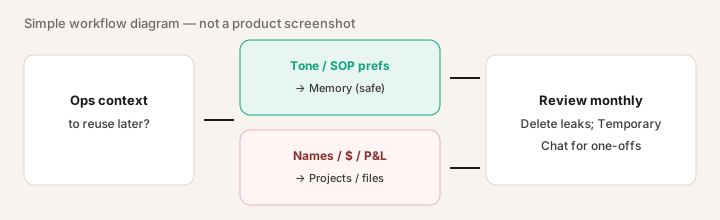
Save in Memory: stable preferences — tone, format, roles (“status notes are bullets-first, owner + date, no emojis”). These help every future chat without exposing customer data.
Do not save in Memory: customer names, dollar amounts, private P&Ls, contract terms, or one-off deal context. Put that in a Project, an uploaded file for the session, or Temporary Chat. Memory is for how you work, not for who paid what.
How to set Memory up for ops work
Examples at a glance: each step has a concrete ops example plus a short Try this.
1. Review what it currently remembers
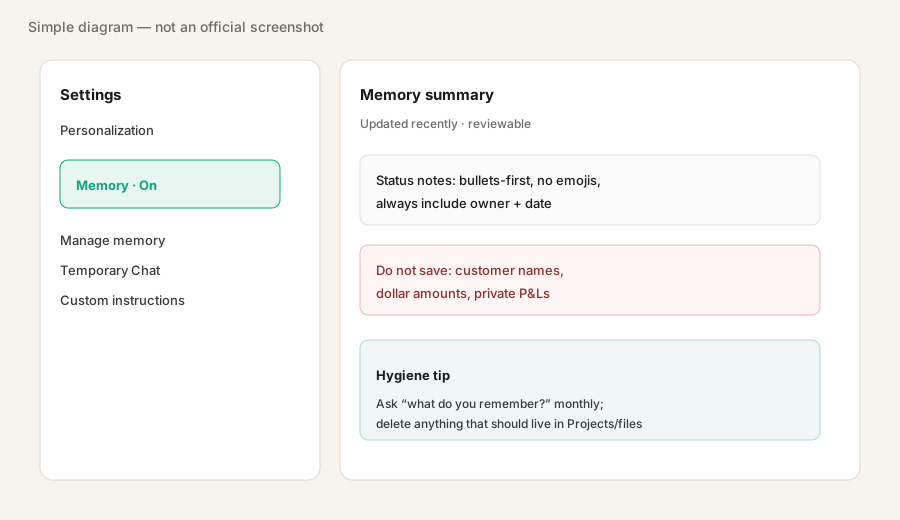
What it is: Before you add more, ask what Memory already holds. Surprises (old vendors, leftover names) are common after months of chat.
In ChatGPT (Memory on):
Show what you currently remember about me. Then remember only: our status note tone is bullets-first, no emojis, always include owner+date. Do not remember any customer names or dollar amounts.
2. Save tone and SOP preferences (not the data)
What it is: Tell ChatGPT the standing rules for how drafts should look. Treat this like lightweight custom instructions that persist — still review them when the house style changes.
After a good draft you want every time:
Remember this preference for future chats: [paste your tone/format rules]. Do not remember any specific people, companies, or dollar amounts from this conversation.
3. Keep confidential work in Projects / files / Temporary Chat
What it is: Recurring private file sets belong in a Project (or Claude Projects if that is your primary seat) with files you control. One-off sensitive asks belong in Temporary Chat so they do not update Memory. Custom GPTs can hold SOP instructions without stuffing customer data into global Memory — see Custom GPTs how-to.
Before pasting a sensitive sheet:
For this chat only: analyze the pasted numbers. Do not save names, amounts, or company identifiers to Memory. If Memory tries to store them, forget them.
4. Monthly hygiene loop
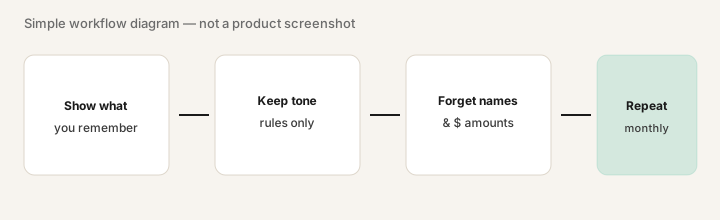
What it is: A short calendar reminder: show memories → keep tone rules → delete anything that looks like customer or money data → confirm Temporary Chat is used for one-offs. OpenAI’s help pages note that deleting a chat does not always clear every related memory — manage Memory deliberately.
Once a month:
List everything you remember that looks like a person name, company name, or dollar amount. Forget those items. Confirm only tone/SOP preferences remain.
Pricing context (September 2026)
Memory is a ChatGPT product feature, not a separate SKU. Availability and capacity have expanded over time (including free-tier rollouts described by OpenAI); Plus, Pro, and Business/Enterprise plans still differ on limits, admin, and data controls. Public consumer list prices often cited: Plus ~$20/month; higher tiers cost more. Confirm on openai.com/chatgpt/pricing and the Memory FAQ.
Uncertainty: Which plans get which Memory capacity, workspace admin defaults, and “reference chat history” toggles change. Team/Business privacy settings can differ from consumer Plus — check your workspace policy before saving ops preferences on a shared seat.
When Memory is useful (honest take)
Memory helps when you rewrite the same tone and SOP rules every week and those rules contain no confidential specifics. It is less useful — and riskier — when people paste customer lists into blank chat and assume “delete chat” erased everything. Prefer Projects/files for private data, Custom GPTs for shared intake bots, and Temporary Chat for one-off sensitive asks.
Paying for ChatGPT Memory and a few other AI tools? The $9 AI toolkit spreadsheet lists every AI subscription you have, what each one costs, and how fast it pays for itself, so you can see which ones are worth the money.
Want someone to do it for you? AI toolkit audit — $19
Related options (educational)
| Need | Better home | Why |
|---|---|---|
| Standing tone / format rules | ChatGPT Memory (or custom instructions) | Reusable across chats without pasting secrets |
| Shared SOP / intake bot | Custom GPT | Team can reuse one instructed bot |
| Private recurring file set | ChatGPT Project / Claude Projects | Files stay scoped; not global Memory |
| One-off sensitive paste | Temporary Chat | Avoids creating or using memories |
| Drafts inside Word/Excel | Microsoft 365 Copilot | Different job — in-file Microsoft work |
FAQ
What is ChatGPT Memory?
A feature that keeps useful context across chats — preferences and details you want reused — so you do not re-explain tone and SOP rules every time. You can review, edit, delete, or turn it off.
What should ops teams save in Memory vs Projects?
Save tone and format rules in Memory. Keep customer names, dollar amounts, and private financials in Projects, files, or Temporary Chat.
How do I review what ChatGPT remembers?
Ask in chat, and use Settings → Personalization → Memory (labels can move) to open the summary. Temporary Chats do not use or create memories.
Where is the full ChatGPT product review?
See /reviews/chatgpt.html. This page is the Memory feature how-to; Custom GPTs live at /reviews/chatgpt-custom-gpts.html.
Optional next step (if seats overlap)
If ChatGPT Memory is one piece of a messy multi-seat writing/ops stack, optional help: $19 AI toolkit audit or $9 AI toolkit spreadsheet — only if overlapping seats are the real problem.
Checkout is live via Stripe. After you pay, we email delivery (spreadsheet) or intake next steps (audit).