AI assistant · Writing & copy · Ops cross-link
Gemini review (Oct 2026): when Workspace overlap beats a separate chat seat
For ops, finance, and small teams already in Docs, Sheets, and Gmail — when Gemini’s context inside Google Workspace replaces an extra ChatGPT or Claude seat, and when a dedicated chat Project or Custom GPT still wins. Features and usage, with honest limits.
Who this page helps
Ops leads, finance owners, and founders whose team already lives in Google Workspace (or Google One) and are about to add another ~$20 AI chat seat. The buying question is overlap: does Gemini already cover the draft/summary job inside the files you have?
What Gemini is
Gemini is Google’s AI assistant: the Gemini app plus helpers that appear inside Gmail, Docs, Sheets, Drive on eligible Google AI / Workspace plans. Consumer paid access is sold as Google AI plans (Plus / Pro / Ultra). Older “Gemini Advanced” naming still appears in older posts. Org SKUs (Gemini for Workspace) change — confirm on Google’s live admin pages.
Major features (with how someone uses them)
Examples at a glance: each feature has a concrete ops/finance example plus a short Try this.
1. Workspace overlap (the buying decision)
What it is: If docs, mail, and sheets already live in Google, Gemini can draft and summarize where the file already is — instead of exporting into Claude or ChatGPT for the same memo.

In Gemini with Drive access on, open a real budget Sheet + related Doc. Prompt:
Only use these two files. Draft a 6-bullet variance note for leadership: what moved >10% MoM, what needs an owner, what is still unclear. Do not invent numbers.
2. Gemini in Docs, Sheets, and Gmail
What it is: On eligible plans, Gemini helpers appear inside Docs (draft/rewrite), Sheets (explain ranges, summarize), and Gmail (reply drafts in thread context). Labels and availability vary by plan and region.
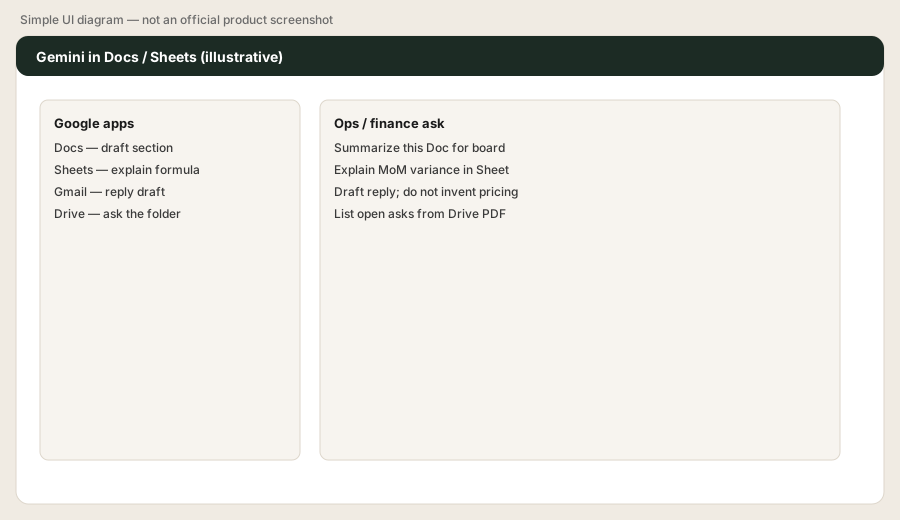
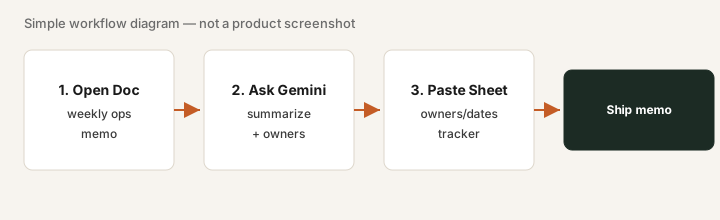
In a real Sheet with last month’s vendor spend (or a 15-row sample):
Using only the selected range, summarize spend by vendor with MoM % change if a prior month column exists. Highlight any vendor up more than 20%. Do not invent missing months — say Unknown. Give me a 3-bullet caption for the board Doc.
3. Gemini app, uploads, and research modes
What it is: The standalone Gemini app supports chat, file uploads, and research-style modes on higher plans. Useful when the ask is broader than one Doc — still secondary if Workspace is your system of record.
In the Gemini app, attach a short PDF and your About Doc:
Only use these uploads. Draft three positioning bullets for an ops/finance buyer. Flag any claim that is not supported by the files. Do not invent pricing or customer logos.
4. When Gemini replaces a second chat seat (and when it doesn’t)
What it is: Gemini wins when the weekly job is “help me inside the Google file I already have.” Claude still wins document-heavy Projects + Artifacts loops; ChatGPT wins when Custom GPTs already encode voice across a Business workspace.
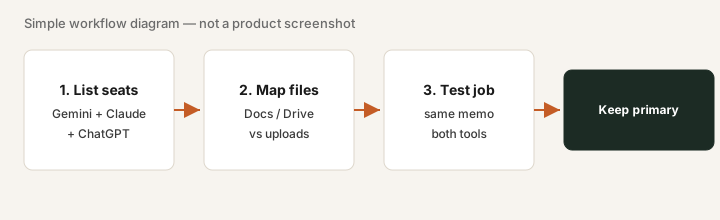
Pick one paid Claude or ChatGPT job you run weekly. Rebuild it once inside Docs/Sheets with Gemini. Then ask:
Compare today’s Gemini-in-Docs output to last week’s Claude/ChatGPT draft for the same memo. List what the other seat still uniquely owns (Project knowledge, Custom GPT voice pack, Artifact charts, admin). If the list is empty for this job, we do not need both seats for it.
Public pricing (checked 24 October 2026)
Figures from Google’s public Google AI / Gemini subscription pages, re-checked on 24 October 2026 (US consumer list prices):
- Free: baseline Gemini app access with limits.
- Google AI Plus: Google’s US plans page now lists Plus from $7.99/month with 400 GB of storage, or $9.99/month ($99.99/year) with 2 TB. The gemini.google subscriptions page still showed $4.99/month when we checked, so Google’s own pages disagree; expect to pay what one.google.com shows at checkout.
- Google AI Pro: $19.99/month or $199.99/year, with 5 TB of storage, expanded Gemini access, and Gemini in Gmail, Docs, and other Google apps where offered.
- Google AI Ultra: two levels, $99.99/month (5x Pro usage limits, 20 TB) and $199.99/month (20x Pro usage limits, 30 TB).
- Gemini for Workspace / Business: organization add-ons change — confirm on Google Workspace admin / sales pages.
Uncertainty: Plan names moved from “Gemini Advanced / Google One AI Premium” toward Google AI Plus/Pro/Ultra. Feature bundles and Workspace SKUs change. Always confirm on Google AI plans and gemini.google/subscriptions.
When Gemini is useful (honest take)
Gemini tends to help when Google Workspace is already the system of record and you want drafts/summaries without a second upload loop. It tends not to replace Claude when Projects + Artifacts are the weekly finance/ops loop, or ChatGPT when shared Custom GPTs already own voice. Paying for Gemini + Claude + ChatGPT for the same Docs memo is stack sprawl.
Paying for Gemini and a few other AI tools? The $9 AI toolkit spreadsheet lists every AI subscription you have, what each one costs, and how fast it pays for itself, so you can see which ones are worth the money.
Want someone to do it for you? AI toolkit audit — $19
Alternatives compared: Claude, ChatGPT, Grok
| Axis | Gemini | Claude | ChatGPT | Grok |
|---|---|---|---|---|
| Typical paid seat (Sep 2026) | Google AI Pro $19.99/mo (as of Oct 24, 2026). Confirm Google AI plans. | Pro ~$20/mo; Team from ~$20–25/member. Confirm claude.com/pricing. | Plus ~$20/mo; Business Standard ~$20–25/user/mo. Confirm openai.com. | The X Subscription: Plus $8/mo, Premium $30/mo (as of Oct 17, 2026, x.ai/pricing); SuperGrok no longer sold to new buyers. |
| Native home | Gmail / Docs / Sheets / Drive | Projects + Artifacts | Custom GPTs + Business workspace | Real-time web / X-adjacent chat |
| Best fit when… | Work already lives in Google apps. | Document-heavy recurring Projects. | Reusable GPTs already cover drafts. | You need fresh public/X context — see Grok. |
| Less useful when… | Knowledge and admin already standardized elsewhere. | Org is Google-only and jobs never leave Docs. | Nobody will maintain Custom GPTs. | You need private finance CSVs as the source of truth. |
Same job, two products: ChatGPT vs Gemini for ops.
Same job, two products: Gemini vs Microsoft 365 Copilot for ops.
FAQ
What is Google Gemini?
Gemini is Google’s AI assistant (app and integrations). Paid Google AI plans unlock higher limits and Gemini inside Gmail, Docs, Sheets, and Drive where available.
How much is Google AI Pro in October 2026?
As of 24 October 2026, Google lists Google AI Pro at $19.99/month (US) or $199.99/year, with 5 TB of storage. Google AI Ultra costs $99.99 or $199.99/month. Confirm on Google’s live subscription pages.
When does Workspace overlap beat a separate chat seat?
When the weekly job is drafting or summarizing inside Docs/Sheets/Gmail you already use, and a second seat mostly re-uploads the same files.
Gemini vs Claude vs ChatGPT — how should we compare?
Compare on where files and admin already live. Keep one primary seat; add a second only for a clear uncovered job.
Optional next step (if seats overlap)
If Gemini is one of several AI seats drafting the same Workspace memos, optional help: $19 AI toolkit audit or $9 AI toolkit spreadsheet — only if you are juggling overlapping seats.
Checkout is live via Stripe. After you pay, we email delivery (spreadsheet) or intake next steps (audit).