AI IDE · Ops & automation
Cursor review (Sep 2026): when one seat replaces contractor hours for a small team
Cursor is an AI-native IDE. This page is for small product/ops-tech teams deciding whether a Cursor seat is cheaper and clearer than another 10 hours of contractor glue — not a generic “AI IDE is the future” piece.
Who this page helps
Founders and ops-tech leads on a small team who keep paying a contractor to poke fragile CSV/CRM scripts — and wonder whether one Cursor seat with a named owner is clearer. If you want a feature parade of “AI coding is magic,” this is not that page.
What Cursor is
Cursor is an AI-native code editor (forked from the VS Code lineage) with chat/Agent, inline Tab completions, and repo-aware edits. Individuals buy Hobby / Pro / Pro+ / Ultra; organizations use Teams (Standard / Premium seats) or Enterprise. This review focuses on the seat-vs-contractor decision for internal glue work.

Major features (with how someone uses them)
1. Agent + repo context
What it is: Cursor’s Agent can read and propose changes across files with repository context — useful when the “job” is understanding brittle internal scripts, not rewriting the product architecture.
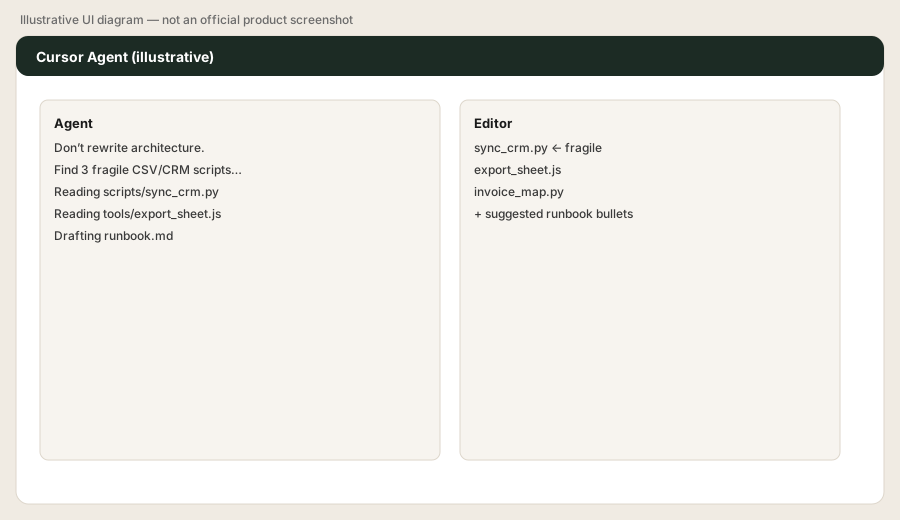
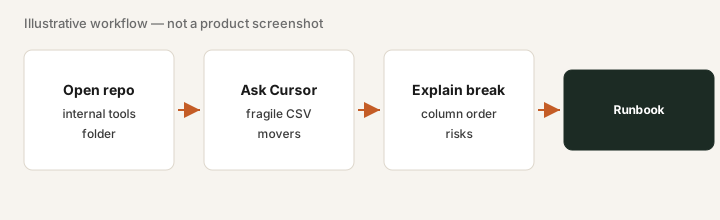
Open a real internal repo in Cursor. Prompt:
Don’t rewrite architecture. Find the three most fragile scripts that move CSV/CRM data, explain what breaks if the column order changes, and draft a 5-bullet runbook for the next person who touches them.
2. Tab completions & inline edits
What it is: Fast inline suggestions and edit flows inside the editor so small fixes (logging, guard clauses, comments) stay in-repo instead of bouncing through a contractor ticket for every tweak.
In a fragile export script, with Cursor open:
Add a guard that fails fast if expected CSV headers are missing or reordered. Do not change business logic. Summarize the guard in two sentences for the runbook.
3. Seat vs contractor hours (the decision)
What it is: Frame the Cursor bill against hours you already buy. A Premium plan at $30/mo or a Teams seat from $30/user/mo (as of Oct 17, 2026) is often cheaper than another 10 contractor hours — if someone on staff will actually open the repo weekly.
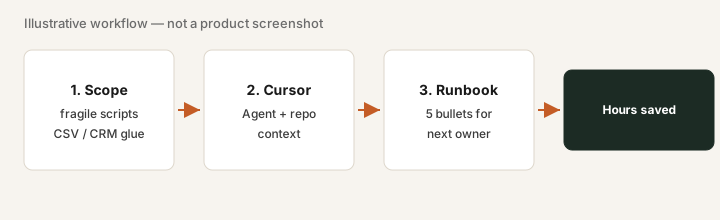
Write one finance line before you buy:
Last month we paid $___ for contractor glue on internal scripts. A Cursor seat would be $___ / month. Named owner: ___. If owner is blank, do not buy the seat yet.
4. Teams seats & usage limits
What it is: Teams offers Standard and Premium seats with included usage and on-demand overages (public docs). Premium is positioned as higher included Agent usage. Enterprise adds pooled usage and advanced admin. Treat usage as part of the bill — not just the seat sticker.
After one week on a trial/seat:
Export or screenshot our Cursor usage for the week. List any on-demand overage. Decide Standard vs Premium only from that number — not from a demo.
Public pricing (as of Oct 17, 2026)
From the official cursor.com/pricing page, as of Oct 17, 2026. Cursor is now sold as part of The X Subscription (Cursor, Grok and X Premium in one plan, with one weekly usage pool shared with Grok). Monthly prices; no annual price is shown:
- Free: $0 — limited agent and chat requests.
- Plus: $8/month — Cursor with Grok models only.
- Premium: $30/month — 4x Plus usage, cloud agents and automations, code hosting, AI code reviews (Bugbot), third-party models at API list price.
- Super: $100/month (15x Plus usage); Ultra: $200/month (50x Plus usage).
- Teams: from $30/user/month — per-seat Premium $30, Super $100 or Ultra $200, plus SSO and admin controls.
- Enterprise: custom (pooled usage, SCIM, invoice billing).
Old plans are closed to new customers: Pro ($20/mo), Pro+ ($60/mo), Ultra ($200/mo), Teams Standard ($40/user/mo) and Teams Premium ($120/user/mo) are now legacy Cursor plans. They keep working for existing subscribers, but new customers start on The X Subscription. Third-party model usage is no longer included and is billed separately at API list price; budget for usage, not the seat sticker alone.
When Cursor is useful (honest take)
Useful when a named staff owner will open real repos weekly and the alternative is recurring contractor hours on the same glue. Not useful as a status-symbol IDE seat nobody opens, or when the “contractor hours” are actually product feature work that still needs a senior engineer.
Paying for Cursor and a few other AI tools? The $9 AI toolkit spreadsheet lists every AI subscription you have, what each one costs, and how fast it pays for itself, so you can see which ones are worth the money.
Want someone to do it for you? AI toolkit audit — $19
Alternatives compared: Claude Code, ChatGPT coding, GitHub Copilot, contractor
| Axis | Cursor | Claude Code | ChatGPT coding | Contractor hours |
|---|---|---|---|---|
| Typical cost signal | Premium $30/mo; Teams from $30/user/mo (as of Oct 17, 2026). Confirm cursor.com/pricing. | Bundled with paid Claude plans — see Claude. | Plus ~$20/mo or Business seat — see ChatGPT. | Often $75–150+/hr; 10 hours dwarfs a seat. |
| Where work happens | AI-native IDE + Agent on the repo. | Coding agent / terminal-oriented Claude workflow. | Chat + tools; weaker as daily IDE home. | Whatever repo access you grant; needs briefs. |
| Best fit when… | Staff owner ships runbooks/fixes in-repo weekly. | Team already lives in Claude paid seats. | Occasional script help; ChatGPT already paid. | One-off migrations or capacity you refuse to staff. |
| Watch-outs | Usage overages; unused seats. | Not a full IDE replacement for everyone. | Copy-paste drift out of repo. | Knowledge leaves when the contract ends. |
Same job, two products: Claude vs Cursor for ops scripts.
FAQ
When does a Cursor seat beat contractor hours?
When the same fragile internal scripts need weekly attention and a seat holder can produce runbooks and safe edits faster than another 10 contractor hours — with a named owner.
How much does Cursor cost in October 2026?
As of Oct 17, 2026, cursor.com/pricing lists Free $0, Plus $8/mo, Premium $30/mo, Super $100/mo, Ultra $200/mo and Teams from $30/user/mo (The X Subscription). The old Pro, Pro+, Ultra and Teams Standard/Premium plans are legacy plans, no longer sold to new customers. Third-party model usage is billed separately.
Is Cursor just another AI IDE?
This page treats Cursor as a seat-cost decision vs contractor glue for small teams, not a generic AI-IDE feature tour.
Cursor vs Claude Code vs ChatGPT for internal scripts?
Cursor wins when the work is repo-native in an IDE. Claude Code and ChatGPT coding help can cover chat/terminal workflows — compare on where the files live and who owns the repo.
Optional next step (if seats overlap)
If Cursor is one of several AI/dev seats and you want a written pass across the toolkit, the optional $19 AI toolkit audit or $9 spreadsheet can help. Soft offer only.
Checkout is live via Stripe. After you pay, we email delivery (spreadsheet) or intake next steps (audit).