Meetings · Meetings & notes
Otter.ai review (Sep 2026): how live notes work and when they’re useful
Otter.ai turns meetings into searchable transcripts, summaries, and highlights. This page is for ops leads and small teams who want to see how live notes and search actually work — with concrete examples.
Who this page helps
If standing meetings lose owners — or you are comparing Otter to Fireflies or Fathom — start here. We cover live capture, summaries, and search with workflow diagrams, dated pricing, and educational alternatives.
What Otter is
Otter.ai is a meeting assistant. It can join or record calls (with consent), produce live transcripts, summaries, and highlights, and store conversations you can search later. Teams share Otters in channels or export notes. This review focuses on what an ops or small-team buyer uses day to day.
Major features (with how someone uses them)
Examples at a glance: each feature has a concrete ops/small-team example plus a Try this mini-workflow.
1. Live transcription & capture
What it is: Otter can transcribe live meetings or uploaded audio with speaker labels and timestamps. Calendar join and platform support depend on plan — check live docs. Always get consent before recording.
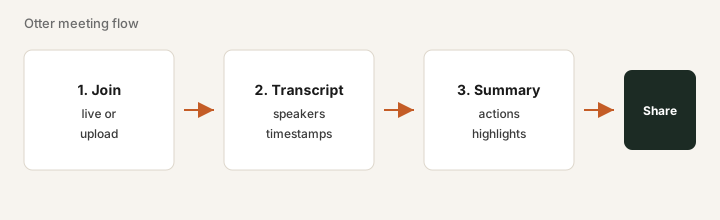
On Free or a trial, with consent:
Invite Otter to one internal standup. Afterward, check speaker labels on three turns and note mute gaps or crosstalk. Only then decide whether customer-call capture is worth configuring.
2. Summaries & action items
What it is: Otter generates summaries and suggested action items from the transcript. Treat them as drafts — humans verify owners before anything becomes a commitment.
After one real meeting:
Open the Otter summary. List every action item it proposed. Mark each: correct owner / wrong owner / missing. Paste the corrected list into your tracker.
3. Search & channels
What it is: Past Otters become searchable. Channels help teams keep customer or project conversations in one place — useful when “what did we tell them in March?” keeps coming up.
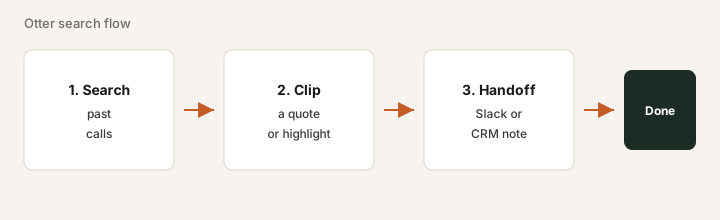
After you have a few meetings stored:
Search for a product or customer name. Open two hits. Copy one exact quote you would trust in a CRM note. If search is noisy, refine before rolling out team-wide.
4. Collaboration & sharing
What it is: Share Otters with teammates, comment, or export. Collaboration depth and admin controls vary by Pro vs Business — confirm the connectors and SSO needs on the vendor site.
Pick one destination you already use:
Share one Otter to Slack (or your wiki). Confirm the right people can open it. Fix permissions before adding paid seats for the whole team.
Public pricing (September 2026)
From Otter public pricing as of September 2026. Confirm on otter.ai/pricing.
- Basic (Free): about 300 transcription minutes/month; short per-conversation caps — fine for a trial.
- Pro: about $16.99 per user / month billed monthly, or about $8.33 billed annually (public pages may show limited-time promos — verify at checkout).
- Business: about $30 per user / month billed monthly, or about $19.99 billed annually — higher limits and admin features per public cards.
- Enterprise: custom (SSO/SCIM often need larger minimums).
Uncertainty flags: Minute pools and promo rates change. Annual discounts help only after a real usage month. Do not buy seats for people who never join calls — and do not stack Otter with Fireflies on the same calendar.
When Otter is useful (honest take)
Otter tends to help when recurring meetings lose decisions and someone will open transcripts. It tends not to help when a human already captures owners reliably, another notetaker already covers those calls, or recordings pile up unread. Prefer one meeting assistant.
Paying for Otter.ai and a few other AI tools? The $9 AI toolkit spreadsheet lists every AI subscription you have, what each one costs, and how fast it pays for itself, so you can see which ones are worth the money.
Want someone to do it for you? AI toolkit audit — $19
Alternatives compared: Fireflies, Fathom, native notes
| Axis | Otter | Fireflies | Fathom | Native Zoom/Meet |
|---|---|---|---|---|
| Typical paid seat (Sep 2026) | Pro ~$17/mo or ~$8.33 annual. Confirm otter.ai/pricing. | Pro ~$18/mo or ~$10 annual. Confirm fireflies.ai/pricing. | Often free/generous for individuals; paid ~$16–20+. Confirm fathom.video. | Included with some Zoom/Meet plans; depth varies. |
| Strength | Live notes habits, searchable Otters, collaboration. | Searchable library, CRM/Slack push, team capture. | Lightweight capture + highlights; popular with sales. | Zero extra vendor if summaries already return owners. |
| Best fit when… | Team already standardized on Otter workflows. | You need search + multi-seat capture and will open transcripts. | You want simple highlight-centric notes with low overhead. | Light use and native summaries already close the job. |
Also see Fireflies and Fathom.
If two seats cover the same job, name the seats and what you pay on the overlap calculator, then keep the grid in the $9 AI toolkit spreadsheet.
FAQ
What is Otter.ai?
A meeting assistant that transcribes live or uploaded audio, produces summaries and highlights, and lets teams search past conversations.
How much does Otter Pro cost in September 2026?
Public pricing commonly lists Pro around $16.99/user/month monthly or about $8.33 annually. Confirm on otter.ai/pricing.
When is Otter useful?
When recurring meetings lose owners and someone will open transcripts. Less useful if another notetaker already covers the same calls.
Otter vs Fireflies vs Fathom?
Compare capture reliability, search/CRM needs, seat price, and whether one notetaker already owns the job. Prefer one meeting assistant.
Optional next step (if seats overlap)
If this tool is one of several AI seats and you want a written pass across the whole list, the optional $19 AI toolkit audit produces a short memo. Prefer an editable grid? The $9 AI toolkit spreadsheet is a one-time CSV. Soft offer only — this deep-dive stands alone.
Checkout is live via Stripe. After you pay, we email delivery (spreadsheet) or intake next steps (audit).