Meetings · Meetings & notes
Fathom review (Sep 2026): how call highlights work and when paid tiers help
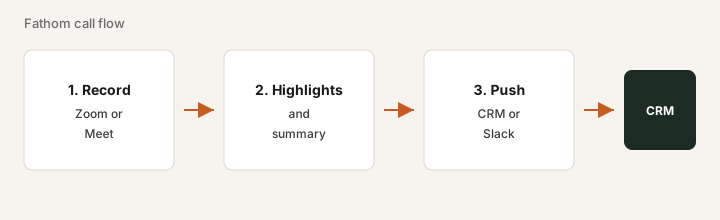
Fathom records meetings, drafts summaries and highlights, and can push notes into CRM or Slack. This page shows how Free vs paid features work for sales and ops teams — with concrete examples.
Who this page helps
If you want meeting capture without paying on day one — or you are deciding whether Premium/Team/Business is worth it after Free — start here. We cover recording, highlights, and CRM push with a workflow diagram, dated pricing, and educational alternatives (Fireflies, Otter, native notes).
What Fathom is
Fathom is a meeting assistant popular with sales and small teams. With consent it records Zoom, Google Meet, or Teams calls, transcribes them, and builds summaries and highlights you can share. Paid tiers add more AI capacity, team features, and CRM field sync. This review focuses on what a RevOps or founder buyer actually uses.
Major features (with how someone uses them)
Examples at a glance: each feature has a concrete sales/ops example plus a Try this mini-workflow.
1. Record & transcript
What it is: Fathom joins or records supported calls and produces a transcript with speakers. Free marketing commonly emphasizes generous recording/transcription — always confirm live limits and get attendee consent.
On Free, with consent:
Record one internal call. Open the transcript, check three speaker turns, and note gaps. Only then enable capture for customer calls.
2. Highlights & summaries
What it is: During or after a call you can mark highlights; AI drafts a summary and action-oriented notes. Advanced AI summaries may be capped on Free — that cap is often where paid upgrades start.
After one call:
Mark three highlights while listening (or right after). Open the AI summary. Correct any wrong owners before pasting into your tracker.
3. CRM & Slack push
What it is: Higher tiers can sync notes or fields into CRM and post summaries to Slack so AEs are not copy-pasting. Mapping quality matters more than the demo — someone has to own field mapping.
Before buying Business for CRM sync:
Time how long AEs spend pasting call notes into CRM this week. If it is under 15 minutes each, stay on Free/Premium until sync has a named owner.
4. Team plans & coaching
What it is: Team and Business seats add shared libraries, admin, coaching views, and (on Business) deeper CRM tools per public marketing. Minimum seat counts often apply — confirm live.
Before a Team quote:
Write: owner name, one coaching or CRM job Team unlocks, and a cancel-by date 30 days out. If you cannot fill that, stay on Free or Premium.
Public pricing (September 2026)
From Fathom public pricing as of September 2026. Confirm on fathom.video/pricing (URL paths vary — some pages use fathom.ai).
- Free: $0 — unlimited recordings/transcriptions advertised; advanced AI summaries/action items capped (secondary writeups often cite ~5 calls/month — confirm live).
- Premium (individuals): about $20 / user / month monthly, or about $16 annual.
- Team: about $19 / user / month monthly, or about $15 annual — often a 2-user minimum.
- Business: about $34 / user / month monthly, or about $25 annual — CRM field sync, Deal View, coaching (2-user minimum common).
- Enterprise: talk to sales (SSO/SCIM, retention, security).
Uncertainty flags: Free-plan AI caps and lookback windows change. Team/Business minimums multiply cost. Do not stack Fathom + Fireflies on the same Zoom account.
When Fathom is useful (honest take)
Fathom tends to help when you want low-friction capture and Free already returns owners — or when paid CRM sync replaces real paste hours. It tends not to help when Fireflies/Otter already cover the same calls, transcripts go unread, or you buy Business for branding without a RevOps owner for field mapping.
Paying for Fathom and a few other AI tools? The $9 AI toolkit spreadsheet lists every AI subscription you have, what each one costs, and how fast it pays for itself, so you can see which ones are worth the money.
Want someone to do it for you? AI toolkit audit — $19
Alternatives compared: Fireflies, Otter, native notes
| Axis | Fathom | Fireflies | Otter | Native Zoom/Meet |
|---|---|---|---|---|
| Typical paid entry (Sep 2026) | Free first; Premium ~$20/mo or ~$16 annual. Confirm fathom.video/pricing. | Pro ~$18/mo or ~$10 annual. Confirm fireflies.ai/pricing. | Pro ~$17/mo or ~$8.33 annual. Confirm otter.ai/pricing. | Included with some licenses; feature depth varies. |
| Strength | Generous Free; highlights; CRM on higher tiers. | Team library, search, CRM/Slack push. | Live notes habits and collaboration. | No extra vendor if summaries already work. |
| Best fit when… | Start Free; pay when CRM/team search is a named job. | Multi-seat search + integrations are required day one. | Team already standardized on Otter. | Light use and native notes close the job. |
If two seats cover the same job, name the seats and what you pay on the overlap calculator, then keep the grid in the $9 AI toolkit spreadsheet.
FAQ
What is Fathom?
A meeting recorder and AI notetaker for Zoom/Meet/Teams that produces transcripts, highlights, and summaries, with CRM/Slack options on paid plans.
Is Free enough?
Often yes for recordings and basic summaries. Upgrade when advanced-AI caps or missing CRM sync create real rework — confirm live Free limits.
When is Business justified?
When CRM field sync replaces weekly paste work and a RevOps owner watches the mapping. Otherwise Team, Premium, or Free may be enough.
Fathom and Fireflies together?
Almost never. Pick one notetaker for the same recurring calls.
Optional next step (if seats overlap)
If this tool is one of several AI seats and you want a written pass across the whole list, the optional $19 AI toolkit audit produces a short memo. Prefer an editable grid? The $9 AI toolkit spreadsheet is a one-time CSV. Soft offer only — this deep-dive stands alone.
Checkout is live via Stripe. After you pay, we email delivery (spreadsheet) or intake next steps (audit).