Writing ops · Writing & copy
Grammarly review (Sep 2026): how Pro style guides work and when seats help
Grammarly sits in the docs and email tools people already use — catching clarity, tone, and style-guide issues before a manager does. This page explains Pro suggestions and team style guides with concrete examples.
Who this page helps
If managers spend hours fixing the same tone and clarity issues — or you are comparing Grammarly seats to “just ask ChatGPT” — start here. We cover in-app suggestions, style guides, and seat economics with a workflow diagram, dated pricing, and educational alternatives.
What Grammarly is (Pro vs “Business”)
Grammarly is a writing assistant that works in browsers, Docs, email, and desktop apps. Free covers basics; Pro (which absorbed most of what used to be marketed as Grammarly Business for many buyers) adds tone, clarity, generative assists, and team style guides. Enterprise is custom security/admin. Confirm the live SKU — naming moved with Superhuman.
Major features (with how someone uses them)
Examples at a glance: each feature has a concrete writing-ops example plus a Try this mini-workflow.
1. Suggestions everywhere you write
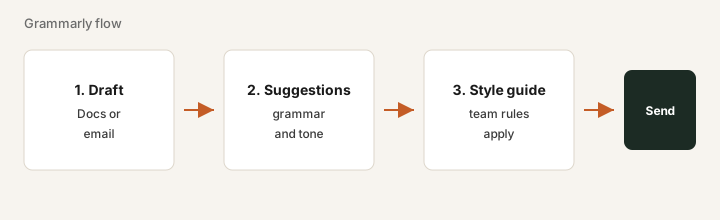
What it is: Inline suggestions for grammar, clarity, and tone in the tools your team already uses — so review happens while drafting, not only in a separate chat paste.
On Pro trial for one week:
Enable Grammarly in the app where you write most (Docs or email). Track how many suggestions you accept on three real documents. If acceptance is near zero, Pro seats will not help.
2. Team style guide & brand tone
What it is: Shared rules (banned phrases, preferred terms, tone) so writers get consistent guidance. This is the main reason teams buy Pro seats instead of relying only on a personal ChatGPT habit.
Before buying seats for everyone:
Add 5 banned phrases and 5 preferred product names to the style guide. Draft one real email. Confirm Grammarly flags a banned phrase. If it does not, fix the guide before rolling out seats.
3. Generative writing assists
What it is: Pro includes generative prompts to rewrite or draft short passages. Free has limited generative use (publicly often ~100 prompts/month — confirm live). Overlap with ChatGPT/Claude is real — buy Grammarly for in-place editing + style guide, not as a second chat app.
Compare apples to apples:
Rewrite the same paragraph once in Grammarly and once in ChatGPT/Claude. Keep whichever workflow you will actually use daily. Do not pay for both if they produce the same edits.
4. Admin, seats & Enterprise
What it is: Pro supports multi-member teams (public cards often up to ~149). Enterprise adds SSO, SCIM, DLP, and similar controls — usually via sales. Idle seats dominate cost.
Before annual renewal:
Export active users. Mark each seat: weekly writer / occasional / never. Remove the “never” seats before talking Enterprise.
Public pricing (September 2026)
From Grammarly public plans as of September 2026. Confirm on grammarly.com/plans.
- Free: basic grammar/spelling; limited generative prompts (publicly ~100/month).
- Pro: about $12 per member / month billed annually ($144/member/year), or about $30 per member / month billed monthly; quarterly option about $60 / member / three months per Grammarly support. Teams up to ~149 seats on Pro per public cards.
- Enterprise: custom — SSO, SCIM, DLP, BYOK, dedicated support (often sold via Superhuman Go).
- Some 2026 writeups mention a separate Superhuman suite “Business” bundle at higher per-member rates — uncertain whether you need it for writing alone; verify on the vendor site.
Uncertainty flags: Plan naming shifted under Superhuman. Confirm the SKU before procurement. Idle seats × list price matter more than feature tours.
When Grammarly is useful (honest take)
Grammarly tends to help when shared style/tone and review-time savings are real across active writers. It tends not to help when the only job is “fix typos,” ChatGPT already proofreads, and nobody opens Grammarly. Enterprise is for security requirements — not nicer underlines.
Paying for Grammarly and a few other AI tools? The $9 AI toolkit spreadsheet lists every AI subscription you have, what each one costs, and how fast it pays for itself, so you can see which ones are worth the money.
Want someone to do it for you? AI toolkit audit — $19
Alternatives compared: ChatGPT, Claude, Word Editor
| Axis | Grammarly Pro | ChatGPT | Claude | Built-in Docs/Word |
|---|---|---|---|---|
| Typical paid entry (Sep 2026) | Pro ~$12/member/mo annual or ~$30 monthly. Confirm grammarly.com/plans. | Plus ~$20/mo; Team higher. Confirm openai.com. | Pro ~$20/mo; Team higher. Confirm claude.com/pricing. | Included with Microsoft 365 / Google Workspace. |
| Job focus | In-place suggestions + team style guide. | General drafts and rewrites in chat. | Long-doc edits, Projects, analysis. | Basic spelling/grammar in the editor. |
| Best fit when… | Many writers need shared rules inside Docs/email. | Org already standardized on OpenAI seats for drafts. | Deep document work lives in Claude Projects. | Light needs and built-in checks are enough. |
FAQ
Is Grammarly Business still a plan?
For most buyers the team features live under Grammarly Pro; Enterprise is custom. Confirm the live SKU on grammarly.com/plans — naming moved with Superhuman.
How much does Pro cost in September 2026?
About $12/member/month annual or about $30 monthly on public cards. Confirm live.
When is Grammarly useful vs ChatGPT?
When shared style guides and in-app suggestions save review time across many writers. Not when occasional typo fixes in chat already cover the job.
When is Enterprise justified?
When SSO/SCIM/DLP are procurement requirements — not when you only want nicer suggestions.
Optional next step (if seats overlap)
If this tool is one of several AI seats and you want a written pass across the whole list, the optional $19 AI toolkit audit produces a short memo. Prefer an editable grid? The $9 AI toolkit spreadsheet is a one-time CSV. Soft offer only — this deep-dive stands alone.
Checkout is live via Stripe. After you pay, we email delivery (spreadsheet) or intake next steps (audit).