Meetings · Meetings & notes
Fireflies review (Sep 2026): how meeting capture works and when it’s useful
Fireflies.ai joins meetings, transcribes them, and turns talk into searchable notes and action items. This page is for ops leads and small teams who want to see how capture, summaries, and CRM push actually work — with concrete examples.
Who this page helps
If standing meetings lose owners and next steps — or customer calls leave no searchable record — start here. We walk through capture, summaries, search, and integrations with workflow diagrams, dated pricing, and educational alternatives (Otter, Fathom, native Zoom/Meet notes).
What Fireflies is
Fireflies.ai is a meeting assistant. With consent, a bot joins Zoom, Google Meet, Teams, and similar; it records, transcribes, and produces summaries, topics, and action items. Teams search past calls, clip soundbites, and push notes into CRM or Slack. This review focuses on what an ops or small-team buyer uses day to day.
Major features (with how someone uses them)
Examples at a glance: each feature below has a concrete ops/small-team example plus a short Try this mini-workflow.
1. Meeting capture & transcript
What it is: Fireflies joins a call (calendar auto-join or ad hoc), records audio/video per your settings, and produces a timestamped transcript with speakers. Exact platforms and limits depend on plan — check live docs.
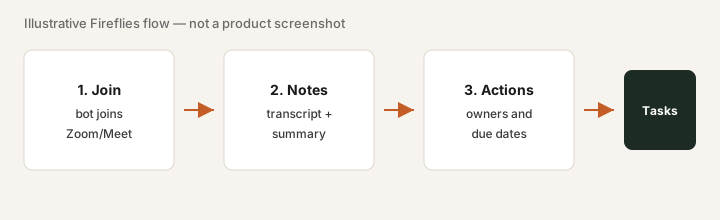
On Free or a trial, with consent from attendees:
Invite Fireflies to your next internal standup. After the call, open the transcript, check speaker labels on three turns, and note anything the bot missed (mute gaps, crosstalk). Only then decide whether auto-join for customer calls is worth configuring.
2. Summaries & action items
What it is: After transcription, Fireflies generates a meeting summary and suggested action items (owners/tasks when the conversation makes them clear). Humans still verify — treat AI notes as a draft, not a contract.
After one real meeting:
Open the Fireflies summary. List every action item it proposed. Mark each: correct owner / wrong owner / missing. Paste the corrected list into your tracker. If more than half are wrong, adjust your meeting habit (say owners out loud) before buying more seats.
3. Search & soundbites
What it is: Past meetings become a searchable library. You can find topics, quotes, and clip short soundbites for handoffs or coaching — useful when “what did we tell the customer in March?” is a recurring question.
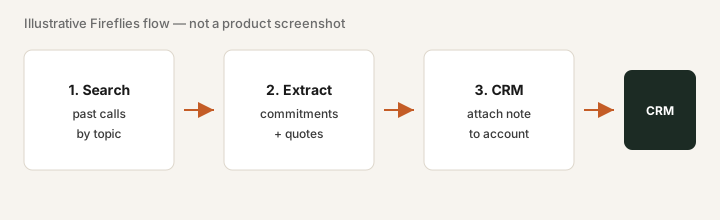
After you have 3+ meetings in the library:
Search for a product name or customer. Open two hits. Copy one exact quote you would trust in a CRM note. If search returns noise, refine filters before rolling out to the whole team.
4. Integrations & CRM push
What it is: Fireflies connects to Slack, CRMs, storage, and other apps so summaries or recordings can land where the team already works. Integration depth varies by plan — confirm the connectors you need on the vendor site.
Pick one destination you already use:
Connect Fireflies to Slack (or your CRM). After the next meeting, confirm the summary landed in the right channel/record. If it did not, fix mapping before adding seats.
Public pricing (September 2026)
Figures from Fireflies’ public pricing as of September 2026. Exclude tax; annual vs monthly differs. Confirm on fireflies.ai/pricing.
- Free: light use / trial — confirm live storage and meeting limits.
- Pro: about $18/seat/month billed monthly, or about $10/seat/month billed annually.
- Business: about $29 / $19 per seat (monthly / annual) — more admin and integration depth per public cards.
- Enterprise: higher seat price / custom — often ~$39/seat annual on public cards; volume discounts possible.
Uncertainty flags: Exact transcription minutes, storage, and AI credit limits change. Annual discounts help only after a real usage month. Seat count multiplies fast — do not buy seats for people who never join calls.
When Fireflies is useful (honest take)
Fireflies tends to help when recurring meetings lose decisions, people re-litigate outcomes in Slack, and someone will open and act on transcripts. It tends not to help when a human already captures owners reliably, the team barely meets, transcripts pile up unread, or recording consent is unclear for the calls that matter. Prefer one meeting assistant — stacking Fireflies + Otter + Fathom for the same job rarely helps.
Paying for Fireflies and a few other AI tools? The $9 AI toolkit spreadsheet lists every AI subscription you have, what each one costs, and how fast it pays for itself, so you can see which ones are worth the money.
Want someone to do it for you? AI toolkit audit — $19
Alternatives compared: Otter, Fathom, and native notes
| Axis | Fireflies | Otter | Fathom | Native Zoom/Meet |
|---|---|---|---|---|
| Typical paid seat (Sep 2026) | Pro ~$18/mo or ~$10 annual. Confirm fireflies.ai/pricing. | Paid tiers commonly ~$10–20+/user — confirm otter.ai/pricing. | Often free/generous for individuals; team plans vary — confirm fathom.video. | Included with some Zoom/Meet plans; feature depth varies by license. |
| Strength | Searchable library, CRM/Slack push, team capture. | Strong live notes / collaboration habits for many teams. | Lightweight capture + highlights; popular with sales teams. | Zero extra vendor if summaries already return owners. |
| Best fit when… | You need search + multi-seat capture and will open transcripts. | Team already standardized on Otter workflows. | You want simple highlight-centric notes with low overhead. | Light use and native summaries already close the job. |
If two seats cover the same job, name the seats and what you pay on the overlap calculator, then keep the grid in the $9 AI toolkit spreadsheet.
Rough months-to-payback from hours saved and what you pay: payback calculator (then keep the list on the $9 spreadsheet).
FAQ
What is Fireflies?
Fireflies.ai is a meeting assistant that joins calls (with consent), transcribes, and produces summaries and action items you can search and send to other tools.
How much does Fireflies Pro cost in September 2026?
Public pricing commonly lists Pro around $18/seat/month monthly or about $10/seat annually. Confirm on fireflies.ai/pricing — plans change.
When is Fireflies useful for ops teams?
When recurring meetings lose owners and next steps, and someone will open transcripts. Less useful if notes already work, you barely meet, or consent blocks key calls.
Fireflies vs Otter vs Fathom — how should we compare?
Compare capture reliability, search/CRM needs, seat price, and whether one notetaker already covers the job. Prefer one meeting assistant.
Optional next step (if seats overlap)
If this tool is one of several AI seats and you want a written pass across the whole list, the optional $19 AI toolkit audit produces a short memo. Prefer an editable grid? The $9 AI toolkit spreadsheet is a one-time CSV. Soft offer only — this deep-dive stands alone.
Checkout is live via Stripe. After you pay, we email delivery (spreadsheet) or intake next steps (audit).