Docs / revenue ops · Sales & marketing
PandaDoc review (Sep 2026): how proposals, quotes, and e-sign work
PandaDoc helps sales and ops assemble proposals, track opens, and collect signatures without juggling slides, PDFs, and email threads. This page shows templates, tracking, and e-sign with concrete examples.
Who this page helps
If sales still builds proposals in slides + PDF + email — and versions go missing mid-deal — start here. We cover templates, send/track, and e-sign with a workflow diagram, dated pricing, and educational alternatives (DocuSign, Google Docs + e-sign, CPQ).
What PandaDoc is
PandaDoc is a document platform for proposals, quotes, and agreements. Teams reuse templates and content blocks, send documents with tracking, run approvals, and collect e-signatures. CRM integrations deepen on Business+. This review focuses on what sales ops and founders use week to week.
Major features (with how someone uses them)
Examples at a glance: each feature has a concrete sales-ops example plus a Try this mini-workflow.
1. Templates & content library
What it is: Reusable templates and approved blocks (pricing tables, bios, legal) so reps stop rebuilding decks from scratch — and legal language stays consistent.
On a trial:
Create one template from your real proposal. Lock the legal section; leave pricing editable. Have one AE generate a draft. If they still export to slides, the template is not ready.
2. Assemble & send
What it is: Drag in library blocks, personalize, and send a tracked link instead of email attachments that fork into v3_final_FINAL.pdf.
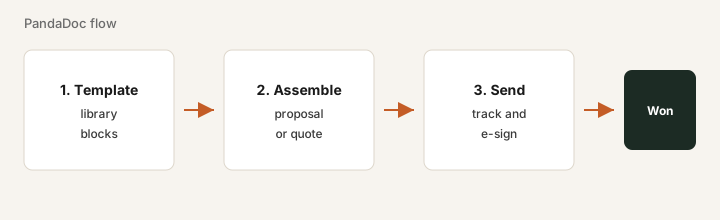
For one live opportunity:
Assemble a proposal from the template, send it to yourself first, and check mobile readability. Fix spacing before sending to a customer.
3. Tracking & approvals
What it is: See opens and time-on-section; route internal approvals before a customer sees pricing. Business tiers advertise richer workflows — confirm live.
After one send:
Open tracking. Note which section got the most time. Bring that topic first on the next call. If tracking is never opened, simplify notifications before buying more seats.
4. E-sign & CRM
What it is: Collect signatures in the same document flow; sync status to CRM on higher plans. Free eSign exists for light signature-only use with low caps — confirm allowances.
Before Business for CRM:
List the CRM fields that must update on send/sign. If CRM is mid-migration, wait — rebuilding automations twice is expensive.
Public pricing (September 2026)
From PandaDoc public/help plan comparisons as of September 2026. Confirm on pandadoc.com/pricing.
- Free eSign: limited sending (help center cites low annual document caps) — fine for rare signatures.
- Starter: about $19 per user / month annual, or about $35 monthly.
- Business: about $49 per user / month annual, or about $65 monthly — CRM integrations, content library, approvals, workspaces per public marketing.
- Enterprise: custom (CPQ, advanced automation, SSO, API).
Uncertainty flags: Document allowances and overage fees (publicly cited around a few dollars per extra doc) vary by plan. Free/Starter caps differ across pages — verify before you model volume.
When PandaDoc is useful (honest take)
PandaDoc tends to help when proposals/quotes are a weekly ops job and version chaos slows deals. It tends not to help when you only need occasional signatures, the workspace becomes a template graveyard, or CRM is mid-migration. Prefer one proposal system of record.
Paying for PandaDoc and a few other AI tools? The $9 AI toolkit spreadsheet lists every AI subscription you have, what each one costs, and how fast it pays for itself, so you can see which ones are worth the money.
Want someone to do it for you? AI toolkit audit — $19
Alternatives compared: DocuSign, Docs + e-sign, CPQ
| Axis | PandaDoc | DocuSign | Google Docs + e-sign | CRM CPQ |
|---|---|---|---|---|
| Typical paid entry (Sep 2026) | Starter ~$19–35/user/mo. Confirm pandadoc.com/pricing. | eSign plans often from ~$10–25+/user/mo — confirm docusign.com. | Docs free/Workspace; e-sign add-on varies. | Usually bundled in mid-market CRM editions — custom. |
| Job focus | Proposal assembly + tracking + sign. | Signature-first enterprise workflows. | Lightweight docs with a separate signer. | Price configuration inside CRM. |
| Best fit when… | Weekly branded proposals need a home. | Signatures/compliance dominate; assembly is elsewhere. | Volume is low and chaos is tolerable. | Complex pricing lives in CRM already. |
Inventory seats by job on the stack map for sales ops.
FAQ
What is PandaDoc?
A document platform for proposals, quotes, and contracts with templates, tracking, approvals, and e-sign.
How much does PandaDoc cost in September 2026?
Starter commonly ~$19/user/mo annual ($35 monthly); Business ~$49/$65. Confirm on pandadoc.com/pricing.
When is PandaDoc useful?
When proposals are a weekly ops job and version chaos costs cycle time. Not for rare PDFs that only need a signature.
PandaDoc vs DocuSign?
Compare proposal assembly + tracking vs signature-first needs. Pick based on the job you run weekly.
Optional next step (if seats overlap)
If this tool is one of several AI seats and you want a written pass across the whole list, the optional $19 AI toolkit audit produces a short memo. Prefer an editable grid? The $9 AI toolkit spreadsheet is a one-time CSV. Soft offer only — this deep-dive stands alone.
Checkout is live via Stripe. After you pay, we email delivery (spreadsheet) or intake next steps (audit).