How-to · Sales ops · PandaDoc · Oct 22, 2026
Build one PandaDoc proposal template from your content library, and use tracking to time follow-ups
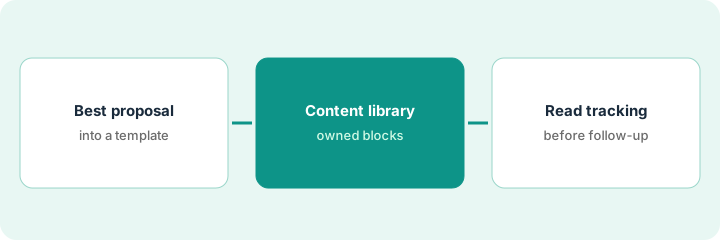
PandaDoc helps sales and ops assemble proposals from templates and approved blocks, send a tracked link instead of attachments, and collect signatures in the same flow. This page shows how to build one template from your best proposal, move reusable blocks into the content library, and use tracking to decide what to raise first on the next call.
Who this is for
Sales ops leads, founders, and account executives who still build proposals in slides, PDFs, and email, and lose versions mid-deal. The job here is one template, one library, and follow-ups timed from tracking.
How to do it
This is a how-to, not a ranking of document tools. Per the PandaDoc review, teams reuse templates and approved content blocks (pricing tables, bios, legal), send documents with tracking that shows opens and time on each section, route internal approvals before a customer sees pricing, and collect e-signatures; CRM integrations deepen on Business. Free eSign exists for light signature-only use with low caps. The ground rule: one proposal system of record, and legal language changes only through the person who owns it.
1. Turn your best recent proposal into a template
What it is: Start from a proposal that already won. Lock the legal section, leave pricing editable, and have one account executive build a real draft from it.
- Pick the best proposal from the last quarter.
- Rebuild it as a PandaDoc template with sections for problem, scope, pricing, and terms.
- Lock the legal section; leave pricing and scope editable.
- Have one account executive build a real draft from the template.
The sales ops manager rebuilds last quarter’s largest win as a template. The first account executive to use it still exports to slides for the scope section, so the manager adds a scope block with a simple table and the next draft stays in PandaDoc.
Rebuild your best recent proposal as a PandaDoc template with the legal section locked and pricing editable, and have one account executive build a real draft from it.
2. Move reusable blocks into the content library
What it is: Pricing tables, team bios, case studies, and legal language belong in the content library so reps stop copying from old deals.
- List the blocks reps paste most often.
- Add each approved version to the content library with an owner.
- Name who may change legal blocks.
- Delete old copies from shared drives once the library version is in use.
The lead adds eight blocks: three pricing tables, four case studies, and the standard terms. Legal blocks are owned by the finance director. Within two weeks no proposal goes out with the old payment terms.
Move the blocks reps paste most into the PandaDoc content library with a named owner for each, and name who may change legal blocks.
3. Read tracking before every follow-up
What it is: After each send, open tracking and see which section got the most time. Bring that topic first on the next call instead of a generic check-in.
- Send the proposal to yourself first and check mobile readability.
- After the customer opens it, note the section with the most time.
- Open the next call on that topic.
- If tracking is never opened, simplify notifications before adding seats.
Tracking shows the buyer spent most of their time on the pricing table and reopened it twice. The account executive opens the follow-up call with pricing options instead of a case study, and the deal moves to signature that week.
After your next send, read PandaDoc tracking, note the section with the most time, and open the follow-up call on that topic.
Pricing context (October 2026)
This how-to quotes no PandaDoc dollar figure. Our review lists September 2026 plan prices, but PandaDoc’s pricing page did not load for our recheck on Oct 22, 2026, so see the PandaDoc review and PandaDoc’s own pricing page before you budget. The review notes CRM integrations, content library, and approvals are marketed on Business, and Free eSign has low sending caps. Dated October 2026.
Checked Oct 22, 2026 on the vendor’s own site: PandaDoc’s pricing page returned “too many requests” to our checks and our reader tool timed out, so we could not confirm the September 2026 prices in our review. This page quotes no PandaDoc dollar figure; see our review for what is known and PandaDoc’s own site before you budget.
Uncertainty: The only prices this site sells here are the optional $9 AI toolkit spreadsheet and $19 AI toolkit audit.
When this helps (honest take)
Useful when proposals and quotes are a weekly job, versions get lost mid-deal, and someone owns the template and the library.
Not useful when you only need occasional signatures, the workspace would become a pile of unused templates, or your CRM is mid-migration.
Related options (educational)
| Need | Where to look | Why |
|---|---|---|
| Proposals, content library, tracking, and e-sign | PandaDoc | Primary path |
| CRM and enrichment for the deals behind proposals | HubSpot vs Clay | Different job |
| Where sales tools fit | Stack map: sales ops | Broader map |
FAQ
What is the PandaDoc content library?
A place for approved reusable blocks, such as pricing tables, bios, and legal language, so reps stop rebuilding proposals from scratch.
Does tracking tell me who will sign?
No. It shows opens and time on each section. Use it to choose what to raise first on the next call.
When should I wait on CRM integration?
Per our review, if your CRM is mid-migration, wait; rebuilding automations twice is expensive.
Why does this page show no PandaDoc prices?
PandaDoc’s pricing page did not load for our recheck on Oct 22, 2026, so we did not repeat the review’s September figures. Check PandaDoc’s pricing page. Our Oct 22, 2026 check of the vendor’s own site is summarized in the pricing section above.
Optional next step
If you want a one-page toolkit map for the tools you already pay for, use the optional $9 AI toolkit spreadsheet. If you want a short review of seat waste and unused tools, use the optional $19 AI toolkit audit. Neither is required to follow this how-to.