Ops · Meetings · Zoom
Zoom AI Companion review (Sep 2026): if the company already pays Zoom
Only if Zoom is already standard — Companion meeting summaries and helpers versus adding Fireflies, Otter, or Fathom. This page maps features, privacy defaults, Sep 2026 pricing honesty, and a draft policy for when notes stay in Zoom.
Who this page helps
Ops leads and IT admins at companies that already pay for Zoom Workplace and are deciding whether built-in AI Companion is enough — or whether to add a separate notetaker seat. If Zoom is not your video standard, start with Fireflies, Otter, or Fathom instead of buying Zoom just for AI. For async status clips (not live meetings), see Loom AI.
What Zoom AI Companion is
Zoom AI Companion is Zoom’s built-in AI layer across meetings and related Workplace apps: meeting summaries, action items, catch-me-up, My Notes, chat compose, and related helpers. Public packaging in 2026 often folds core Companion into paid Workplace plans, with higher “agentic” or credit-metered add-ons (sometimes branded ZoomMate / AI Productivity Suite) sold separately. This review focuses on the ops job — use Companion if Zoom is already paid for — not a full Zoom Workplace catalog.

Major features (with how someone uses them)
Examples at a glance: each feature has a concrete ops example plus a Try this mini-workflow.
1. Meeting summaries & action items
What it is: After (or during) a Zoom meeting, Companion can draft a summary and proposed action items so the host does not re-listen to the recording. Best when the company already records or hosts in Zoom and notes can stay under Zoom admin controls.
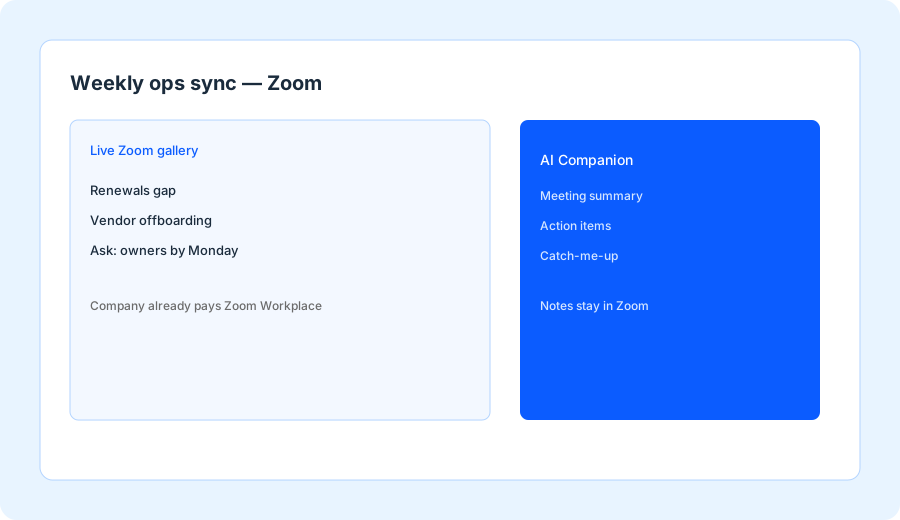
After one real Zoom ops sync where Companion drafted notes:
Rewrite the summary as: 5 bullets max, then action items as verb + object + Owner: ____ + Due: ____. Delete any person, date, or metric not spoken in the meeting. Note where the summary is stored (Zoom cloud vs local export).
2. Catch-me-up & in-meeting help
What it is: Companion can help late joiners catch up and answer in-meeting questions from the conversation so far. Useful on long ops syncs; less useful when everyone arrives on time and the agenda is already written.
On the next Zoom call you join late:
Ask Companion (or paste the catch-me-up draft): list decisions already made, open questions, and anything assigned to me. Mark Unknown if the draft invents an owner.
3. Companion vs external notetaker policy
What it is: The real buying decision for Zoom-heavy companies is not “is AI cool?” — it is a written rule for when notes stay in Zoom versus when Fireflies/Otter/Fathom may join. Privacy defaults, guest meetings, and where notes are stored belong in that policy.
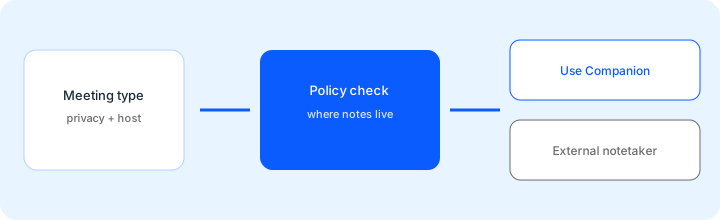
Draft a policy: when we use Zoom AI Companion vs an external notetaker. Include privacy defaults and where notes are stored.
Draft a policy: when we use Zoom AI Companion vs an external notetaker. Include privacy defaults and where notes are stored.
4. Workplace plans vs ZoomMate add-ons
What it is: Public Zoom packaging (Sep 2026) often includes core Companion on paid Workplace seats, while agentic / credit-heavy add-ons (ZoomMate or AI Productivity Suite style products) sit on top with per-user fees and AI credits. Paying for an external notetaker and a ZoomMate seat for the same Monday standup is the common overspend.
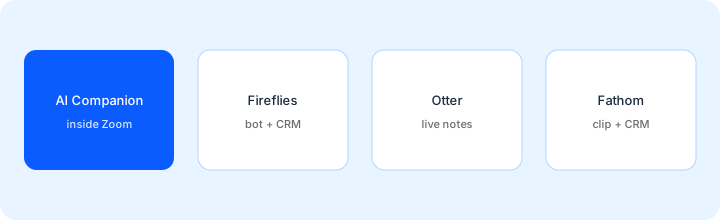
Before buying an external notetaker seat:
List last month’s meetings by host platform (Zoom / Meet / Teams / other). If ≥70% are Zoom-hosted and notes can stay in Zoom, pilot Companion for 2 weeks before adding Fireflies, Otter, or Fathom. Write where each tool’s notes are stored.
Public pricing (September 2026)
From zoom.us/pricing and Zoom AI / ZoomMate public pages we cross-checked in September 2026 (per user where listed; confirm live):
- Zoom Workplace Basic (Free): $0 — limited AI allowances on public cards (small monthly caps for summaries / My Notes style features). Confirm live limits.
- Zoom Workplace Pro / Business (paid): Pro is $14.16/user/month billed annually or $16.99 monthly; Business is $18.33 annually or $21.99 monthly (zoom.us/pricing, checked October 2026). Core AI Companion features are commonly included with eligible paid Workplace plans — no separate Companion SKU on many public cards.
- ZoomMate / agentic AI add-ons: often listed near $20/user/month (region-dependent) with included AI credits for heavier agentic search/workflows. Feature names and credit meters move — confirm on Zoom’s current AI pricing pages.
- Enterprise: custom — SSO, retention, admin controls, volume pricing.
Uncertainty flags: Zoom has renamed and rebundled AI products through 2025–2026 (AI Companion vs ZoomMate vs AI Productivity Suite). Free vs paid allowances, credit meters, and regional availability change. Older “Companion is a paid add-on” articles may be stale if your tenant already includes core features. Never budget from this page alone — check zoom.us/pricing and your admin console.
When Zoom AI Companion is useful (honest take)
Companion tends to help when Zoom is already the company standard, most meetings are Zoom-hosted, and you want summaries without a second bot joining every call. It tends not to help when you need a notetaker across Meet/Teams, deep CRM clip workflows, or when privacy policy forbids AI notes on certain meeting types. Buying Fireflies/Otter/Fathom “just in case” while Companion already covers Zoom-only standups is stack sprawl — pick the job (Zoom-native notes vs cross-platform bot), then the tool.
Paying for Zoom AI Companion and a few other AI tools? The $9 AI toolkit spreadsheet lists every AI subscription you have, what each one costs, and how fast it pays for itself, so you can see which ones are worth the money.
Want someone to do it for you? AI toolkit audit — $19
Alternatives compared: Companion vs Fireflies / Otter / Fathom
| Axis | Zoom AI Companion | Fireflies | Otter | Fathom |
|---|---|---|---|---|
| Best when… | Zoom already paid; notes can stay in Zoom. | Bot + search/CRM across many calls. | Live notes / collaboration focus. | Clips + CRM-friendly call library. |
| Cost shape (Sep 2026) | Included on paid Workplace (from $14.16/user/mo annual); ZoomMate add-on $20/user/mo monthly or $16.67 annual. | Separate notetaker seat — see Fireflies review. | Separate seat — see Otter review. | Separate seat — see Fathom review. |
| Less useful when… | Most meetings are not on Zoom. | You only need Zoom-native summaries. | You already get enough from Companion. | You do not need clips/CRM sync. |
Also see Fireflies, Otter, Fathom, Granola, tl;dv, Loom AI, the meetings & notes hub, and the ops & automation hub.
If two seats cover the same job, name the seats and what you pay on the overlap calculator, then keep the grid in the $9 AI toolkit spreadsheet.
FAQ
What is Zoom AI Companion?
Zoom’s built-in AI layer for meetings and related Workplace apps: summaries, action items, catch-me-up, My Notes, and related helpers — strongest when the company already pays Zoom.
How much does Zoom AI Companion cost in September 2026?
Core features are commonly included with paid Zoom Workplace plans; Free Basic has limited allowances; the ZoomMate add-on is $20/user/month monthly or $16.67 annually, with 2,200 AI credits per user per month. Confirm on zoom.us/pricing — bundles rename often.
When should we use Companion instead of Fireflies, Otter, or Fathom?
When Zoom is already standard, notes can live in Zoom, and you do not need a cross-platform bot or deep CRM clip workflow. Keep an external notetaker when meetings span Meet/Teams or your CRM process depends on that tool.
Where are Companion notes stored?
Typically in the Zoom account under admin retention settings. Write the storage location into your meeting-AI policy and confirm current defaults in Zoom admin docs before rolling out company-wide.
Optional next step (if seats overlap)
If Companion plus an external notetaker plus a chat seat all draft the same Monday standup notes, a short written pass across the list can help. Optional: $19 AI toolkit audit or $9 AI toolkit spreadsheet. Soft offer only — this deep-dive stands alone.
Checkout is live via Stripe. After you pay, we email delivery (spreadsheet) or intake next steps (audit).