Meetings · Sales clips · CRM handoff
tl;dv review (Sep 2026): call clips and CRM handoff without full transcription sprawl
tl;dv records Zoom/Meet/Teams with a bot, keeps searchable video, and shines when you need timestamped clips and a clean CRM handoff — not another unread transcript archive. Features and usage, with honest EUR pricing notes for US buyers.
Who this page helps
Sales managers, AEs, and ops leads who need shareable call moments and a short CRM update — not another full-transcription seat that nobody opens. If you are comparing clip-first tools against Fireflies/Otter/Fathom (and notes-first Granola), start here.
What tl;dv is
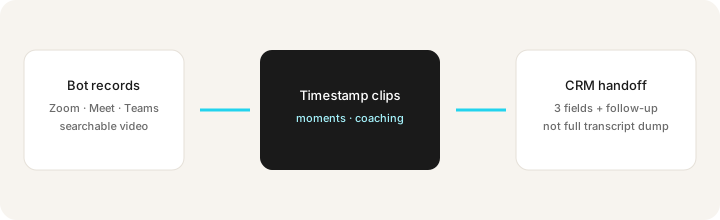
tl;dv (tldv.io) is a meeting recorder: a bot joins Zoom, Google Meet, or Microsoft Teams, records video, produces transcripts and AI notes/moments, and lets you cut timestamped clips for coaching or handoff. The buying angle on this page is clips + CRM fields without drowning the team in transcript sprawl. Public list prices are in EUR — US buyers should convert and confirm live.
Major features (with how someone uses them)
Examples at a glance: each feature has a concrete sales/ops example plus a Try this mini-workflow.
1. Bot record & searchable video
What it is: With consent, tl;dv joins supported calls, records video, and makes recordings searchable. Free tiers typically include recordings/transcripts with AI features metered — confirm live caps before you promise unlimited AI summaries to the team.
On Free, with consent:
Record one internal practice call. Search three phrases you know were said. Note any gaps before enabling capture for customer calls.
2. Timestamped clips & AI moments
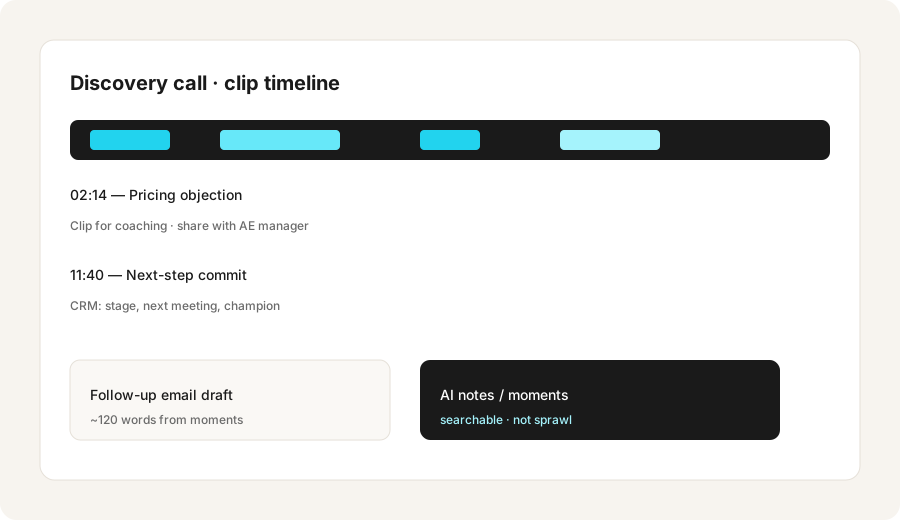
What it is: Cut short clips at timestamps; AI surfaces moments you can share for coaching or Slack. This is the difference vs notes-only tools: the artifact is a moment, not a paragraph dump.
After one real customer call:
From this call summary, produce: 3 CRM fields to update, 1 follow-up email draft (120 words), and timestamps I’d clip if available.
3. CRM handoff without transcription sprawl
What it is: Paid plans emphasize pushing structured outcomes toward CRM and workflows so AEs update a few fields — stage, next step, champion — instead of pasting the whole transcript into a note field. Someone still owns the mapping.
Before adding seats for CRM sync:
Write the three CRM fields that must update after every discovery call. Time one AE doing that by hand this week. If under 10 minutes and accurate, stay on Free until mapping has a named owner.
4. When clips beat notes-only (and when they don’t)
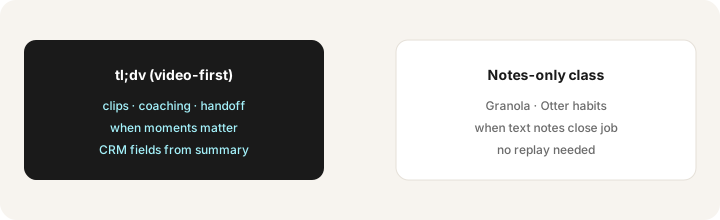
What it is: Clips win for coaching, objection libraries, and proving what a customer said. Notes-first tools (for example Granola) win when founders only need decisions and owners, and nobody will open video. Same calendar should not run both styles by default.
Pick one recurring call type:
Answer: (1) Will anyone rewatch a clip this month? (2) Do we need CRM fields from the call? (3) Is a bot in the room acceptable? If yes/yes/yes — try tl;dv. If no/no/no — prefer notes-first or native notes.
Public pricing (September 2026) — EUR
From tl;dv public pricing schema / page as of September 2026. Prices are listed in EUR. Confirm on tldv.io/app/pricing. US buyers: convert carefully — FX and card currency presentation vary.
- Free: €0 — recordings and transcripts advertised; AI features metered on public marketing. Confirm live caps.
- Pro: about €29 / seat / month billed monthly, or about €18 / seat / month billed annually (~€216/year per seat on the public offer card we saw).
- Business: about €39 / seat / month monthly, or about €29 / seat / month annual (~€348/year per seat on that card).
Uncertainty flags: Currency is EUR — approximate USD moves with FX (often mid-$20s to low-$40s per seat/month depending on plan and rate; do not treat a snapshot conversion as the invoice). AI meter limits on Free, CRM connector depth, and annual promo labels change. Always confirm live before buying for a US team.
When tl;dv is useful (honest take)
tl;dv tends to help when clips, coaching, and a short CRM handoff are the real jobs — and when the team will actually share moments. It tends not to help when notes-only already closes the loop, when nobody rewatches video, or when Fireflies/Fathom already cover the same calendar. Paying for tl;dv plus another full notetaker on the same Zoom account is stack sprawl — pick one bot for those calls.
Paying for tl;dv and a few other AI tools? The $9 AI toolkit spreadsheet lists every AI subscription you have, what each one costs, and how fast it pays for itself, so you can see which ones are worth the money.
Want someone to do it for you? AI toolkit audit — $19
Alternatives compared: Fireflies, Otter, Fathom, Granola
| Axis | tl;dv | Fireflies | Fathom | Granola |
|---|---|---|---|---|
| Typical paid entry (Sep 2026) | Pro ~€29/mo or ~€18 annual (EUR). Confirm tldv.io/app/pricing. | Pro often ~$18/mo or ~$10 annual. Confirm fireflies.ai/pricing. | Free first; Premium ~$20/mo. Confirm fathom.video/pricing. | Basic $0; Business ~$14/user/mo. Confirm granola.ai/pricing. |
| Native strength | Clips + video + handoff | Team library, search, CRM/Slack | Generous Free; highlights; CRM on higher tiers | Notes-first, no bot, editable enhanced notes |
| Best fit when… | Coaching clips and CRM fields matter more than notes-only. | Multi-seat search + integrations day one. | Start Free; pay when CRM/team search is named. | Founders/ops want notes without a bot. |
| Less useful when… | Nobody will open video or clips. | You only need a few founder notes. | You need clip libraries as the primary artifact. | You need replayable video moments. |
Also see Fireflies, Otter, Fathom, and Granola.
If two seats cover the same job, name the seats and what you pay on the overlap calculator, then keep the grid in the $9 AI toolkit spreadsheet.
FAQ
What is tl;dv?
A meeting recorder for Zoom/Meet/Teams with searchable video, timestamped clips, AI notes/moments, and CRM-oriented handoff so teams share moments instead of transcript dumps.
How much is tl;dv in September 2026?
Public prices are in EUR: Free €0; Pro ~€29/seat/mo or ~€18 annual; Business ~€39/€29. Confirm on tldv.io/app/pricing. US buyers should convert FX carefully.
When do clips matter more than notes-only?
When coaching or proving a customer moment needs video. If text notes and owners already close the job, notes-first tools may be enough.
tl;dv and Fireflies together?
Almost never on the same recurring calls. Pick one bot recorder for that calendar.
Optional next step (if seats overlap)
If tl;dv is one of several AI seats and you want a written pass across the whole list, the optional $19 AI toolkit audit produces a short memo. Prefer an editable grid? The $9 AI toolkit spreadsheet is a one-time CSV. Soft offer only — this deep-dive stands alone.
Checkout is live via Stripe. After you pay, we email delivery (spreadsheet) or intake next steps (audit).