Meetings · Meetings & notes · Founders / ops
Granola review (Sep 2026): meeting notes for founders/ops — vs Fireflies, Otter, Fathom
Granola is a notes-first meeting assistant: device capture (no bot in the room), editable enhanced notes from transcript plus typed cues, recipes, and shared folders. This page shows when that workflow fits founders and ops — and when a bot recorder still wins.
Who this page helps
Founders and ops leads who want usable meeting notes without another bot joining every Zoom — and who already type a few cues during the call. If your buying question is “notes job vs full video library,” start here. We cover capture, recipes, chat across meetings, dated pricing, and educational alternatives (Fireflies, Otter, Fathom).
What Granola is
Granola is a notes-first meeting assistant. It captures from your desktop (bot-free device audio per public product copy), combines the transcript with the sparse notes you type, and produces editable enhanced notes. Public trust copy states audio is deleted after transcription — Granola is not positioned as a replayable video library. Recipes/templates, shared folders, and AI chat across meetings round out the workflow. This review focuses on what a founder or ops buyer actually uses week to week.
Major features (with how someone uses them)
Examples at a glance: each feature has a concrete founder/ops example plus a Try this mini-workflow.
1. Device capture & enhanced notes
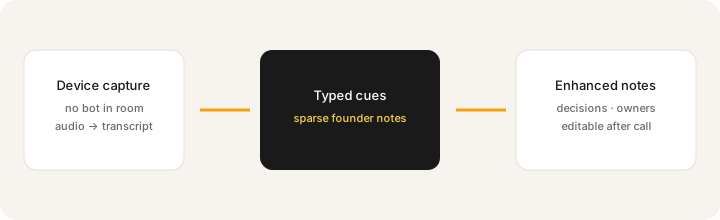
What it is: Granola listens from your device rather than joining as a meeting bot. You type light cues while the call runs; after the meeting, enhanced notes merge transcript context with what you wrote. That is the core product job — not coaching clips or a video vault.
After one real meeting:
Turn these raw notes into: decisions, action items (owner blanks), and a 5-line founder update. Mark anything I didn’t actually say as Unknown.
2. Recipes & note templates
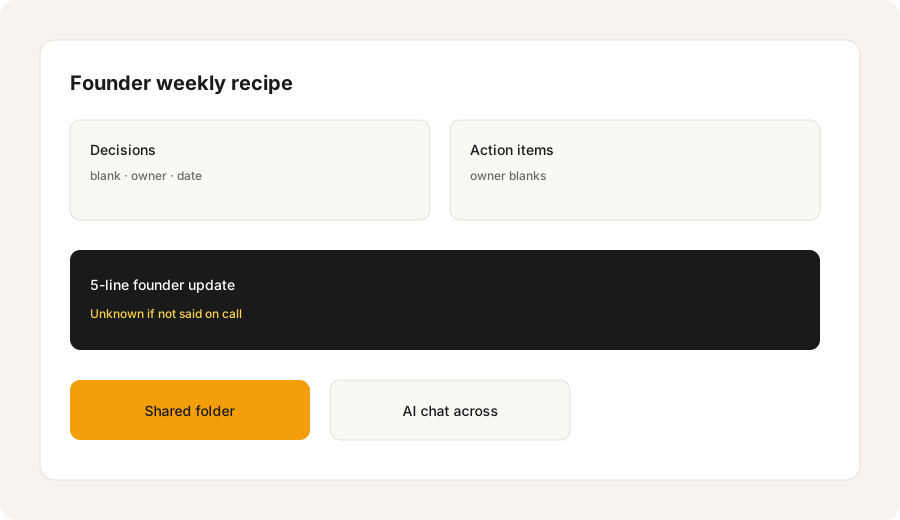
What it is: Recipes / customized note templates shape the output structure (decisions, actions, update blocks) so every founder standup or customer call lands in a familiar shape. Useful when “notes” means the same sections every week — not a freeform transcript dump.
Before your next recurring standup:
Create a recipe with exactly four sections: Decisions, Action items (owner blanks), Risks, 5-line founder update. Reject any section that invents owners you did not assign on the call.
3. AI chat across meetings & shared folders
What it is: Chat within and across meetings (model options expand on paid tiers per public cards) plus shared folders for collaboration. The useful habit is asking “what did we decide about X last week?” instead of scrolling Slack threads.
After three meetings in one folder:
Ask: Across these meetings, list open action items with owners. Flag anything without an owner as Unknown. Do not invent due dates.
4. Business integrations (Slack, Notion, HubSpot, and more)
What it is: Public Basic includes Slack-style collaboration basics; Business adds advanced integrations commonly listed as Notion, HubSpot, Attio, Affinity, Zapier, plus API/MCP notes on the pricing page. Mapping still needs a named owner — the integration alone does not clean CRM fields.
Before buying Business for integrations:
Time how long you spend pasting Granola notes into Notion or HubSpot this week. If under 20 minutes and no named CRM owner, stay on Basic until the handoff job is real.
Public pricing (September 2026)
From Granola public pricing as of September 2026. Confirm on granola.ai/pricing — history windows and integration lists move.
- Basic: $0 / user / month — AI meeting notes, limited meeting history (public compare table cites ~30 days), AI chat, shared folders, customized templates, multi-language. Confirm live.
- Business: about $14 / user / month — unlimited notes/history, advanced AI models, integrations (Attio, Notion, HubSpot, Affinity, Zapier, etc.), centralized billing, API/MCP notes on public cards.
- Enterprise: from about $35 / user / month — SSO/SCIM, admin controls, org-wide retention policies, HIPAA-compliant workspaces listed on public compare, priority support.
Uncertainty flags: Monthly billing is emphasized on the public page we checked; annual discounts (if any) were not locked from that card. Audio-deleted-after-transcription is vendor trust copy — confirm if legal/compliance needs a signed DPA detail. Do not assume video replay exists.
When Granola is useful (honest take)
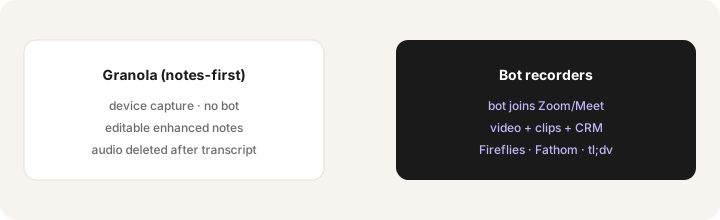
Granola tends to help when you want founder/ops notes without a bot in the room, you already type sparse cues, and enhanced notes (not clips) close the job. It tends not to help when you need searchable video, coaching clips, or deep CRM field sync on day one — those jobs lean toward Fathom, Fireflies, or tl;dv. Running Granola plus a full notetaker bot on every recurring call is stack sprawl — pick the capture style that matches the job.
Paying for Granola and a few other AI tools? The $9 AI toolkit spreadsheet lists every AI subscription you have, what each one costs, and how fast it pays for itself, so you can see which ones are worth the money.
Want someone to do it for you? AI toolkit audit — $19
Alternatives compared: Fireflies, Otter, Fathom, native notes
| Axis | Granola | Fireflies | Otter | Fathom |
|---|---|---|---|---|
| Typical paid entry (Sep 2026) | Basic $0; Business ~$14/user/mo. Confirm granola.ai/pricing. | Pro often ~$18/mo or ~$10 annual. Confirm fireflies.ai/pricing. | Pro often ~$17/mo or ~$8.33 annual. Confirm otter.ai/pricing. | Free first; Premium ~$20/mo. Confirm fathom.video/pricing. |
| Capture style | Device / notes-first (no bot) | Bot joins; team library + search | Live notes habits + collaboration | Bot/recorder; highlights + CRM on higher tiers |
| Best fit when… | Founders/ops want editable notes without a bot. | Multi-seat search + integrations day one. | Team already standardized on Otter. | Start Free; pay when CRM/team search is named. |
| Less useful when… | You need video clips / coaching library. | You refuse bots in the room. | You only need post-call enhanced notes. | You only need sparse founder notes. |
Also see Fireflies, Otter, Fathom, and tl;dv (clips + CRM handoff).
If two seats cover the same job, name the seats and what you pay on the overlap calculator, then keep the grid in the $9 AI toolkit spreadsheet.
FAQ
What is Granola?
A notes-first meeting assistant: device capture, enhanced editable notes from transcript + typed cues, recipes, shared folders, and AI chat across meetings.
How much is Granola in September 2026?
Public cards list Basic $0, Business ~$14/user/mo, Enterprise from ~$35/user/mo. Confirm on granola.ai/pricing.
Does Granola keep call video or audio?
Public trust copy says audio is deleted after transcription; it is not sold as a video replay library. Confirm live if retention is a buying constraint.
Granola and Fireflies together?
Almost never on the same recurring calls. Pick notes-first or bot-recorder for that calendar — not both.
Optional next step (if seats overlap)
If Granola is one of several AI seats and you want a written pass across the whole list, the optional $19 AI toolkit audit produces a short memo. Prefer an editable grid? The $9 AI toolkit spreadsheet is a one-time CSV. Soft offer only — this deep-dive stands alone.
Checkout is live via Stripe. After you pay, we email delivery (spreadsheet) or intake next steps (audit).