Ops · Async video · Meetings
Loom AI review (Sep 2026): async ops updates — when a clip beats a meeting
Async status via Loom AI summaries — when a short screen-and-cam clip replaces a standup or a long Slack thread. This page maps recording, AI summaries/action items, plan honesty, and fair alternatives for ops leads who already ship video updates.
Who this page helps
Ops leads on distributed or calendar-heavy teams who need status, a quick demo, or a decision brief without booking another standup — and who want AI to turn the clip into Slack-ready bullets and owner blanks. If you only need live meeting notes (not a recorded update), start with Otter, Fathom, or Granola. If you need heavy AV editing, see Descript.
What Loom AI is
Loom (now under Atlassian) is an async screen-and-camera recorder with share links, comments, and engagement views. Loom AI is the paid AI layer commonly packaged as Business + AI: auto summaries, chapters, action items, filler-word cleanup, and related helpers. This review focuses on the ops job — when a clip beats a meeting — not influencer growth tips.

Major features (with how someone uses them)
Examples at a glance: each feature has a concrete ops example plus a Try this mini-workflow.
1. Async ops update clips
What it is: Record screen + cam in a browser or desktop app, get a share link, and let teammates watch when ready. The buying question for ops is whether a 2–4 minute status clip replaces a standing standup or a 40-message Slack thread — not whether Loom can film a webinar.
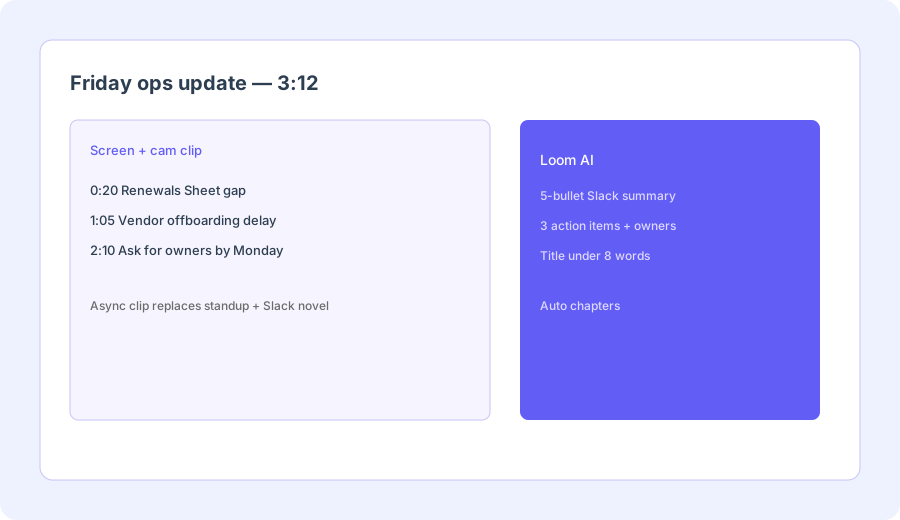
Before your next status standup, record one real 3-minute update:
Record a Loom covering: what shipped, what’s blocked, and one ask. Cap at 3 minutes. Post the link with “reply in comments if you disagree” — skip the calendar invite unless someone needs debate.
2. AI summaries & Slack bullets
What it is: On Business + AI (public packaging, Sep 2026), Loom AI drafts summaries and chapters from the transcript so viewers can skim before watching. For ops, the high-ROI pattern is a 5-bullet Slack summary that stands alone if someone never opens the video — with a hard rule: do not invent metrics missing from the clip.
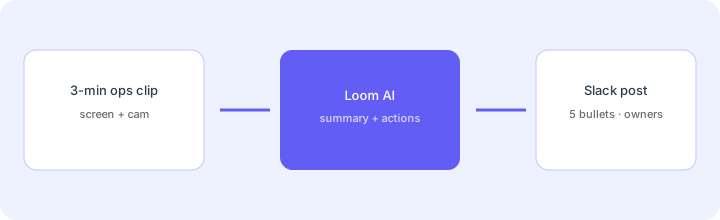
From this 3-minute ops update transcript:
From this 3-minute ops update transcript: 5-bullet Slack summary, 3 action items with owner blanks, title under 8 words.
3. Action items & short titles
What it is: Loom AI can propose action items and a short title from the recording. Useful when the clip ends with “we need owners by Monday” and you want blanks ready for Slack — not when the model invents owners who were never named.
After Loom AI drafts actions from one clip:
Rewrite each action as: verb + object + Owner: ____ + Due: ____. Delete any action that invents a person, date, or metric not spoken in the clip. Keep the video title under 8 words.
4. Business vs Business + AI
What it is: Public Loom packaging (Sep 2026) separates Business (recording, storage, branding, insights) from Business + AI (summaries, chapters, action items, filler cleanup, and related AI tools). Enterprise adds SSO/SCIM and org controls. Paying for AI seats when the team only needs share links is the common overspend.
Before upgrading to Business + AI:
List last month’s status meetings that were one-way updates. Estimate how many could be a 3-minute Loom. If we cannot name a weekly AI-summary owner, stay on Business (or Free) for 30 days and write Slack bullets by hand.
Public pricing (September 2026)
From loom.com/pricing and Atlassian Loom pricing pages we cross-checked in September 2026 (per user; confirm live):
- Starter (Free): $0 — limited videos / length on public cards (commonly cited as a small free library with short caps). Confirm live limits.
- Business: about $18/user/month monthly or about $15 billed annually — unlimited recording/storage style packaging, branding, insights; no full AI summary suite.
- Business + AI: about $24/user/month monthly or about $20 billed annually — adds AI summaries, chapters, action items, filler-word removal, and related AI tools on public cards.
- Enterprise: custom — SSO/SCIM, advanced admin, retention controls, dedicated support.
Uncertainty flags: Loom is under Atlassian; loom.com vs atlassian.com annual billing can differ (per-seat vs user tiers). Older reviews still quote pre-acquisition prices that no longer match public cards. Feature gates between Business and Business + AI can move — never budget from this page alone.
When Loom AI is useful (honest take)
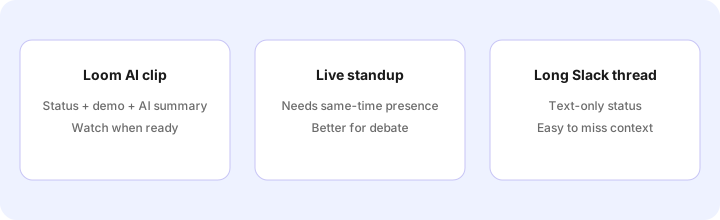
Loom AI tends to help when status is one-way, teammates are in different time zones, and a short clip plus AI bullets beats both a standup and a Slack novel. It tends not to help when you need real-time debate, when nobody will watch video, or when you only needed a live notetaker for Zoom/Meet. Buying Business + AI “just in case” while also paying for a full notetaker and a chat seat for the same Friday update is stack sprawl — pick the job, then the tool.
Paying for Loom AI and a few other AI tools? The $9 AI toolkit spreadsheet lists every AI subscription you have, what each one costs, and how fast it pays for itself, so you can see which ones are worth the money.
Want someone to do it for you? AI toolkit audit — $19
Alternatives compared: Loom AI vs standup / Slack / notetakers
| Axis | Loom AI | Live standup | Slack thread | Meeting notetaker |
|---|---|---|---|---|
| Best when… | One-way status + short demo. | Debate / negotiation needed. | Text-only, no visual needed. | Live call already happened. |
| Cost shape (Sep 2026) | Business ~$18; +AI ~$24 /user/mo. | Calendar time (often the real cost). | Slack you already pay for. | Otter/Fathom/etc. seat — see those reviews. |
| Less useful when… | Nobody watches video. | Update is pure status. | You need a screen walkthrough. | There was no meeting to record. |
Also see Descript, Otter, Fathom, Granola, tl;dv, the meetings & notes hub, and the ops & automation hub.
FAQ
What is Loom AI?
Loom’s paid AI layer on async screen-and-camera videos: summaries, chapters, action items, filler cleanup, and related helpers — not a live meeting notetaker by itself.
How much does Loom AI cost in September 2026?
Public cards: Free Starter; Business ~$18/user/mo (~$15 annual); Business + AI ~$24/user/mo (~$20 annual); Enterprise custom. Confirm on loom.com/pricing — Atlassian tier billing can change the math.
When should a Loom clip replace a standup?
When the update is one-way status or a short demo people can watch async. Keep the live meeting when you need debate or a real-time decision.
Will Loom AI invent owners or metrics?
It can. Treat summaries as drafts: blank any person, date, or number that was not spoken in the clip before you post to Slack.
Optional next step (if seats overlap)
If Loom AI is one of several AI seats (notetaker + chat + video) and you want a written pass across the whole list, the optional $19 AI toolkit audit produces a short memo. Prefer an editable grid? The $9 AI toolkit spreadsheet is a one-time CSV. Soft offer only — this deep-dive stands alone.
Checkout is live via Stripe. After you pay, we email delivery (spreadsheet) or intake next steps (audit).