Ops · AV content · Transcript edit
Descript review (Sep 2026): edit ops video/podcast like a doc
AV content ops — when Overdub and transcript editing save editor hours for internal updates or simple podcasts, with Sep 2026 media-hour / AI-credit honesty and fair alternatives.
Who this page helps
Ops and small-team leads who ship internal video updates or a simple podcast and lose hours cutting ums, writing show notes, and pulling clip lines — without needing a full Premiere timeline. If you only need meeting notes (not media surgery), start with Otter, Fathom, or Granola. If you need cinematic multi-cam, stay in Premiere / Final Cut.
What Descript is
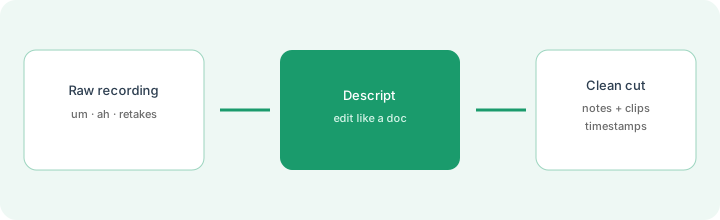
Descript is a text-based audio/video editor: the transcript is the timeline. Delete a sentence and the matching audio/video goes with it. AI helpers (Underlord and related tools) cover filler removal, Studio Sound, clip suggestions, show-notes drafts, translation/dubbing on higher plans, and AI speech / Overdub where enabled. This review focuses on ops AV content — internal updates and simple podcasts — not influencer growth hacks.

Major features (with how someone uses them)
Examples at a glance: each feature has a concrete ops example plus a Try this mini-workflow.
1. Edit media by editing the transcript
What it is: Descript’s core job: treat the recording like a document. Cut digressions, swap takes, and tighten pauses by changing text instead of scrubbing a traditional timeline. For talking-head ops updates, this is usually faster than teaching every ops lead Premiere.
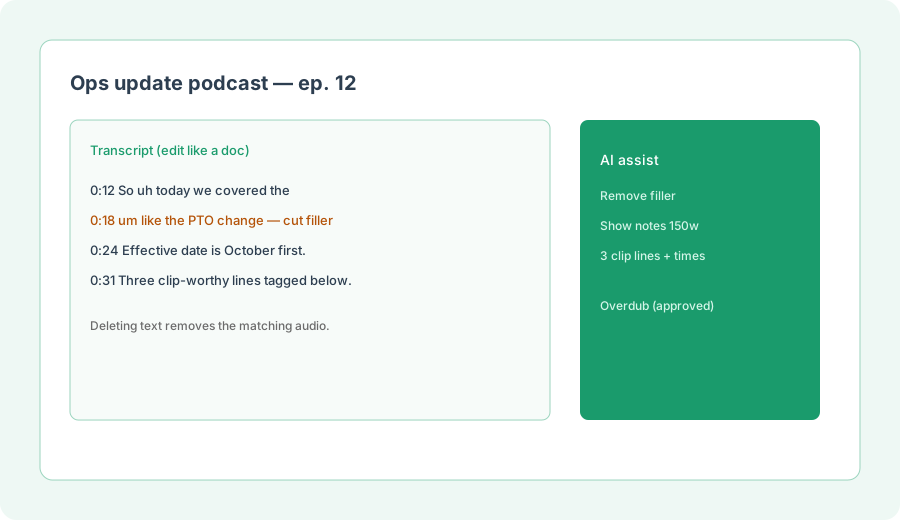
On a real internal recording (or a pasted transcript):
From this transcript, remove filler, produce a 150-word show notes blurb, and list 3 clip-worthy lines with approximate timestamps.
2. Filler removal, show notes & clips
What it is: AI tools highlight um/uh/like, shorten word gaps, suggest clips, and draft social posts / show notes / summaries with timestamps. Public pricing meters many of these against AI credits separate from media hours — so a “free” filler pass still costs credit budget on paid plans.
After one filler-removal pass:
List every automatic cut Descript proposed. Keep only cuts that remove filler or obvious retakes. Reject any cut that removes a policy number, date, or owner name.
3. Overdub / AI speech honesty
What it is: Descript can regenerate speech or use custom voice clones (Overdub / AI Speech) to patch flubs without re-recording. Powerful for small internal fixes; risky for customer-facing or legal wording. Public plans gate regenerate limits and voice-clone features — confirm approval requirements and listen to every regenerated line.
Before enabling Overdub on a series:
Write a one-page rule: Overdub allowed only for (a) internal updates, (b) factual patches under 15 seconds, (c) after a named human listens. Ban Overdub for legal, compensation, or customer promises.
4. Media hours & AI credits
What it is: Descript bills per editor seat and meters two pools: media hours (imported/recorded media processed) and AI credits (Underlord, Studio Sound, Green Screen, Eye Contact, generative tools, etc.). Free includes 60 media minutes and a one-time AI credit trial. Hobbyist cannot buy top-ups on public cards; Creator and Business can. Hitting the media-hour ceiling mid-month strands edits until reset or upgrade.
Before picking a plan:
Estimate monthly recorded hours and AI-heavy actions (filler, Studio Sound, clips, Overdub). Map to Descript’s published media-hour and AI-credit allowances. If we cannot name a meter owner, stay on Free for one pilot episode only.
Public pricing (September 2026)
From descript.com/pricing (Sep 2026; prices per person/month):
- Free: $0 — ~60 media minutes/month; limited one-time AI credits; watermarked 720p export.
- Hobbyist: $16 billed annually or $24 monthly — 10 media hours, 400 AI credits, 1080p watermark-free; no top-ups on public cards.
- Creator: $24 annually / $35 monthly — 30 media hours, 800 AI credits, 4K export, full Underlord + top-ups; scale to a small team (billed per seat).
- Business: $50 annually / $65 monthly — 40 media hours, 1,500 AI credits, Brand Studio, translation/dubbing, priority support/SLA.
- Enterprise: custom media hours, AI credits, SSO/SCIM, procurement terms.
Uncertainty flags: Media-hour vs AI-credit burn rates vary by feature; remote-recording hours are a separate drive-level meter on public comparison tables; promo bonuses change. Confirm live plan cards and help-center top-up rules before budgeting a content calendar.
When Descript is useful (honest take)
Descript tends to help when talking-head or podcast edits are mostly text cuts, filler/show-notes/clips eat editor hours, and a traditional NLE is overkill for internal updates. It tends not to help when you need cinematic multi-cam color work, when you only need searchable meeting notes (buy a notetaker), or when media-hour ceilings will strand a busy month on Hobbyist. Overdub is a patch tool — not a replacement for reviewed scripts on sensitive topics.
Paying for Descript and a few other AI tools? The $9 AI toolkit spreadsheet lists every AI subscription you have, what each one costs, and how fast it pays for itself, so you can see which ones are worth the money.
Want someone to do it for you? AI toolkit audit — $19
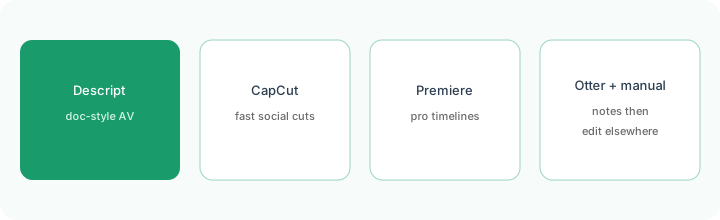
Alternatives compared: Descript vs CapCut / Premiere / Otter+manual
| Axis | Descript | CapCut | Premiere / Final Cut | Otter + manual |
|---|---|---|---|---|
| Best when… | Edit AV by editing a transcript. | Fast social templates / short cuts. | Pro multi-cam / color timelines. | Notes only; edit elsewhere. |
| Cost shape (Sep 2026) | Seat + media hours + AI credits. | Often free/low; feature gates vary. | App seat + learning time. | Notetaker seat + editor time. |
| Less useful when… | You need cinema-grade timelines. | You need long podcast show notes. | Ops only ships simple talking-heads. | You still need media surgery. |
Also see Otter, Fathom, tl;dv, Granola, and the meetings & notes hub.
FAQ
What is Descript?
A text-based audio/video editor: change the transcript to change the media, plus AI helpers for filler, sound, clips, notes, and (where enabled) Overdub/AI speech.
How much does Descript cost in September 2026?
Free $0; Hobbyist $16/$24; Creator $24/$35; Business $50/$65 (annual/monthly public cards); Enterprise custom. Watch media hours and AI credits as separate meters — confirm on descript.com/pricing.
Descript vs CapCut or Premiere?
Descript for doc-style talking-head/podcast edits. CapCut for fast social. Premiere/Final Cut for pro timelines. Pick one primary editor for the same show.
Will AI fix a bad recording?
No. Studio Sound and filler tools help polish; they do not invent missing facts or replace a reviewed script for sensitive announcements.
Optional next step (if seats overlap)
If Descript is one of several AI seats and you want a written pass across the whole list, the optional $19 AI toolkit audit produces a short memo. Prefer an editable grid? The $9 AI toolkit spreadsheet is a one-time CSV. Soft offer only — this deep-dive stands alone.
Checkout is live via Stripe. After you pay, we email delivery (spreadsheet) or intake next steps (audit).