How-to · Sales ops · Stack inventory · Oct 2026
Stack map for sales ops (Oct 2026): inventory AI seats by GTM job
How-to inventory — jobs, tools, owners, overlaps for sales ops; soft $9/$19. Pair with Stack map for finance ops and revops role guides.
What this how-to covers
This page helps sales ops and revops leads inventory AI seats by GTM job — not a product pitch for any one vendor. Unique intent: fill a Job | Tool | Owner | Cost/mo | Overlap | Decision blank for pipeline, sequences, CI (conversation intelligence), enrichment, and forecast, then notice where CRM AI, sequencing AI, CI tools, enrichment, and chat seats do the same work. Companion: Stack map for finance ops, ChatGPT for revops, Claude for revops. Broader trim: AI stack trim playbook.
How to inventory sales ops AI seats
Examples at a glance: each step has a concrete sales-ops example plus a short Try this.
1. Build the blank table (primary)
What it is: Six columns — Job | Tool | Owner | Cost/mo | Overlap | Decision — seeded with five GTM jobs: pipeline, sequences, CI, enrichment, and forecast. Leave blanks. Do not invent tools that are not on the bill, and do not invent exact prices when the invoice is unclear — write “Unknown — check bill.”
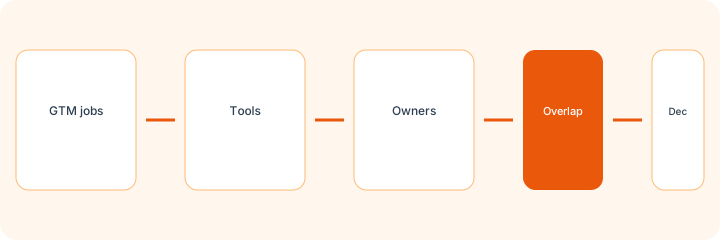
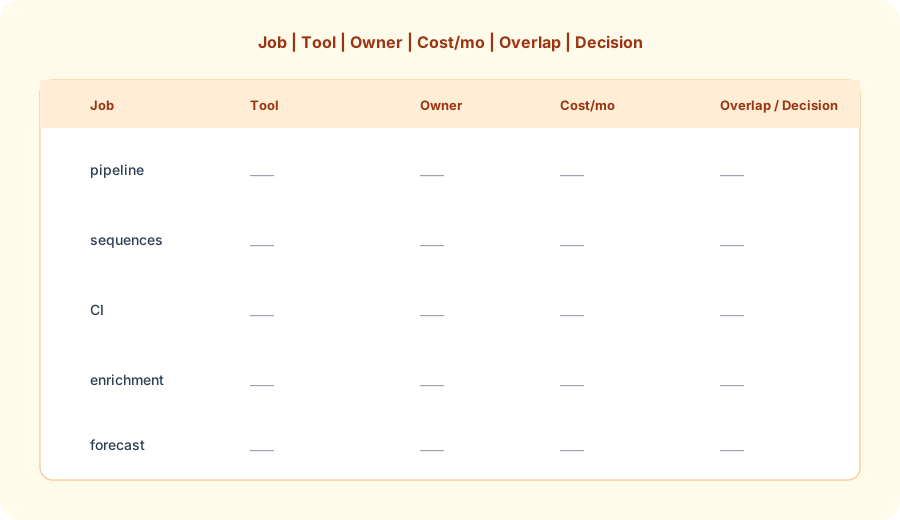
Primary SoT workflow:
Build Job | Tool | Owner | Cost/mo | Overlap | Decision blank for: pipeline, sequences, CI, enrichment, forecast.
2. Owners and cost/mo honesty
What it is: Every row needs a human owner (who renews / who uses it weekly) and a cost/mo from the invoice or “Unknown.” AI chat can help format the table; it must not invent seat counts or dollar amounts — or invent deals in the pipeline.
Owner + bill pass:
For each of the five GTM jobs, name the owner and Cost/mo from invoices only. If missing, write Unknown — check bill. Do not invent prices or invent deals.
3. Mark overlaps in plain language
What it is: When two tools touch the same job, write one sentence — not a rating. Example: “CRM AI and ChatGPT both draft the same pipeline hygiene notes from the same export.” Soft $19/$9 below only if those overlaps are real and unpaid attention is scarce.
Overlap sentences:
For each row with two or more tools, write one plain sentence about what both do on that job. No ratings. Flag any job with no paid tool as blank.
4. Write a Decision without scorecards
What it is: Decision is a next step in plain language: keep split (CRM AI for in-app / chat for memos), pause a rarely used seat, or consolidate after a 30-day trial. Do not use KEEP/CUT/WAIT-style labels — they are not required and are not used on this site’s reviews.
Decision lines:
For pipeline and forecast only: write a Decision in one sentence each (keep split, pause, or consolidate). No scorecard labels. Name who owns the follow-up date.
Pricing context (October 2026)
Vendor seat prices for CRM AI, sequencing, CI, enrichment, Claude, ChatGPT, and Sheets AI live on each vendor’s public pricing pages. This how-to is dated October 2026 and is not a price sheet — fill Cost/mo from your invoices, not from guessed list prices.
Uncertainty: Plan names, AI add-ons, and regional pricing change. Always verify on live vendor pages and your bill before budgeting. Optional structured help: $9 toolkit spreadsheet or $19 toolkit audit.
When this inventory is useful (honest take)
Useful when sales ops pays for more than one AI surface and suspects two tools draft the same pipeline note, sequence, or forecast narrative. Less useful when you have one CRM AI seat and one chat habit with clear jobs. Soft $19/$9 only if overlaps are real.
Comparing several AI tools for the same job? The $9 AI toolkit spreadsheet puts each one you pay for on one page with cost, usage, and payback, so overlaps are easy to spot.
Want someone to do it for you? AI toolkit audit — $19
Related options (educational)
| Need | Better home | Why |
|---|---|---|
| Inventory seats by GTM job | This stack map | Jobs · tools · owners · overlaps · decision |
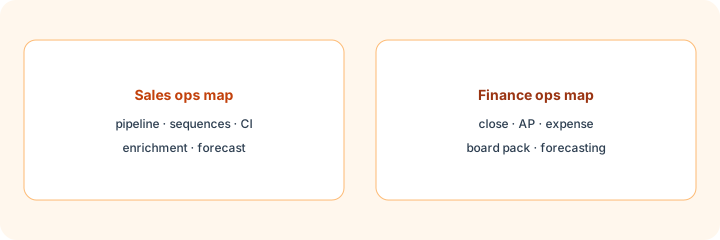
| Finance ops inventory | Stack map for finance ops | Close · AP · expense · board pack · forecasting |
| Revops chat outside CRM | ChatGPT for revops · Claude for revops | Memos and hygiene with pasted context — never invent deals |
| Broader ops trim | AI stack trim playbook | Meeting notes / writing / automation / research |
If two seats cover the same job, name the seats and what you pay on the overlap calculator, then keep the grid in the $9 AI toolkit spreadsheet.
FAQ
What is a sales ops stack map?
A Job | Tool | Owner | Cost/mo | Overlap | Decision table for pipeline, sequences, CI, enrichment, and forecast — without inventing tools.
Which jobs first?
Those five. Leave blanks. Do not invent seats to fill the grid.
Do we need scorecard labels?
No. Plain overlap notes and a Decision sentence are enough.
When do $9 / $19 toolkit offers help?
Only when several paid seats cover the same sales ops jobs and you want a structured pass. Email Toolkit spreadsheet $9 or Audit $19.
Optional next step (if seats overlap)
If CRM AI, sequencing AI, CI, enrichment, and revops chat seats overlap on the same GTM jobs, optional help mapping overlap: $19 AI toolkit audit or $9 AI toolkit spreadsheet. Email Audit $19 or Toolkit spreadsheet $9.
Checkout is live via Stripe. After you pay, we email delivery (spreadsheet) or intake next steps (audit).