How-to · Ops · Stack trim
AI stack trim playbook (Sep 2026): map overlapping seats without a scorecard
Educational how-to — map jobs→tools, find overlaps, decide in plain language. Soft $9 spreadsheet / $19 audit only if seats clearly overlap. No scorecard required.
Who this playbook is for
Ops leads, founders, and finance partners who pay for more than one AI seat and suspect two tools draft the same weekly memo, meeting notes, or research brief. If you only have one chat seat and one notetaker with clear jobs, you may not need a trim pass yet. Product deep-dives live under Reviews; this page is the how-to for mapping overlap without a scorecard.
What “stack trim” means here
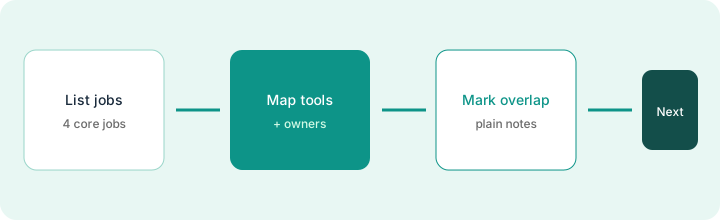
Stack trim = list the jobs you care about, write which paid tools touch each job, note where two tools do the same work, then pick a primary and a next step (keep both with a split, pause one, or consolidate). You do not invent tools to fill blanks, and you do not need scorecard-style labels — plain sentences are enough.
How to run the playbook
Examples at a glance: each step has a concrete ops example plus a Try this mini-workflow.
1. Build the job → tools table
What it is: A five-column table — Job | Tools we use | Owner | Overlap notes | Next step — seeded with four jobs: meeting notes, writing, automation, research. Leave blanks. Do not invent tools that are not on the bill.
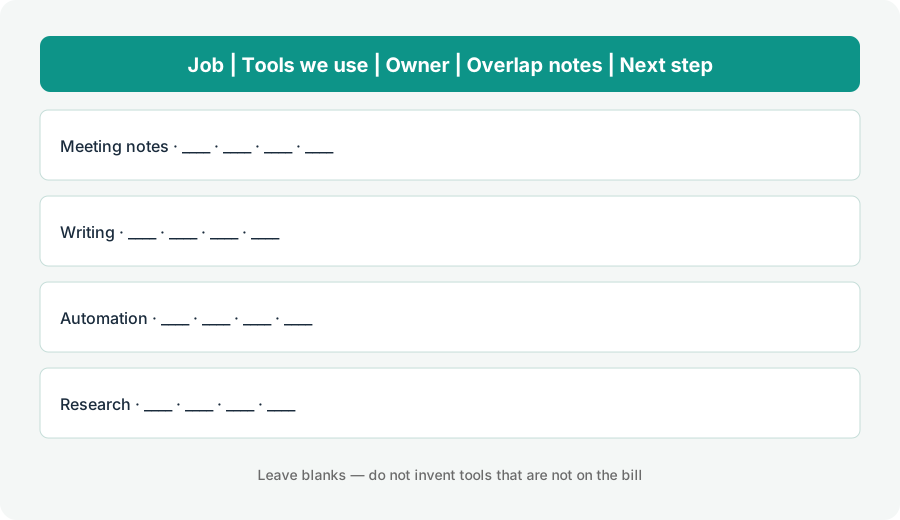
Make a table: Job | Tools we use | Owner | Overlap notes | Next step. Jobs: meeting notes, writing, automation, research. Leave blanks — don’t invent tools.
Make a table: Job | Tools we use | Owner | Overlap notes | Next step. Jobs: meeting notes, writing, automation, research. Leave blanks — don’t invent tools.
2. Mark overlaps in plain language
What it is: For each row with two or more tools, write one sentence about what both do on that job — not a rating. Example: “Claude and ChatGPT both draft the Monday ops update.”
For every row with 2+ tools:
For each job with two or more tools, write one Overlap note: what both tools do on that job in the last 30 days. If you cannot name a real use, leave the second tool blank and check the invoice instead of inventing usage.
3. Decide primary vs pause
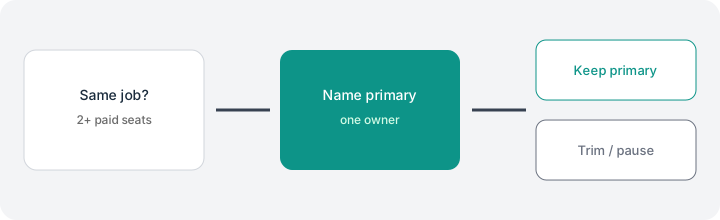
What it is: Name one primary tool per overlapping job and a next step for the rest (pause renewal, split by audience, or keep both with a written reason). No scorecard — a named owner and a calendar date beat labels.
Fill the Next step column:
For each overlapping job, write: Primary tool = ____ (owner ____). Other tool next step = keep with split / pause on renewal date ____ / consolidate by ____. Do not invent a tool that is not already in Tools we use.
4. When a sheet or audit helps (soft next step)
What it is: If the table shows several jobs with the same overlapping seats and nobody owns the cleanup, a structured sheet or a short audit can help. Optional — this playbook is free and complete on its own.
Before paying for help:
Count jobs where Overlap notes is non-empty. If ≥2 jobs share the same overlapping pair of seats, decide whether a free second pass of this table is enough — or whether you want the $9 toolkit spreadsheet or $19 audit. Leave Next step blank until that decision is real.
Checkout is live via Stripe. After you pay, we email delivery (spreadsheet) or intake next steps (audit). Soft offer — this playbook stands alone. Also: /audit.html · /stack.html.
Pricing context (September 2026)
This playbook itself is free. Soft paid helpers on aiproduct.reviews (Sep 2026): $9 AI toolkit spreadsheet and $19 AI toolkit audit — checkout via Stripe Payment Links above, or start from /stack.html and /audit.html. Individual AI product prices change often; when you map seats, confirm each vendor’s public pricing page (examples: claude.com/pricing, openai.com/pricing, zoom.us/pricing). Do not budget renewals from this page alone.
Uncertainty flags: Seat packaging, AI credit meters, and “included vs add-on” AI features move through 2025–2026. Always verify the live invoice and admin console for each tool you list.
When this playbook is useful (honest take)
- Useful when: You pay for 2+ AI seats that touch the same weekly jobs; renewals are coming up; finance asks “what are we paying AI for?”
- Less useful when: You have one clear chat seat and one clear notetaker with no overlap; you have not opened last month’s invoices yet; you want a scorecard — this page will not give you one.
Comparing several AI tools for the same job? The $9 AI toolkit spreadsheet puts each one you pay for on one page with cost, usage, and payback, so overlaps are easy to spot.
Want someone to do it for you? AI toolkit audit — $19
Alternatives (same cleanup job)
| Axis | This playbook | $9 toolkit spreadsheet | $19 toolkit audit |
|---|---|---|---|
| Best when… | You can fill a four-job table in one sitting. | You want a reusable sheet for renewals. | You want a guided pass with intake. |
| Less useful when… | Nobody will open the invoices. | A napkin table already settled the overlap. | Overlap is already fixed with a named primary. |
Related reviews that often show up in the table: Claude, ChatGPT, Zoom AI Companion, Fireflies, Claude for founders, and the ops & automation hub.
If two seats cover the same job, name the seats and what you pay on the overlap calculator, then keep the grid in the $9 AI toolkit spreadsheet.
FAQ
What is an AI stack trim playbook?
A plain-language how-to: list jobs, map tools and owners, mark overlaps, write next steps — without inventing tools or using a scorecard.
Which jobs should we map first?
Meeting notes, writing, automation, and research. Leave blanks for tools you do not actually pay for.
Do we need a scorecard to trim AI seats?
No. Overlap notes and a named primary per job are enough for most small teams.
When is a paid toolkit audit or spreadsheet useful?
Only when several paid seats cover the same job and you want a structured pass. Optional $9 / $19 — this playbook stands alone.