How-to · Writing ops · Grammarly · Oct 22, 2026
Write one Grammarly style guide for your team, and check whether it catches what ChatGPT proofreading misses
Grammarly works inside the docs and email tools people already use, and team style guides give every writer the same rules. That is the main reason teams buy seats instead of relying on a personal chat habit. This page shows how to write one small style guide, roll it out to three writers, and test it fairly against chat proofreading.
Who this is for
Ops leads, writing team leads, and managers who spend hours fixing the same tone and clarity issues, or who are comparing Grammarly seats with “just ask ChatGPT.” The job here is one style guide and a fair test. For setting up Jasper Brand Voice for one campaign — a different job (drafting campaigns in a saved voice, not enforcing rules where people write) — see Jasper Brand Voice campaign.
How to do it
This is a how-to, not a ranking of writing tools. Per the Grammarly review, Grammarly offers inline suggestions for grammar, clarity, and tone in browsers, docs, email, and desktop apps; Pro adds tone, clarity, generative assists, and team style guides, and has absorbed most of what used to be marketed as Grammarly Business for many buyers. Enterprise adds security and admin controls through sales. The review notes overlap with ChatGPT and Claude is real. The ground rule: buy seats for in-place editing and a shared style guide, not as a second chat app.

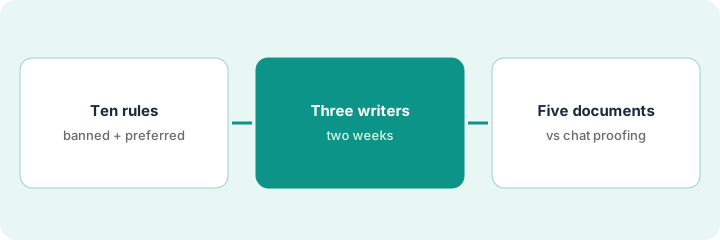
1. Write ten style rules
What it is: Keep the first style guide short: five banned phrases and five preferred terms or product names. Then test that Grammarly flags a banned phrase in a real draft.
- List five phrases your managers keep removing.
- List five preferred product names or terms with the wrong versions you see.
- Add all ten to the team style guide.
- Draft one real email and confirm a banned phrase gets flagged.
The manager adds five banned phrases (including “per my last email”) and five preferred terms (“resident,” not “renter,” in letters). A test email with a banned phrase gets flagged, so the guide is ready for writers.
Add five banned phrases and five preferred terms to a Grammarly team style guide and confirm a banned phrase is flagged in one real draft.
2. Roll it out to three writers for two weeks
What it is: Turn Grammarly on where the three writers write most and track how many suggestions they accept. Low acceptance means seats will not help.
- Pick three writers who send the most outside email or documents.
- Turn Grammarly on in the app they write in most.
- Track accepted suggestions on three real documents each.
- Ask each writer which style-guide flags were useful.
Two of three writers accept most style-guide flags; the third writes mostly short replies and accepts almost none. The support lead notes the difference for the seat decision.
Roll out the style guide to three writers in the app they use most for two weeks and track how many suggestions each accepts.
3. Compare with ChatGPT or Claude proofreading on five real documents
What it is: Run the same five documents through Grammarly and through the chat assistant you already pay for. Keep whichever workflow writers will actually use, and remove seats nobody opens.
- Pick five real documents from the pilot.
- Proofread each in Grammarly and in ChatGPT or Claude with the same rules pasted in.
- Count which style-guide issues each one caught.
- Mark each seat: weekly writer, occasional, or never, and remove the never seats.
On five documents, Grammarly catches every banned phrase while writing; chat proofreading catches most of them but only when someone remembers to paste the document. The head of operations keeps two seats and moves the third writer back to chat for occasional checks.
Proofread five real documents in Grammarly and in ChatGPT or Claude with the same rules, count what each caught, and remove seats nobody uses weekly.
Pricing context (October 2026)
This how-to isn’t a price sheet. Per the Grammarly review, Free covers basics, Pro is per member, and Enterprise is custom. We rechecked the review’s September 2026 Pro prices on Grammarly’s plans page on Oct 22, 2026 (below). Dated October 2026.
Checked Oct 22, 2026 on the vendor’s own site: Grammarly’s plans page lists Pro at $12 per member per month billed annually ($144 a year), $60 per quarter, or $30 billed monthly, for teams up to 149 members; Enterprise is through sales (September 2026, per our review; checked Oct 22).
Uncertainty: The only prices this site sells here are the optional $9 AI toolkit spreadsheet and $19 AI toolkit audit.
When this helps (honest take)
Useful when several active writers share a style guide, managers spend real time fixing the same issues, and writers work in apps where in-place suggestions help.
Not useful when the only job is fixing typos, ChatGPT already proofreads everything you send, or nobody opens Grammarly.
Related options (educational)
| Need | Where to look | Why |
|---|---|---|
| In-place suggestions and team style guides | Grammarly | Primary path |
| Campaign drafting in a saved brand voice | Jasper Brand Voice campaign | A different job |
| General assistants for proofreading | Claude vs ChatGPT for ops | Your comparison baseline |
FAQ
Is Grammarly Business still a plan?
Per our review, for most buyers the team features now live under Grammarly Pro; Enterprise is custom. Naming moved with Superhuman, so confirm the live plan.
How many rules should the first style guide have?
This page starts with ten: five banned phrases and five preferred terms. Add more only after writers accept the first ten.
When is Enterprise justified?
Per our review, when single sign-on, user provisioning, or data loss prevention are procurement requirements, not when you only want nicer suggestions.
What does Grammarly Pro cost?
On Oct 22, 2026 Grammarly’s plans page listed Pro at $12 per member per month billed annually ($144 a year) or $30 billed monthly (September 2026, per our review; checked Oct 22).
Optional next step
If you want a one-page toolkit map for the tools you already pay for, use the optional $9 AI toolkit spreadsheet. If you want a short review of seat waste and unused tools, use the optional $19 AI toolkit audit. Neither is required to follow this how-to.