Compare · Ops scripts · Sep 2026
Claude vs Cursor for ops scripts (Sep 2026): chat Projects vs IDE agents
Educational side-by-side for ops maintaining glue scripts — CSV cleaners, export mungers, light automation helpers — in Claude Projects chat versus Cursor IDE agents. Not a brand ranking. Run the same task in both; pick the environment you’d actually maintain.
How to compare fairly (ops rule)
Ops scripts fail when they overwrite quietly or invent transforms nobody can audit. This compare focuses on script maintenance — adding dry-run and logging — not on building a SaaS product. Full product context: Claude, Claude Projects, Cursor, Cursor Rules, role patterns on Claude for ops, and chat-only ops jobs on ChatGPT for ops.
Examples at a glance: each section has a concrete ops example plus a short Try this.
1. Job: dry-run + logging on a CSV cleaner (primary)
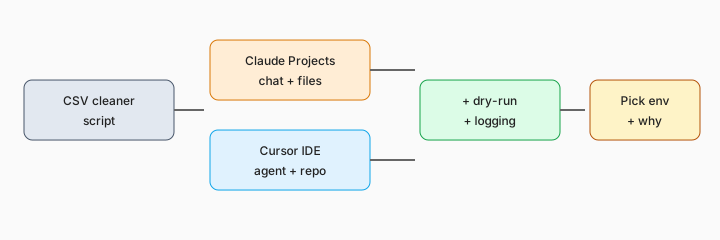
What the job is: Take an existing small Python/Node script that cleans a CSV and add (1) a dry-run mode that prints the plan and writes nothing, and (2) structured logs for input path, row counts, and skip reasons. Then note which environment you’d keep using for the next six months.
--dry-run and logging. They ship the version they can re-run next quarter with less fear.
Primary SoT workflow:
Same task: add dry-run + logging to a CSV cleaner. Note which environment you’d use and why.
2. Claude Projects for glue code
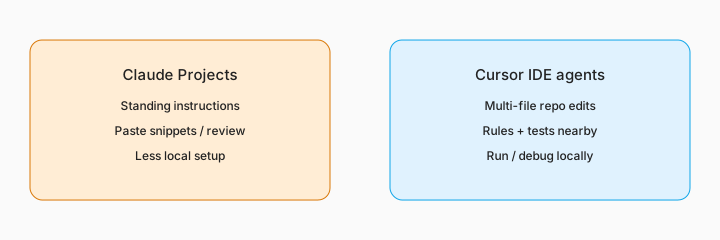
What it is: Claude Projects hold standing instructions (“never overwrite source; always show a sample diff”) and project files. Strong when you paste a script, review a patch in chat, and copy it back to your runbook host. Weaker when you need multi-file refactors, local test runners, and git hunks in one place.
Project instructions draft:
Write 8 standing instructions for a Claude Project that maintains ops CSV/JSON glue scripts (dry-run, logging, no silent overwrite, sample output, no invented schemas).
3. Cursor IDE agents + Rules
What it is: Cursor agents edit in the repo with Rules guiding style and safety. Strong when the script sits beside tests, sample fixtures, and a real shell. Weaker when you have no local clone and only need a one-off review from a pasted gist.
scripts/clean_vendors.py + fixtures/vendors_sample.csv. Cursor agent adds dry-run, runs it locally, and you commit the log format your team agreed on.
Cursor Rules sketch:
Draft a short Cursor Rule for ops scripts: require --dry-run, structured logs, never delete source files, prefer small diffs, ask before changing CLI flags.
4. Script hygiene checklist
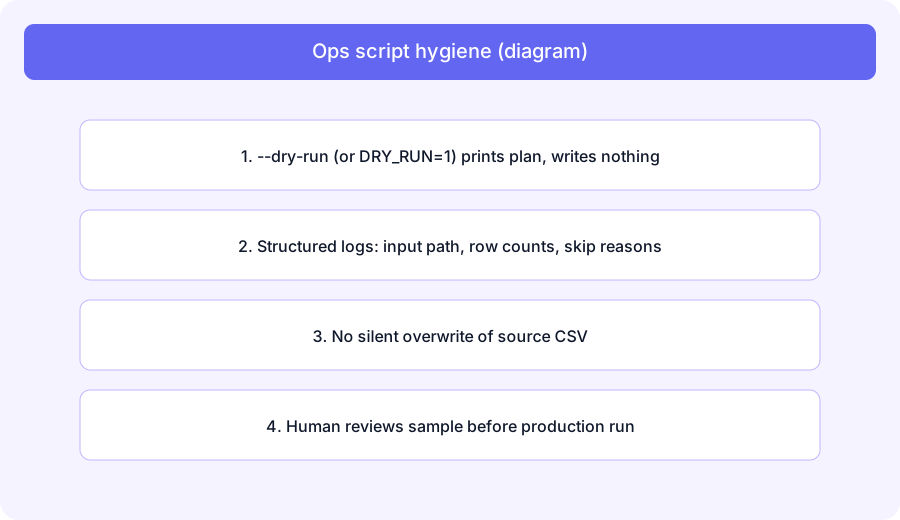
What it is: Environment choice matters less than habits. Every production-touching glue script should support dry-run, log counts/skips, avoid silent overwrite, and get a human sample review. Soft $19/$9 below only if Claude, Cursor, and automation seats overlap on the same maintenance jobs. Also compare chat-only ops work on ChatGPT for ops and flow tools like Power Automate AI when the “script” should become a managed flow instead.
Audit three scripts:
For 3 ops scripts you own: note dry-run (Y/N), logging (Y/N), silent overwrite risk (Y/N), and whether Claude Projects or Cursor would be the better home for the next change — one sentence each.
Pricing context (September 2026)
Claude plans are on Anthropic’s public pricing; Cursor plans on cursor.com/pricing. This page is dated September 2026 and is not a price sheet — we do not invent exact seat or usage prices.
Uncertainty: Project limits, agent usage caps, and Rules packaging change. Verify live before budgeting dual seats.
When each often fits (honest take)
Claude Projects often fit paste-and-patch glue, standing instructions, and teams light on local IDE setup. Cursor often fits repo-native scripts, multi-file edits, and local dry-runs. Many ops folks keep both: Project for quick reviews, Cursor when the script graduates into a maintained folder. Soft $19/$9 below only if seats overlap on the same jobs.
Related options (educational)
| Need | Better home | Why |
|---|---|---|
| Chat + standing instructions | Claude Projects (this compare) | Paste snippets; review patches |
| Repo + local run/debug | Cursor · Cursor Rules | IDE agents beside fixtures/tests |
| Chat-only ops (no code) | Claude for ops · ChatGPT for ops | Memos and cleanup without scripts |
| Managed automation instead of a script | Power Automate AI · Zapier / Make | When glue should be a flow, not a file |
FAQ
When should ops use Claude Projects for scripts?
When chat + standing instructions + pasted files are enough. See Claude Projects.
When should ops use Cursor?
When the script lives in a repo and you want IDE agents, Rules, and local runs. See Cursor and Cursor Rules.
What hygiene should every ops script have?
Dry-run, structured logs, no silent overwrite, human sample review.
Where do I verify pricing?
On Anthropic and Cursor public pricing pages — this page does not invent exact prices.
Still choosing between Claude and Cursor? The $19 AI toolkit audit gives you a written plan for which tools to keep using and which to drop across your whole AI stack, including this pair.
Prefer to do it yourself? Spreadsheet — $9
Optional next step (if seats overlap)
If these seats would sit beside other BI, chat, or automation seats on the same ops jobs, optional help mapping overlap: $19 AI toolkit audit or $9 AI toolkit spreadsheet. Email Audit $19 or Toolkit spreadsheet $9.
Checkout is live via Stripe. After you pay, we email delivery (spreadsheet) or intake next steps (audit).