Feature how-to · Cursor
Cursor Rules how-to (Sep 2026): consistent ops/scripts codegen for small eng+ops teams
Feature how-to linked from the Cursor deep-dive: write Rules so Agent edits follow team conventions on glue scripts — no silent column drops, row-count logs, explicit schemas, and dry-run flags.
Who this page helps
Small eng+ops teams that keep fragile CSV/API glue scripts in a repo and want AI edits to obey the same safety conventions every time — not a one-off chat reminder. If you need the broader seat-vs-contractor decision, start with the Cursor deep-dive. This page is the Rules feature how-to only.
What Cursor Rules are
Cursor Rules are instructions Cursor’s Agent and inline AI follow while editing. Teams usually store them under .cursor/rules (project) or as user rules, with optional globs so a Rule only applies to matching files. For ops scripts, a good Rule is short, testable, and boring: never delete columns; log before/after counts; prefer explicit schemas; require a dry-run before destructive writes.

Major features (with how someone uses them)
Examples at a glance: each feature has a concrete ops example plus a Try this mini-workflow.
1. Project Rules for glue scripts
What it is: Check Rules into the repo so every teammate’s Agent session inherits the same conventions. Scope with globs (**/scripts/**, **/*csv*.py) so style Rules do not fight frontend code. Keep one “ops safety” Rule always-on for transform scripts.
ops-csv-safety.mdc under .cursor/rules with always-apply for scripts/. The next Agent edit on a cleanup script already knows not to drop columns.
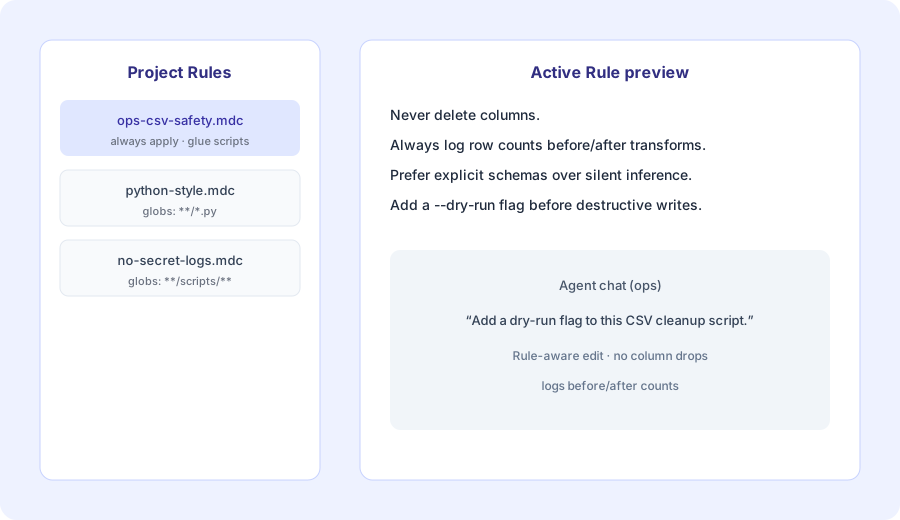
In a real glue-script repo:
Create a Project Rule named ops-csv-safety that always applies under scripts/. Include exactly: Never delete columns; always log row counts before/after transforms; prefer explicit schemas. Then open a CSV cleanup script and ask Agent to summarize which Rule bullets apply to this file.
2. Ops safety conventions (the useful defaults)
What it is: The content of the Rule matters more than the file format. Ops teams lose hours when AI “helpfully” renames columns, silently drops nulls, or invents schemas. Write Rules as constraints the Agent can check against — not vague “be careful with data” advice.
rows_in / rows_out and failing closed if a required column is missing — so a bad export surfaces in CI or a dry-run, not after finance loads the sheet.
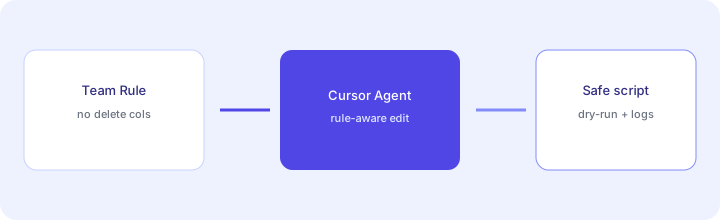
Add a Rule (exact Marketing primary):
Add a Rule: “Never delete columns; always log row counts before/after transforms; prefer explicit schemas.” Then: “Add a dry-run flag to this CSV cleanup script.”
3. Agent edits with dry-run flags
What it is: Once the Rule exists, ask Agent for a concrete change — usually a --dry-run path that prints planned writes without mutating files. Pair Rule text with a short Agent prompt so the flag, logging, and schema checks land together.
--dry-run, prints planned output path + row counts, and only writes when the flag is absent — matching the Rule’s “log before/after” bullet.
With the Rule active and a real cleanup script open:
Respect Project Rules. Add a --dry-run flag that prints planned output path, rows_in, rows_out, and columns kept. Do not write files when --dry-run is set. Do not delete or rename columns.
4. When Rules are not enough
What it is: Rules guide generation; they do not replace tests, code review, or secrets hygiene. If the script touches production data, add a unit test on row counts and a human review before merge. Prefer API/batch jobs with typed schemas when the “UI scrape + script” path is already brittle.
After the dry-run lands:
List 3 checks a human reviewer should run before merging this script change. Include one fixture-based assertion on column names and one on row counts. Do not invent production credentials.
Pricing context (as of Oct 17, 2026)
Rules ship with Cursor; seats and Agent usage still drive cost. As of Oct 17, 2026, the official cursor.com/pricing page sells Cursor as part of The X Subscription: Plus $8/month (Grok models only), Premium $30/month, Super $100/month, Ultra $200/month, and Teams from $30/user/month. The old Pro ($20), Pro+ ($60), Teams Standard ($40/user) and Teams Premium ($120/user) plans are legacy plans, no longer sold to new customers. This how-to does not replace the dated pricing section on the Cursor review.
Uncertainty: Usage overages, request limits, and which plan unlocks heavier Agent runs change — verify live before budgeting seats.
When Cursor Rules are useful (honest take)
Rules help when the same eng+ops people edit the same glue scripts weekly and conventions keep getting forgotten in chat. They help less when nobody owns the repo, when “Rules” become a novel nobody reads, or when the real need is typed APIs and tests rather than smarter codegen. A three-bullet ops safety Rule beats a 2,000-word style guide.
Paying for Cursor Rules and a few other AI tools? The $9 AI toolkit spreadsheet lists every AI subscription you have, what each one costs, and how fast it pays for itself, so you can see which ones are worth the money.
Want someone to do it for you? AI toolkit audit — $19
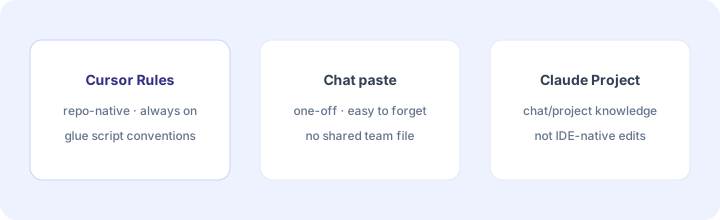
Alternatives compared: Rules vs chat vs Project instructions
| Axis | Cursor Rules | Chat paste | Claude Project instructions | Copilot custom instructions |
|---|---|---|---|---|
| Best when… | Repo-native IDE edits on glue scripts. | One-off ask; no shared repo Rule yet. | Chat/Project workflows outside the IDE. | GitHub Copilot is already the IDE AI. |
| Cost shape (Sep 2026) | Cursor seat (confirm live). | Included in whatever chat seat you use. | Claude plan (confirm live). | Copilot seat (confirm live). |
| Less useful when… | No shared repo / no owner. | Same conventions every day. | You need IDE multi-file edits. | Team standardizes on Cursor. |
Also see Cursor deep-dive, Claude Projects, Claude Artifacts, and the ops & automation hub.
FAQ
What are Cursor Rules?
Project- or user-level instructions that guide Agent and inline AI edits so generated code follows team conventions — for example never deleting CSV columns or always logging row counts.
When should ops teams use Rules instead of chat paste?
When the same glue-script conventions must apply across many Agent edits. Chat paste is easy to forget; a Rule stays in the repo.
Do I need Cursor Pro for Rules?
Rules ship with Cursor plans; usage and Agent limits vary. Confirm on cursor.com/pricing.
How does this relate to the Cursor deep-dive?
This is a feature how-to. The full product review is at /reviews/cursor.html.
Optional next step (if seats overlap)
If Cursor is one of several AI seats and you want a written pass across the whole list, the optional $19 AI toolkit audit produces a short memo. Prefer an editable grid? The $9 AI toolkit spreadsheet is a one-time CSV. Soft offer only — this how-to stands alone.
Checkout is live via Stripe. After you pay, we email delivery (spreadsheet) or intake next steps (audit).