Role guide · Ops leads · Gemini · Workspace
Gemini for ops leads (Nov 2026): day-to-day work inside Google Workspace
Role guide — the daily ops loop in Gmail, Docs, and Sheets with Gemini: turn email threads into decision logs, keep the tracker honest, and ship a short Slack update — without cloning the product deep-dive or the Sheets how-to.
Who this guide is for
Ops leads (and founder-operators wearing the ops hat) whose mail, memos, and trackers already live in Google Workspace — and who want a repeatable day-to-day loop with Gemini, not another generic “use AI for productivity” list. Product overlap, pricing detail, and alternatives live on the Gemini deep-dive. Sheets-only formulas and range prompts live on Gemini in Sheets. This page does not clone those — it is the ops-lead role guide.
The daily ops loop (picture)
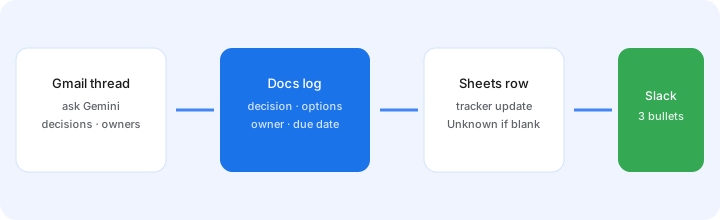
Primary habit: stay where the file already is. Ask Gemini in the app, write Unknown when the thread does not name an owner, then move on. Soft CTA later only if you are also paying Claude or ChatGPT for the same Workspace draft job.
How an ops lead actually runs Gemini
Examples at a glance: each step has a concrete ops example plus a Try this mini-workflow.
1. Gmail → Docs decision log
What it is: Paste (or open) a real email thread, ask Gemini for a Docs-ready decision log with fixed columns — decision, options, owner, due date — then paste into a standing ops Doc. Force Unknown instead of inventing owners.
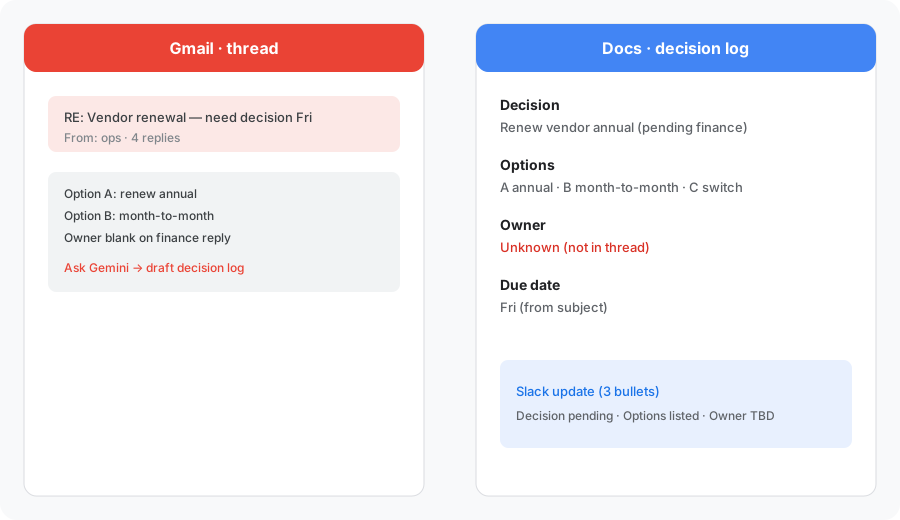
Primary locked prompt — paste a real thread:
From this pasted email thread, draft a Docs-ready decision log: decision, options, owner, due date. Then a 3-bullet Slack update.
Add: mark any missing owner or date as Unknown. Do not invent names.
2. Sheets tracker hygiene
What it is: Open the ops tracker that already lives in Drive. Ask Gemini in Sheets to list rows with blank owners or stale due dates — then you assign humans. Deeper formula and range patterns sit on the Gemini in Sheets how-to; here the job is weekly hygiene, not building a new model.
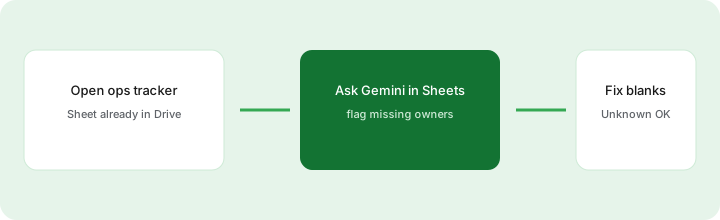
In your open-asks Sheet (eligible Gemini-in-Sheets plan):
Using only this sheet, list rows missing owner or due date. Columns: row, ask, owner, due date, gap. Use Unknown for blanks. Do not invent owners.
3. Slack update from the log
What it is: After the Docs log and Sheet pass, ask Gemini for a short Slack paste — three bullets max — so the team hears decisions without reading the whole thread.
Using only this decision log, write a 3-bullet Slack update: (1) decision, (2) open Unknowns, (3) next owner + due date. No fluff. No invented owners.
4. Gemini inside Gmail, Docs, and Sheets
What it is: On eligible Google AI / Workspace plans, Gemini helpers appear inside the apps you already use. Labels and availability vary by plan and region — confirm live. The ops habit is the same: ask where the file lives, ground answers in that file, mark Unknown when the source is silent.
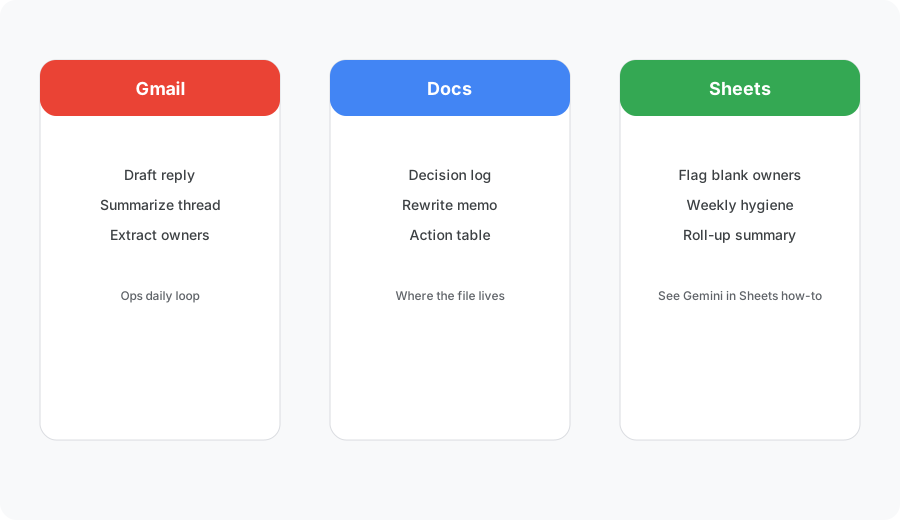
In Docs with a real SOP open:
Using only this document, produce a checklist of weekly ops steps with owner blanks. Mark any step without a named owner as Unknown.
When Gemini for ops is useful (honest take)
Gemini tends to help ops leads when mail, memos, and trackers already live in Google, you want drafts grounded in those files, and a short decision-log → Sheet → Slack loop closes the day. It tends not to help when you need a durable Project knowledge base outside Google, Custom GPT-style intake bots, or deep call-clip libraries — those jobs lean toward Claude, ChatGPT, or a meeting tool. Paying Gemini plus Claude plus ChatGPT for the same Workspace memo job is seat sprawl — pick the home where the files already are.
Paying for Gemini and a few other AI tools? The $9 AI toolkit spreadsheet lists every AI subscription you have, what each one costs, and how fast it pays for itself, so you can see which ones are worth the money.
Want someone to do it for you? AI toolkit audit — $19
Alternatives (educational)
| Axis | Gemini (this guide) | Claude | ChatGPT Team |
|---|---|---|---|
| Best when… | Work is already in Gmail/Docs/Sheets. | You need Projects + files as a durable ops KB. | You need Custom GPTs / shared Team chats. |
| Ops habit | Decision log in Docs → Sheet → Slack. | Meeting → action inside a Project. | SOP GPT or recurring Team space. |
| Less useful when… | Files live in Microsoft or Notion only. | Every draft must stay inside Google apps. | You only need in-Doc rewrites. |
Also see Claude for ops, Microsoft 365 Copilot, and the ops hub.
Same job, two products: ChatGPT vs Gemini for ops.
Same job, two products: Gemini vs Microsoft 365 Copilot for ops.
Pricing (checked November 5, 2026)
Most ops leads get Gemini through their company's Google Workspace plan, and Gemini is now bundled in. On workspace.google.com/pricing (checked Nov 5, 2026, US, 1-year commitment): Business Starter $7, Business Standard $14, and Business Plus $22 per user per month. Starter lists the Gemini assistant in Gmail plus the Gemini chat app; Standard adds Gemini in Docs, Meet, and more, which is what the decision-log and tracker workflows above need. New customers may see an introductory discount on the first months.
If you use a personal Google account instead, Google AI plans lists Google AI Pro at $19.99/month ($199.99/year) and Google AI Ultra at $99.99/month (monthly only), as of Nov 5, 2026. Full dated notes are on the Gemini deep-dive.
Uncertainty flags: Business Starter does not list Gemini in Docs or Sheets, so check your plan before you count on those helpers. Storage bundles and Ultra pricing change — always verify live.
Optional next step (if seats overlap)
If Gemini already covers Workspace drafts and you still pay Claude or ChatGPT for the same memo job, fix the overlap before adding more. Optional help: $19 AI toolkit audit or $9 AI toolkit spreadsheet — only if you are juggling multiple seats with the same job.
Checkout is live via Stripe. After you pay, we email delivery (spreadsheet) or intake next steps (audit). Soft offer — this role guide stands alone.
FAQ
How should an ops lead run Gemini day to day?
Stay inside Workspace: summarize Gmail threads into a Docs decision log (decision, options, owner, due date), update the Sheets tracker with Unknown for blanks, then send a short Slack update. Prefer files that already live in Drive over re-pasting into a second chat seat.
When does Gemini for ops beat Claude or ChatGPT?
When the work is already in Gmail, Docs, and Sheets and you need drafts grounded in those files. Claude Projects or ChatGPT Team still win when you need a durable project knowledge base or Custom GPTs outside Google.
How much is Gemini for this workflow in November 2026?
For a company account, Google Workspace business plans now include Gemini: Business Starter $7, Business Standard $14, and Business Plus $22 per user per month on a 1-year commitment (Starter has Gemini in Gmail and the Gemini app; Standard adds Gemini in Docs, Meet, and more). For a personal Google account, Google AI Pro is $19.99/month ($199.99/year) and Google AI Ultra is $99.99/month. Prices are US list prices checked Nov 5, 2026 on Google's pricing pages.
Where is the full Gemini product review?
See /reviews/gemini.html for Workspace overlap, pricing, and alternatives. For Sheets-only workflows see /reviews/google-sheets-gemini.html. This page is the ops-lead day-to-day role guide.