Feature how-to · Sheets · Gemini
Gemini in Sheets how-to (Nov 2026): cleanup, formulas, and variance notes
For ops and finance people already in Google Sheets — how to clean categories, fix formulas, and draft short variance notes inside the grid, without exporting to a separate chat seat. Differentiates from the broader Gemini Workspace review.
Who this page helps
Ops leads and finance owners whose weekly numbers already live in Sheets, and who keep losing time to “download CSV → paste into chat → copy answers back.” The job here is in-file cleanup and short analysis, not a full Gemini product buy decision (that’s gemini.html).
What Gemini in Sheets is
Gemini in Google Sheets is the assistant that shows up in the Sheets side panel (and related entry points) on eligible plans. Public help pages describe creating tables and formulas, analyzing ranges, charts, conditional formatting, filters/pivots, and — on newer rollouts — building or editing more of the spreadsheet from natural language. You stay in the file; Gemini writes into cells or proposes edits you approve.
Major features (with how someone uses them)
Examples at a glance: each feature has a concrete ops/finance example plus a short Try this.
1. Cleanup / classify in place (the buying decision for this how-to)
What it is: Select a messy category column, give Gemini an allowed list, and ask it to write a new cleaned column — synonym merge without leaving Sheets.
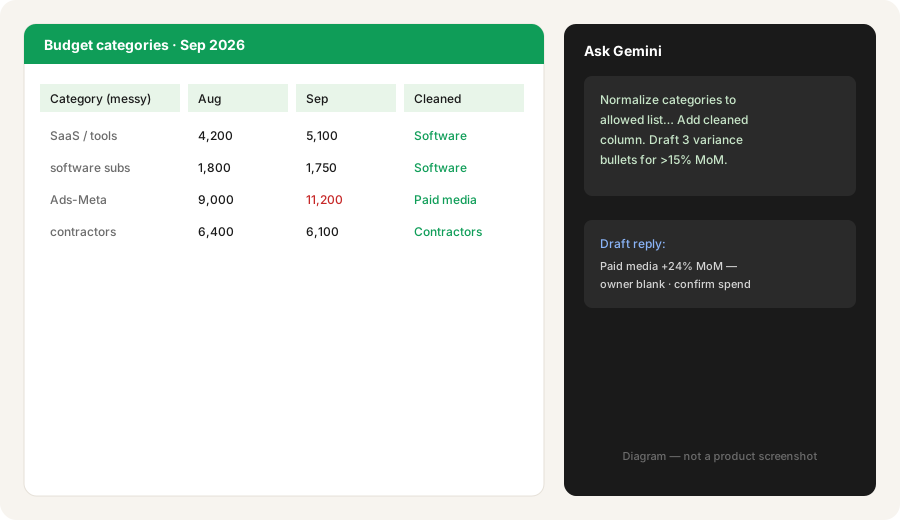
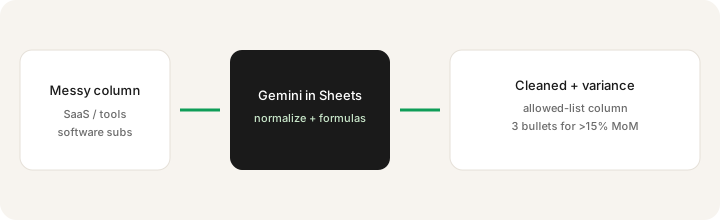
Select a messy category column in Sheets (with Gemini available):
Normalize categories to this allowed list: [paste list]. Add a new column with cleaned values. Then draft 3 variance bullets for any category >15% MoM.
2. Formulas and structure help
What it is: Ask Gemini to propose SUMIFS, QUERY, or percentage MoM formulas, or to add helper columns. Newer Workspace updates also advertise building/editing more complex sheet structure from natural language — still verify every formula against a known row.
With a two-month spend table selected:
Add a helper column MoM_pct = (Sep-Aug)/Aug. Format as percent. List the top 5 movers by absolute dollar change. Do not invent rows that are not in this range.
3. Variance notes from the open range
What it is: After cleanup, ask for three short leadership bullets grounded only in the visible numbers — owners left blank. This is a note draft, not a journal entry.
After the cleaned column exists:
Using only this sheet range, write 3 variance bullets for leadership. Each bullet: category, MoM %, likely driver blank, owner blank. Do not invent journal entries or dollar amounts not in the range.
4. When to stay in Sheets vs export to chat
What it is: Gemini in Sheets wins the tight loop (select → clean → short note). A dedicated Claude Project or Custom GPT still wins multi-file close packs, long memos, and reusable finance bots that live outside one workbook.
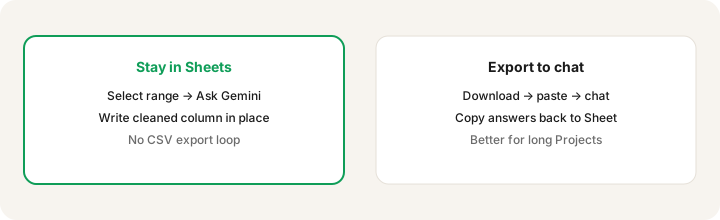
Pick one real Sheet job this week:
Ask: (1) Is the answer a new column or a short note inside this file? (2) Do I need last month’s board pack + three PDFs too? If yes/no → try Gemini in Sheets first. If no/yes → use a Project or Custom GPT and paste results back.
Access and pricing (checked November 8, 2026)
Gemini in Sheets is a plan entitlement, not a separate Sheets SKU. Figures below are US list prices from Google’s own Workspace pricing and Google AI plans pages, checked Nov 8, 2026. Prices exclude tax. Confirm live — limits and plan names move.
- Google Workspace Business Standard ($14) / Plus ($22): per user per month on a 1-year commitment; Google’s plan table marks Gemini in Sheets as included on both (plus Docs, Slides, Drive, and Meet). Business Starter ($7) does not include Gemini in Sheets — only Gemini in Gmail, the Gemini chat app, and Vids. If your team is on Starter, budget the $7 jump to Standard per seat before planning any in-grid AI workflow.
- Enterprise Standard / Plus: included with Gemini-in-Sheets entitlements on public feature tables; custom pricing.
- AI Expanded / Ultra add-ons: public limit tables show higher monthly caps for Sheets
AI()function uses and build/edit actions vs base Business Standard/Plus. - Personal Google AI Pro / Ultra: AI Pro is $19.99/month ($199.99/year) and Google lists “work smarter in Docs and Sheets” among its benefits; Ultra is $99.99/month (5x) or $199.99/month (20x). AI Plus ($4.99) lists Gemini only for Gmail proofreading, not Sheets. These plans are for personal Google accounts only — Workspace customers use their Workspace edition or a Gemini add-on instead. See Google AI plans.
Uncertainty: Per-user monthly caps for build/edit and AI() cells differ by SKU; promotional access windows have end dates. We could not treat any third-party blog as the sole list price. Always confirm on Google’s Sheets + Gemini help, Workspace pricing, and your admin console.
When Gemini in Sheets is useful (honest take)
It tends to help when the data already lives in Sheets and the job is cleanup, a formula, or a three-bullet variance note you will paste into Slack. It tends not to replace a finance Project or Custom GPT for multi-file close packs, or Excel Copilot if the company standard is Microsoft 365. Paying for Gemini + Claude + ChatGPT just to clean the same category column is stack sprawl — use the seat that already sits next to the file.
Paying for Gemini in Sheets and a few other AI tools? The $9 AI toolkit spreadsheet lists every AI subscription you have, what each one costs, and how fast it pays for itself, so you can see which ones are worth the money.
Want someone to do it for you? AI toolkit audit — $19
Alternatives compared: export chat, Excel Copilot, Claude/ChatGPT
| Axis | Gemini in Sheets | Claude / ChatGPT + CSV | Excel Copilot |
|---|---|---|---|
| Typical access (Nov 2026) | Workspace Business Standard $14+ per user/mo (annual) or personal Google AI Pro $19.99/mo. Not on Starter. | Chat seat ~$20–25/user/mo. See Claude / ChatGPT. | Microsoft 365 Copilot license. See Copilot review. |
| Native strength | Edit in the open Sheet | Long multi-file reasoning / bots | In-Excel analysis if Office is home |
| Best fit when… | Cleanup + short variance in Google Sheets. | Board pack / close Project spanning files. | Excel is the system of record. |
| Less useful when… | You need a reusable finance bot outside one file. | You only need a cleaned column today. | Your team lives in Google Sheets. |
FAQ
What is Gemini in Google Sheets?
Google’s in-spreadsheet assistant for formulas, cleanup, analysis, and related edits on eligible plans — without exporting to a separate chat app.
How do I get Gemini in Sheets in November 2026?
Workspace Business Standard ($14/user/mo annual) or Plus ($22), or personal Google AI Pro ($19.99/mo) or Ultra. Business Starter ($7) and AI Plus ($4.99) don’t include it. Checked Nov 8, 2026 — confirm on Google’s pricing pages.
When should I stay in Sheets vs export to Claude or ChatGPT?
Stay for in-grid cleanup and short notes. Export for multi-file close/board-pack Projects and reusable finance bots.
Is this the same as the Gemini product review?
No — gemini.html is the Workspace overlap buy decision. This page is the Sheets feature how-to.
Optional next step (if seats overlap)
If Gemini in Sheets is one of several AI seats doing the same cleanup-and-paste loop, optional help: $19 AI toolkit audit or $9 AI toolkit spreadsheet — only if you are juggling overlapping seats.
Checkout is live via Stripe. After you pay, we email delivery (spreadsheet) or intake next steps (audit).