What’s new · Microsoft 365 Copilot · Sep 2026
What’s new in Microsoft 365 Copilot (Sep 2026): ops-relevant changes
Dated changelog-style guide — only Microsoft 365 Copilot changes that affect Excel/Outlook-heavy ops teams. Not a rehash of the Microsoft 365 Copilot deep-dive — that remains the how-to; this page is what moved in September 2026 per public Microsoft sources.
Who this changelog is for
Ops leads on a ~20-person tenant who already live in Excel, Outlook, Word, and Teams with Microsoft 365 Copilot licenses (or are deciding whether Sep changes justify a re-look) and need a dated “what actually moved” note — not another full product review. Deep how-tos stay on microsoft-365-copilot. Suite compare: Gemini vs Copilot for ops.
Sep 2026 snapshot (picture)
Uncertainty flag: Microsoft rolls features by license, channel, and programs such as Frontier and private preview. Treat the Sep 25, 2026 Microsoft blog and Learn release notes as directional; confirm in your tenant, admin center, and on microsoft.com Copilot pricing.
Preview honesty: Home and Code start via Frontier; Autopilot expands to private preview late September per Microsoft’s blog — not the same as broad GA for every seat. “Today” (mail/calendar command center) is called out as private preview in October.
Primary prompt (Marketing SoT) — run against Microsoft’s public Sep 2026 docs/blog, not rumor threads:
From Microsoft public Sep 2026 Copilot notes, list 5 changes for Excel/Outlook-heavy ops teams — cite sources.
Changes that matter for ops teams
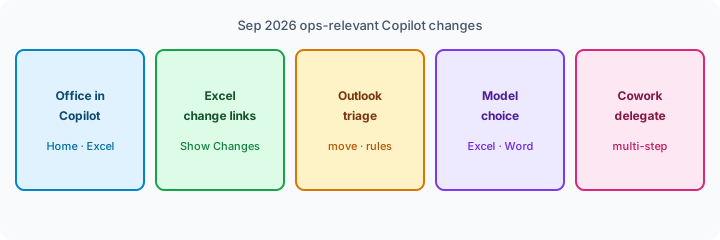
Examples at a glance: each change below includes a concrete ops example plus a short Try this. We skip consumer CarPlay and facilities profile-card items here; cite them only if your ops team actually uses those surfaces.
1. Office in Copilot / Home — Word, Excel, PowerPoint inside the Copilot app
What changed (public ≈ Sep 25, 2026 — Official Microsoft Blog): Microsoft introduced a reimagined Copilot with Home (Chat and Cowork together) and Office in Copilot — create or update real, editable Word, Excel, and PowerPoint files from Copilot that stay in sync with the Office apps. Home and Code start rolling out through the Frontier program in the coming weeks per the same post — confirm whether your tenant is in Frontier before you rewrite weekly SOP paths.
Source: Introducing the new Copilot with Home, Code and Autopilot (Sep 25, 2026).
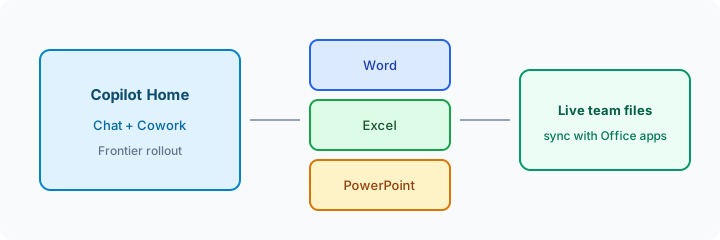
If Home / Office in Copilot is available on your seat:
From this pasted status dump only: create a one-page Word ops memo and an Excel table of owner + risk blanks. Do not invent metrics. Flag Unknown where the paste is silent. Keep the files editable for the team.
2. Excel — navigate to workbook changes from Copilot + Show Changes attribution
What changed (public ≈ Sep 23, 2026 Learn release notes window): Copilot in Excel responses can include links that jump you to new sheets, tables, ranges, charts, and shapes. The Show Changes pane can show Copilot attribution cards so AI edits sit beside manual changes — useful when ops needs to audit what the model touched before a leadership send.
Source: Release Notes for Microsoft 365 Copilot (September 23, 2026 section — Excel items).
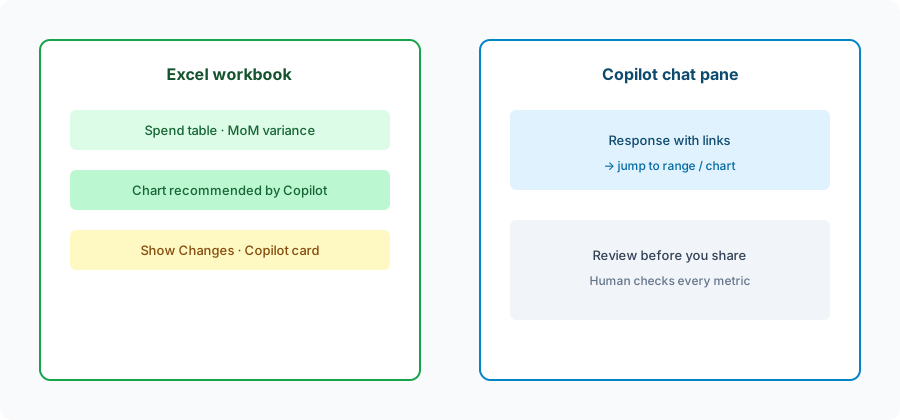
In Excel with Copilot (if licensed), on a real spend sheet:
Summarize top 10 merchants MoM from this sheet only. Prefer links to the ranges you change. Do not create new sheets unless I ask. I will review Show Changes before sharing.
3. Outlook — more natural-language triage actions
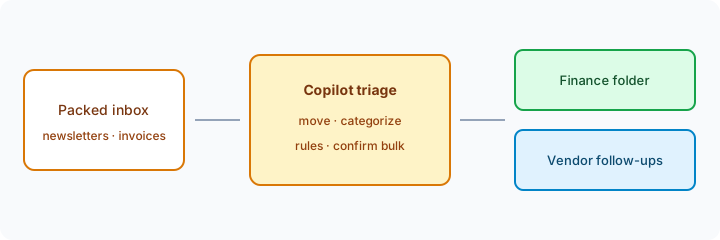
What changed (public ≈ Sep 23, 2026 Learn release notes): Microsoft 365 Copilot supports additional Outlook triage actions via natural language — including deleting, moving, copying, categorizing messages, and managing inbox rules and folders — with confirmation prompts for bulk or mailbox-level changes (more than five emails or rule changes).
Source: same Learn release notes (Outlook triage item under Microsoft 365 Copilot).
In Outlook Copilot Chat (if licensed), on a non-critical folder first:
Move emails from [vendor] about invoices from last week into my Finance folder. Categorize as Vendor-AP. Stop and ask me to confirm before acting on more than five messages. Do not delete anything.
4. Model choice — Claude Opus 5.5 and GPT-6 Sol in Copilot surfaces
What changed (public ≈ Sep 22, 2026 — Microsoft Copilot Blog): Anthropic’s Claude Opus 5.5 and OpenAI’s GPT-6 Sol begin rolling out across Word, Excel, PowerPoint, Chat, Cowork, and Copilot Studio. Availability may vary by license, access, and region. Work IQ still grounds responses in organizational files, meetings, chats, and business data you can access.
Source: More Models, One Copilot (Sep 22, 2026).
If a model menu is available in Excel or Word Copilot:
Using only this open workbook/section: draft a 6-bullet MoM variance note with owners. Do not invent metrics. If a model picker is available, try two models and keep the draft with fewer edits.
5. Copilot Cowork — delegate multi-step outcomes (with supervision)
What changed (public ≈ Sep 2026 Learn notes + Sep 25 blog): Copilot Cowork lets you describe an outcome and have Copilot gather context from emails, meetings, chats, files, and business data, then return completed results with you in the loop. The Sep 25 blog positions Cowork for end-to-end packages (for example an RFP response or financial close package) and notes usage-based billing patterns for longer agentic work alongside user subscription licenses for everyday Chat/Office assists — confirm live FinOps settings before you scale pilots.
Sources: Learn release notes (Cowork item) and Microsoft blog Sep 25, 2026.
If Cowork is available and usage policy allows a pilot:
Cowork: Using only files and mail I can access in the Close-FY26 folder/thread set: draft a close checklist with owners and a one-page risks memo. Pause for my approval before sending any email or editing shared workbooks. Do not invent figures.
What did not change for ops (still use the deep-dive)
- In-app Word / Excel / Outlook / Teams jobs remain the core reason to buy a full Copilot seat vs a separate chat box — see Microsoft 365 Copilot.
- Copilot Chat ≠ full Copilot license — lighter web-grounded chat on eligible plans is still not the same as deep in-app Excel/Word work.
- Human review still owns sendable memos, finance numbers, and bulk mail actions (confirmation prompts help; they do not replace judgment).
- Autopilot / Today / Code are announced with Frontier or private-preview timing — do not treat blog demos as tenant-wide GA.
Vs ChatGPT / Gemini what’s-new (brief)
What’s new in ChatGPT (Sep 2026) covers Astra + Work Library/Data/Deep Research. What’s new in Gemini (Sep 2026) covers Workspace-side updates. Microsoft’s Sep notes emphasize Office-in-Copilot, Excel auditability, Outlook triage, multi-model choice, and Cowork. Suite fit compare: Gemini vs Copilot for ops. ChatGPT for ops patterns: ChatGPT for ops.
Pricing & access context (September 2026)
Figures summarized from Microsoft’s public Copilot pricing pages and the Sep 25, 2026 blog as of September 2026. Plan names, Frontier gates, usage-based billing for agentic features, and promos change — confirm live.
- Microsoft 365 Copilot (enterprise add-on): public US pages often about $30/user/month paid yearly; qualifying Microsoft 365 plan usually required.
- Microsoft 365 Copilot Business: public pages often about $21/user/month paid yearly (promotional first-year pricing may be lower).
- Everyday vs agentic spend: Microsoft’s Sep 25 post describes user subscription licenses for everyday Chat/Office work and usage-based billing for longer agentic capabilities (Cowork, Code, Autopilot, some frontier models). Confirm Cost Management / FinOps settings before scaling Cowork pilots.
Uncertainty: Which seats see Home, Office in Copilot, Cowork, model pickers, and Outlook triage this week depends on license, channel, and admin policy. Always confirm in-product and on Microsoft Learn release notes before you change seats or SOPs.
When this update helps (honest take)
It tends to help when your ops team already lives in Excel and Outlook weekly, needs clearer audit trails on Copilot sheet edits, wants safer bulk triage with confirmations, or is ready to pilot Cowork / Office-in-Copilot under admin guardrails.
It tends not to help when your company is Google Workspace–centered (see Gemini vs Copilot for ops), when Frontier/preview features are not on your tenant yet, when usage-based Cowork spend is blocked, or when you only needed a one-line chat answer. Buying seats solely for a Frontier demo you cannot access is usually wasted — soft next step below only if multiple AI seats overlap on the same weekly jobs.
Paying for Microsoft 365 Copilot and a few other AI tools? The $9 AI toolkit spreadsheet lists every AI subscription you have, what each one costs, and how fast it pays for itself, so you can see which ones are worth the money.
Want someone to do it for you? AI toolkit audit — $19
FAQ
What changed in Microsoft 365 Copilot in September 2026 that ops should notice?
Office in Copilot / Home (Frontier), Excel jump-to-change links + Show Changes Copilot cards, expanded Outlook triage with bulk confirm, Claude Opus 5.5 / GPT-6 Sol model rollout, and Copilot Cowork for multi-step outcomes. Confirm live on your plan.
Is Home / Autopilot GA for everyone?
No. Microsoft’s Sep 25 blog puts Home/Code on Frontier rollout and Autopilot on private preview expansion — confirm tenant access.
How does this compare to ChatGPT or Gemini Sep updates?
Different stacks. See What’s new in ChatGPT, What’s new in Gemini, and Gemini vs Copilot for ops.
Where is the deeper M365 Copilot guide?
microsoft-365-copilot.html. This page is the dated Sep 2026 changelog only.
Optional next step (if seats overlap)
If Microsoft 365 Copilot is one of several AI seats doing the same weekly memo/sheet/mail loop, optional help: $19 AI toolkit audit or $9 AI toolkit spreadsheet — only if you are juggling overlapping seats. Email hello@aiproduct.reviews with subject Toolkit spreadsheet $9 or Audit $19 if you prefer.
Checkout is live via Stripe. After you pay, we email delivery (spreadsheet) or intake next steps (audit).