What’s new · Gemini · Sep 2026
What’s new in Gemini (Sep 2026): Workspace changes ops should care about
Dated changelog-style guide — only Gemini / Google Workspace changes that affect Docs/Sheets-heavy ops and finance weekly work. Not a rehash of the Gemini deep-dive, Gemini for ops, or Gemini in Sheets pages — those remain the how-tos; this page is what moved in September 2026 per public Google sources.
Who this changelog is for
Ops and finance leads on a Docs/Sheets-heavy Google Workspace team who already use Gemini in Gmail/Docs/Sheets and need a dated “what actually moved” note — not another full product review. Deep how-tos stay on gemini, gemini-for-ops, google-sheets-gemini, and the compare ChatGPT vs Gemini for ops.
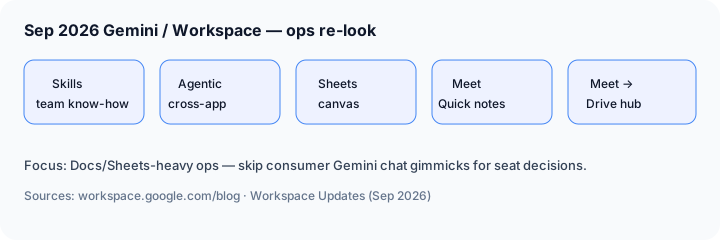
Sep 2026 snapshot (picture)

Uncertainty flag: Google rolls Gemini features by Workspace edition (Business Standard / Plus, Enterprise Standard / Plus), Google AI Pro / Ultra personal plans, and admin toggles (including Gemini Beta / Workspace Studio settings). Treat Workspace Blog + Workspace Updates posts as directional; confirm in your Admin console and on workspace.google.com/pricing.
Primary prompt (Marketing SoT) — run against Google’s public Sep 2026 Gemini/Workspace notes, not rumor threads:
From Google’s public Sep 2026 Gemini/Workspace notes, list 5 changes for a Docs/Sheets-heavy ops team — cite sources.
Changes that matter for ops teams
Examples at a glance: each change below includes a concrete ops example plus a short Try this. We skip consumer-only Gemini chat gimmicks here; cite them only if your ops team actually ships work from the consumer app.
1. Workspace Skills — reusable team know-how for Gemini
What changed (public ≈ Sep 16, 2026): Google’s Skills in Workspace post describes reusable prompts that guide Gemini with your team’s rules, templates, and reference files. Skills can be drafted in Docs with a skill builder, refined in Workspace Studio, and @mentioned in the Gemini side panel across Gmail, Docs, Slides, Drive, and Chat. Public notes say availability depends on admins enabling the Gemini Beta setting — confirm before you rewrite SOPs.
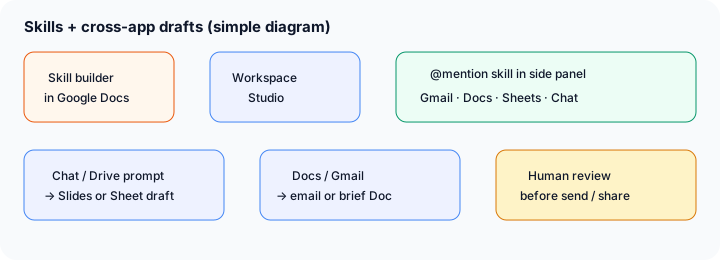
If Skills are enabled for your Workspace:
Draft a Workspace Skill for our weekly ops status: required headings (Progress, Risks, Asks), owner + date required on every bullet, never invent metrics. Include one reference Doc template path. List how a teammate @mentions it from Chat and from Docs.
2. Cross-app agentic capabilities — drafts without tab thrash
What changed (public ≈ Sep 9, 2026): Google’s five agentic capabilities post describes prompting Gemini from Chat, Drive, Docs, or Gmail to create formatted Docs, structured Sheets, or Slides while you stay in the current app — for example Chat → leadership deck, Drive folder → cost tracker Sheet, Docs → team email, Gmail thread → structured brief Doc, Docs proposal → branded deck. Public rollout notes target Business Standard/Plus, Enterprise Standard/Plus, and Google AI Pro/Ultra (and Education Pro). Confirm live before you change handoff SOPs.
In Chat or Drive (where Ask Gemini is available on your plan):
Using only context I can access in this Chat thread and the linked Drive folder: draft a 6-slide leadership update with Progress, Risks, Asks. Do not invent metrics. Flag Unknown where sources are silent. Leave owner blanks for me to fill.
3. Sheets canvas — interactive mini-apps on top of your Sheet
What changed (public ≈ Sep 10, 2026): Google’s Sheets canvas post describes AI-powered mini-apps (Kanban boards, executive dashboards, scenario models, timelines, priority matrices, workshop boards) built with Gemini 3.8 Flash from natural language. Changes on the canvas update underlying Sheet cells; sharing still uses standard Drive permissions. Path called out publicly: Insert → Create a canvas. Available on Business/Enterprise Standard and Plus (and listed Google AI Pro/Ultra / Education Pro) per the post — confirm in your Sheet.
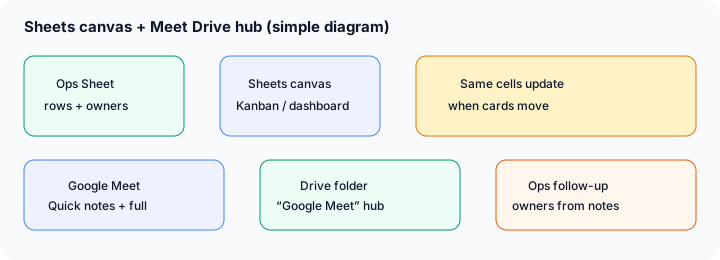
In a Sheet with task, owner, status, due date columns (Insert → Create a canvas if available):
Create a canvas Kanban from this sheet only: columns Not started / In progress / Need input / Done. Cards show task + owner. Dragging a card must update the Status cell. Do not invent tasks missing from the sheet.
4. Meet Quick notes — one-page takeaways by default
What changed (public ≈ Sep 22, 2026): Google’s Workspace Updates: Quick notes post makes Quick notes the default tab in Take notes for me Docs and the default summary in the notes email — high-level action items, outcomes, and talking points on a single page, with Full notes still available for depth. Availability listed for Business Standard/Plus, Enterprise Standard/Plus, Frontline Plus, Google AI Pro for Education, and Google AI Pro/Ultra consumer. Admin control is the existing Take notes for me setting — confirm org policy before you assume every meeting produces notes.
After a Take notes for me meeting (if enabled):
From this Meet Quick notes Doc only: extract a table of action items with owner and due date blanks. Flag any item with no named owner as Needs owner. Do not invent owners that aren’t in the notes.
5. Meet artifacts organized into a Google Meet Drive hub
What changed (public late Aug → Sep 2026 continuity): Google’s August 2026 Workspace feature drop (still the public source ops teams cite into September) describes Meet automatically organizing notes, transcripts, and recordings into a parent Google Meet folder in the host’s My Drive, with per-meeting subfolders and shortcuts for attendees. Related Sep Meet notes (Quick notes; admin defaults for Take notes for me) make that hub more useful week to week — confirm your plan’s defaults, especially if Business Standard/Plus auto-notes policies apply in your tenant.
Using only files in this meeting’s Google Meet Drive subfolder: list notes Doc, transcript, and recording links; summarize decisions + open questions in 6 bullets; propose Sheet columns for owner follow-up. Do not invent files that aren’t in the folder.
What did not change for ops (still use the how-tos)
- Gemini side panel in Docs/Sheets/Gmail remains the day-to-day drafting surface — see Gemini for ops and Gemini in Sheets.
- Product deep-dive patterns for when Gemini fits because work already lives in Workspace are unchanged in intent — see Gemini.
- Human review of metrics, owners, and outbound emails is still required; Skills and canvas do not replace a system of record.
- Consumer Gemini app-only features that never touch Docs/Sheets/Meet are out of scope for this ops changelog.
Vs ChatGPT / Claude (brief)
What’s new in ChatGPT (Sep 2026) covers Astra + Business Library/Data/Deep Research + support plugins. What’s new in Claude (Sep 2026) covers One Claude + Docs/Slides + redesigned Projects. Gemini’s Sep notes strengthen in-Workspace Skills, cross-app drafts, Sheets canvas, and Meet notes/Drive organization. Side-by-side on where files live: ChatGPT vs Gemini for ops.
Pricing & access context (September 2026)
Figures summarized from Google’s public Workspace pricing, Google AI plans, and the Sep product posts above. Edition gates, Gemini Beta / Studio admin toggles, and Meet Take notes defaults change — confirm live.
- Workspace Business / Enterprise: Skills, agentic cross-app drafts, and Sheets canvas are described for Business Standard/Plus and Enterprise Standard/Plus in the Sep posts (plus listed Google AI Pro/Ultra / Education Pro cases). Confirm your edition and Admin console.
- Google AI Pro: public consumer pages often list about $19.99/month (US) with expanded Gemini access inside Workspace apps where offered — confirm on gemini.google/subscriptions.
- Meet Take notes / Quick notes: gated by existing Take notes for me controls and plan lists in Workspace Updates; some Business tenants may see different default-on policies — ask your admin.
Uncertainty: Which seats see Skills @mentions, Ask Gemini in Chat/Drive, canvas under Insert, and Quick notes this week depends on edition, region, and admin settings. Always confirm in-product and on Google’s Help Center / Workspace Updates before you change seats or SOPs.
When this update helps (honest take)
It tends to help when your Docs/Sheets-heavy ops team already lives in Workspace weekly, wants shared status/proposal Skills instead of one-off prompts, needs first-draft decks or Sheets without leaving Chat/Drive, wants a canvas view on top of a tracker Sheet, or needs faster Meet follow-up via Quick notes + the Google Meet Drive hub.
It tends not to help when your company already standardized on ChatGPT Business Custom GPTs or Claude Projects for the same jobs, when admins have Gemini Beta / Studio / Take notes disabled, when finance requires a BI tool rather than a Sheet canvas, or when you only needed a one-line chat answer. Buying higher Workspace editions solely for a beta skill you will not govern is usually wasted — soft next step below only if multiple AI seats overlap on the same weekly jobs.
Paying for Gemini and a few other AI tools? The $9 AI toolkit spreadsheet lists every AI subscription you have, what each one costs, and how fast it pays for itself, so you can see which ones are worth the money.
Want someone to do it for you? AI toolkit audit — $19
FAQ
What changed in Gemini / Workspace in September 2026 that ops should notice?
Skills; cross-app agentic drafts; Sheets canvas; Meet Quick notes; Meet → Drive hub organization. Confirm live on your plan and cite the Workspace Blog / Updates posts linked above.
Do the Gemini deep-dive and Sheets how-to still matter?
Yes. Keep using gemini, gemini-for-ops, and google-sheets-gemini. This page is the dated Sep 2026 changelog only.
How does this compare to ChatGPT’s Sep 2026 updates?
ChatGPT Astra + Work connectors/plugins vs Gemini in-Workspace Skills/canvas/Meet. See What’s new in ChatGPT and ChatGPT vs Gemini for ops.
Where are the deeper Gemini guides?
gemini.html · for ops · Sheets · vs ChatGPT. This page is the dated Sep 2026 changelog only.
Optional next step (if seats overlap)
If Gemini is one of several AI seats doing the same weekly memo/deck/tracker loop, optional help: $19 AI toolkit audit or $9 AI toolkit spreadsheet — only if you are juggling overlapping seats. Or email hello@aiproduct.reviews with subject Audit $19 / Toolkit spreadsheet $9.
Checkout is live via Stripe. After you pay, we email delivery (spreadsheet) or intake next steps (audit).