What’s new · Claude · Sep 2026
What’s new in Claude (Sep 2026): changes ops should actually care about
Dated changelog-style guide — only Claude changes that affect weekly ops/finance workflows (Projects, Artifacts, Docs/Slides, Team access). Not a rehash of the Claude deep-dive, Projects, Artifacts, or Claude for ops pages — those remain the how-tos; this page is what moved in September 2026.
Who this changelog is for
Ops leads and finance owners who already use Claude Projects + Artifacts weekly and need a dated “what actually moved” note — not another full product review. Deep feature how-tos stay on claude-projects, claude-artifacts, claude-for-ops, and claude-for-finance.
Sep 2026 snapshot (picture)
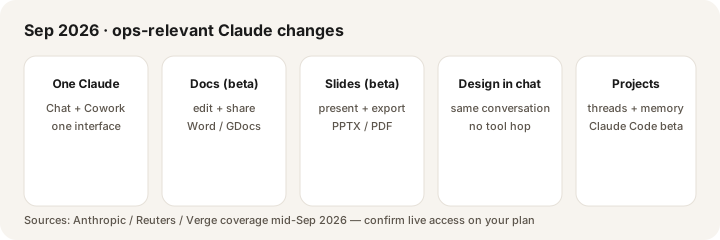
Uncertainty flag: Rollout order (Pro/Max first; Team/Free later), exact UI labels, and which seats see Docs/Slides today can move week to week. Treat press + Anthropic blog posts as directional; confirm in your own Claude account and on claude.com/pricing.
Primary prompt (Marketing SoT) — run against Anthropic’s public product pages, not rumor threads:
Based on Anthropic’s public Sep 2026 product pages, list 5 changes that affect an ops lead using Projects + Artifacts weekly — ignore hype, cite the page.
Changes that matter for weekly ops
Examples at a glance: each change below includes a concrete ops example plus a short Try this.
1. One Claude — Chat and Cowork in one interface
What changed (≈ Sep 16, 2026): Public coverage (including Reuters and The Verge) describes Anthropic merging regular chat and Cowork into a single “one Claude” experience so you stop picking the right tool before every task. Artifacts, Projects, connectors, and skills stay available as Claude decides what the job needs.
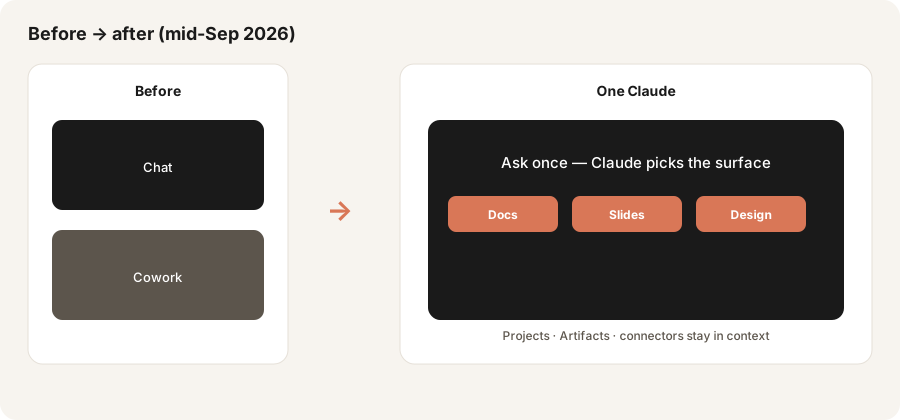
In the same Claude conversation with your weekly Project attached:
From this pasted status dump only: (1) extract action items with owner + date blanks, (2) draft a half-page ops memo, (3) say whether a Doc or Slides surface fits better for leadership. Do not invent metrics.
2. Claude Docs (beta) — editable documents from chat
What changed: Claude Docs (beta) lets you create and edit documents inside Claude, collaborate with comments, share a link, and export toward Word or Google Docs (per public Sep 16 coverage). For ops, that means the memo can stay editable in Claude instead of dying as chat text you re-paste into Docs.
If Docs appears on your plan:
Create a Claude Doc titled “Week 38 ops readout.” Use only the Project files + this paste. Sections: what moved, risks, decisions needed, owners. Leave dollar amounts as blanks if not in the files. Export path note at the bottom.
3. Claude Slides (beta) — decks without leaving the thread
What changed: Claude Slides (beta) supports creating and editing presentations in conversation, presenting from Claude, and exporting to PowerPoint or PDF (public Sep 16 coverage). This is the “bullet brief → deck” job many ops teams currently send to Gamma or paste into Slides by hand.
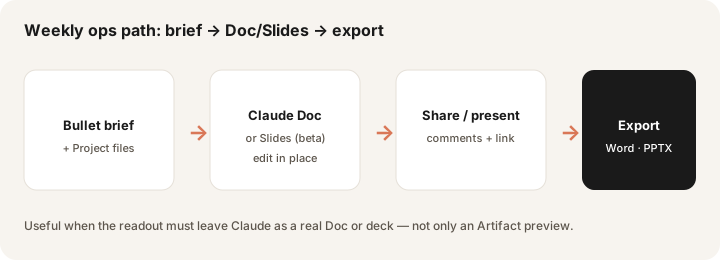
Paste eight real readout bullets (sanitize names if needed):
Make a 6-slide deck: problem, metrics, risks, decisions needed, owners, next week. Minimal decoration; finance-readable. Flag any metric not present in my paste as Unknown.
4. Claude Design inside the same conversation
What changed: Claude Design moves into the main conversation surface alongside Docs and Slides, so visual work is one ask away instead of a separate tool hop (public Sep 16 coverage). Standalone Design continues; the ops win is fewer mode switches when a one-pager needs a simple visual.
From this decision brief only, draft a simple one-page visual: three options, recommended path marked, owner + date blanks, no invented ROI. Keep it grayscale and printable.
5. Projects redesigned — coordinator + parallel threads (Claude Code beta)
What changed (≈ Sep 17, 2026): Anthropic’s Projects redesigned post describes Projects that use a coordinator plus parallel threads (each a Claude Code cloud session), shared memory, and a library of files/artifacts. Early beta access is limited (select Pro/Max Claude Code users first; Team/Enterprise and broader chat/Cowork later). Existing web/desktop Projects keep working during the upgrade.
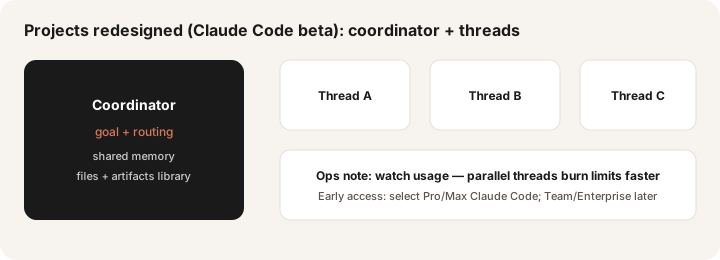
If redesigned Projects appear in your Claude Code account (otherwise skip and keep classic Projects):
Project goal: “Weekly close checklist refresh.” Thread A: draft checklist Doc from Project files only. Thread B: list three risks if Sunday automation fails. Do not invent journal entries. Summarize both threads for the finance lead with owner blanks.
What did not change for ops (still use the how-tos)
- Classic Projects + custom instructions remain the weekly home for close notes and SOPs until redesigned Projects reach your plan — see Projects how-to.
- Artifacts still matter for live, shareable outputs inside Claude; Code/org Artifact sharing rules still depend on plan — see Artifacts how-to.
- Role patterns for ops and finance memos are unchanged in intent — see Claude for ops and Claude for finance.
Vs ChatGPT Team / Gemini (brief)
ChatGPT Team/Business still fits when shared Custom GPTs encode close SOPs. Gemini / Gemini in Sheets still fit when the work already lives in Workspace. Claude’s Sep 2026 Docs/Slides push reduces the “export everything” tax — only if your seat has access and your team will edit there. Side-by-side on three ops jobs: Claude vs ChatGPT for ops.
Pricing & access context (September 2026)
Figures summarized from Anthropic’s public claude.com/pricing as of September 2026. Plan names, usage multipliers, and which seats include Docs/Slides/redesigned Projects change — confirm live.
- Pro: about $20/month billed monthly, or about $17/month when billed annually ($200 up front). Public pages list Claude Code, Projects, and Claude Design/Slides/Docs among Pro capabilities.
- Max: from about $100/month (5× or 20× Pro usage options). Early / higher-limit access often lands here first.
- Team: Standard seats about $25/user/month monthly or $20 annual; Premium about $125/$100. Minimum two seats. Project sharing/collaboration is a Team+ feature on public matrices.
- Enterprise: about $20/seat/month plus usage at API rates, billed annually — plus admin/compliance controls.
Uncertainty: Mid-Sep rollout notes say Pro/Max first for “one Claude” and Docs/Slides, with Team/Free later; redesigned Projects start as a Claude Code beta for select Pro/Max users. Always confirm feature availability in-product and on pricing / Anthropic news before you change seats.
When this update helps (honest take)
It tends to help when you already live in Claude weekly and were losing time switching Chat vs Cowork, or re-pasting memos/decks into Docs/Slides. Docs/Slides are useful when leadership needs an editable Doc or presentable deck without a second tool — and your plan actually shows those surfaces. Redesigned Projects help multi-step agentic work once you have access; they are not required for next Monday’s close checklist on classic Projects.
It tends not to help when your company already standardized on ChatGPT Custom GPTs or Gemini-in-Workspace for the same jobs, when Docs/Slides are not on your seat yet, or when you only needed a one-line chat answer. Buying Max solely for a beta surface you will not edit in is usually seat waste — soft next step below only if multiple AI seats overlap on the same weekly jobs.
Paying for Claude and a few other AI tools? The $9 AI toolkit spreadsheet lists every AI subscription you have, what each one costs, and how fast it pays for itself, so you can see which ones are worth the money.
Want someone to do it for you? AI toolkit audit — $19
FAQ
What changed in Claude in September 2026 that ops should notice?
One Claude (Chat + Cowork), beta Docs and Slides, Design in conversation, and redesigned Projects with coordinator/threads (limited early access). Confirm live on your plan.
Do I still need Claude Projects and Artifacts the old way?
Yes for most weekly loops today. Keep using the Projects and Artifacts how-tos while new surfaces roll out.
How does this compare to ChatGPT Team or Gemini?
ChatGPT wins on shared Custom GPTs; Gemini wins inside Workspace. Claude Docs/Slides narrow the document/deck gap if you have access. See Claude vs ChatGPT for ops.
Where are the deeper Claude guides?
claude.html · Projects · Artifacts · for ops · for finance. This page is the dated Sep 2026 changelog only.
Optional next step (if seats overlap)
If Claude is one of several AI seats doing the same weekly memo/deck/close loop, optional help: $19 AI toolkit audit or $9 AI toolkit spreadsheet — only if you are juggling overlapping seats.
Checkout is live via Stripe. After you pay, we email delivery (spreadsheet) or intake next steps (audit).