Writing & copy · Ops cross-link · Decks
Gamma review (Sep 2026): deck drafts from bullets for ops/finance readouts
For ops and finance leads who need a weekly readout deck from a bullet brief — when Gamma is fast enough, and when a designer or template-rigid tool still wins. Features and usage, with honest limits.
Who this page helps
Ops leads, finance owners, and founders who already have the story in eight bullets but lose an hour formatting slides. The buying question is whether an AI deck draft gets you to a finance-readable readout — or whether you need locked templates / a designer for board and brand decks.
What Gamma is
Gamma is an AI tool for presentations, docs, and web-style cards. You paste a brief or outline; it drafts a multi-card deck you edit in place, then share or export (PDF, PPTX, and related formats on public pages). It is strongest when speed-to-first-draft matters. It is weaker when you need strict brand systems or pixel-perfect board art.
Major features (with how someone uses them)
Examples at a glance: each feature has a concrete ops/finance example plus a short Try this.
1. Bullets → readout deck (the buying decision)
What it is: Paste a short brief; Gamma drafts a card-based deck. For ops, the win is a six-slide structure (problem, metrics, risks, decisions, owners, next week) without opening PowerPoint blank.
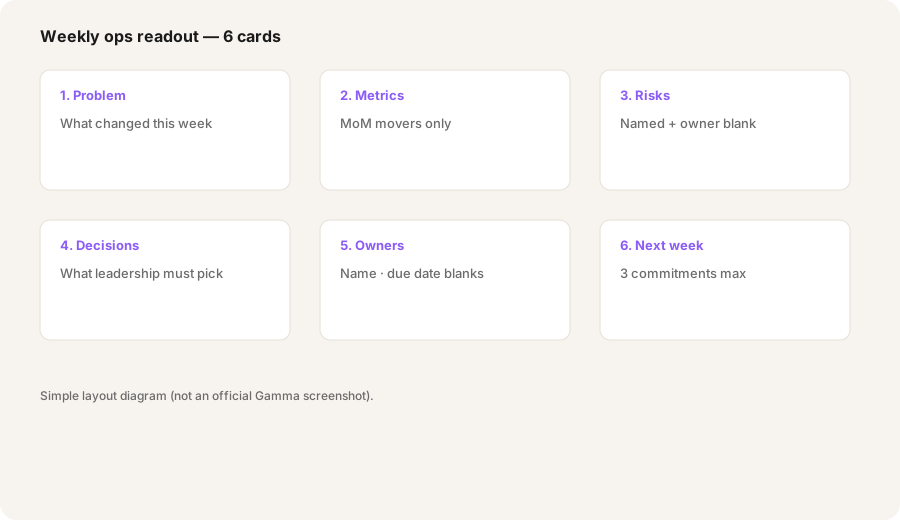

In Gamma, paste 8 bullets from a weekly ops readout:
Make a 6-slide deck: problem, metrics, risks, decisions needed, owners, next week. Minimal decoration; finance-readable.
2. Edit, themes, and export
What it is: After the draft, you edit cards, tighten copy, and export or share. Paid plans advertise branding removal, more AI credits, custom fonts/domains, and analytics — labels move, so treat them as “more polish and less Gamma watermark,” not as a substitute for checking the numbers yourself.
After your first Gamma draft:
Rewrite each slide title to under 6 words. Replace any invented metrics with [BLANK]. Add a footer line: Source = weekly ops Doc · Owner blanks. Keep decoration minimal.
3. When Gamma beats rigid templates — and when it doesn’t
What it is: Gamma’s freer drafts help when the outline changes every week. Template-rigid tools (for example Beautiful.ai-class products) help when sections must stay locked for board or brand decks. A human designer still wins for high-stakes visual systems Gamma cannot enforce.
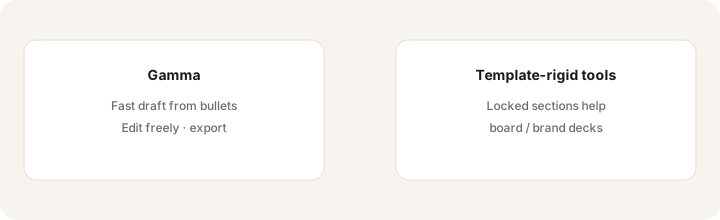
Pick one real deck job you ship this month:
List: (1) Must sections stay locked every time? (2) Is the audience finance/ops or board/brand? (3) Do we need pixel brand control? If no/ops/no — try Gamma first. If yes/board/yes — prefer templates or a designer pass.
4. The weekly ops readout loop
What it is: The useful habit is not “make pretty slides” — it is a repeatable loop: bullets from the tracker → Gamma draft → human number check → share link or PPTX. Claude or ChatGPT can draft outline text; Gamma owns the visual card layout.
Build a reusable weekly loop:
Save this as your standing brief template: 8 bullets max → same 6-slide prompt → 10-minute human pass (owners + numbers only) → share link. Reject any slide that invents a metric.
Public pricing (September 2026)
Figures summarized from Gamma’s public pricing / help pages and secondary writeups as of September 2026. Exact credits, slide limits, and annual discounts move — confirm live.
- Free: limited one-time AI credits; Gamma branding on output; smaller per-prompt slide caps.
- Plus: often listed around $12/month (about $9/month billed annually) — more credits, remove branding. Confirm live.
- Pro: often listed around $25/month (about $18/month annual) — premium models, custom branding, analytics, API notes on public pages. Confirm live.
- Ultra: often listed around $100/month (annual figures vary by source) — highest credit tier / advanced models. Confirm live.
- Team / Business: public help pages have listed Team around $20/seat/month annual-style packaging (seat minimums) and Business higher with SSO/admin controls. Confirm live on gamma.app/pricing.
Uncertainty: Credit math, cards-per-prompt, and Team vs individual tabs change. We could not lock every annual Ultra figure from a single unchanging public card on every fetch. Always confirm on gamma.app/pricing before you buy.
When Gamma is useful (honest take)
Gamma tends to help when you already know the story in bullets and need a finance-readable deck draft this afternoon. It tends not to replace a designer for brand systems, or a locked board template when every section must stay identical quarter to quarter. Paying for Gamma plus a writing AI seat plus a designer retainer for the same weekly ops deck is stack sprawl — use Gamma for the draft job, keep Claude/ChatGPT for the written brief if that is already your habit.
Paying for Gamma and a few other AI tools? The $9 AI toolkit spreadsheet lists every AI subscription you have, what each one costs, and how fast it pays for itself, so you can see which ones are worth the money.
Want someone to do it for you? AI toolkit audit — $19
Alternatives compared: Beautiful.ai-class, PowerPoint + Claude, Canva
| Axis | Gamma | Template-rigid (e.g. Beautiful.ai) | Claude/ChatGPT + PPTX | Canva |
|---|---|---|---|---|
| Typical paid seat (Sep 2026) | Plus ~$12/mo; Pro ~$25/mo. Confirm gamma.app/pricing. | Varies by vendor. Confirm their pricing page. | Chat seat ~$20/mo + Office you already own. See Claude / ChatGPT. | Pro/Teams tiers. Confirm canva.com/pricing. |
| Native strength | Fast AI deck from brief | Locked section templates | Outline text; you still layout slides | Design library + brand kits |
| Best fit when… | Weekly ops/finance readouts from bullets. | Board/brand decks need rigid structure. | You only need outline copy, not layout. | Marketing visuals already live in Canva. |
| Less useful when… | You need pixel brand control every slide. | Outline changes every week. | Layout is the bottleneck. | You only need a six-slide ops memo. |
FAQ
What is Gamma?
An AI presentation/doc tool that turns a brief into an editable multi-card deck. Useful for ops/finance readout drafts when speed matters.
How much is Gamma in September 2026?
Public pages often list Free, Plus (~$12/mo), Pro (~$25/mo), Ultra (~$100/mo), plus Team/Business seats. Confirm on gamma.app/pricing.
When is Gamma enough vs Beautiful.ai or a designer?
Gamma for fast freer drafts; template tools for locked board sections; a designer for high-stakes brand systems.
Can Gamma replace PowerPoint for weekly ops?
Often for drafts and share links. Many teams still export PPTX for final leadership edits.
Optional next step (if seats overlap)
If Gamma is one of several AI seats doing the same draft-and-paste loop, optional help: $19 AI toolkit audit or $9 AI toolkit spreadsheet — only if you are juggling overlapping seats.
Checkout is live via Stripe. After you pay, we email delivery (spreadsheet) or intake next steps (audit).