How-to · Finance decks · Gamma · Oct 8, 2026
Draft a finance-readable deck from bullets you already have
“Finance-readable deck” here does not mean Gamma invents your key numbers. It means the story already exists in bullets you trust; Gamma lays out the slides fast, and a person checks every figure against the sheet or finance pack before anyone forwards it.
Who this is for
Ops and finance leads who already have the weekly or monthly readout in eight to fifteen bullets (or an outline backed by a spreadsheet) and lose an hour to slide formatting. If the board wants locked section layouts every quarter, Beautiful.ai template rails may fit better than a freer Gamma draft — compare the jobs; do not buy both for the same weekly deck by default.
How to do it
This page is a how-to. It is not a ranking of deck tools. The Gamma review explains the features and the weekly readout loop; this page is the number-check routine around them — sourced bullets in, one draft, and a named person who signs off on every figure. Dated pricing lives on that review and on Beautiful.ai for the template-first alternative.

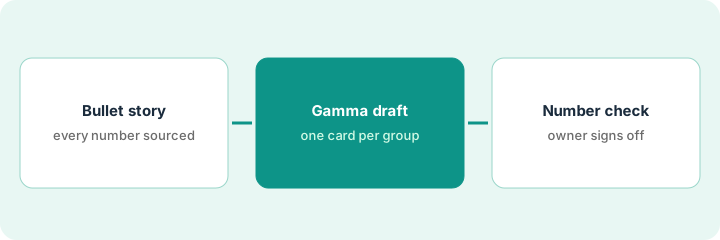
1. Step 1 — Write the bullet story first
What it is: Finish the story outside the deck tool. Gamma speeds up layout; it does not create finance numbers you can trust.
- Outline in order: context → key numbers → what changed and why → risks → the ask → appendix notes.
- Every number in the bullets points at a cell, a report, or says Unknown.
- No vague claims like “strong growth” without a figure you can defend.
- Name the person who checks the figures before sending — usually finance or whoever owns the pack.
Fifteen bullets for the monthly ops readout. Revenue and cash figures point at named spreadsheet tabs. Two risks are marked Unknown until accounts payable confirms. The ask is one sentence. No slide tool is open yet.
Paste your outline into a doc and highlight every number. If any number has no source and is not marked Unknown, fix the outline before you open Gamma.
2. Step 2 — Generate the Gamma draft
What it is: Paste the finished outline into Gamma to draft a set of slides (Gamma calls them cards) that you edit in place, then share or export to PDF, PowerPoint, PNG, or Google Slides. See Gamma.
- Ask for the section order you already wrote — not “make it inspiring.”
- Delete any card that adds a chart or metric that is not in your bullets.
- Treat generation as a first draft, not endless polish. Premium features and advanced models use AI credits.
- If you need rigid, locked section layouts for board packs, move that job to Beautiful.ai rather than fighting Gamma’s freer cards.
Gamma returns twelve cards. Two decorative charts cite no source, so they are deleted. The key-number cards keep the spreadsheet figures from the outline. Export waits for Step 3.
Paste the outline and ask: One card per section header below, in this order. Use only the numbers in the text. Do not add charts, metrics, or claims that are not here. Delete anything that brings in a new figure.
3. Step 3 — A person checks every number
What it is: Before the deck goes to email, a chat channel, or a leadership review, a person compares every figure on the slides with the source pack.
- Check the key numbers and the what-changed lines cell by cell (or report by report).
- Fix wording the AI softened in a way that changes meaning (“slightly down” when the sheet shows a clear miss).
- Leave Unknown risks labeled Unknown on the slide.
- Export or share only after the named owner signs off — even if that is a checkmark reply in chat.
The owner finds one rounded percentage that hid a miss. The card is corrected, the Unknown accounts-payable risk stays labeled, and then the PDF goes to the leadership channel.
Print or export the draft and tick each number against the sheet. If you skip the tick pass, do not send — faster formatting is not worth a wrong figure.
Pricing context (October 2026)
This how-to is not a price sheet. Plan detail for Gamma and Beautiful.ai lives on those reviews. Recheck each vendor’s site before you budget. Dated October 2026.
Checked Oct 8, 2026 on the vendor’s own pricing page: gamma.app/pricing lists Free at $0 (400 credits at signup that do not refill, up to 10 slides per prompt, export to PDF, PPTX, PNG, and Google Slides), Plus at $9 per seat per month billed annually ($108 a year; up to 100 slides per prompt, no Gamma branding), Pro at $18 ($216 a year; custom branding, analytics, API access), and Ultra at $90 ($1,080 a year). The page says annual billing saves up to 28% and that “unlimited AI creations” means everyday use under fair use, with premium features using credits. We read the annual view; Beautiful.ai was not rechecked.
Uncertainty: AI credit pools, branding removal, export options, and team seats change. If an invoice and a review disagree, trust the invoice. Do not paste a marketing list price you did not pay. The only prices this site sells here are the optional $9 AI toolkit spreadsheet and $19 AI toolkit audit.
When this helps (honest take)
Useful when the story already exists in bullets, getting a first draft fast matters for weekly ops or finance readouts, and a person checks the numbers every time.
Not useful when the numbers are not ready, you need the same locked board template every quarter (consider Beautiful.ai), or you want the tool to make up key numbers. Paying for Gamma and Beautiful.ai for the same weekly deck is usually sprawl; different jobs can justify both.
Related options (educational)
| Need | Where to look | Why |
|---|---|---|
| Bullets to a fast card deck | Gamma | Quick first drafts for ops and finance readouts |
| Locked slide layouts and board rails | Beautiful.ai | When section types must stay fixed |
| Close chores beside the deck | Get a close checklist that answers from your books | The numbers still come from people |
| Finance tools inventory | Stack map — finance ops | List job, tool, owner, and overlap |
Related reviews: Gamma · Beautiful.ai. Related how-tos: Get a close checklist that answers from your books · Write Friday’s update from the monday board. Free: seat-waste calculator if two deck seats cover the same weekly readout.
FAQ
Will Gamma make up key numbers?
It might if your outline is vague. Put only sourced numbers (or Unknown) in the bullets, then delete any chart or figure you did not supply.
Gamma or Beautiful.ai?
Gamma for quick, freer weekly drafts from bullets. Beautiful.ai when locked layouts matter for board or brand. See Gamma and Beautiful.ai — this page is not a ranking.
Can the first AI draft go straight to leadership?
Not on this page’s pattern. A named person checks the numbers first, every time.
Where do dated prices live?
On the Gamma review and gamma.app/pricing. This October 2026 how-to only repeats prices we checked on the vendor’s own pricing page on Oct 8, 2026.
Optional next step
Free reviews stay free. Neither offer is required to use this page. If two presentation AI seats already cover the same readout job, optional help: $9 AI toolkit spreadsheet (seats, spend, owner, cancel-by, overlap) or $19 AI toolkit audit when you want a written memo.