Writing & copy · Decks · Finance
Beautiful.ai review (Sep 2026): template-rigid decks vs Gamma freeform
When template guardrails help finance and board decks versus Gamma’s freer drafts — Smart Slides, locked sections, Sep 2026 Pro/Team pricing, and an honest split of when each tool wins.
Who this page helps
Finance owners, founders, and ops leads who ship board or investor packs with the same section order every time — agenda, KPIs, variance, risks, ask, appendix — and who want templates that refuse to turn into a collage. If your weekly ops readout changes outline every Tuesday, start with Gamma instead. If you need pixel brand systems, keep a designer pass.
What Beautiful.ai is
Beautiful.ai is a presentation product built around Smart Slides: structured layouts that auto-adjust as you add content, plus AI helpers (often framed as DesignerBot / AI generation on public pages) to draft copy into those layouts. The product thesis is guardrails first — less freestyle, more consistent decks. This review focuses on that rigidity as a feature for finance/board work, not as a knock on freer tools.

Major features (with how someone uses them)
Examples at a glance: each feature has a concrete finance/ops example plus a Try this mini-workflow.
1. Smart Slides & template guardrails
What it is: You pick a Smart Slide type (timeline, comparison, metrics, agenda, etc.); the layout reflows as you add bullets or charts instead of free-dragging boxes. For board packs, the win is that section types stay recognizable quarter to quarter — not that AI invents a new visual language every time.
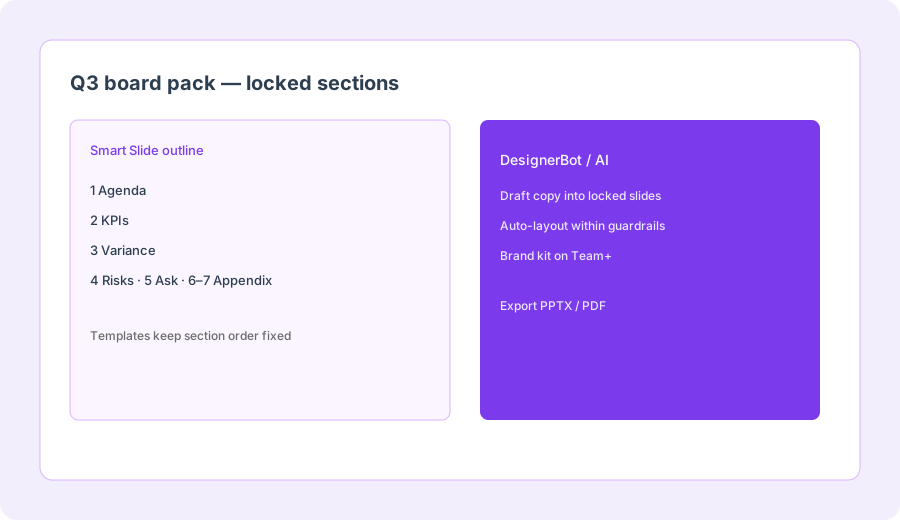
Open a blank deck and pick Smart Slide types only:
Build slides labeled Agenda, KPIs, Variance, Risks, Ask, Appendix (two slides). Do not freeform-design. Note which slide types forced a clear structure vs where you wanted freer layout.
2. Locked board-deck outlines
What it is: The useful habit is a standing outline: agenda → KPIs → variance → risks → ask → appendix. Templates beat freeform AI slides when the board expects the same path every meeting. Freer tools win when the story structure changes weekly.
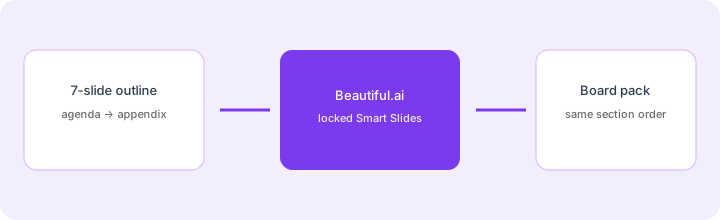
Outline a 7-slide board deck with locked sections:
Outline a 7-slide board deck with locked sections: agenda, KPIs, variance, risks, ask, appendix. Note where templates beat freeform AI slides.
3. AI draft inside the rails
What it is: Public Beautiful.ai packaging includes AI content generation / DesignerBot-style helpers to draft text into slides. Treat it as a copy assistant inside Smart Slides — not a license to invent board metrics. KPI and variance cards should still cite your Sheet or finance pack.
After an AI draft on KPI / variance slides:
Replace every number with the value from our Sheet or mark [BLANK]. Rewrite slide titles under 6 words. Keep appendix for definitions only — no new claims on the Ask slide.
4. Vs Gamma freeform (the buying split)
What it is: Gamma turns bullets into freer card decks fast — great for weekly ops/finance readouts. Beautiful.ai’s rigidity helps when sections must stay locked for board/brand. Paying for both for the same weekly deck is usually sprawl; paying for both for different jobs can be rational.
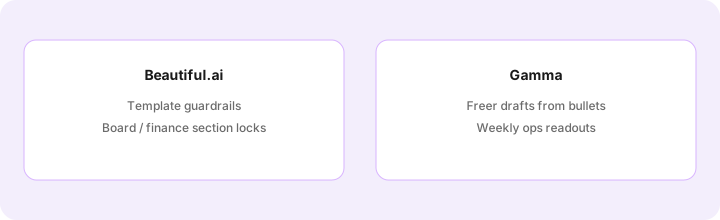
Pick one real deck you ship this month:
Answer: (1) Must section order stay identical every time? (2) Is the audience board/finance or weekly ops? (3) Do we need brand-kit locks across seats? If yes/board/yes — try Beautiful.ai. If no/ops/no — try Gamma first (Gamma review).
Public pricing (September 2026)
From beautiful.ai/pricing-plans and public writeups cross-checked in September 2026:
- No permanent free plan on public pages — commonly a 14-day trial (card required; auto-charges if you do not cancel). Confirm live.
- Pro: about $12/month billed annually, or about $45 month-to-month — individual seats, Smart Slides, AI generation, export.
- Team: about $40/user/month billed annually, or about $50/user/month monthly — typically 2–20 seats; shared brand libraries / collaboration on public cards.
- Enterprise: custom — SSO/SCIM, advanced permissions, audit logs, onboarding (20+ seat framing on public pages).
- One-off presentation: some public FAQ copy still mentions a single-presentation purchase (~$45); treat as optional and confirm live.
Uncertainty flags: Annual vs monthly gaps are large (Pro $12 vs $45). Team seat minimums, brand-guardrail packaging, and trial billing rules move. Always confirm on beautiful.ai/pricing-plans before budgeting a board calendar.
When Beautiful.ai is useful (honest take)
Beautiful.ai tends to help when section order and visual consistency matter more than freestyle AI — board packs, finance readouts with fixed agendas, brand-locked Team libraries. It tends not to help when every weekly deck needs a new structure (use Gamma), when you only need outline text (Claude/ChatGPT + PPTX), or when a designer already owns the brand system end to end. Template rigidity is the product — if you hate guardrails, you will hate this tool for the right reasons.
Paying for Beautiful.ai and a few other AI tools? The $9 AI toolkit spreadsheet lists every AI subscription you have, what each one costs, and how fast it pays for itself, so you can see which ones are worth the money.
Want someone to do it for you? AI toolkit audit — $19
Alternatives compared: Beautiful.ai vs Gamma / Claude+PPTX / Canva
| Axis | Beautiful.ai | Gamma | Claude/ChatGPT + PPTX | Canva |
|---|---|---|---|---|
| Best when… | Locked board/finance sections. | Weekly freer drafts from bullets. | Outline text only; you layout. | Marketing visuals already in Canva. |
| Cost shape (Sep 2026) | Pro ~$12/mo annual; Team ~$40/user. | Plus/Pro tiers — see Gamma. | Chat seat + Office you own. | Pro/Teams — confirm canva.com. |
| Less useful when… | Outline changes every week. | Board needs identical section locks. | Layout is the bottleneck. | You only need a 7-slide board memo. |
Also see Gamma, Canva Magic Studio, Claude, Claude for finance, the writing & copy hub, and the ops & automation hub.
FAQ
What is Beautiful.ai?
A presentation tool built on Smart Slides and template guardrails, with AI draft help inside those layouts — stronger for consistent board/finance decks than freestyle AI art.
How much does Beautiful.ai cost in September 2026?
Public cards: Pro ~$12/mo annual (~$45 monthly); Team ~$40/user/mo annual (~$50 monthly); Enterprise custom. Trial, not a free forever plan — confirm on beautiful.ai/pricing-plans.
Beautiful.ai vs Gamma?
Beautiful.ai when sections must stay locked; Gamma when weekly ops readouts want freer drafts from bullets. See the Gamma review for the freer side of the same job family.
Will AI fix bad board numbers?
No. Guardrails fix layout chaos; they do not make invented metrics true. Source KPI/variance slides from your finance system every time.
Optional next step (if seats overlap)
If Beautiful.ai is one of several AI deck/writing seats and you want a written pass across the whole list, the optional $19 AI toolkit audit produces a short memo. Prefer an editable grid? The $9 AI toolkit spreadsheet is a one-time CSV. Soft offer only — this deep-dive stands alone.
Checkout is live via Stripe. After you pay, we email delivery (spreadsheet) or intake next steps (audit).