Sales & marketing · Visuals · AI
Canva Magic Studio review (Sep 2026): ops/marketing visuals without a design seat
When Magic Studio covers internal decks, social, and one-pagers — and when you still need a designer or Gamma / Beautiful.ai — with concrete Try this prompts and honest pricing notes (as of Oct 17, 2026).
Who this page helps
Ops and marketing leads on small teams without a dedicated design seat who need internal announcements, social posts, and light decks that look intentional — navy/white brand colors, no stock-photo clutter — without waiting a week for a designer. If your only job is a weekly leadership deck from bullets, start with Gamma. If brand systems and board-locked layouts matter, keep a designer (or template-rigid tools like Beautiful.ai) in the loop.
What Canva Magic Studio is
Magic Studio is Canva’s umbrella for AI design tools inside Canva: Magic Design (prompt → layout options), Magic Write (in-canvas copy), image/video helpers, and related features that share plan-level AI allowances. This review focuses on ops/marketing visuals without hiring a design seat — not a claim that Magic Studio replaces brand systems, illustration, or campaign creative direction. Feature names and allowance rules shift; always confirm the live Magic Studio page and your workspace AI usage meter.

Major features (with how someone uses them)
Examples at a glance: each feature has a concrete ops/marketing example plus a Try this mini-workflow.
1. Internal one-pagers & announcements
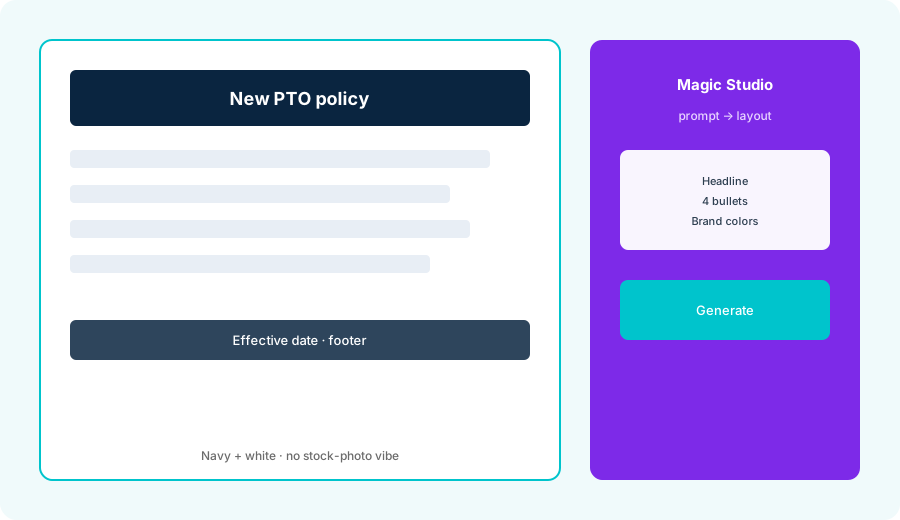
What it is: Canva’s sweet spot for ops is a single page that ships the same day: policy change, PTO update, office hours, or launch note. Magic Studio helps turn a short brief into a layout with headline, bullets, and footer — then you tighten brand colors and kill anything that looks like a stock-photo collage.
In Magic Studio / Magic Design:
Make a one-page internal announcement: new PTO policy. Headline, 4 bullets, footer with effective date. Brand colors: navy + white. No stock-photo vibe.
2. Magic Design / prompt → layout
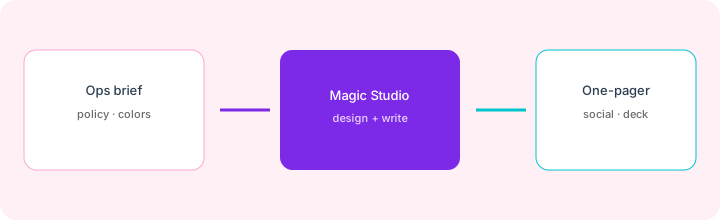
What it is: Magic Design (and related Canva AI entry points) turns a short prompt into several layout options you edit in the Canva canvas. Useful for social sizes and light decks when you already know the message; weak when you need a custom illustration system or pixel-perfect brand rules Magic cannot enforce.
Before publishing social variants:
Generate 3 LinkedIn-sized layouts for this product update (paste 5 bullets). Use only our Brand Kit colors. Flag any layout that invents quotes, logos, or metrics not in the paste.
3. Magic Write inside the canvas
What it is: Magic Write drafts, shortens, or expands copy while you stay on the design. Handy for tightening a policy one-pager or social caption without bouncing to ChatGPT — still human-owned for legal/HR wording. Treat invented policy details as a bug.
On one real announcement draft:
Rewrite these 4 approved bullets to ≤18 words each. Do not change eligibility, dates, or who to contact. Mark Unknown if a bullet lacks a fact you would need to invent.
4. Brand kit, AI allowance & limits
What it is: Paid Canva plans expand Brand Kits, templates, and monthly AI allowances (Standard / Premium / Ultra tiers on public help pages). Some tools (e.g. Magic Write on certain plans) sit outside the shared allowance under fair use — others burn the meter. Free has tight limits; Pro/Business raise them; Enterprise is custom. Confirm your live AI usage page before budgeting an AI Pass add-on.
Before buying more Canva seats for AI:
List our last 10 shipped visuals and where each was made (Canva / Gamma / Figma / designer). If fewer than half belong in Canva already, keep Magic Studio experiments on one Brand Kit for 30 days instead of a full seat rollout.
Public pricing (as of Oct 17, 2026)
Magic Studio rides on Canva seats — there is no separate “Magic Studio-only” SKU on public cards. From Canva’s official US canva.com/pricing page, as of Oct 17, 2026 (monthly and yearly toggle both checked):
- Free: $0 — 1.6M+ templates, 5GB storage, up to 20 Standard or Premium AI uses.
- Pro: $18 / month or $144 / year for one person (the yearly price is lower than the one we listed in September) — 5 Brand Kits, premium assets, 100GB storage, 10x the Free AI allowance (Premium or Ultra AI).
- Business: $25 / person / month or $250 / person / year — collaboration and team admin, 100 Brand Kits and approvals, 500GB storage, 20x the Free AI allowance.
- Enterprise: custom (contact sales) — SSO/SCIM, admin controls, contracted AI packaging.
- AI Pass / top-ups: Canva lists an AI Pass add-on for Pro and Business, and AI top-ups for Business, at extra cost. The pricing page shows no price for them, so treat them as quote-at-checkout — confirm on your billing page before budgeting.
Uncertainty flags: Which Magic features sit inside vs outside the shared allowance, exact Free trial caps, Teams vs Business naming, and regional price cards can differ by account. Magic Write marketing pages still cite older “50 total / 500 monthly” style limits on some URLs. Never budget from this page alone — open canva.com/pricing and your workspace AI usage meter.
When Magic Studio is useful (honest take)
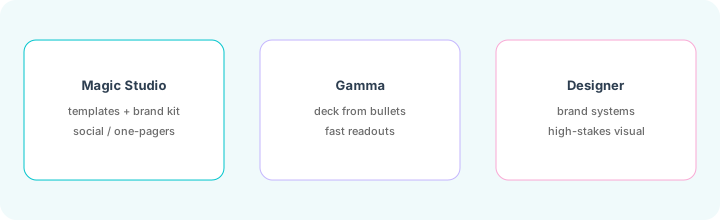
Magic Studio tends to help when internal one-pagers, social sizes, and light decks already belong in Canva, Brand Kit colors matter, and you need same-day visuals without a design seat. It tends not to help when the job is a bullet→deck weekly readout Gamma already covers, when Beautiful.ai-style locked sections matter for board packs, or when illustration/brand systems need a human designer. Buying Canva “for Magic Studio” while another tool is the real visual system of record is usually an expensive parallel stack.
Paying for Canva Magic Studio and a few other AI tools? The $9 AI toolkit spreadsheet lists every AI subscription you have, what each one costs, and how fast it pays for itself, so you can see which ones are worth the money.
Want someone to do it for you? AI toolkit audit — $19
Alternatives compared: Magic Studio vs Gamma vs Beautiful.ai vs designer
| Axis | Magic Studio | Gamma | Beautiful.ai | Designer / Figma |
|---|---|---|---|---|
| Best when… | One-pagers, social, brand-kit templates. | Fast multi-card decks from bullets. | Locked board/template rigidity. | Brand systems & high-stakes visual. |
| Cost shape (Sep 2026) | Canva Free/Pro/Business + AI allowance. | Gamma credits/seats (see Gamma). | Seat plans on Beautiful.ai. | Human hours + design tools. |
| Less useful when… | You only need readout decks. | You need social sizes + Brand Kits. | You need freeform one-pagers. | You only need same-day internal posts. |
Also see Gamma, AdCreative.ai, Descript, and the sales & marketing hub.
FAQ
What is Canva Magic Studio?
Canva’s AI design suite (Magic Design, Magic Write, and related tools) for drafting one-pagers, social, and light decks inside Canva — not a separate chat app.
How much does Canva Magic Studio cost in October 2026?
As of Oct 17, 2026, Canva’s US pricing page lists Free $0; Pro $18/mo or $144/yr; Business $25/person/mo or $250/person/yr; Enterprise custom. AI allowances differ by plan; AI Pass costs extra. Confirm on canva.com/pricing.
Magic Studio vs Gamma?
Magic Studio when Canva templates + Brand Kit + social/one-pagers are the job. Gamma when bullet→deck speed is the job. Don’t buy both for the same weekly readout.
Will Magic Studio replace a designer?
No for brand systems, illustration, or high-stakes campaign creative. Yes often enough for same-day internal announcements and routine social.
Optional next step (if seats overlap)
If Canva Magic Studio is one of several AI seats and you want a written pass across the whole list, the optional $19 AI toolkit audit produces a short memo. Prefer an editable grid? The $9 AI toolkit spreadsheet is a one-time CSV. Soft offer only — this deep-dive stands alone.
Checkout is live via Stripe. After you pay, we email delivery (spreadsheet) or intake next steps (audit).