How-to · monday.com · Ops status · Oct 5, 2026
Write Friday’s leadership update from the monday board, not from memory
Memory invents green status. The board, if you keep it honest, does not.
Who this is for
Ops leads whose work already lives on monday boards. If Asana or ClickUp is your system of record, use those reviews — Asana AI, ClickUp Brain — same ritual.
How to do it
This page is a how-to. It is not a ranking of work-management tools. Product detail and dated pricing live on the reviews linked below.
1. Step 1 — Make the board the only source
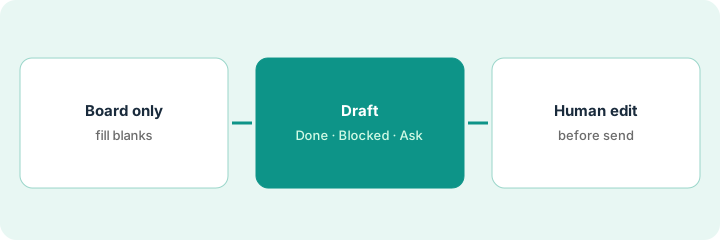
What it is: Before Friday, require status, owner, and date fields filled on active items. Empty fields beat fictional updates.
Read monday.com AI for board-native summary patterns and an honest look at AI credits.
Thursday’s blank-status filter shows five items. Three owners fill them in; two are marked blocked-need-legal on purpose.
Thursday 4pm filter: items with blank status. Ping owners once. Do not draft until blanks are intentional (Unknown / blocked-need-X).
2. Step 2 — Draft the update from board fields
What it is: Ask monday AI (or paste a sanitized board export into your chat seat) for:
- Shipped / moved this week
- Blocked with owner
- Asks for leadership
Rules: no invented percentages, no “team is crushing it,” cite board item names.
The draft cites “Vendor onboarding — Done” and “SSO rollout — Blocked (IT)” by item name. No percentages, no “great week.”
“Using only these board rows, write a 10-line Friday update: Done / Blocked / Ask. Mark Unknown where status is blank. No adjectives.”
3. Step 3 — Human edit before Slack or email
What it is: Add the politics and context AI will miss. Cut anything not on the board unless you label it as new info.
The sender adds one line AI could not know — the blocked item is waiting on a budget call Monday — and labels it as new info.
Send the same outline for three Fridays. If leadership asks for a different structure, change the template once — do not freestyle from memory again.
Pricing context (October 2026)
This how-to is not a price sheet. Public list prices for monday.com AI, ClickUp Brain, Asana AI, and Claude for ops live on those reviews. Recheck each vendor’s site before you budget. Dated October 2026.
Uncertainty: AI credits, plan tiers, and per-seat AI add-ons change. If an invoice and a review disagree, trust the invoice. Do not paste a marketing list price you did not pay. The only prices this site sells here are the optional $9 AI toolkit spreadsheet and $19 AI toolkit audit.
When this helps (honest take)
Useful when the board is trusted enough that leaders already glance at it.
Not useful when the board is fiction — fix hygiene first, or AI will summarize fiction faster.
Related options (educational)
| Need | Where to look | Why |
|---|---|---|
| Work lives on monday boards | monday.com AI | Board-native summaries |
| Work lives in ClickUp | ClickUp Brain | Same ritual, different home |
| Work lives in Asana | Asana AI | Same ritual, different home |
| Drafting from a sanitized export | Claude for ops | Chat seat with hard rules |
Related reviews: monday.com AI · ClickUp Brain · Asana AI · Claude for ops. Related how-to: Three checks before you add another AI seat.
FAQ
Why not write the update from memory?
Memory invents green status. Board fields with owners and dates do not, if you keep them filled.
What should the AI draft include?
Done, Blocked with owner, and Asks for leadership — citing board item names, with no invented percentages and Unknown where status is blank.
What if the board is out of date?
Fix board hygiene first. Otherwise AI will summarize fiction faster.
Where do dated prices live?
On the linked reviews and the vendor sites. This October 2026 how-to does not invent list prices.
Optional next step
Free reviews stay free. Neither offer is required to use this page. If several tracker AI seats overlap, optional help: $9 AI toolkit spreadsheet (seats, spend, owner, cancel-by, overlap) or $19 AI toolkit audit when you want a written memo.