Ops · Boards · AI
monday.com AI review (Sep 2026): boards for ops — updates and summaries without another chat seat
Educational look at monday AI for status updates and summaries when the board is already the truth: Sidekick, Updates Assistant, AI blocks, credits honesty, and when a separate chat seat still wins.
Who this page helps
Ops leads on small teams already living on monday boards who want Friday leadership updates, status summaries, and light column autofill without buying another chat seat that retypes the board. If monday is not where work is tracked, this page is the wrong buy question; start with AI in your real system of record instead.
What monday.com AI is
monday.com AI is monday’s native AI layer on the work platform: Sidekick as the main conversational entry point (board/doc/people context), AI Updates Assistant for summarizing or writing updates, AI blocks for column-level jobs (summarize, extract, assign labels/people, and more), plus credit-metered agents, AI workflows, and AI Notetaker. This review focuses on status updates and summaries for ops teams already on boards — not a pitch to migrate your whole company to monday for AI alone.
Major features (with how someone uses them)
Examples at a glance: each feature has a concrete ops example plus a Try this mini-workflow.
1. AI Updates Assistant (status without another seat)
What it is: monday’s AI Updates Assistant helps summarize or write item updates from board context. Public AI Feature Catalog copy (Sep 2026) describes Updates Assistant as not consuming AI credits — useful when you want a leadership note without burning the credit pool. Confirm live; catalogs change.
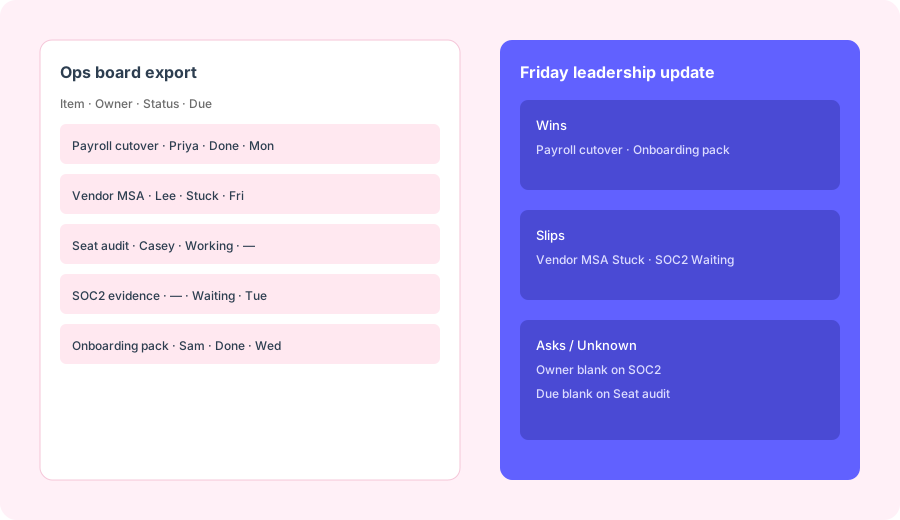
Paste a board export snippet you already trust:
Write a Friday leadership update: wins, slips, asks. Only use rows in the paste; mark Unknown where data is missing.
2. monday Sidekick (board-aware assistant)
What it is: Sidekick is monday’s context-aware assistant — publicly framed as the main AI entry point in 2026 — for questions and actions across boards, docs, people, and connected apps (email/calendar/Slack where enabled). Credit consumption varies by message complexity on credit-based accounts; older packaging and free daily message allowances have appeared in public announcements — confirm for your account type.
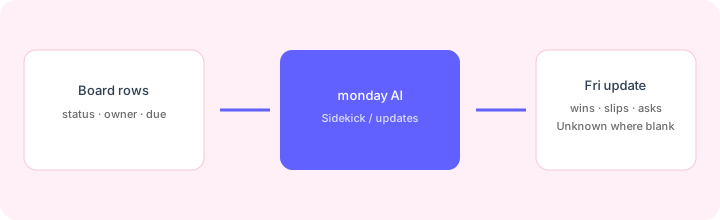
On one real board:
Using only visible columns on this board, list Stuck or Waiting items with blank owners or blank dues. Produce three Slack bullets. Do not invent items not on the board.
3. AI blocks on columns
What it is: AI blocks are pre-built column/workflow actions — summarize, write, extract, categorize, assign labels/people, sentiment, prioritize, and custom prompts. Public catalog pricing commonly cites 8 credits per action, with same-item actions within 24 hours counted once (subitems separate). Best for repeatable column hygiene — not for inventing strategy.
Before turning on Autofill with AI across a board:
Pick one text column. Draft an AI block prompt that outputs only: Status risk (one line) + Missing field (Owner/Due/None). Refuse any prompt that invents new board items.
4. AI credits & plan gates
What it is: For many work-platform customers joining on/after May 6, 2026, monday sells seats + AI credits together. Public support docs cite minimum monthly pools of about 1,000 (Basic) / 2,000 (Standard) / 3,000 (Pro), with higher buckets available. Sidekick and agents scale by complexity; Notetaker is commonly 120 credits per meeting hour. Some lighter features (Updates Assistant, text-to-filters, formula builder) are listed as credit-free in the Feature Catalog. Older accounts may still be on pre-credit packaging — confirm in Admin → AI governance.
Before scaling Sidekick or AI blocks:
Estimate monthly Sidekick messages, AI block actions, and Notetaker hours. Convert with monday’s published credit rates. If we cannot name a credit owner and a monthly ceiling, keep Updates Assistant-only for 30 days.
Public pricing (September 2026)
monday AI is not a single flat SKU — it rides on work-platform seats plus (for many new accounts) a shared AI credit pool. From public monday.com/pricing, the AI portfolio pricing model, and the AI Feature Catalog (Sep 2026):
- Seats: Basic / Standard / Pro / Enterprise work-platform seats remain the cost floor — AI does not replace seat pricing. Check live seat prices on monday’s pricing page (annual vs monthly).
- AI credits (post–May 6, 2026 work-platform model): minimum monthly pools commonly 1,000 / 2,000 / 3,000 by Basic / Standard / Pro; higher buckets available on Standard/Pro; Enterprise via sales.
- Example consumption (catalog): AI blocks ~8 credits/action; Sidekick/agents vary by complexity bands; AI Notetaker ~120 credits/hour.
- Often described as credit-free: AI Updates Assistant, text-to-board filters, some formula/column suggestion helpers — confirm in the live Feature Catalog for your account.
- Pre-May-2026 accounts: may still be on different packaging; monday’s own support note says to contact support/account team if you want to move to credits.
Uncertainty flags: Credit rates, included buckets, and which features are credit-free can change. monday CRM / monday dev / monday service may follow different AI packaging than the work platform. Never budget from a blog table alone — open Admin AI governance and monday’s pricing configurator.
When monday.com AI is useful (honest take)
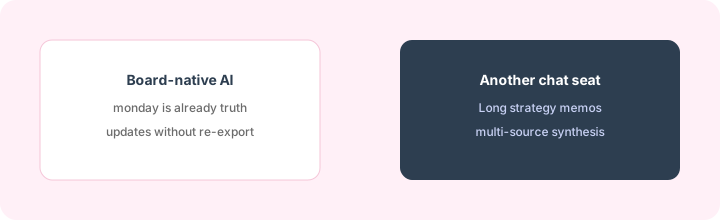
monday AI tends to help when the board is already the truth, columns are clean enough to trust, and you want status updates/summaries without re-exporting to ChatGPT/Claude every Friday. It tends not to help when you hoped AI would fix a messy board, when work mostly lives in email/Sheets, or when you need long multi-source strategy memos a dedicated chat Project handles better. Buying monday “for the AI” while keeping another PM board is usually the expensive parallel stack this page warns against.
Paying for monday.com AI and a few other AI tools? The $9 AI toolkit spreadsheet lists every AI subscription you have, what each one costs, and how fast it pays for itself, so you can see which ones are worth the money.
Want someone to do it for you? AI toolkit audit — $19
Alternatives compared: stay native vs parallel tools
| Axis | monday.com AI | ClickUp Brain | Claude / ChatGPT Project | Sheets + LLM |
|---|---|---|---|---|
| Best when… | monday boards are already truth. | ClickUp is already system of record. | Long memos / multi-doc synthesis. | One-off hygiene without more SaaS. |
| Cost shape (Sep 2026) | monday seats + AI credits (new accounts). | ClickUp seats + Brain add-on (see ClickUp Brain). | Chat seat + paste/export time. | Near $0 tooling; human time is the cost. |
| Less useful when… | monday is not where work lives. | You only need monday Friday updates. | You only need board-native wins/slips/asks. | You need multi-user board-grounded agents. |
Also see ClickUp Brain, Notion AI, Claude for ops, and the ops & automation hub.
Same job, two products: monday.com AI vs ClickUp Brain.
Same job, two products: Coda AI vs monday.com AI.
FAQ
What is monday.com AI?
monday’s native AI layer: Sidekick, Updates Assistant, AI blocks, plus credit-metered agents/workflows/Notetaker — built on monday boards, not a separate PM tool.
How much does monday AI cost in September 2026?
Seats plus (for many new work-platform accounts) AI credits with tier minimums around 1k/2k/3k per month. Confirm on monday.com/pricing and the AI Feature Catalog — older accounts may differ.
Should we buy monday just for AI?
Rarely for this page’s job. Prefer AI inside the board tool you already run. monday AI shines when boards are already paid for and trusted.
Will AI fix a messy monday board?
No. Clean owners, statuses, and dues first — or AI will confidently summarize blank rows.
Optional next step (if seats overlap)
If monday AI is one of several AI seats and you want a written pass across the whole list, the optional $19 AI toolkit audit produces a short memo. Prefer an editable grid? The $9 AI toolkit spreadsheet is a one-time CSV. Soft offer only — this deep-dive stands alone.
Checkout is live via Stripe. After you pay, we email delivery (spreadsheet) or intake next steps (audit).