Docs / wiki · Ops & automation
Notion AI review (Nov 2026): how wiki AI works and when it’s useful
Notion AI lives inside the workspace many ops teams already use — page drafts, meeting notes, Q&A, and Agents. This page shows how those features work with concrete examples.
Who this page helps
If your team already drafts specs, SOPs, and meeting notes in Notion — and you are deciding whether Business AI seats are worth the upgrade — start here. We walk through in-page AI, Meeting Notes, and Agents with workflow diagrams, dated pricing, and educational alternatives (Claude, ChatGPT, Confluence AI, Sheets + LLM).
What Notion AI is
Notion AI is generative help inside Notion pages and databases: rewrite and summarize, ask questions over workspace content, capture AI Meeting Notes, and (on Business/Enterprise) run Notion Agent and credit-based Custom Agents. Full AI is bundled with Business (~$20/member/mo annual); Free and Plus typically offer only a limited trial. This review focuses on what an ops or small-team buyer uses day to day.
Major features (with how someone uses them)
Examples at a glance: each feature has a concrete ops/small-team example plus a Try this prompt.
1. In-page AI (write, summarize, Q&A)
What it is: On a Notion page you can ask AI to draft, rewrite, translate, or summarize a selection — and ask questions that pull from pages in the workspace (subject to plan limits). Output stays editable in Notion so teammates do not re-paste from a separate chat tab.
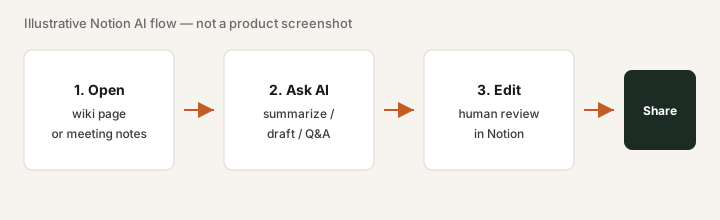
On a Business trial or page with AI enabled:
Using only this page, rewrite the messy notes into a numbered SOP with Owner and Due columns. Flag any step that has no owner. Do not invent tools we did not mention.
2. AI Meeting Notes
What it is: Notion can capture or enhance meeting notes with AI summaries, decisions, and action items that land as Notion pages — useful when the wiki is already where follow-ups live. Exact capture methods and limits depend on plan; confirm live docs.
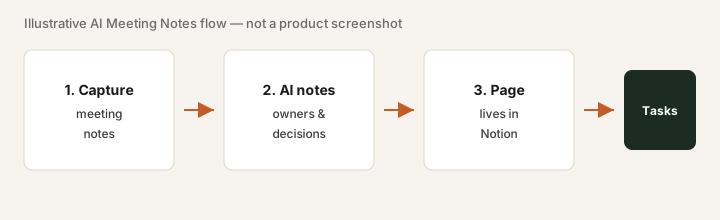
After one real meeting (with consent):
Open the AI Meeting Notes page. List every proposed action item. Mark each: correct owner / wrong owner / missing. Fix owners in Notion before sharing the page as source of truth.
3. Notion Agent & credits
What it is: Notion Agent can take multi-step actions across the workspace (draft updates, fill databases) within plan limits. Custom Agents and some advanced usage may consume credits billed separately on Business/Enterprise. Credit packs and included allowances change — treat credits as an uncertainty flag.
Before enabling credit packs:
Name one Agent job that must run weekly (e.g. “draft status from this CSV into five project pages”). Run it once manually with in-page AI. If nobody opens the pages, do not buy credits.
4. Enterprise Search (Business+)
What it is: Business marketing lists Enterprise Search (often in beta) so people can find answers across Notion content more like an internal search assistant. Depth and connectors evolve — verify what is generally available on your workspace.
If Search is enabled on your plan:
Ask three real questions a new hire would ask. Note which answers cite the right page vs invent details. Fix page titles and verification before rolling Search out as “HR bot.”
Public pricing (November 2026)
From Notion public pricing, checked 3 November 2026. Prices change, so re-check on notion.com/pricing.
- Free: $0 — limited Notion AI trial only (not production AI).
- Plus: $10/member/month billed annually ($12 billed monthly) — still trial AI only on public cards.
- Business: $20/member/month billed annually ($24 billed monthly) — full Notion AI, Agent, AI Meeting Notes, Enterprise Search (as listed).
- Enterprise: contact sales (no public card price) — SCIM, audit log, zero data retention options with LLM providers, etc.
- Credits: Custom Agents are free to try, then $10 per 1,000 monthly Notion credits; Workers (custom-code agent tools) are in beta. Included allowances per plan aren’t on the pricing card, so check Notion’s credit docs before budgeting heavy Agent use.
Uncertainty flags: The old ~$10 AI add-on is retired for new buyers; full AI means Business+. Credit burn and Agent limits change. Idle Business seats × $20 dominate cost more than demos.
When Notion AI is useful (honest take)
Notion AI tends to help when Notion is already the system of record for docs and specs, people write there weekly, and AI saves context-switching to another chat. It tends not to help when the team barely opens Notion, you would migrate Confluence/Google Docs only to unlock AI, or finance analysis belongs in Sheets plus Claude/ChatGPT. Prefer wiki AI where the pages already live — not a platform migration sold as a feature.
Paying for Notion AI and a few other AI tools? The $9 AI toolkit spreadsheet lists every AI subscription you have, what each one costs, and how fast it pays for itself, so you can see which ones are worth the money.
Want someone to do it for you? AI toolkit audit — $19
Alternatives compared: Claude, ChatGPT, Confluence AI, Sheets + LLM
| Axis | Notion AI | Claude | ChatGPT | Confluence AI / Sheets+LLM |
|---|---|---|---|---|
| Typical paid entry (Sep 2026) | Business $20/member/mo annual ($24 monthly), checked 3 Nov 2026. | Pro $20/mo monthly or $17/mo annual; Team higher (checked 30 Oct 2026). | Plus ~$20/mo; Team/Business higher. Confirm openai.com. | Confluence AI via Atlassian plans; Sheets+LLM often near-zero incremental if seats exist. |
| Job focus | In-wiki drafts, meeting notes, Agents on Notion data. | Projects, Artifacts, deep file analysis. | General chat, Custom GPTs, broad plugins. | Stay in Confluence or analyze numbers in Sheets. |
| Best fit when… | Notion is already SoR and seats are active weekly. | Long docs and uploads outside Notion. | Org standardized on OpenAI seats. | Wiki is Confluence, or the job is finance tables. |
Same job, two products: Notion AI vs Coda AI.
Rough months-to-payback from hours saved and what you pay: payback calculator (then keep the list on the $9 spreadsheet).
Inventory seats by job on the stack map for knowledge ops.
FAQ
What is Notion AI?
Generative help inside Notion: draft/summarize on pages, AI Meeting Notes, workspace Q&A, and (on Business/Enterprise) Agent plus credit-based Custom Agents.
How much does Notion Business cost in November 2026?
$20/member/month billed annually or $24 billed monthly, with full AI included (Notion public pricing, checked 3 Nov 2026).
When is Notion AI useful?
When the team already lives in Notion and will use AI on those pages weekly. Not when you would migrate a wiki only for AI.
Notion AI vs Claude or ChatGPT?
Compare where the artifact lives. Notion AI for in-wiki work; Claude/ChatGPT for deep analysis outside Notion. Avoid paying twice for the same paragraphs.
Optional next step (if seats overlap)
If this tool is one of several AI seats and you want a written pass across the whole list, the optional $19 AI toolkit audit produces a short memo. Prefer an editable grid? The $9 AI toolkit spreadsheet is a one-time CSV. Soft offer only — this deep-dive stands alone.
Checkout is live via Stripe. After you pay, we email delivery (spreadsheet) or intake next steps (audit).