Compare guide · Ops runbooks · Sep 2026
Notion AI vs Coda AI for ops (Sep 2026): wikis vs docs+tables
Educational side-by-side for ops — Notion wiki patterns vs Coda doc+table patterns on runbooks and trackers. Not a scorecard. Companions: Notion AI for ops and Coda AI.
How to compare fairly (runbook rule)
Ops leads usually do not need a winner badge. They need less editing on SOPs — and a clear rule for whether the runbook is a wiki of pages or a doc with first-class tables. This page walks Notion AI for ops patterns vs Coda AI with the same runbook content. For private multi-file synthesis outside the wiki, see Claude Projects.
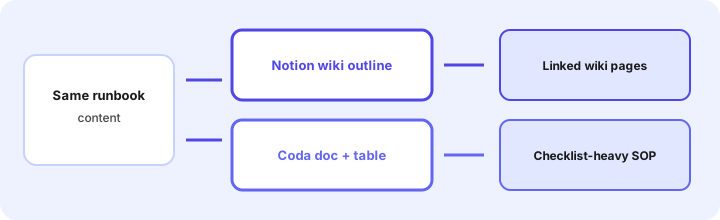
Examples at a glance: each job has a concrete ops example, a simple diagram, and a short Try this you can paste into both products.
Rule first: wiki vs doc+table
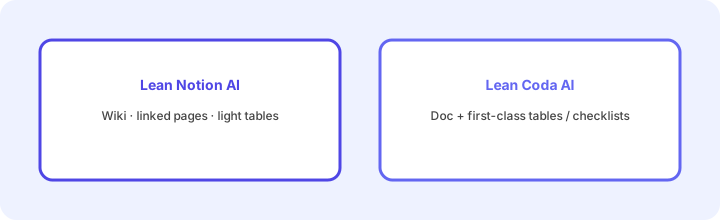
What the rule is: If SOPs are a web of linked pages (policy → procedure → FAQ) with light databases, lean Notion AI. If the runbook is one doc that must mix narrative with a real checklist/table (owners, steps, status in columns), lean Coda AI. Migrating the whole company wiki “for AI” is rarely cheaper than improving the home you already pay for.
Inventory before you renew:
List your last 10 runbook edits. Mark each Wiki pages / Doc+table / Both. Put the next 30 days of SOP work only in the tool that matches unless quality fails.
Job 1: Same runbook structure (both modes)
What the job is: Take one messy runbook and outline structure in Notion vs Coda — then notice which outline fits a checklist-heavy SOP.
Where Notion AI often helps: Headings, toggles, linked subpages, and a light database for related tickets. See Notion AI for ops.
Where Coda AI often helps: Purpose / steps / owners plus a checklist table in one doc. See Coda AI.
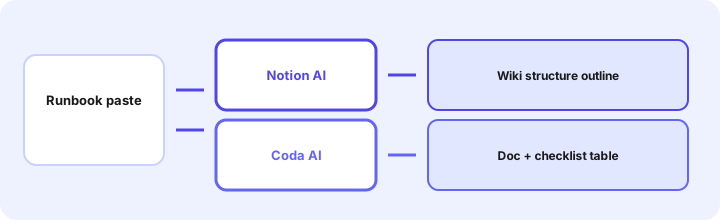
Same runbook in both (Marketing SoT primary):
Same runbook content: outline structure in Notion vs Coda and which fits a checklist-heavy SOP.
Paste into Notion AI and Coda AI (or Docs AI). Record which output you would publish after one edit — and where owners were still Unknown.
Job 2: Checklist-heavy SOP
What the job is: Steps with owners and Done flags that must stay sortable — not only prose.
Where Coda AI often helps: First-class tables/checklists beside the narrative so on-call can filter Incomplete.
Where Notion AI often helps: When the checklist is short and the real value is linking to policy pages; a simple to-do list may be enough.
Checklist stress test:
Turn this SOP into a checklist with columns Step, Owner, Done. Flag steps with no owner. Say whether you would keep this as a Notion page or a Coda table — one sentence why.
Job 3: Lightweight tracker beside the runbook
What the job is: A small open-items list tied to the SOP (not a full PM tool).
Where Notion AI often helps: A linked database on the wiki page for open exceptions — especially if Notion is already SoR for docs. Role patterns: Notion AI for ops.
Where Coda AI often helps: Views on the same doc’s table (open / by owner) without leaving the runbook. Product deep-dive: Coda AI.
One tracker only:
Design a 5-column open-exceptions tracker for this runbook. Say Notion database vs Coda table. Do not invent exception rows — schema only.
Public pricing context (September 2026)
Figures and plan names change. Always confirm live: Notion pricing (incl. Notion AI add-on / Business+AI packaging) and Coda pricing (Coda / Superhuman Docs AI entitlements — branding has been in flux after Coda joined the Superhuman suite). This page is a fit compare dated September 2026, not a price sheet.
- Notion AI: Often an add-on or included on higher Notion plans — confirm seat vs AI SKU for your workspace.
- Coda AI / Docs AI: Maker/Doc Maker limits and AI usage vary; confirm current Superhuman Docs / Coda plan cards in-product.
Uncertainty: AI packaging, Maker roles, and suite branding change. Do not budget from a blog post — use live vendor pages and your admin center.
When each often fits (plain language)
| Situation | Often lean Notion AI | Often lean Coda AI |
|---|---|---|
| SOPs are linked wiki pages | Yes — page tree + light DB | Only if you rewrite as docs |
| Checklist-heavy on-call SOP | Short lists OK | Yes — table + filters |
| Team already standardized on Notion | Yes — improve in place | Migration cost usually high |
| Team already standardized on Coda | Migration cost usually high | Yes — improve in place |
| Multi-file synthesis outside wiki | Claude Projects — different job | |
Related options (educational)
| Need | Better home | Why |
|---|---|---|
| Notion-centered ops wiki | Notion AI for ops | Role guide for wiki → tracked work |
| Coda docs+tables runbooks | Coda AI | Single-product deep-dive |
| Private files / multi-source memos | Claude Projects | Outside the wiki |
| Confluence-centered | Confluence AI | Stay in Atlassian wiki |
| Task tracker (not wiki) | Asana AI · Asana Intelligence | Work graph, not SOP prose |
When this compare is useful
Useful when you are deciding whether runbooks should stay in a Notion wiki, move toward Coda doc+tables, or keep both for different SOP shapes. Less useful when you only need one product’s deep-dive (Notion AI for ops / Coda AI) or when the bottleneck is chat synthesis outside the wiki. This page is educational — not a scorecard.
Still choosing between Notion AI and Coda AI? The $19 AI toolkit audit gives you a written plan for which tools to keep using and which to drop across your whole AI stack, including this pair.
Prefer to do it yourself? Spreadsheet — $9
FAQ
Should ops pick Notion AI or Coda AI for runbooks?
Lean Notion for wiki page trees; lean Coda for checklist-heavy docs+tables. Keep the home you already pay for when you can — not a brand ranking.
How do I compare them fairly?
Run the same runbook content in both. Outline structure in Notion vs Coda and note which fits a checklist-heavy SOP. Publish the draft that needs less editing.
How is this different from the single-product pages?
Those pages go deep on one tool. This page compares wiki vs doc+table patterns for the same ops job.
What do they cost in September 2026?
Confirm on Notion and Coda / Superhuman Docs pricing pages. Packaging changes — this compare is dated September 2026.
Optional next step (if seats overlap)
If Notion AI and Coda AI would both sit beside Claude and suite AI seats, optional help mapping overlap: $19 AI toolkit audit or $9 AI toolkit spreadsheet. Email Audit $19 or Toolkit spreadsheet $9.
Checkout is live via Stripe. After you pay, we email delivery (spreadsheet) or intake next steps (audit).