Tool · Ops & automation · Asana · Sep 2026
Asana Intelligence review (Sep 2026): smarter fields and summaries in Asana
Deeper Asana AI/Intelligence features for teams already standardized on Asana — smart fields, stale-task rules, and a weekly summary format. Companion to the Asana AI overview (do not treat this as a replacement page).
What Asana Intelligence covers here
This page is the deeper companion to Asana AI. That overview explains Smart Features, Dash, AI Teammates, and AI Studio at a glance. Here we focus on Intelligence-style field design, stale-task rules, and a reusable weekly summary format for ops/PMs who already live in Asana and want less Monday-morning export chaos — without inventing owners the project never had.

Major features (with how someone uses them)
Examples at a glance: each feature has a concrete ops example plus a short Try this.
1. Smarter fields from a project paste
What it is: Paste the field list you already use (Owner, Due, Risk, Last touch, Status) and ask Intelligence-style assists to propose which fields should drive rules and summaries. Prefer grounding in your schema — do not invent custom fields the workspace never configured.
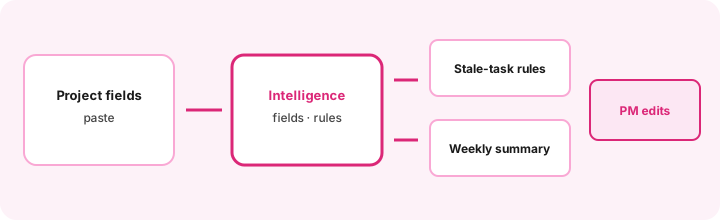
Primary SoT workflow:
Paste project fields. Propose Intelligence-style rules for stale tasks and a weekly summary format.
2. Stale-task rules (human confirms)
What it is: Draft rules such as “no comment / no status change in 7 days → nudge Owner” or “Risk = High and Due past → escalate.” Rules should reference fields that exist. Empty Last touch or blank Owner stays Unknown — AI must not invent people.
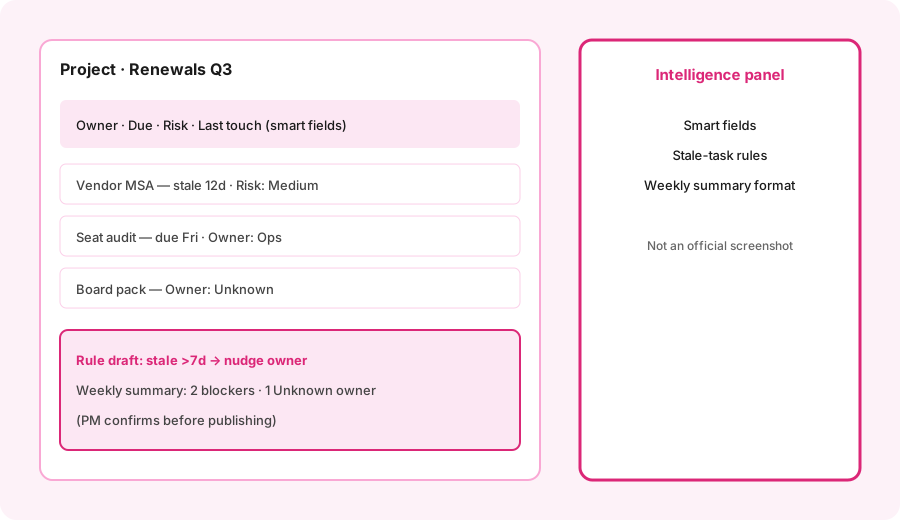
Rule honesty:
From only these fields (Owner, Due, Risk, Last touch): draft 3 stale-task rules. For each: trigger, action, and what to do if Owner is blank. Do not invent owners or SLAs.
3. Weekly summary format (repeatable)
What it is: A fixed outline you can reuse every Monday: blockers, stale tasks, Unknown owners, decisions needed, and “left alone this week.” Intelligence/Smart summaries help draft; a PM publishes.
Summary template:
Using only this project export paste: draft a weekly summary with sections Blockers / Stale >7d / Unknown owners / Decisions needed. Mark Unknown where the export is silent. Do not invent progress.
4. Vs the Asana AI overview page
What it is: Educational boundary, not a ranking. Read Asana AI for Dash / Teammates / Studio and request meters. Stay here for field design, stale rules, and weekly summary craft. Both pages assume Asana is already SoR — neither is a migration pitch.
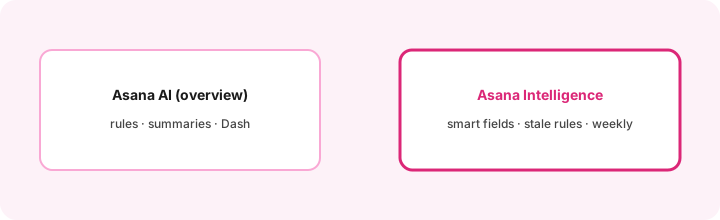
Read order:
Skim Asana AI overview for Dash/Studio limits. Then run the primary paste-fields prompt on one live project. Note which fields were too empty for rules before enabling anything company-wide.
Pricing context (September 2026)
Public Asana pages (as of September 2026) list paid tiers such as Starter and Advanced (often cited around $10.99 and $24.99 per user/month billed annually — confirm live) plus Enterprise. Asana AI / Smart Features, AI Studio credit pools (e.g. Basic allotments by tier), and AI Teammates/Dash base request allotments with consumption beyond the base are documented on asana.com/pricing and Asana Help (AI Studio pricing). This page is dated September 2026 and is not a price sheet.
Uncertainty: Seat prices, AI Studio Plus/Pro packs, request meters, and which assists are “included base” vs consumption change. Model your monthly AI requests before enabling Teammates domain-wide. Always verify on live vendor pages and your admin console.
When Asana Intelligence is useful (honest take)
Useful when Asana is already the tracker of record, custom fields are mostly filled, and you want repeatable stale-task + weekly summary patterns with human confirmation. Less useful when owners/dues are blank, when eng lives only in Linear and Asana is a mirror, or when you hoped AI would replace project hygiene. For the broader AI surface (Dash, Teammates, Studio), start with Asana AI.
Paying for Asana Intelligence and a few other AI tools? The $9 AI toolkit spreadsheet lists every AI subscription you have, what each one costs, and how fast it pays for itself, so you can see which ones are worth the money.
Want someone to do it for you? AI toolkit audit — $19
Related options (educational)
| Need | Better home | Why |
|---|---|---|
| Asana already SoR — deeper fields/rules | Asana Intelligence (this page) | Smart fields, stale rules, weekly format |
| Asana AI layer at a glance | Asana AI | Summaries, Dash, Teammates, Studio |
| ClickUp-centered work | ClickUp Brain | Stay where the work already lives |
| Monday.com boards | Monday AI | Board-native assists |
| Eng issue tracker | Linear AI | Tickets, not Asana mirrors |
Same job, two products: ClickUp Brain vs Asana Intelligence.
Same job, two products: Asana Intelligence vs Jira AI.
FAQ
How is Asana Intelligence different from the Asana AI overview?
The overview covers the AI layer broadly. This page goes deeper on smart fields, stale-task rules, and weekly summary format for teams already on Asana.
Should Asana Intelligence invent missing owners or dues?
No. Mark Unknown and have a PM assign before enabling rules that notify people.
When is Asana Intelligence useful for ops?
When Asana is SoR and fields are clean enough for rules and Monday summaries. Not a fix for empty projects.
What does Asana AI / Intelligence cost in September 2026?
Confirm on asana.com/pricing and Asana Help. Seats, AI Studio credits, and request meters change — this review is dated September 2026.
Optional next step (if seats overlap)
If Asana Intelligence would sit beside ClickUp Brain, Monday AI, and chat seats, optional help mapping overlap: $19 AI toolkit audit or $9 AI toolkit spreadsheet. Email Audit $19 or Toolkit spreadsheet $9.
Checkout is live via Stripe. After you pay, we email delivery (spreadsheet) or intake next steps (audit).