Ops · Project management · AI add-on
ClickUp Brain review (Sep 2026): AI inside the PM tool ops already uses
When ClickUp is already the system of record, Brain can turn task pastes into overdue-by-owner lists, risk bullets, and standup scripts — without inventing work that is not in the list. This page maps Assistant, summaries, credits honesty, and when a separate chat Project is clearer.
Who this page helps
Ops leads on small teams already living in ClickUp who want AI for standups, risk lists, and status updates inside the PM tool — not another chat seat that invents a second task list. If ClickUp is not where work is tracked, this page is the wrong buy question; start with AI in your real system of record or a dedicated chat Project instead.
What ClickUp Brain is
ClickUp Brain is ClickUp’s native AI layer: an in-app assistant grounded on workspace context, project summaries and updates, AI writing, web research, and credit-metered Super Agents / AI Fields / related features. As of Nov 7, 2026, ClickUp’s public pricing bundles ClickUp Brain² into every plan (Free Forever, Core, Business, Enterprise, Max) with a pooled monthly AI credit allowance, instead of separate Brain AI / Everything AI add-ons. This review focuses on what an ops team already on ClickUp can use week to week — without assuming you should migrate to ClickUp for AI alone.

Major features (with how someone uses them)
Examples at a glance: each feature has a concrete ops example plus a Try this mini-workflow.
1. Brain Assistant on tasks
What it is: The in-app assistant (Brain / Brain Assistant in public copy) for asking questions and drafting from ClickUp context — tasks, docs, and related workspace data. ClickUp’s Nov 2026 pricing describes premium model usage as trial on Free and Core, premium models on Business, scaled usage on Enterprise, and maximum usage on Max. Treat model names and fair-use limits as moving targets; confirm on ClickUp’s Brain help and pricing pages.
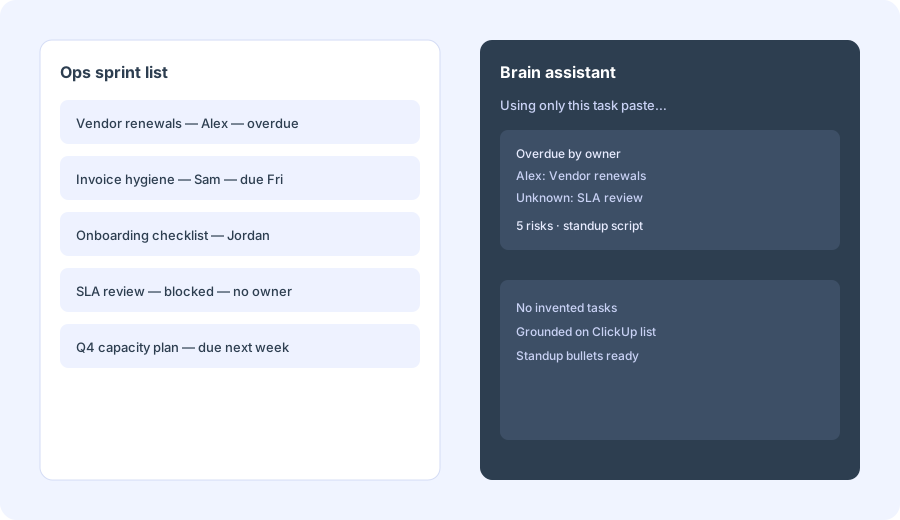
On one real ClickUp list you already own:
Using only this task list paste, produce: overdue by owner, 5 risks, and a standup script. Do not invent tasks that aren’t in the paste.
2. Project summaries & updates
What it is: Public Brain packaging includes project summaries and status-style updates grounded on ClickUp work. The high-ROI ops pattern is turning the list you already trust into a leadership or standup note — not asking AI to invent a healthier backlog.
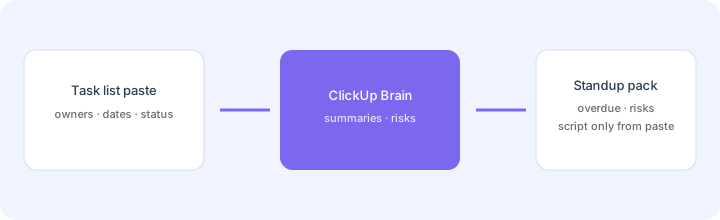
After pasting one space or list:
Write a 8-line Friday ops update from only this ClickUp paste: wins, slips, asks. Mark any owner or due date that is blank as Unknown. Do not add tasks not in the paste.
3. AI writing, fields & agents
What it is: Beyond chat, each plan’s pooled AI credits cover Super Agents, AI Fields, image generation and more; the Max plan lists unlimited AI Fields, Notetaker, image generation, Autopilot Agents and AI Dashboard Cards (per clickup.com/brain/pricing, Nov 7, 2026). Ops should treat write-backs (auto-assign, auto-prioritize) as human-approved until the board is clean.
Before enabling agents or AI Fields at scale:
List three Brain jobs that must stay human-approved (owner changes, priority changes, deletes). List two jobs that may draft only (standup script, status comment polish). Do not enable write-backs for the first list.
4. AI credits & plan gates
What it is: Advanced agent/field/image features consume AI credits from a pooled monthly allowance. As printed on clickup.com/brain/pricing on Nov 7, 2026: Free Forever 500 credits per workspace, Core 1K, Business 1.5K, Enterprise 3K and Max 10K credits per user per month (pooled). Extra credits are $10 per 10K, with an auto top-up option. Confirm on ClickUp’s live pricing page and your workspace AI usage view — this is the uncertainty that bites budgets.
Before upgrading plans or buying extra credits:
Estimate monthly agent/field actions we expect. Convert with ClickUp’s published credit allowance and $10 per 10K top-up rate. If we cannot name a credit owner and a monthly ceiling, keep Assistant + summaries only for 30 days.
Public pricing (Nov 7, 2026)
ClickUp Brain² now ships bundled into every ClickUp plan with a pooled monthly AI credit allowance — the older Brain AI and Everything AI add-ons are no longer listed. As printed on clickup.com/brain/pricing on Nov 7, 2026 (per user / month):
- Free Forever: $0 — ClickUp Brain² trial, 500 credits per workspace.
- Core: $9 billed yearly (regular price $12) — Brain² trial, trial premium model usage, 1K credits / user / month pooled.
- Business: $17 billed yearly (regular price $25) — Brain² premium models, unlimited standard models, 1.5K credits / user / month pooled.
- Enterprise: custom pricing (talk to sales) — scaled premium model usage, unlimited standard models, unlimited AI Notetaker, 3K credits / user / month pooled.
- Max: $100 billed yearly (regular price $120) — everything in Enterprise plus Brain² MAX, maximum premium model usage, 10K credits / user / month pooled.
- Extra AI credits: $10 per 10K credits, added to any plan.
Uncertainty flags: ClickUp repackaged Brain from paid add-ons (Brain AI / Everything AI) into bundled plans. Credit pools and which features are trial vs included can change with short notice. Never budget from a blog table alone — open ClickUp’s live pricing page and your workspace AI usage dashboard.
When ClickUp Brain is useful (honest take)
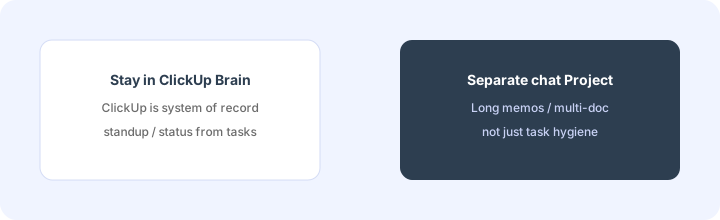
ClickUp Brain tends to help when ClickUp is already the system of record, tasks have owners and dates clean enough to trust, and you want standup/status AI without exporting to another chat. It tends not to help when you hoped AI would fix a messy workspace, when most work lives in Sheets/email instead of ClickUp, or when you need long multi-doc strategy memos a dedicated Claude/ChatGPT Project handles better. Buying ClickUp “for Brain” while keeping another PM tool is usually the expensive parallel stack this page warns against.
Paying for ClickUp Brain and a few other AI tools? The $9 AI toolkit spreadsheet lists every AI subscription you have, what each one costs, and how fast it pays for itself, so you can see which ones are worth the money.
Want someone to do it for you? AI toolkit audit — $19
Alternatives compared: stay native vs parallel tools
| Axis | ClickUp Brain | monday.com AI | Claude / ChatGPT Project | Sheets + LLM |
|---|---|---|---|---|
| Best when… | ClickUp is already system of record. | monday boards are already truth. | Long memos / multi-doc synthesis. | One-off hygiene without more SaaS. |
| Cost shape (Nov 2026) | ClickUp plan seats (Brain² bundled) + any extra AI credits. | monday seats + AI credits (see monday AI). | Chat seat + paste/export time. | Near $0 tooling; human time is the cost. |
| Less useful when… | ClickUp is not where tasks live. | You only need ClickUp-native standups. | You only need in-list overdue/risk scripts. | You need multi-user PM-grounded agents. |
Also see monday.com AI, Notion AI, Claude for ops, and the ops & automation hub.
Same job, two products: ClickUp Brain vs Asana Intelligence.
Same job, two products: monday.com AI vs ClickUp Brain.
FAQ
What is ClickUp Brain?
ClickUp’s native AI (Brain², bundled into every plan): Assistant for workspace-grounded help, project summaries/updates, AI writing, plus credit-metered agents and fields — built on ClickUp data, not a separate PM tool.
How much does ClickUp Brain cost in November 2026?
As of Nov 7, 2026, Brain² is bundled into ClickUp plans: Free $0, Core $9, Business $17, Max $100 per user/month billed yearly (regular $12 / $25 / $120), Enterprise custom. Each plan has a pooled AI credit allowance; extra credits are $10 per 10K. Confirm on clickup.com/brain/pricing.
Should we buy ClickUp just for Brain?
Rarely for this page’s job. Prefer AI inside the PM tool you already run. Brain shines when ClickUp is already paid for and trusted.
Will Brain fix a messy ClickUp workspace?
No. Clean owners, due dates, and statuses first — or AI will confidently draft from bad tasks.
Optional next step (if seats overlap)
If ClickUp Brain is one of several AI seats and you want a written pass across the whole list, the optional $19 AI toolkit audit produces a short memo. Prefer an editable grid? The $9 AI toolkit spreadsheet is a one-time CSV. Soft offer only — this deep-dive stands alone.
Checkout is live via Stripe. After you pay, we email delivery (spreadsheet) or intake next steps (audit).