Role guide · Ops · Notion AI
Notion AI for ops (Nov 2026): wiki notes → tracked work
Role guide inside Notion — turn meeting notes into tasks and database rows without leaving the wiki. Honest split: when Notion AI helps vs ChatGPT Team or Claude Projects for the same ops loop. Soft CTA only if multiple AI seats overlap on the same notes→tracker job.
Who this guide is for
Ops leads (and founder-operators) whose meeting notes and task database already live in Notion and who want a repeatable notes→tracked-work loop — not a generic Notion AI feature list. Product deep-dive: notion-ai.html. Chat-shaped version of status work: chatgpt-for-ops.html. Claude-shaped version: claude-for-ops.html.
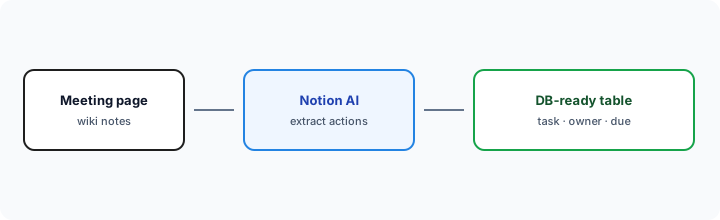
Wiki notes → tracked work (picture)
How an ops lead actually runs Notion AI
Examples at a glance: each pattern has a concrete ops example plus a short Try this.
1. Meeting extract → database-ready table (primary pattern)
What it is: On a Notion meeting page, ask Notion AI to pull action items into a table you can paste (or duplicate) into your ops database: task, owner, due date, source heading. Stay in the wiki of record instead of exporting to a separate chat seat for the same extract.
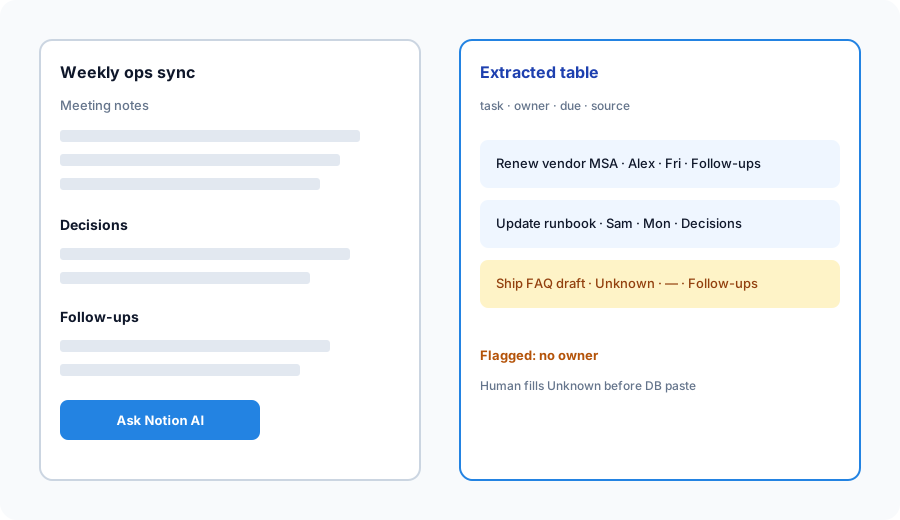
In a Notion meeting page:
Extract action items into a database-ready table: task, owner, due date, source heading. Flag anything without an owner.
2. Owner blanks and “Unknown” discipline
What it is: The extract only helps if humans refuse invented owners. Instruct Notion AI to leave Unknown when the page never named a person — then require a human pass before the row hits the tracker.
After the primary extract:
For every row with owner Unknown or blank, quote the source sentence. Do not invent names. List which rows block paste into the DB until a human assigns an owner.
3. Runbook page → short FAQ + checklist
What it is: For ops runbooks that already live in Notion, ask AI for a 5-question FAQ and a checklist with owner blanks — using only that page. Useful when the wiki is the system of record (similar pattern to Confluence AI when Confluence is SoR).
Using only the open runbook page:
Produce a short FAQ (5 Qs) and a checklist of steps with owner blanks. Flag contradictions. Do not add controls that are not on this page.
4. When Notion AI fits vs ChatGPT / Claude Projects
What it is: Same notes→actions job; different home. Notion AI wins when notes and the DB already live in Notion. ChatGPT Team wins when shared Custom GPTs are how the team encodes status SOPs (ChatGPT for ops). Claude Projects wins when long files + Artifacts are the weekly habit (Claude for ops). Running all three on the same meeting paste is usually seat overlap.
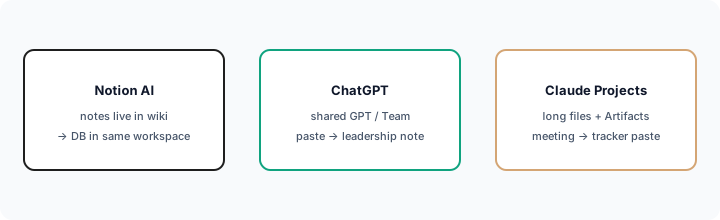
One decision this month:
List where our meeting notes and task DB live. If both are Notion, run notes→DB extract only in Notion AI for 30 days. Revisit Chat/Claude for this job only if edit quality fails a real tracker review.
When seats overlap
If Notion AI, ChatGPT, and Claude are all extracting the same meeting into tracker rows, you are paying three times for one habit. Pick the seat that already holds the notes and database. Soft next step below only if that overlap is real.
Pricing context (November 2026)
Figures from Notion’s public pricing page, checked 3 November 2026. Plan names, AI credits, and Agent availability change, so re-check before you budget.
- Free ($0) and Plus ($10/member/mo annual, $12 monthly): trial AI only — fine for testing the extract prompt, not for a weekly ops loop.
- Business ($20/member/mo annual, $24 monthly): full Notion AI, AI Meeting Notes, and Agent. Enterprise is contact-sales.
- Custom Agents: free to try, then $10 per 1,000 monthly Notion credits. See notion.com/pricing.
- For this role guide: You need whatever plan your workspace already uses for Notion AI on pages — this page is not a reason to buy Notion solely for AI if Confluence or a chat seat is already the SoR.
Uncertainty: Credit pools, Agent limits, and which plans include AI Meeting Notes have moved through 2025–2026. Always confirm on Notion pricing and Notion Help before you budget.
When Notion AI for ops is useful (honest take)
It tends to help when Notion is already the wiki + task home and you need meeting extracts and runbook FAQs that paste into the same workspace DB — with Unknown owners left blank for humans. It tends not to replace ChatGPT Team when shared GPTs are the status habit, or Claude when Projects/Artifacts already own long meeting→tracker work. Paying Notion AI + Chat + Claude for the same extract is stack sprawl.
Paying for Notion AI and a few other AI tools? The $9 AI toolkit spreadsheet lists every AI subscription you have, what each one costs, and how fast it pays for itself, so you can see which ones are worth the money.
Want someone to do it for you? AI toolkit audit — $19
FAQ
When should ops use Notion AI instead of ChatGPT or Claude?
When notes and the task DB already live in Notion. Prefer ChatGPT for shared GPT status loops; Claude for Projects/Artifacts long-file loops.
How do I turn Notion meeting notes into tracked work?
Use the locked Try this under Extract: table with task, owner, due, source heading; flag missing owners; human fill before DB paste.
Is this the same as the Notion AI product review?
No — notion-ai.html is the deep-dive. This page is the ops role guide (notes → tracked work).
What does Notion AI cost in November 2026?
Full AI needs Business: $20/member/month annual or $24 monthly. Free and Plus get trial AI only; Custom Agents add $10 per 1,000 credits after the trial (notion.com/pricing, checked 3 Nov 2026).
Optional next step (if seats overlap)
If Notion AI is one of several AI seats doing the same notes→tracker loop, optional help: $19 AI toolkit audit or $9 AI toolkit spreadsheet — only if you are juggling overlapping seats.
Checkout is live via Stripe. After you pay, we email delivery (spreadsheet) or intake next steps (audit).