Ops · Docs+tables · AI
Coda AI review (Sep 2026): docs+tables for ops runbooks
When Coda AI helps maintain runbooks and SOPs that mix narrative with tables — vs Notion AI and Claude Projects — with concrete Try this prompts and honest Sep 2026 pricing notes.
Who this page helps
Ops leads on small teams whose SOPs live as messy docs — half narrative, half checklists — who want AI that can rewrite a runbook into purpose, steps, owners, and a table without bouncing to another chat seat every week. If your runbooks are already clean Notion pages with light tables, start with Notion AI. If you need multi-file strategy memos, prefer a Claude Project.
What Coda AI is
Coda AI is AI inside Coda docs (publicly evolving as Docs AI under Superhuman Docs after Coda joined the Superhuman suite in mid-2026): write, edit, and ask across pages that mix prose with tables, views, and automations. This review focuses on ops runbooks and SOPs — not a pitch to migrate your whole company wiki for AI alone. Branding and packaging are in flux; always confirm the live product name and plan card for your workspace.

Major features (with how someone uses them)
Examples at a glance: each feature has a concrete ops example plus a Try this mini-workflow.
1. Runbook rewrite (docs + tables in one pass)
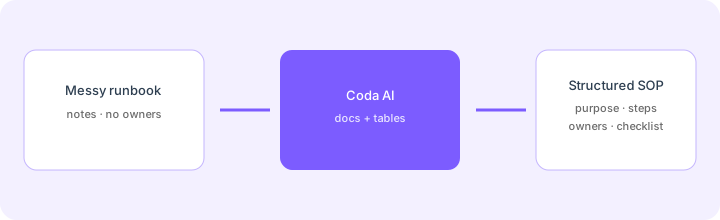
What it is: Coda’s strength for ops is the same surface for narrative SOP text and structured tables. AI can turn a messy paste into purpose, numbered steps, owners, and a checklist table — then keep living in the doc instead of a one-off chat answer that rots in Slack.
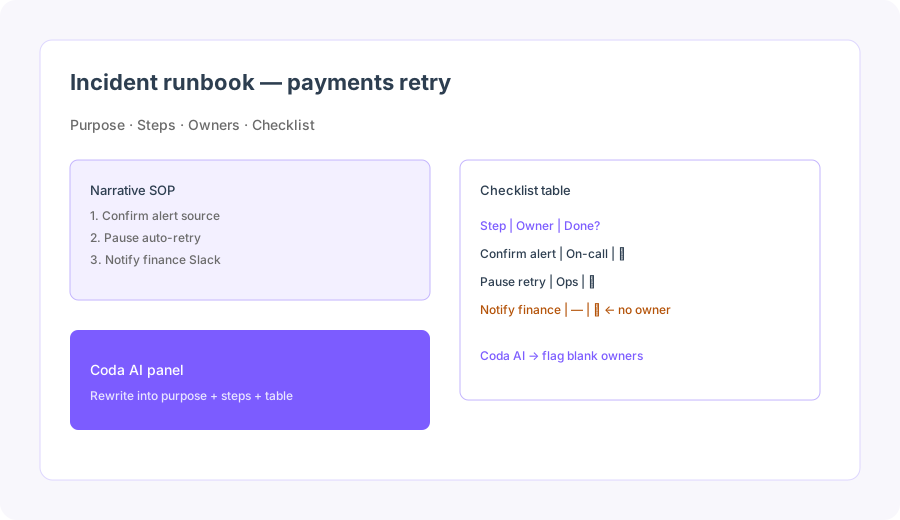
Paste a messy runbook you already trust:
Turn this messy runbook into: purpose, steps, owners, and a checklist table. Flag steps with no owner.
2. Ask / edit inside the doc
What it is: Docs AI (Coda AI) lets you ask questions and rewrite sections with the open doc as context — useful for “what’s missing before we publish this SOP?” without exporting the whole page to ChatGPT. Best when the page is already the system of record; weak when half the truth still lives in someone’s head.
On one real SOP page:
Using only text already on this page, list steps that lack an owner, a tool name, or a success check. Output a three-bullet Slack note. Do not invent steps that are not on the page.
3. AI for tables & checklists
What it is: Coda tables are first-class (rows, columns, views). AI helps draft columns, fill summaries, or normalize status values when the table is the checklist ops actually ticks during an incident. Treat invented rows as a bug — same rule as board-native AI elsewhere on this site.
Before trusting AI-filled table cells:
Draft a column prompt that outputs only: Owner (name or Unknown) + Status (Not started / In progress / Blocked / Done). Refuse any output that adds new checklist rows not already in the table.
4. Plans & packaging honesty
What it is: In Sep 2026, public pricing routes through Superhuman Docs plan cards (Free / Pro / Business / Enterprise) with Doc Maker billing. Docs AI is publicly described as included on paid plans during Beta (fair use), with a limited Free trial. Some help-center articles still describe older Coda AI credits per Doc Maker — your workspace may still be on legacy packaging. Confirm in billing admin before you budget.
Before buying more Doc Makers for AI:
List our top 10 live runbooks and where each lives today (Coda / Notion / Docs / Slack). If fewer than half already live in Coda, keep AI experiments on one pilot doc for 30 days instead of a full migration.
Public pricing (September 2026)
Coda’s public pricing now surfaces as Superhuman Docs plan cards. From coda.io/pricing and superhuman.com/plans/docs (Sep 2026):
- Free: $0 — limited doc sharing; Docs AI limited trial.
- Pro: about $12 / Doc Maker / month billed annually ($15 monthly) — unlimited doc size; write/edit/ask with AI called out on plan cards.
- Business (formerly Team on older Coda cards): about $33 / Doc Maker / month billed annually ($40 monthly) — stronger collaboration, locking, unlimited automations on public cards.
- Enterprise: custom — SSO/SCIM, AI admin controls, governance.
- Docs AI packaging: public FAQ copy says Docs AI is included on paid plans during Beta under fair use; Free gets a limited trial. Older help articles list credit buckets (e.g. Pro ~2,000 / Team ~6,000 / Enterprise ~12,000 credits per Doc Maker) plus paid top-ups — treat those as possible legacy paths.
Uncertainty flags: Branding (Coda vs Superhuman Docs), whether your workspace is on Beta-included AI vs credit meters, and exact seat vs Maker rules can differ by account age. Bundle pricing with other Superhuman products may appear on the same plan family. Never budget from a blog table alone — open your workspace billing page and the live plan card.
When Coda AI is useful (honest take)
Coda AI tends to help when runbooks already mix narrative and tables, owners/checklists matter during incidents, and you want rewrite help without exporting to another chat Project every week. It tends not to help when the wiki already lives in Notion and tables are light, when SOPs are still tribal knowledge no AI can invent, or when you need long multi-source strategy memos a dedicated Claude/ChatGPT Project handles better. Buying Coda “for the AI” while keeping another wiki as truth is usually an expensive parallel stack.
Paying for Coda AI and a few other AI tools? The $9 AI toolkit spreadsheet lists every AI subscription you have, what each one costs, and how fast it pays for itself, so you can see which ones are worth the money.
Want someone to do it for you? AI toolkit audit — $19
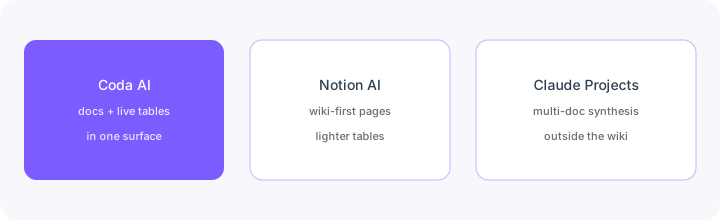
Alternatives compared: Coda vs Notion AI vs Claude Projects
| Axis | Coda AI | Notion AI | Claude Projects | Docs / Sheets + LLM |
|---|---|---|---|---|
| Best when… | Runbooks need prose + live tables. | Notion is already the wiki. | Multi-doc synthesis / long memos. | One-off rewrite without more SaaS. |
| Cost shape (Sep 2026) | Doc Maker seats + Docs AI packaging. | Notion seats + AI add-on (see Notion AI). | Chat seat + paste/export time. | Near $0 tooling; human time is the cost. |
| Less useful when… | Coda is not where SOPs live. | You need heavy checklist tables. | You only need in-wiki runbook hygiene. | You need multi-user living SOPs. |
Also see Notion AI, Claude Projects, Claude for ops, monday.com AI, and the ops & automation hub.
Same job, two products: Coda AI vs monday.com AI.
Same job, two products: Notion AI vs Coda AI.
FAQ
What is Coda AI?
AI inside Coda docs (Docs AI under Superhuman Docs branding in 2026): write/edit/ask across pages that mix narrative with tables — built for living runbooks, not a separate chat app.
How much does Coda AI cost in September 2026?
Public Superhuman Docs cards: Free $0; Pro ~$12/mo per Doc Maker annually ($15 monthly); Business ~$33/$40; Enterprise custom. Docs AI called included on paid during Beta (fair use). Confirm on coda.io/pricing — legacy credit packaging may still apply.
Coda AI vs Notion AI?
Coda when docs+tables runbooks are the job. Notion AI when the wiki already lives in Notion. Don’t buy both for the same SOP set.
Will AI fix a messy runbook culture?
No. Name owners and success checks first — or AI will confidently structure blank steps.
Optional next step (if seats overlap)
If Coda AI is one of several AI seats and you want a written pass across the whole list, the optional $19 AI toolkit audit produces a short memo. Prefer an editable grid? The $9 AI toolkit spreadsheet is a one-time CSV. Soft offer only — this deep-dive stands alone.
Checkout is live via Stripe. After you pay, we email delivery (spreadsheet) or intake next steps (audit).