What’s new · ChatGPT · Sep 2026
What’s new in ChatGPT (Sep 2026): changes worth an ops re-look
Dated changelog-style guide — only ChatGPT changes that affect a ~20-person ops team on ChatGPT Team/Business. Not a rehash of the ChatGPT deep-dive, Custom GPTs, or Memory pages — those remain the how-tos; this page is what moved in September 2026 per public OpenAI sources.
Who this changelog is for
Ops leads on a ~20-person ChatGPT Team / Business workspace who already use shared Custom GPTs and Memory and need a dated “what actually moved” note — not another full product review. Deep how-tos stay on chatgpt, chatgpt-custom-gpts, chatgpt-memory, and chatgpt-for-finance.
Sep 2026 snapshot (picture)
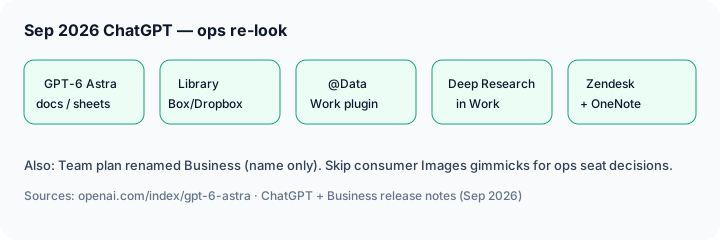

Uncertainty flag: OpenAI rolls features by plan (Plus / Pro / Business / Enterprise), and labels like ChatGPT Work vs consumer chat can differ by account. Enterprise admins may need to enable Astra. Treat blog posts + Help Center release notes as directional; confirm in your workspace and on openai.com/chatgpt/pricing.
Name note: OpenAI renamed ChatGPT Team → ChatGPT Business (public FAQ: name change only — features, pricing, and limits unchanged). Ops admins may see new invoice wording; treat “Team” in older SOPs as Business.
Primary prompt (Marketing SoT) — run against OpenAI’s public Sep 2026 docs/blog, not rumor threads:
From OpenAI’s public Sep 2026 docs/blog, list 5 changes that affect a 20-person ops team on ChatGPT Team — cite sources, skip consumer gimmicks.
Changes that matter for ops teams
Examples at a glance: each change below includes a concrete ops example plus a short Try this. We skip consumer-heavy Images 2.5 creative gimmicks here; cite them only if your ops team actually ships internal visuals from ChatGPT.
1. GPT-6 Astra — stronger multi-step docs, sheets, slides, and computer use
What changed (public ≈ early Sep 2026, expanded mid-Sep): OpenAI’s GPT-6 Astra post describes improvements in coding, research, computer use, and complex multi-step work — including creating documents, spreadsheets, and presentations that follow templates and adapt when requirements change. Rollout notes say Plus / Pro / Business / Enterprise (Enterprise often off by default until an admin enables it). Usage sits inside existing subscription allowances, with optional credits for more.
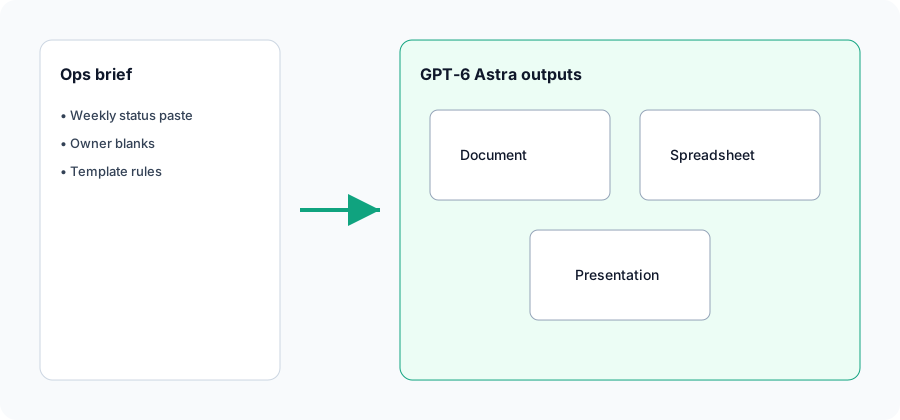
In a Business workspace chat with your status template attached (or pasted):
From this pasted status dump only: (1) draft a one-page ops memo matching our template headings, (2) a six-slide leadership deck, (3) a Sheet table of owner + risk blanks. Do not invent metrics. Flag Unknown where the paste is silent.
2. Library expands — Box, Dropbox, and SharePoint
What changed (public ≈ Sep 10, 2026 in ChatGPT release notes): Box, Dropbox, and SharePoint join Library alongside earlier Drive-style connectors. Connected accounts keep their existing permissions — useful when SOPs and close packets already live in those systems instead of being re-uploaded every week.
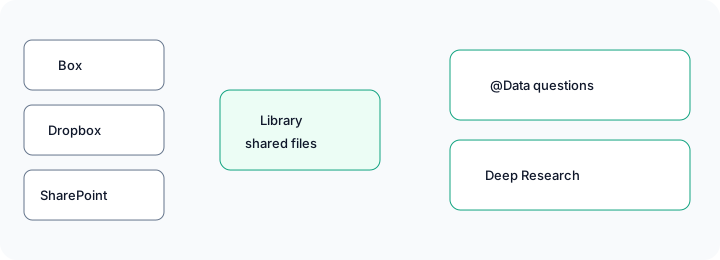
If Library connectors are enabled for your workspace:
Using only the SOP file I added from Library (do not invent steps): produce purpose, numbered steps, owners, and a checklist table. Flag any step with no owner as Needs owner.
3. Data plugin in ChatGPT Work — ask business questions on connected sources
What changed (public ≈ Sep 10, 2026 — ChatGPT / Business release notes): The Data plugin helps analyze connected business data in ChatGPT Work (and Codex). Ask a business question, investigate changes, or draft an interactive dashboard/report; workspace admins manage installation policy. Members start with @Data once it is available. Connected-account permissions still apply.
@Data which vendors slipped SLA this month vs last, then forwards the draft table to finance — still reconciling against the Billing system of record before anyone emails a vendor.
If @Data is installed and your sources are connected:
@Data Using only connected sources I can access: list top 5 SLA slips this month vs prior month by vendor. Columns: vendor, slip count, owner blank, confidence. Do not invent vendors missing from the source.
4. Deep Research in ChatGPT Work
What changed (public ≈ Sep 10, 2026): Deep Research lands in ChatGPT Work (and Codex) for longer, multi-source research tasks that produce shareable outputs. Public notes tie usage to plan allowance / workspace credits — confirm live before you treat it as unlimited for every ops brief.
Deep research only public vendor pages for [tool]: summarize pricing units, AI add-ons, and admin controls a 20-person ops team must check. Cite links. Mark Unknown where the public page is silent. Skip consumer feature fluff.
5. Zendesk & OneNote plugins (beta) — support + notes without tab thrash
What changed (public ≈ Sep 3, 2026 — Business release notes): Zendesk and OneNote plugins appear in the plugin directory for ChatGPT and Codex (beta). Zendesk helps review tickets/customer history and draft replies using the member’s own Zendesk access. OneNote helps find/summarize notes and capture decisions/actions through supported actions.
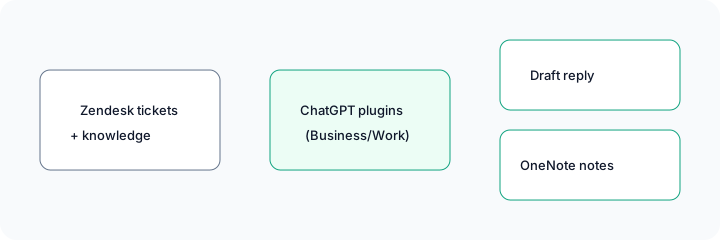
If plugins are allowed in your Business workspace:
Using Zendesk data I can access only: summarize the last 5 tickets on [topic], draft one reply for the repetitive how-to case, and list ticket types that must always escalate to a human (refunds, account deletes, legal).
What did not change for ops (still use the how-tos)
- Custom GPTs remain the shared SOP home for intake bots and close checklists — see Custom GPTs how-to.
- Memory still stores recurring preferences; it does not replace a team GPT with your rules — see Memory how-to.
- Product deep-dive patterns for when ChatGPT fits weekly ops work are unchanged in intent — see ChatGPT and ChatGPT for finance.
- Images 2.5 (templates, sketch, comments — public ≈ Sep 8) is real but mostly creative; only re-look if ops actually ships flyers/one-pagers from ChatGPT (compare Canva Magic Studio / Gamma).
Vs Claude / Gemini (brief)
What’s new in Claude (Sep 2026) covers One Claude + Docs/Slides + redesigned Projects. Gemini / Gemini in Sheets still fit when the work already lives in Workspace. ChatGPT’s Sep notes strengthen Business connectors (Library / Data / Deep Research / support plugins) and Astra artifacts. Side-by-side on three ops jobs: Claude vs ChatGPT for ops.
Pricing & access context (September 2026)
Figures summarized from OpenAI’s public ChatGPT pricing and product posts as of September 2026. Plan names, Work feature gates, Astra admin toggles, and credit math change — confirm live.
- Plus / Pro: consumer/pro tiers; Astra rolling out per OpenAI’s availability notes. Pro gets higher limits and Astra Pro per the Astra post.
- Business (formerly Team): workspace admin, no training on business data by default (per OpenAI Business materials). Name change only — see Business rename FAQ. Confirm current per-seat list price on the pricing page.
- Enterprise: admin controls; Astra may be off by default until enabled.
- API (context only): Astra API list pricing on the Astra post was about $10 / $50 per million input/output tokens (Standard) — separate from ChatGPT seats; confirm on OpenAI’s API pricing page.
Uncertainty: Which seats see Library connectors, @Data, Deep Research, and Zendesk/OneNote this week depends on workspace settings and rollout. Always confirm in-product and on OpenAI Help Center release notes before you change seats or SOPs.
When this update helps (honest take)
It tends to help when your ~20-person ops team already lives in ChatGPT Business weekly, needs better multi-step memos/decks (Astra), wants SOPs from SharePoint/Box/Dropbox without re-upload tax, or is ready to pilot Zendesk/OneNote plugins with clear escalate rules. Data + Deep Research help when admins will connect sources and humans still reconcile numbers.
It tends not to help when your company already standardized on Claude Projects or Gemini-in-Workspace for the same jobs, when Enterprise still has Astra disabled, when plugins are blocked by policy, or when you only needed a one-line chat answer. Buying seats solely for a beta plugin you will not connect is usually wasted — soft next step below only if multiple AI seats overlap on the same weekly jobs.
Paying for ChatGPT and a few other AI tools? The $9 AI toolkit spreadsheet lists every AI subscription you have, what each one costs, and how fast it pays for itself, so you can see which ones are worth the money.
Want someone to do it for you? AI toolkit audit — $19
FAQ
What changed in ChatGPT in September 2026 that ops should notice?
GPT-6 Astra; Library Box/Dropbox/SharePoint; Data plugin and Deep Research in Work; Zendesk/OneNote plugins (beta); Team→Business rename (name only). Confirm live on your plan.
Do Custom GPTs and Memory still matter?
Yes. Keep using the Custom GPTs and Memory how-tos. Astra does not replace a shared SOP GPT.
How does this compare to Claude’s Sep 2026 updates?
Claude Docs/Slides vs ChatGPT Astra + Work connectors/plugins. See What’s new in Claude and Claude vs ChatGPT for ops.
Where are the deeper ChatGPT guides?
chatgpt.html · Custom GPTs · Memory · for finance. This page is the dated Sep 2026 changelog only.
Optional next step (if seats overlap)
If ChatGPT is one of several AI seats doing the same weekly memo/deck/support loop, optional help: $19 AI toolkit audit or $9 AI toolkit spreadsheet — only if you are juggling overlapping seats.
Checkout is live via Stripe. After you pay, we email delivery (spreadsheet) or intake next steps (audit).