Role guide · Legal ops · Claude
Claude for legal ops (Oct 2026): playbooks, intake, and clause checklists
Role guide — not legal advice; Projects for playbooks and intake summaries with human review gates. This page maps how legal ops can use Claude for checklists and questions for counsel — never as a substitute for a lawyer.
Who this guide is for
Legal ops coordinators, ops leads who route NDAs, and founder-operators who prep materials for counsel — not people looking for an AI lawyer. Product deep-dive and alternatives live on claude.html. Related: Claude for ops, Claude Projects, DocuSign AI (agreement send/search for teams already on DocuSign), Typeform AI (intake forms upstream of legal).
Not legal advice (read this)
Claude can draft checklists and questions from files you upload. It cannot practice law, cannot know your facts or jurisdiction, and should not be told to “approve this NDA.” Outputs are drafts for humans. If a prompt asks for legal advice, rewrite the prompt so the model only lists checklist items and risks to ask counsel.
The intake → counsel loop (picture)
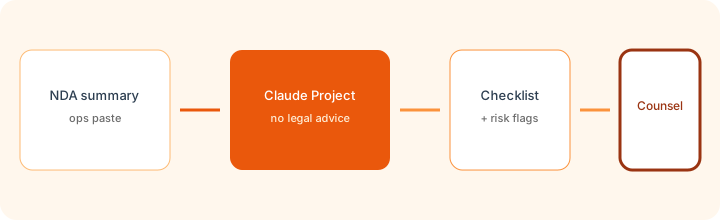
How legal ops actually runs Claude
Examples at a glance: each feature has a concrete legal-ops example plus a Try this mini-workflow.
1. Project NDA intake
What it is: A Claude Project that holds playbooks, sample NDA summaries, and custom instructions that forbid legal advice and accept/reject decisions. Reuse the Project instead of blank chats that forget the rules.

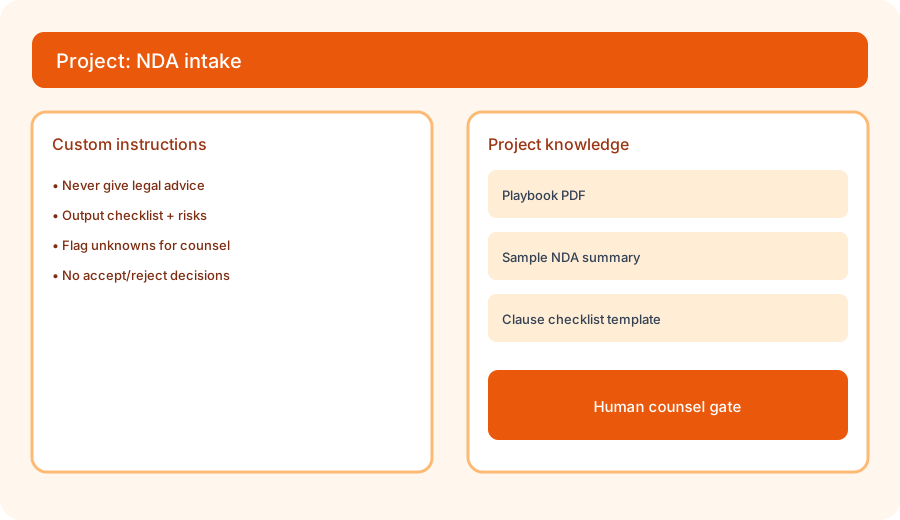
Set up the Project, then run the primary prompt:
Project NDA intake. Instructions: never give legal advice; output checklist + risks to ask counsel. Run on a sample NDA summary.
2. Playbooks as Project knowledge
What it is: Upload the ops playbook (who routes what, what fields intake must collect, when counsel must review) into Project knowledge. Instruct Claude to use only those files so it does not invent company policy.
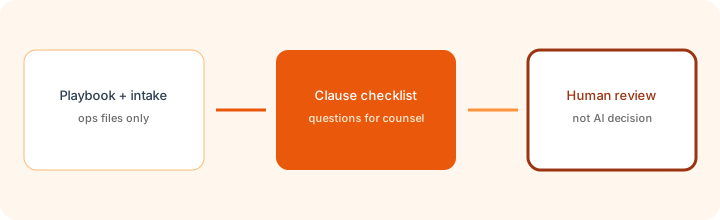
In the NDA intake Project:
Using only Project files, list which playbook routing bucket this summary appears to match. Columns: bucket, evidence quote, Unknown if missing. Do not invent policy. Do not give legal advice.
3. Clause checklists (questions for counsel)
What it is: Turn a summary into a structured checklist — governing law mentioned?, mutual vs one-way?, term length stated?, unusual IP or non-compete language flagged as “ask counsel.” Checklists are questions, not conclusions.
On a redacted sample summary:
Produce a clause checklist with columns: topic, status (Present / Missing / Unclear), quote or Unknown, question for counsel. Add 5 risk questions. Never recommend accept or reject. Never give legal advice.
4. Human review gates
What it is: The send/signature step stays with humans and your e-sign stack. Claude drafts the prep packet; counsel (or the authorized signer policy) decides. Pair with DocuSign AI only if you already send in DocuSign and want search/checklist assists there — still not a counsel replacement.
Before any pilot with real NDAs:
Write a one-page gate policy: which Claude outputs are allowed (checklist, questions), which are forbidden (accept/reject, legal advice, jurisdiction conclusions), and who must sign off before e-sign. Share with counsel for approval.
When seats overlap (soft next step)
If Claude Projects already cover intake checklists and you still pay for overlapping chat seats that draft the same legal-ops memos, fix the overlap before adding more. Optional help: $19 AI toolkit audit or $9 AI toolkit spreadsheet — only if you are juggling multiple seats with the same job. Soft offer — this role guide stands alone.
Checkout is live via Stripe. After you pay, we email delivery (spreadsheet) or intake next steps (audit). Or email hello@aiproduct.reviews with subject Audit $19 / Toolkit spreadsheet $9.
Pricing context (October 2026)
Legal ops usually needs Pro or Team if Projects + higher usage matter. Public list: Pro ~$20/mo monthly; Team Standard ~$25/member/mo monthly (~$20 annual). Confirm claude.com/pricing. Full dated notes on the Claude deep-dive. Prices change — never budget from this role guide alone.
Related tools (not substitutes for counsel)
| Job | Often useful | Notes |
|---|---|---|
| Playbook + checklist drafts | Claude for legal ops / Projects | Human counsel gate required. |
| General ops Projects | Claude for ops | Same Project pattern; different files. |
| Agreement send / search | DocuSign AI | If you already live in DocuSign. |
| Upstream intake forms | Typeform AI | Collect fields before legal review. |
Paying for Claude and a few other AI tools? The $9 AI toolkit spreadsheet lists every AI subscription you have, what each one costs, and how fast it pays for itself, so you can see which ones are worth the money.
Want someone to do it for you? AI toolkit audit — $19
FAQ
Is this page legal advice?
No. This is ops workflow education. It is not legal advice, not a substitute for counsel, and not a recommendation to accept or reject any agreement.
How should legal ops set up Claude for NDA intake?
Create a Project, upload playbooks and sample summaries, set instructions that forbid legal advice and accept/reject decisions, require checklist plus risks to ask counsel, then keep a human counsel gate before any send.
When should legal ops buy another AI seat?
Only when a clear intake or playbook job remains uncovered after Claude Projects/files. Fix overlapping chat seats first.
Where is the full Claude product review?
See /reviews/claude.html. Project setup: /reviews/claude-projects.html. This page is the legal ops role guide.