Ops · Legal ops · Agreements
DocuSign AI review (Sep 2026): agreements for ops/legal ops handoffs
AI assists around agreements for teams already on DocuSign — not e-sign shopping in the abstract. This page maps Agreement Manager AI, clause checklists for ops handoffs, plan honesty on IAM vs plain eSignature, and fair alternatives when a CLM or counsel workflow is the real job.
Who this page helps
Ops and legal-ops leads who already send NDAs, MSAs, or vendor packs in DocuSign and want AI to help search signed agreements, draft clause checklists, and structure handoffs before counsel reviews — not founders still picking an e-sign brand. If your job is intake forms before a contract exists, see Typeform AI. For drafting internal playbooks (not legal advice), see Claude for ops. For post-sign routing into Sheets or Slack, pair DocuSign with Zapier, Make, or n8n.
What DocuSign AI is
DocuSign is best known for eSignature. DocuSign AI in 2026 commonly shows up inside Intelligent Agreement Management (IAM): Agreement Manager (AI search, management, analysis, data extraction), AI-driven template helpers, Workflow Builder, and on Enhanced / higher packaging AI-Assisted Review for review and redlining. DocuSign also markets Iris as its agreement-tuned AI engine and has discussed agent / MCP-style integrations — treat those as evolving; confirm current packaging on DocuSign’s site. This review focuses on the ops job — agreements for ops/legal ops handoffs.

Major features (with how someone uses them)
Examples at a glance: each feature has a concrete ops example plus a Try this mini-workflow.
1. Agreement Manager AI search & extract
What it is: IAM plans advertise a smart repository that processes new documents (with a one-time historical allotment commonly cited as 5,000 agreements per user for new IAM customers — confirm live). AI search and data extraction help ops find renewal dates, parties, and key fields without opening every PDF. Extractions are drafts — wrong dates still ship bad renewals.
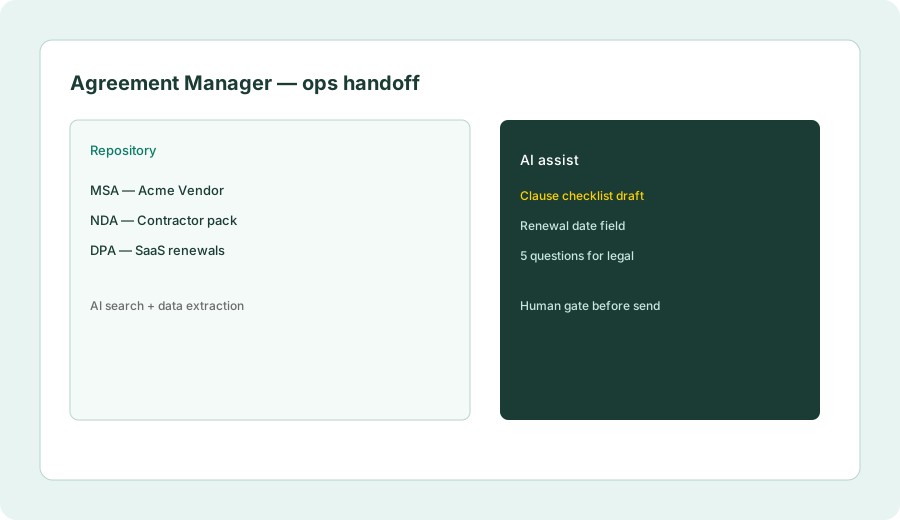
On one signed vendor MSA (or a redacted sample):
Extract: parties, effective date, renewal/termination notice window, liability cap mention (yes/no/unclear). Mark every field the model invents as [VERIFY] against the PDF before sharing with finance.
2. Ops → legal handoff checklists
What it is: The high-ROI ops pattern is not “AI signs for you.” It is a clause checklist + questions for counsel before an envelope goes out. Use AI (inside DocuSign where your plan includes review helpers, or beside it with a chat seat) to structure the handoff — then stop. This is not legal advice.
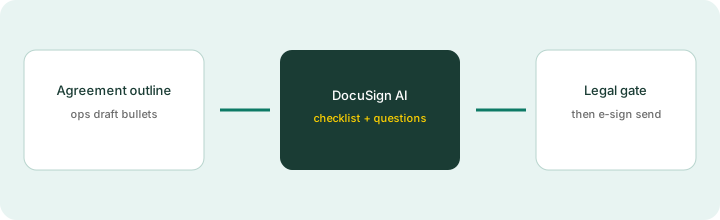
From an agreement outline:
From this agreement outline, list clause checklist for ops handoff and 5 questions to ask legal before send.
3. Workflow Builder & automation sends
What it is: IAM plans include Workflow Builder with plan-gated workflow counts (public cards often show 1 / 3 / 10 workflows on Starter / Standard / Professional). Automation sends (Web Forms, PowerForms, Bulk Send, API) have separate allowances — commonly cited as ~100 automation sends per user per year on annual Standard/Professional packaging. Confirm live; overages and definitions change.
Before upgrading IAM tiers for workflows:
List the three agreement types you send monthly. For each, write: trigger, template, human approval step, Slack/email notify. If you cannot name a weekly owner for the workflow, stay on the lower IAM tier (or eSignature-only) for 30 days.
4. IAM AI vs plain eSignature
What it is: DocuSign still sells eSignature plans separately from IAM. IAM adds the AI repository, workflows, and related agreement-layer features. Paying IAM prices when the team only needs envelopes and a shared Drive folder of PDFs is a common overspend. Conversely, staying on eSignature while searching 500 PDFs by hand wastes ops time — measure the handoff job first.
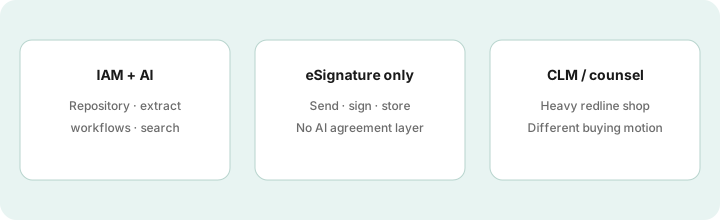
For last quarter’s agreements:
Count: envelopes sent, times someone hunted a clause in old PDFs, times counsel was blocked waiting on ops. If clause hunts are rare, do not buy IAM for AI alone; if they are weekly, pilot Agreement Manager on one vendor category first.
Public pricing (September 2026)
From Docusign IAM plans & pricing we cross-checked in September 2026 (USD web cards; annual commitment billed monthly — confirm live):
- IAM Starter: about $45/user/month — ~100 envelope sends/user/year on public cards; eSignature Standard-style features; 1 Workflow; AI search/management/analysis; Agreement Manager processing for new docs + one-time historical allotment (commonly 5,000/user for new IAM customers).
- IAM Standard: about $50/user/month — often 3-user minimum; unlimited envelopes via web app on public cards; 3 Workflows; AI repository features.
- IAM Professional: about $80/user/month — often 3-user minimum; Business Pro-style eSign features; 10 Workflows; forms/automation packaging on public cards.
- Enhanced / Enterprise: sales-quoted — public cards mention extras such as AI-Assisted Review, org management, 24/7 support.
Uncertainty flags: DocuSign also sells a separate eSignature ladder (Personal / Standard / Business Pro) with different prices — do not mix those numbers into an IAM quote. Automation-send allowances, historical document allotments, and AI-Assisted Review gates are easy to misread. Regional pages and partner quotes can differ. Never budget from this page alone.
When DocuSign AI is useful (honest take)
DocuSign AI / IAM tends to help when you already live in DocuSign, agreements pile up, and ops needs search, extraction, and structured legal handoffs before send. It tends not to help when you are still shopping e-sign vendors, when volume is tiny and PDFs in Drive are fine, or when the real need is a full CLM/redline shop with dedicated counsel tooling. AI checklists are not legal advice — human gates stay mandatory.
Paying for DocuSign AI and a few other AI tools? The $9 AI toolkit spreadsheet lists every AI subscription you have, what each one costs, and how fast it pays for itself, so you can see which ones are worth the money.
Want someone to do it for you? AI toolkit audit — $19
Alternatives compared: DocuSign AI vs eSign / CLM / chat
| Axis | DocuSign IAM + AI | eSignature-only | Chat + PDFs | Heavy CLM |
|---|---|---|---|---|
| Best when… | Already on DocuSign; need AI search/handoffs. | Send/sign is the whole job. | Occasional clause questions. | High-volume negotiation/redline. |
| Cost shape (Sep 2026) | IAM ~$45–$80+/user/mo web cards. | Lower eSign ladder — confirm live. | Chat seat + storage you have. | Enterprise CLM quotes. |
| Less useful when… | You are still picking an e-sign brand. | You hunt clauses weekly. | You need governed repository. | You only needed envelopes. |
Also see Typeform AI (pre-contract intake), Claude for ops, Zapier, Make, n8n, and the ops & automation hub.
FAQ
What is DocuSign AI?
AI capabilities packaged mainly with DocuSign IAM — Agreement Manager search/analysis/extraction, template helpers, and on higher tiers AI-Assisted Review — for teams already in DocuSign.
How much does DocuSign IAM cost in September 2026?
Public web cards: Starter ~$45, Standard ~$50, Professional ~$80 per user/month (annual | billed monthly; Standard/Professional often 3-user minimum). Confirm on the IAM pricing page; eSignature-only plans differ.
Is this an e-sign vendor comparison?
No. This page assumes DocuSign is already the agreement home and asks when the AI/IAM layer helps ops and legal-ops handoffs.
Can AI replace legal review before send?
No. Use AI for checklists and questions; counsel (or your approved reviewer) still gates send. Never treat model output as legal advice.
Optional next step (if seats overlap)
If DocuSign IAM is one of several AI seats (chat + CLM + automation) and you want a written pass across the whole list, the optional $19 AI toolkit audit produces a short memo. Prefer an editable grid? The $9 AI toolkit spreadsheet is a one-time CSV. Soft offer only — this deep-dive stands alone.
Checkout is live via Stripe. After you pay, we email delivery (spreadsheet) or intake next steps (audit).