Ops · Intake forms · Automation
Typeform AI review (Sep 2026): smarter forms for ops intake
When Typeform AI helps build and branch intake forms for vendors and internal requests — and when Google Forms plus a separate LLM is enough. This page maps AI Form Builder, logic branches, Ask AI summaries, plan honesty, and fair alternatives for ops leads who already own the intake job.
Who this page helps
Ops leads who run vendor intake, security questionnaires, or internal request forms and want AI to draft questions, branch paths, and summarize open-ended answers — without turning every form into a marketing quiz. If you only need a free checkbox survey inside Google Workspace, start with Forms. If you need multi-step automation after submit, pair any form with Zapier, Make, or n8n (see also n8n vs Make). For drafting playbooks beside the form, see Claude for ops.
What Typeform AI is
Typeform is a conversational form and survey product. Typeform AI (public packaging, Sep 2026) covers helpers such as AI Form Builder, Form Importer, Brand Kit from a URL, Translator, Content Optimizer, Clarify with AI follow-ups, and Ask AI / qualitative analysis on responses. This review focuses on the ops job — smarter forms for ops intake — not lead-gen Growth Flow upsells in the abstract.

Major features (with how someone uses them)
Examples at a glance: each feature has a concrete ops example plus a Try this mini-workflow.
1. AI Form Builder for ops intake
What it is: Type a prompt so Typeform AI drafts questions and a form structure in seconds. For ops, the value is a vendor or request intake skeleton you edit — not a one-click publish of whatever the model invents. Always mark true required fields yourself after the draft.
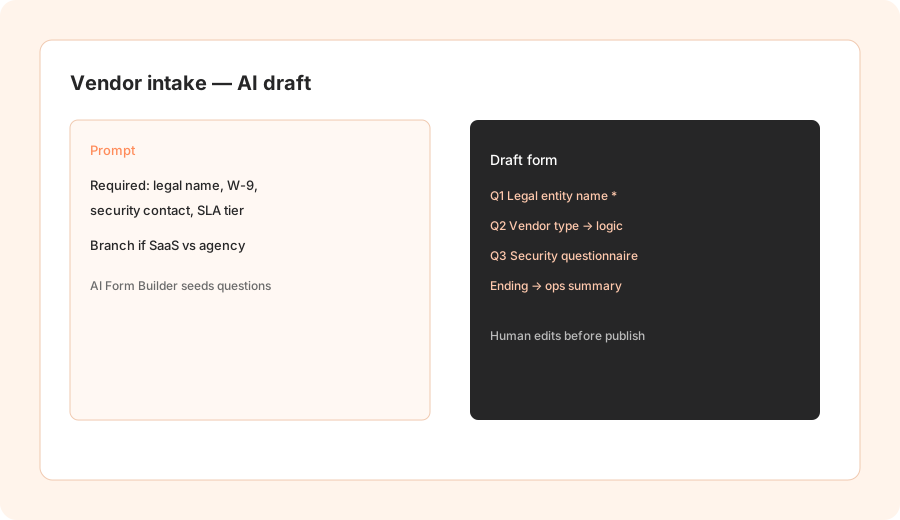
Design a vendor intake form:
Design a vendor intake form: required fields, 2 logic branches, and a summary prompt for ops review.
2. Logic branches & required fields
What it is: Conditional logic skips irrelevant questions (SaaS vs agency, employee vs contractor). AI can propose branches; ops must verify that required compliance fields never sit behind a skip path that respondents can dodge. Pair with Clarify with AI only when open text is allowed to be fuzzy — not for tax IDs.
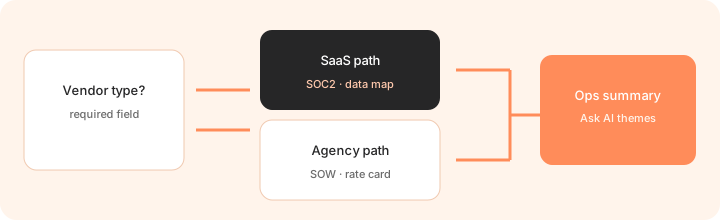
After AI drafts branches:
List every required field. For each logic branch, confirm the field is still reachable. Rewrite any skip path that lets a vendor avoid W-9, security contact, or data residency.
3. Ask AI & response summaries
What it is: Ask AI and qualitative analysis summarize open-ended answers into themes and charts. Useful when ops reviews a week of intake comments and needs a short digest for Slack — with a hard rule: do not invent risk ratings the respondent never wrote.
On a sample batch of open-ended answers:
Ask AI: summarize themes for ops review in 5 bullets. Flag any claim that invents a risk score, deadline, or owner not present in the responses. End with 3 follow-up questions for humans.
4. Vs Google Forms + LLM
What it is: The honest alternative for many ops teams is Google Forms (or Microsoft Forms) plus exporting to Sheets and summarizing in Claude or ChatGPT. Typeform AI wins on conversational UX and in-product analysis; Forms + LLM wins on cost and Workspace familiarity. Response caps on Typeform plans are the real cost driver — not the AI badge alone.
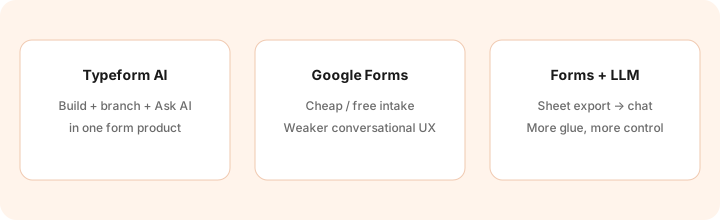
Before buying Typeform for intake:
Estimate monthly responses for the next quarter. If under ~100 and Workspace is home, run the same vendor intake in Google Forms once, summarize with your chat seat, and only then justify Typeform’s response-tier spend.
Public pricing (September 2026)
From typeform.com/pricing we cross-checked in September 2026 (USD; confirm live — Typeform sometimes shows A/B price cards):
- Free: $0 — very limited monthly responses (commonly cited as ~10/mo on third-party writeups; confirm live).
- Basic: about $39/mo monthly or about $28/mo billed annually — 100 responses/mo, 1 user; public cards mention AI-powered form creation.
- Plus: about $79/mo monthly or about $56/mo billed annually — 1,000 responses/mo, 3 users; remove branding / custom subdomain.
- Business: about $129/mo monthly or about $91/mo billed annually — 10,000 responses/mo, 5 users; drop-off / conversion analytics style packaging.
- Growth Flow / Talent / Enterprise: separate SKUs (Growth Flow commonly ~$266–$379/mo depending on annual vs monthly packaging; Talent ~$119–$169; Enterprise custom). Confirm on the live pricing page.
Uncertainty flags: Typeform’s Help Center notes they experiment with pricing — monthly vs annual and comparison-table figures can disagree with hero cards. AI features are woven into core plans rather than a single “AI add-on” line item; plan gates still move. Never budget from this page alone.
When Typeform AI is useful (honest take)
Typeform AI tends to help when intake UX and branching matter, respondents expect a polished form, and Ask AI summaries save a weekly ops digest. It tends not to help when you need a free internal checkbox form, when response volume will blow past your tier every month, or when the real job is post-submit routing (buy Zapier/Make/n8n for that). Paying for Growth Flow “just in case” while the team only needed Basic intake is stack sprawl — pick the intake job, then the plan.
Paying for Typeform AI and a few other AI tools? The $9 AI toolkit spreadsheet lists every AI subscription you have, what each one costs, and how fast it pays for itself, so you can see which ones are worth the money.
Want someone to do it for you? AI toolkit audit — $19
Alternatives compared: Typeform AI vs Forms / LLM / automation
| Axis | Typeform AI | Google Forms | Forms + LLM | Zapier / Make / n8n |
|---|---|---|---|---|
| Best when… | Branded intake + in-form AI. | Cheap Workspace surveys. | You already summarize exports. | Routing after submit matters. |
| Cost shape (Sep 2026) | Response-tier plans ~$28–$91+/mo annual. | Often $0 inside Workspace. | Forms + chat seat you already pay. | Automation seat — see those reviews. |
| Less useful when… | Tiny internal polls. | You need conversational UX. | Nobody will run the LLM step. | You only needed better questions. |
Also see Zapier, Make, n8n, n8n vs Make, Claude for ops, and the ops & automation hub.
FAQ
What is Typeform AI?
Typeform’s built-in AI for drafting forms, optimizing questions, clarifying vague answers, translating, and analyzing responses with Ask AI — useful for ops intake, not only quizzes.
How much does Typeform cost in September 2026?
Public annual-effective cards commonly show Basic ~$28, Plus ~$56, Business ~$91 per month; monthly list prices are higher. Growth/Talent/Enterprise are separate. Confirm on typeform.com/pricing — A/B tests happen.
When should ops use Typeform AI instead of Google Forms plus an LLM?
When conversational UX, logic branches, and in-product Ask AI summaries justify the response-tier spend. Otherwise Forms + your chat seat is often enough.
Will Ask AI invent risk scores?
It can overstate themes. Treat summaries as drafts: blank any severity, owner, or deadline that was not written by a respondent.
Optional next step (if seats overlap)
If Typeform is one of several AI seats (forms + chat + automation) and you want a written pass across the whole list, the optional $19 AI toolkit audit produces a short memo. Prefer an editable grid? The $9 AI toolkit spreadsheet is a one-time CSV. Soft offer only — this deep-dive stands alone.
Checkout is live via Stripe. After you pay, we email delivery (spreadsheet) or intake next steps (audit).