Role · Legal ops · Gemini · Oct 2026
Gemini for legal ops (Oct 2026): Workspace drafts for contract trackers and intake
Many legal teams run their contract tracker in a spreadsheet and their intake through email and Docs. Gemini in Google Workspace can work inside those files: find renewals in a tracker, draft an intake summary, summarize a long thread. This page shows four jobs with a Try this each. It is not legal advice; counsel decides.
What this page covers
This page is for the legal ops manager, paralegal, or solo in-house lawyer whose company runs on Google Workspace and who hasn’t (yet) bought a contract platform. It covers tracker and intake work — not negotiating clauses, which belongs with counsel and tools built for it.
One plan detail matters first: on Google’s Workspace pricing page (read 5 October 2026), Gemini in Sheets and Gemini in Docs are not included in Business Starter; Starter lists Gemini in Gmail and the Gemini app. Business Standard, Business Plus, and Enterprise include Gemini in Gmail, Docs, Sheets, and more. Check your plan before trying the Sheets workflow below.
Facts come from Google’s Workspace pricing page and its Gemini in Google Sheets help article, read on 5 October 2026.
Major features (with how someone uses them)
Examples at a glance: each feature has a concrete example from a real job plus a short Try this you can run this week.
1. Renewals in the next 90 days from a tracker (primary)
What it is: Google’s help page says Gemini in Sheets (the Ask Gemini side panel) can create tables and formulas, generate analysis, build charts, and take actions such as filtering, sorting, conditional formatting, and pivot tables, with an Undo for actions. It works best on native Sheets files — convert an .xlsx first. A tracker with clean columns (counterparty, start date, term, notice period, auto-renew) is exactly what it needs.
The risk is the same as any renewal list: the tracker is only as right as the data entered. Gemini can filter the rows correctly and still miss a renewal if the notice period column is wrong or an amendment wasn’t recorded.
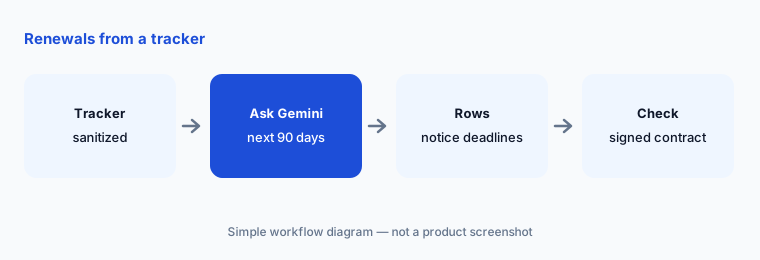
Primary workflow:
In a Sheet of sanitized contract metadata, ask Gemini for renewals in the next 90 days. Check each row against the signed contract before you set a reminder.
2. Draft an intake summary in Docs
What it is: Contract requests often arrive as a vague email: “Can legal look at this vendor agreement by Friday?” In plans that include Gemini in Docs, you can draft a structured intake summary — counterparty, contract type, value if stated, deadline, data involved, business owner — from the request text, then send it back to the requester to confirm.
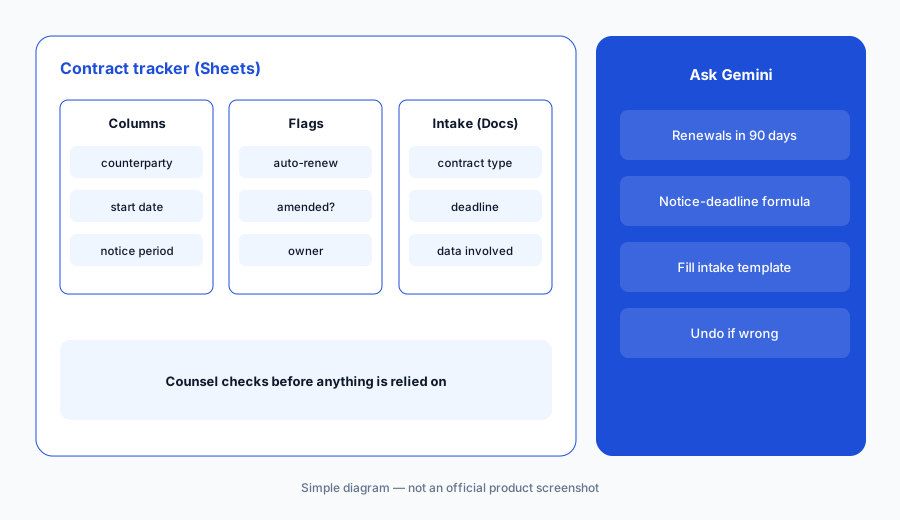
Use your template:
Write your intake template as headings in a Doc. Paste one sanitized request and ask Gemini to fill it. Send the filled template to the requester to confirm before anyone reviews the contract.
3. Summarize a long negotiation thread in Gmail
What it is: Gemini in Gmail is included on every Business plan, Starter included. It can summarize a long email thread — useful when a contract negotiation has 40 replies and you need to know what’s still open. Ask for open points and who owns each, then check against the latest redline, not the summary.
Summary vs redline:
Ask Gemini in Gmail for the open points in one negotiation thread. Compare the list with the latest redline and note any point the summary got wrong.
4. Where Gemini stops
What it is: Gemini in Workspace works on the files you open; it isn’t a contract repository, it doesn’t send reminders on its own, and it doesn’t make legal calls. When the tracker passes a few hundred contracts or renewals keep slipping, a contract platform such as Juro or Ironclad is the better home. For clause negotiation, see Spellbook.
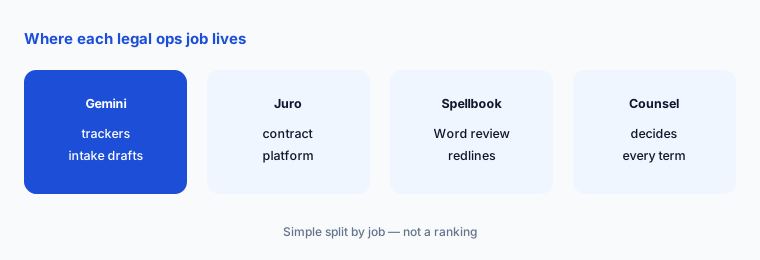
Set a threshold:
Write the point at which your spreadsheet tracker stops being enough (number of contracts, missed renewals). Review it each quarter.
Pricing context (October 2026)
Google’s Workspace pricing page, read on 5 October 2026, listed Business Starter at $7, Business Standard at $14, and Business Plus at $22 per user per month with a one-year commitment; Enterprise is contact-sales. A 14-day trial and a time-limited promotional discount were shown. Gemini in Sheets and Docs is listed for Standard, Plus, and Enterprise — not Starter.
Uncertainty: Workspace prices and Gemini packaging change, monthly (flexible) billing costs more than the annual-commitment figures, and promotions are temporary. Check the live pricing page and your admin console before buying.
When it’s useful (honest take)
Useful when your tracker and intake already live in Sheets, Docs, and Gmail, you’re on Business Standard or above, and someone checks every row against the signed contract.
Less useful when you’re on Business Starter (no Gemini in Sheets or Docs), your tracker data is unreliable, or the volume has outgrown a spreadsheet.
Paying for Gemini and a few other AI tools? The $9 AI toolkit spreadsheet lists every AI subscription you have, what each one costs, and how fast it pays for itself, so you can see which ones are worth the money.
Want someone to do it for you? AI toolkit audit — $19
Related options (educational)
| Need | Better home | Why |
|---|---|---|
| Trackers and intake drafts in Workspace | Gemini for legal ops (this page) | Inside Sheets, Docs, and Gmail |
| Spreadsheet work with Gemini in general | Sheets + Gemini | Formulas, tables, analysis |
| A contract platform with AI | Juro AI | Templates, approvals, Operator |
| Clause review in Word | Spellbook | Redlines counsel approves |
| Same jobs with Claude | Claude for legal ops | Projects for legal ops |
FAQ
Does Gemini in Sheets come with Business Starter?
No. On 5 October 2026, Google’s Workspace pricing page listed Gemini in Sheets and Docs for Business Standard, Plus, and Enterprise. Starter includes Gemini in Gmail and the Gemini app.
Can Gemini find upcoming renewals in a contract tracker?
Yes, if the tracker has clean date and term columns. Google’s help page says Gemini in Sheets can filter, sort, create formulas, and analyze data. Check every row against the signed contract.
How much does Google Workspace cost in October 2026?
Business Starter $7, Standard $14, and Plus $22 per user per month with a one-year commitment; Enterprise is contact-sales.
Does Gemini work on Excel files?
Google’s help page says Gemini in Sheets works best with native Google Sheets files and suggests saving an .xlsx as a Google Sheet first.
Is Gemini legal advice?
No. It drafts and summarizes; counsel decides. This page is educational, not legal advice.
Optional next step (if seats overlap)
If legal pays for Workspace with Gemini, a contract platform, and other chat seats that all summarize the same agreements, that overlap is worth mapping. Map the overlap with the $19 AI toolkit audit or the $9 AI toolkit spreadsheet.
Both pages explain what you get and how delivery works before you decide.