Tool · Legal · Juro · Oct 2026
Juro AI review (Oct 2026): contract automation assists for in-house teams
Juro is a browser-native contract platform: teams create contracts from templates, route approvals, negotiate, sign, and store them in one place. Its AI reviews and redlines against your playbooks, redrafts and summarizes clauses, and — through Operator — answers plain-language questions about your contracts with citation links. This page shows each assist with an example and a Try this. It is not legal advice; humans sign off.
What this Juro AI page covers
This page is for the in-house lawyer or legal ops manager at a scaling company whose sales, HR, and procurement teams create lots of routine contracts, and who wants to know which of Juro’s AI assists can take work off legal’s plate without losing control.
Juro has shipped AI steadily through 2026: AI Review arrived in April; Operator, a contract intelligence agent, went to beta in April and launched in May; Juro added a Claude MCP connection in June and contract work in Claude in August; and on 30 September 2026 it added drafting from templates via Operator, Claude, or ChatGPT, a contract status summary page, and broader Operator queries.
Facts come from juro.com’s AI intake & review page, pricing page, and monthly product updates (April–September 2026), read on 5 October 2026. Juro does not publish list prices.
Major features (with how someone uses them)
Examples at a glance: each feature has a concrete example from a real job plus a short Try this you can run this week.
1. Ask Operator about renewal terms (primary)
What it is: Juro describes Operator as an agent that understands the context of your documents. Its May 2026 update gives examples — which MSAs renew this quarter, what your standard liability cap is, parent and child relationships — and says answers come with citation links to the source. The September update says Operator can now query more contract data, including activity, statuses, attachments, and folders.
Renewal dates are where AI summaries go wrong most quietly: notice periods, auto-renewal language, and amendments can all move the real date. The citation link is how you check.
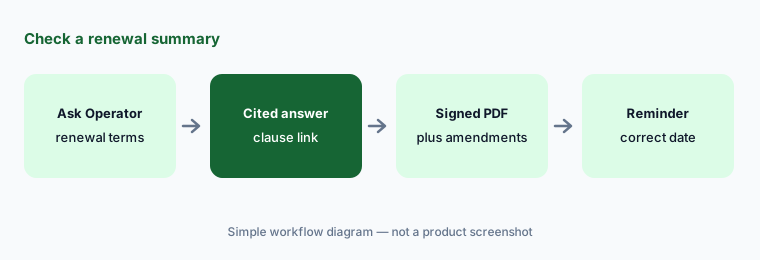
Primary workflow:
Ask Juro AI (Operator) to summarize one signed contract’s renewal terms. Check the date against the signed PDF, including any amendments, before you put it in a reminder.
2. AI Review and redlines against your playbook
What it is: Juro says its AI can review and redline contracts — including in Microsoft Word — based on playbooks you control, so you set legal guardrails and the AI applies them. AI Review arrived in April 2026. The new contract summary page (September) also lets you get an AI review alongside the contract’s full history.
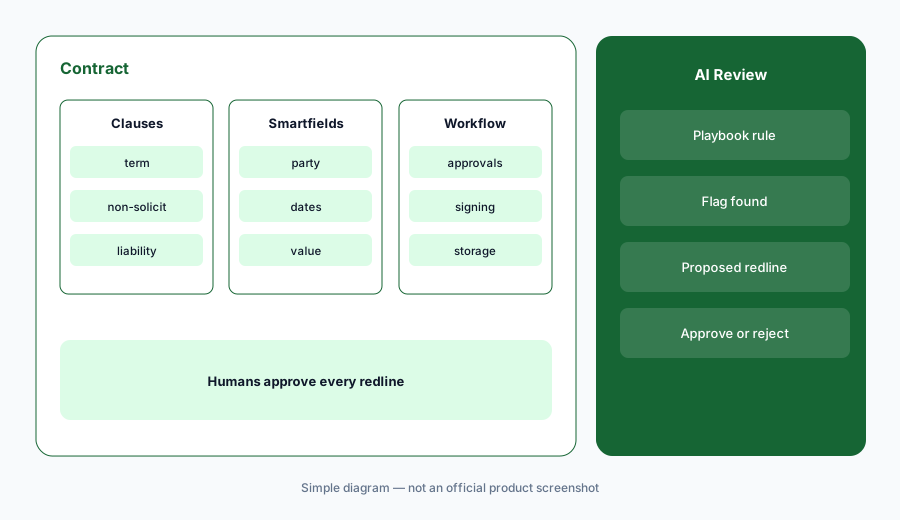
Write the playbook first:
Write the three positions you always take on one contract type. Set them as a playbook, run AI Review on one sanitized inbound contract, and check whether each flag matches what you would have marked.
3. AI Assistant: redraft, check, summarize
What it is: Juro’s AI Assistant sits in the contract editor and can redraft clauses, check for compliance, and summarize contracts. It’s useful for business users who create contracts from templates and need a plain-English summary, and for legal when a clause needs a quick rewrite.
Summaries stay outside the contract:
Ask AI Assistant for a plain-English summary of one clause. Put the summary in the approval note, not the contract, and have the template owner check it once.
4. Draft from templates via Operator, Claude, or ChatGPT
What it is: On 30 September 2026, Juro said you can ask Operator to create a contract from a template (choose the template and workspace, fill required answers and smartfields, then edit), and that, with an AI connector set up, Claude or ChatGPT can draft and edit contracts using your Juro templates. Juro lists drafting from scratch without a template as “coming soon.”
The same update added a contract summary page (who received it, what has happened, a suggested next action, and reminders) and controls for external signing, such as pre-assigned signatories and expiry dates on signing links.
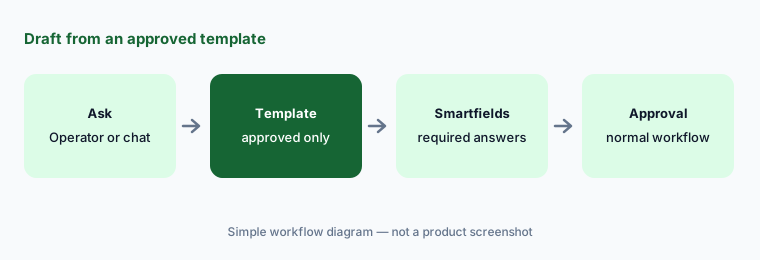
Templates only:
Allow AI drafting only from approved templates at first. Draft one NDA through Operator or a connected chat tool and confirm it entered your normal approval workflow.
5. Versus Spellbook, Ironclad, and Gemini
What it is: Juro fits teams that want creation, approval, signing, storage, and AI in one browser-native platform. Spellbook fits lawyers negotiating in Word. Ironclad is a CLM often chosen by larger legal teams. Gemini in Sheets can help with a tracker if you don’t have a contract platform yet.
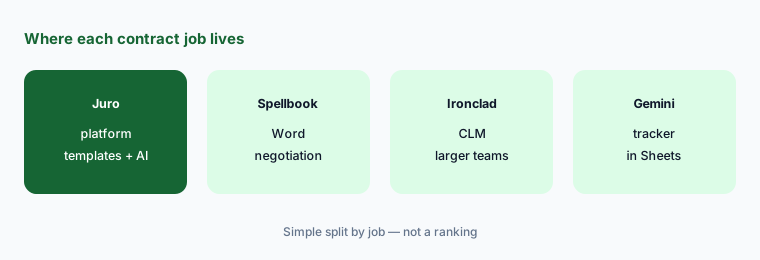
Home for the job:
List your top three contract types by volume. If business teams create them from templates, a platform like Juro fits. If lawyers negotiate each one in Word, start with a Word tool.
Pricing context (October 2026)
Juro does not publish a list price. When we checked on 5 October 2026, its pricing page offered a plan calculator and demo booking rather than published prices. We don’t list or estimate one. Ask which AI features (AI Review, AI Assistant, Operator, AI Extract, AI connectors) are included in your plan and whether any are metered.
Uncertainty: Your quote is the only reliable number. Some features (for example AI Extract for vendor contracts) have been described as early access; confirm availability on your plan. Juro’s contract counts and acceptance rates are vendor claims.
When it’s useful (honest take)
Useful when business teams create lots of routine contracts from templates, legal sets the guardrails once, and you want questions about signed contracts answered with citations you can check.
Less useful when most of your contracts are bespoke and negotiated in Word by outside counsel, or when you just need a renewal tracker for a few dozen agreements.
Paying for Juro AI and a few other AI tools? The $9 AI toolkit spreadsheet lists every AI subscription you have, what each one costs, and how fast it pays for itself, so you can see which ones are worth the money.
Want someone to do it for you? AI toolkit audit — $19
Related options (educational)
| Need | Better home | Why |
|---|---|---|
| Browser-native contracts with AI built in | Juro AI (this page) | Templates, approvals, signing, Operator |
| Negotiation and redlines in Word | Spellbook | Word add-in for lawyers |
| CLM for larger legal teams | Ironclad AI | Repository and workflows |
| Renewal tracker in a spreadsheet | Gemini for legal ops | Before you have a platform |
| Document generation for sales | PandaDoc | Proposals and quotes |
FAQ
What is Juro Operator?
Juro describes Operator as a contract intelligence agent that answers plain-language questions about your contracts, such as which MSAs renew this quarter, with citation links to the source. Since September 2026 it can also create contracts from templates.
How much does Juro cost in October 2026?
Juro does not publish a list price; its pricing page uses a calculator and demo booking. Pricing comes from a quote.
Can Juro’s AI redline contracts?
Juro says its AI can review and redline contracts, including in Word, based on playbooks you control. AI Review arrived in April 2026.
Does Juro work with Claude or ChatGPT?
Yes. Juro added a Claude MCP connection in June 2026, and on 30 September 2026 said Claude or ChatGPT can draft and edit contracts from Juro templates once an AI connector is set up.
Is Juro’s AI legal advice?
No. It drafts, reviews against your playbooks, and summarizes; people approve and sign. This page is educational, not legal advice.
Optional next step (if seats overlap)
If legal pays for a contract platform, a Word add-in, and chat seats that all summarize the same agreements, that overlap is worth mapping before renewal. Map the overlap with the $19 AI toolkit audit or the $9 AI toolkit spreadsheet.
Both pages explain what you get and how delivery works before you decide.