Compare · Accounting firm ops · Oct 2026
Juno vs SurePrep (Oct 2026): per-return AI tax prep vs 1040SCAN and SPbinder for tax firms
Juno and SurePrep both take the typing out of tax prep, but they are sold and built differently. Juno is AI return prep priced per return, with Preparer, Binder, Reviewer, and Advisor in one plan and business returns since April 2026. SurePrep, now part of Thomson Reuters, is a 1040 suite: 1040SCAN scan-and-populate, SPbinder workpapers, the TaxCaddy client app, and the newer Ready to Review agent, all quote-only. This page splits them by job, shows how to test both on returns you already filed, says when manual entry still makes sense, and is not a ranking. Each section has a Try this.
What this comparison covers
This page is for a tax firm owner, reviewing tax manager, preparer of record, or firm administrator choosing between Juno and SurePrep for the coming season, or asking whether one should replace the other. It is not tax, audit, or accounting advice; a licensed CPA, EA, or the engagement partner owns any return, workpaper, audit conclusion, client letter, or filing.
Facts come from our Juno AI and Thomson Reuters SurePrep reviews, re-checked on 21 October 2026 against Juno's pricing page and home page and Thomson Reuters' SurePrep page. We did not test either product. Accuracy, coverage, and time-saved figures on both sites are vendor or customer claims.
The overlap is the same job: turning a stack of client documents into data in the tax software and a workpaper a reviewer can follow. The difference is the shape. Juno sells one plan per return and pushes to a wide list of tax software, including Drake and ProSeries. SurePrep is a set of products that firms often buy in pieces, and its suite integrations name four tax programs.
Ground rules for either pilot: the preparer of record compares every extracted field with the source document before anything is pushed; the reviewing tax manager logs every field each tool got wrong on closed returns; the client manager reads every document request list before clients see it; the tax partner decides which tool, if any, the firm commits to. This comparison is not a ranking.
| Question | Juno | SurePrep (Thomson Reuters) |
|---|---|---|
| Built around | AI return prep from source documents, sold per return with everything included | A 1040 suite: 1040SCAN scan-and-populate, SPbinder workpapers, TaxCaddy client app, Outsource service |
| Extraction | Preparer reads W-2s, 1099s, K-1s, brokerage statements, and QuickBooks or Xero financials; every value links to its source | 1040SCAN bookmarks and sorts documents into a return-order index and exports data; Thomson Reuters says 65% of standard documents need no manual verification |
| Workpapers | Binder with source mapping, tick marks, sign-offs, and notes | SPbinder with leadsheets, cross-references, and up to four sign-off levels |
| Review help | Reviewer exceptions and firm “Gotcha checks”; self-correcting verification layer (18 Jun 2026) | Review Wizard side-by-side; AI K-1 Reclass; Ready to Review agentic 1040 prep (US GA 15 Dec 2025, simple 1040s) |
| Business returns | 1120, 1120-S, 1065 from QuickBooks or Xero (16 Apr 2026) | Suite described for 1040s; TaxCaddy also covers 1041s |
| Tax software | Drake, Lacerte, ProConnect, ProSeries, CCH Axcess, “and more” | CCH Axcess Tax, GoSystem Tax RS, Lacerte, UltraTax CS; only 1040SCAN ORGANIZE works with any tax software |
| Price | $50 list per return, volume and season discounts; custom above 2,500 returns | Quote-only (“Contact sales”) |
| Who signs off | Preparer of record on every pushed field; reviewing tax manager on every exception | Preparer of record on every K-1 category; reviewing tax manager on every populated field |

Major features (with how someone uses them)
Examples at a glance: each feature has a concrete example from a real job plus a short Try this you can run this week.
1. Same ten closed returns through both (primary)
What it is: The cleanest comparison uses work you have already finished: ten returns from last season, filed and reviewed, picked for mixed complexity — a W-2 household, a brokerage-heavy return, a Schedule C, rentals, a few K-1s. Juno offers 5 free preparations with no credit card (pricing FAQ); SurePrep pilots go through Thomson Reuters sales (Contact sales). Run the same source documents through both and compare each result line by line with the filed return.
A demo return is built to look good. A filed return already has the right answer on it, so every wrong field is visible.
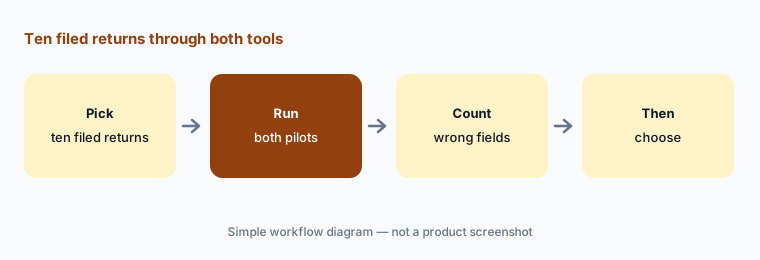
Primary workflow:
Pick ten closed returns of mixed complexity. Have the reviewing tax manager run both and count every field each got wrong before choosing for the season.
2. Extraction: Juno Preparer vs 1040SCAN
What it is: Juno's Preparer reads W-2s, 1099s, K-1s, Schedules C and E, brokerage statements, and QuickBooks or Xero financials, links every value to its source, and pushes nothing until someone marks it ready. Its 18 June 2026 post describes a verification layer that cross-checks figures within a brokerage statement — Juno's internal benchmark. 1040SCAN bookmarks and sorts source documents into a workpaper index that follows the order of the return and exports the data; Thomson Reuters says it processes 4 to 7 times more documents than alternatives and verifies data for 65% of standard documents automatically — vendor claims.
Both tools show where a number came from. That only helps if the preparer opens the source on the fields that matter.
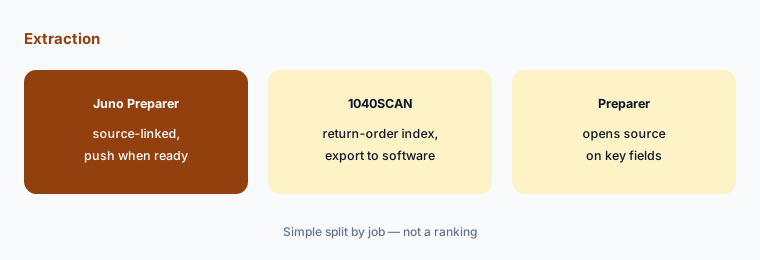
Open the source:
On three brokerage-heavy returns, have the preparer of record open the source for every 1099-B total in both tools before marking any field ready.
3. Workpapers: Juno Binder vs SPbinder
What it is: Juno's Binder builds a workpaper per return with every data point mapped to its source, plus tick marks, references, sign-offs, and notes; Juno says it can replace separate workpaper software. SPbinder organizes documents into an index that follows the 1040, adds tick marks, annotations, threaded notes, and hyperlinked cross-references on any supported file type, and supports up to four sign-off levels and leadsheets with change tracking.
Moving workpaper software is a bigger change than moving extraction. Reviewers learn where to look, and that habit is hard to rebuild in season.
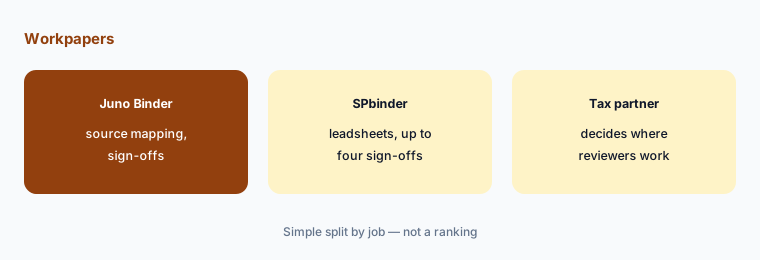
Ask about the binder:
Before choosing, have the tax partner ask both vendors in writing whether you can keep your current workpaper binder, and what changes for reviewers if you do not.
4. Review help: Juno Reviewer vs Ready to Review and K-1 Reclass
What it is: Juno's Reviewer compares source documents and the prior-year return with the draft and lists exceptions, including firm-defined “Gotcha checks.” On the Thomson Reuters side, SPbinder's AI K-1 Reclass pre-fills category suggestions for supplemental K-1 amounts, and Ready to Review — generally available in the US since 15 December 2025 and switched on through CoCounsel Tax — prepares simple 1040s end to end for a reviewer to check.
A list of exceptions is a list of what the tool chose to flag. The lines it stayed quiet on still belong to the reviewer.
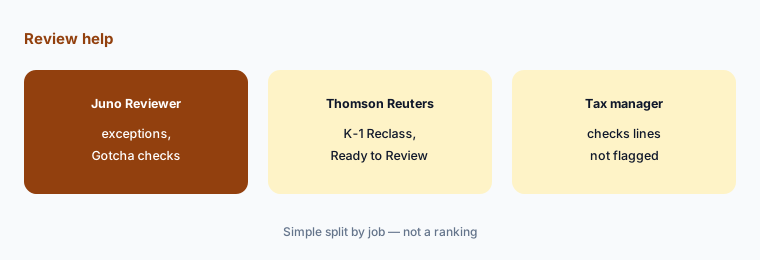
Check what was not flagged:
On two closed returns, have the reviewing tax manager list three errors she knows were there and check whether each tool flagged them.
5. Client intake and planning: Juno checklist and Advisor vs TaxCaddy
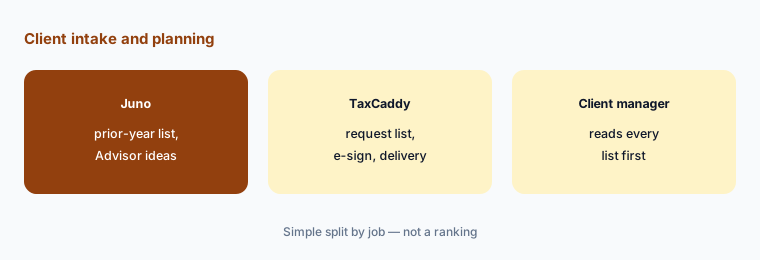
What it is: Juno's expected document checklist (14 Aug 2026) reads a client's prior-year return, lists each document it included, and clears items as they arrive; its Advisor drafts planning ideas. TaxCaddy is SurePrep's client app: it builds a request list from data in the firm's tax software, pulls some documents through Smart Links, and handles questionnaires, e-signature, payments, and delivery of the final return.
A request list built from last year asks for last year's documents. New income, a move, or a new entity will not be on it unless someone asks.
Read the list first:
For five clients, have the client manager compare each tool's request list with what the client actually sent last season before any list goes out.
6. Which tax software each pushes to, and when to keep manual entry
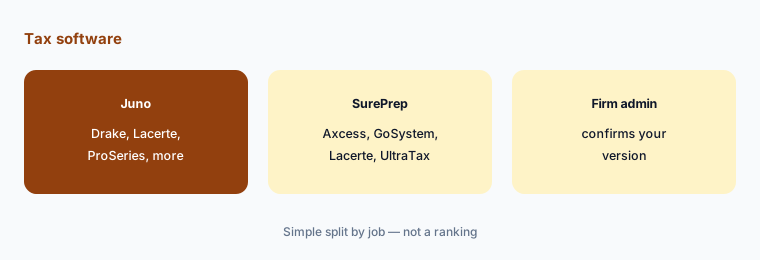
What it is: Juno says it pushes directly to Drake, Lacerte, ProConnect, ProSeries, CCH Axcess, “and more” (home page); its ProSeries page says business-return support there is coming. Thomson Reuters' SurePrep FAQ lists CCH Axcess Tax, GoSystem Tax RS, Lacerte, and UltraTax CS, and says only 1040SCAN ORGANIZE works with any tax software. Some returns are still faster and safer by hand: a first-year client with a messy prior preparer, a return with unusual state allocations, or a partnership K-1 with long supplemental statements that both tools read differently in your pilot.
Neither tool decides a tax position. If a return needs judgment on every page, extraction saves typing but not review.
Confirm your software:
Have the firm administrator get written confirmation from both vendors that they push to your tax software and version, and agree which return types stay manual this season.
Pricing context (October 2026)
Juno (pricing page, checked 21 Oct 2026): one flat rate per return, whatever the complexity. The calculator shows a $50 list price per return, a volume discount of up to $5 per return as volume rises, and an “end of tax season” discount of $5 per return on a first order; at its default of 500 returns that is $44 per return. Above 2,500 returns pricing is custom, with a pilot. Every plan includes Preparer, Binder, Reviewer, Advisor, integrations, K-1 processing, and business returns, and users scale at 2 per 100 returns. The trial is 5 free preparations.
SurePrep (SurePrep page, checked 21 Oct 2026): quote-only. The SurePrep, 1040SCAN, SPbinder, and TaxCaddy pages offer “Contact sales” or a demo and print no prices; Ready to Review also prints no price. Firms often license the pieces separately, so ask for each line in writing.
Because one is priced per return and the other by quote, compare them on your own return count: multiply your expected returns by Juno's per-return figure for that volume, and ask Thomson Reuters for a written quote covering the same returns and the products you would actually use.
Uncertainty: We did not test either product. Features, dates, and prices come from each vendor's pricing and product pages as read on 21 Oct 2026 and can change. Juno's per-return figures come from the pricing calculator in the page source. Thomson Reuters publishes no SurePrep or Ready to Review prices. Integration lists differ by product on Thomson Reuters' pages, and Juno's list ends in “and more” — confirm your tax software and version. Accuracy and coverage figures are vendor claims.
When it’s useful (honest take)
Useful when you can run ten closed returns through both tools before the season, know your return count, and have a preparer of record and reviewing tax manager who will check every field in the pilot.
Less useful when your main need is practice management with return prep plugged in (TaxDome AI or Canopy AI), cited tax research (Blue J vs CCH Axcess Expert AI), or an all-in-one tax suite where scanning is part of the contract (CCH Axcess Expert AI).
Still choosing between Juno and SurePrep? The $19 AI toolkit audit gives you a written plan for which tools to keep using and which to drop across your whole AI stack, including this pair.
Prefer to do it yourself? Spreadsheet — $9
Related options (educational)
| Need | Better home | Why |
|---|---|---|
| Per-return AI prep with workpapers and review | Juno AI | $50 list per return before discounts |
| 1040 scan-and-populate, binder, client app | Thomson Reuters SurePrep | Quote only |
| Scan and K-1 extraction inside CCH Axcess Tax | CCH Axcess Expert AI | Quote only |
| Client portal and tax workflow with Juno plugged in | TaxDome AI | $800–$1,200 per seat/year |
| Practice system choice | Karbon vs TaxDome | Compare |
FAQ
What is the main difference between Juno and SurePrep?
Juno is AI return prep sold per return, with Preparer, Binder, Reviewer, and Advisor in one plan and business returns since April 2026. SurePrep is Thomson Reuters' 1040 suite — 1040SCAN, SPbinder, TaxCaddy — plus the Ready to Review agent, sold by quote. This page is not a ranking.
Which is cheaper in October 2026?
Juno prints a $50 list price per return with volume and season discounts ($44 per return at 500 returns on its calculator). SurePrep prints no prices. Multiply your return count by Juno's figure and ask Thomson Reuters for a written quote for the same returns.
Which tax software does each work with?
Juno lists Drake, Lacerte, ProConnect, ProSeries, CCH Axcess, and more. Thomson Reuters lists CCH Axcess Tax, GoSystem Tax RS, Lacerte, and UltraTax CS for SurePrep, and says only 1040SCAN ORGANIZE works with any tax software. Confirm your version in writing.
Should we keep entering some returns by hand?
Often, yes. Returns flagged as complex at intake — unusual state allocations, long K-1 supplemental statements, a first-year client with a messy prior preparer — can be faster and safer entered by the preparer of record. Use your pilot results to set the rule.
Who approves AI output in a side-by-side pilot?
The preparer of record for every extracted field and K-1 category, the reviewing tax manager for every exception and the pilot log, the client manager for every request list, and the tax partner for the final choice. Nothing here is tax advice.
Optional next step (if seats overlap)
If your firm pays for a tax-prep AI tool, a scanning add-on in its tax suite, and general chat seats that all touch the same returns, that overlap is worth mapping. Map the overlap with the $19 AI toolkit audit or the $9 AI toolkit spreadsheet. Email Audit $19 or Toolkit spreadsheet $9.
Checkout is live via Stripe. After you pay, we email delivery (spreadsheet) or intake next steps (audit).