Tool · Accounting firm ops · Canopy · Oct 2026
Canopy AI review (Oct 2026): AI document sorting, smart intake, client portal help, and tax-resolution workflows for accounting firms
Canopy is an all-in-one practice-management platform for tax, accounting, and bookkeeping firms: client portal, documents, workflow, billing, and a tax resolution module. Its AI sits inside those pieces: uploads that sort and rename themselves, intake checklists built from last year's data, return delivery that reads the finished PDF, a month-end close module, and Canopy Coworker, an AI agent that plans and runs tasks and is in beta. This page is about using them while a named person still checks every filed document, return, and client message. Each section has a Try this.
What this Canopy page covers
This page is for a managing partner, operations manager, or client manager at a tax or accounting firm that runs on Canopy or is comparing practice systems. It is not tax, accounting, or audit advice, and nothing here replaces a CPA or EA reviewing the work.
Canopy's AI page groups its AI as Canopy Coworker, AI task reminders and follow-up emails, Canopy Notetaker, and Tax Workflow Automation. Its FAQ says plainly that “Canopy AI does not directly prepare tax returns”; return preparation comes through partner tools. The biggest 2026 releases were Coworker on 30 April, Close Automation in open beta on 10 June, and Tax Workflow Automation on 15 July.
Ground rules before you turn anything on: the client manager checks every AI-filed document before prep starts; the preparer of record reviews every AI-drafted return before it goes to review; no Coworker plan runs until a named person approves it in the review queue. Canopy's governance page says every AI output is editable and that you make the final call.

Major features (with how someone uses them)
Examples at a glance: each feature has a concrete example from a real job plus a short Try this you can run this week.
1. AI document sorting and renaming (primary)
What it is: Canopy's Tax Workflow Automation page says client uploads are “instantly matched, classified, and renamed by your firm's rules,” and its pricing grid lists AI Document Renaming: set global naming conventions and rename documents uploaded into Canopy. Smart Intake also matches bulk uploads to the items on each client's request list.
A wrong match is quiet. A spouse's W-2 filed under the primary taxpayer, or a 2024 statement renamed as 2025, looks tidy until the preparer opens it.
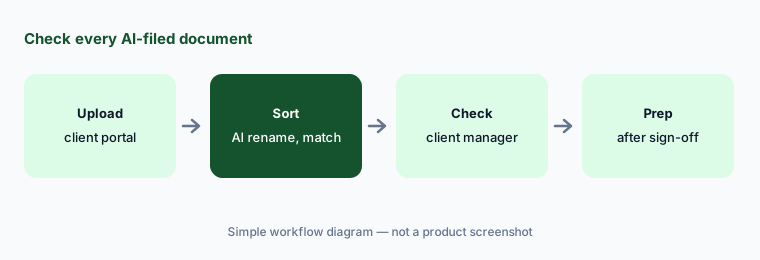
Primary workflow:
Let Canopy sort one week of client uploads. Have the client manager check every document type and client match before the preparer opens the file.
2. Smart Intake questionnaires and document checklists
What it is: Smart Intake turns organizers into questionnaires that pre-fill from last year's data and build a document checklist in real time as the client answers (Canopy). Canopy added AI questionnaires in October 2025, and its pricing FAQ says a client credit is used the first time you use Smart Intake for a client (an AI questionnaire, a checklist, or Respond with AI); after that the client's use is unlimited for the subscription.
A checklist built from last year misses what changed: a new rental property, a sold business, a child who aged out of a credit.
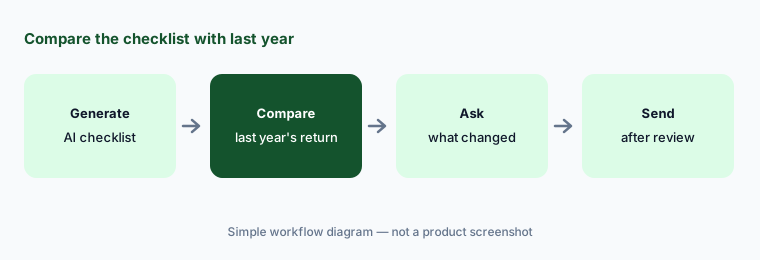
Compare first:
Build Smart Intake checklists for ten returning clients. Have the tax manager compare each one with last year's return and ask the client what changed before the request goes out.
3. Smart Prep and Smart Delivery (client portal help)
What it is: Tax Workflow Automation, launched 15 July 2026, joins Smart Intake with Smart Prep and Smart Delivery. Smart Prep sends selected documents to a partner (Filed, Byron, or Juno) that extracts data and drafts a 1040 in your existing tax software (Canopy names Drake, CCH Axcess, ProConnect, and UltraTax). Smart Delivery reads the finished return PDF, fills in the delivery details, places e-signature fields such as Form 8879, and bundles the invoice so the client reviews, signs, and pays in one flow in the portal.
Canopy says AI-generated outputs are marked and editable. That helps only if someone reads them: a misplaced signature field or a wrong balance due goes straight to the client.
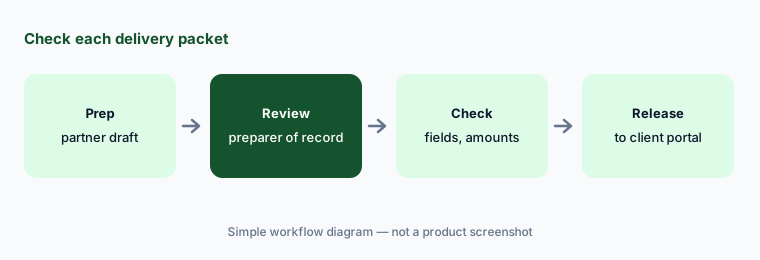
Check before release:
Run Smart Delivery on ten finished returns. Have the preparer of record check every signature field, amount, and invoice in each packet before any client sees it.
4. Canopy Coworker (beta)
What it is: Canopy introduced Coworker on 30 April 2026 as an agent that executes work inside Canopy: you describe an outcome in plain English, it builds a step-by-step plan, and it runs the approved steps across tasks, workflows, client emails, statuses, and billing. The Coworker page describes a “Plan, Act, Review” loop and a review queue where staff approve AI-drafted items before they execute. Canopy's pricing page labels Coworker Beta, and existing customers are told to ask their customer success manager about availability.
An agent that can send client follow-ups and change statuses can make many small mistakes quickly. Start with tasks that stay inside the firm.
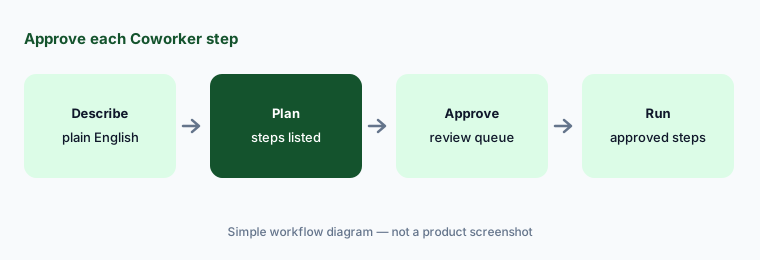
Approve each step:
Ask Coworker for a plan to chase ten clients with missing documents. Have the operations manager check the client list against the open-items report and approve each drafted message in the review queue before anything is sent.
5. Close Automation for client books (open beta)
What it is: Canopy opened Close Automation to all customers in beta on 10 June 2026. It connects to QuickBooks Online (other ledgers are planned), runs 11+ data monitors for issues such as missing receipts and unclassified expenses, shows a books-health measure per client, and creates resolution tasks. It also generates AI client summaries, risk notes, and anomaly reports that can be sent from Canopy.
An AI summary sent to a client reads like the firm's opinion of their books. It has to be right before it leaves.
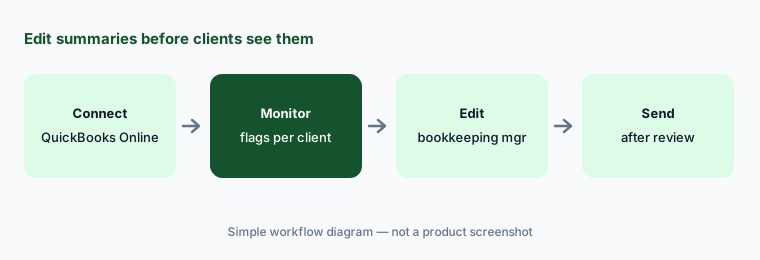
Review before sending:
Run Close Automation on one closed month for five clients. Have the bookkeeping manager compare every flag with the books your team closed and edit each AI summary before any client sees it.
6. Notetaker, tax resolution tools, API, and AI controls
What it is: Canopy launched Canopy Notetaker on 23 April 2026: it joins virtual meetings, transcribes them, and files a summary and action items on the client record. The tax resolution module pulls up to 20 years of IRS transcripts, tracks notices with step-by-step fixes, and fills 200+ federal and state forms; Canopy does not describe those tools as AI. On 30 September 2026 Canopy opened an external API that reads, creates, and updates core records. Its AI governance page says firm data is not used to train or test models unless the firm opts in, that Canopy uses OpenAI and Anthropic within those limits, and that every AI output is editable.
A meeting summary on the client record becomes part of the file. Decide what the firm records, who tells the client, and who checks the action items, before the notetaker joins its first call.
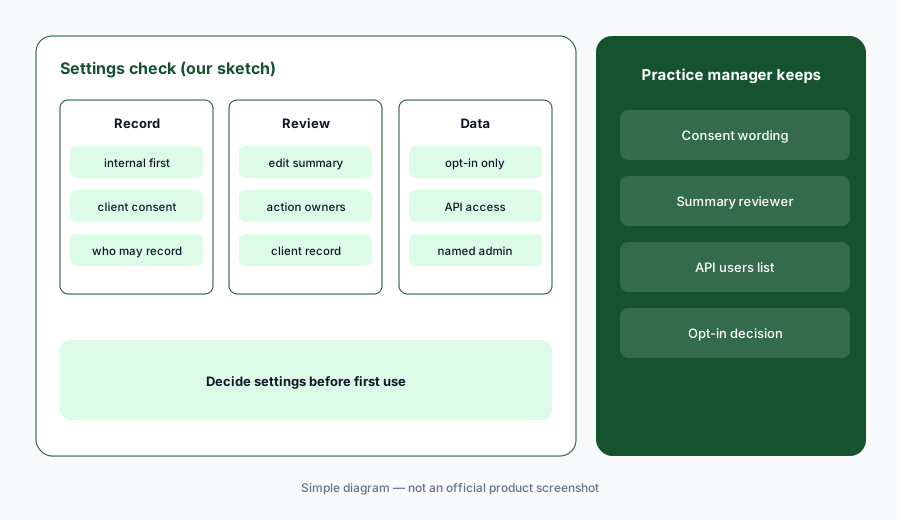
Settings first:
Before the notetaker joins any client meeting, have the practice manager write who may record, how clients are told, and who edits each summary before it is saved to the client record.
Pricing context (October 2026)
Canopy's pricing page (checked 21 Oct 2026) prints three plans billed annually: Standard $74 per user per month, Plus $109 per user per month (marked most popular), and Premium $149 per user per month, which is labeled “coming soon.” Enterprise is a custom quote. Canopy says annual billing saves 20% over monthly. Every plan includes “core AI capabilities”; Coworker is labeled Beta.
Add-ons are priced separately: Tax Workflow Automation starts at $34 per client credit (annual billing, volume discounts); Close Automation is $10 per connected client per month (annual billing; first five connections included); Tax Resolution is $50 per user per month (annual billing). Knowledge-based authentication is $1.25 per credit, and Canopy Payments prints 3.30% + $0.20 for cards and 1% (capped at $10) for ACH. Smart Prep partners (Filed, Byron, Juno) each need their own subscription, priced by the partner (Smart Prep FAQ).
Canopy's press releases cite 20 to 50 minutes saved per client on intake and returns prepared four times faster with up to 70% less manual work. Those are Canopy's figures, not our measurements.
Uncertainty: We did not test Canopy. Features, dates, and prices come from Canopy's pricing page, AI, Coworker, governance, and tax workflow pages, and press releases as read on 21 Oct 2026 and can change. Coworker is in beta, Close Automation is in open beta with QuickBooks Online only, and Premium is marked coming soon. Time-saved figures are Canopy's claims.
When it’s useful (honest take)
Useful when your firm wants one system for portal, documents, workflow, and billing, tax season is choked by sorting uploads and chasing documents, and a named client manager will check what the AI files and sends.
Less useful when your firm runs on email-centered practice management (Karbon AI), you need cited tax research rather than workflow (CCH Axcess Expert AI or Blue J), or your bottleneck is audit evidence and testing (Fieldguide AI).
Paying for Canopy AI and a few other AI tools? The $9 AI toolkit spreadsheet lists every AI subscription you have, what each one costs, and how fast it pays for itself, so you can see which ones are worth the money.
Want someone to do it for you? AI toolkit audit — $19
Related options (educational)
| Need | Better home | Why |
|---|---|---|
| Practice management: document sorting, intake, delivery, Coworker | Canopy AI (this page) | $74 / $109 per user/month annual; add-ons extra |
| Email-centered practice management and close checks | Karbon AI | $59 / $89 per user/month annual |
| Client portal and tax workflow with AI checklists | TaxDome AI | $800–$1,200 per seat/year |
| Tax research and document review inside CCH Axcess | CCH Axcess Expert AI | Quote only |
| Audit evidence review and testing agents | Fieldguide AI | Quote only |
FAQ
Does Canopy AI prepare tax returns?
No. Canopy's FAQ says Canopy AI does not directly prepare tax returns. Smart Prep sends documents to a partner (Filed, Byron, or Juno) that drafts the return in your tax software, and the preparer of record reviews it.
What is Canopy Coworker?
Coworker is an AI agent Canopy introduced on 30 April 2026. You describe an outcome, it builds a plan, and staff approve AI-drafted items in a review queue before they execute. Canopy's pricing page labels it Beta.
How much does Canopy cost in October 2026?
Standard is $74 and Plus $109 per user per month billed annually; Premium at $149 is marked coming soon and Enterprise is a quote. Tax Workflow Automation starts at $34 per client credit, Close Automation is $10 per connected client per month, and Tax Resolution is $50 per user per month.
Does Canopy train AI on my firm's data?
Canopy's AI governance page says it does not use firm data for training or testing unless the firm opts in, and that third-party providers such as OpenAI and Anthropic do not train their general models on it.
Who should check Canopy's AI output?
The client manager for every AI-filed document and intake checklist; the preparer of record for every Smart Prep draft and delivery packet; the bookkeeping manager for every close flag and client summary; a named approver for every Coworker plan.
Optional next step (if seats overlap)
If you pay for Canopy, a separate prep partner, and a general chat seat that all touch the same client documents, that overlap is worth mapping. Map the overlap with the $19 AI toolkit audit or the $9 AI toolkit spreadsheet. Email Audit $19 or Toolkit spreadsheet $9.
Checkout is live via Stripe. After you pay, we email delivery (spreadsheet) or intake next steps (audit).